
Gallery
About Figma
Figma is the design tool that ate the design industry. By 2022, when Adobe announced its $20B acquisition attempt, Figma had already won the war against Sketch and InVision.
The acquisition fell through in late 2023 over EU antitrust concerns. Figma stayed independent, raised more money, and kept shipping. The product is now arguably stronger than ever.
If you're a designer, you've used Figma. If you're a PM, engineer, or marketer working with designers, you've also used Figma. Here's the breakdown anyway, because the product keeps evolving.
What Figma actually does
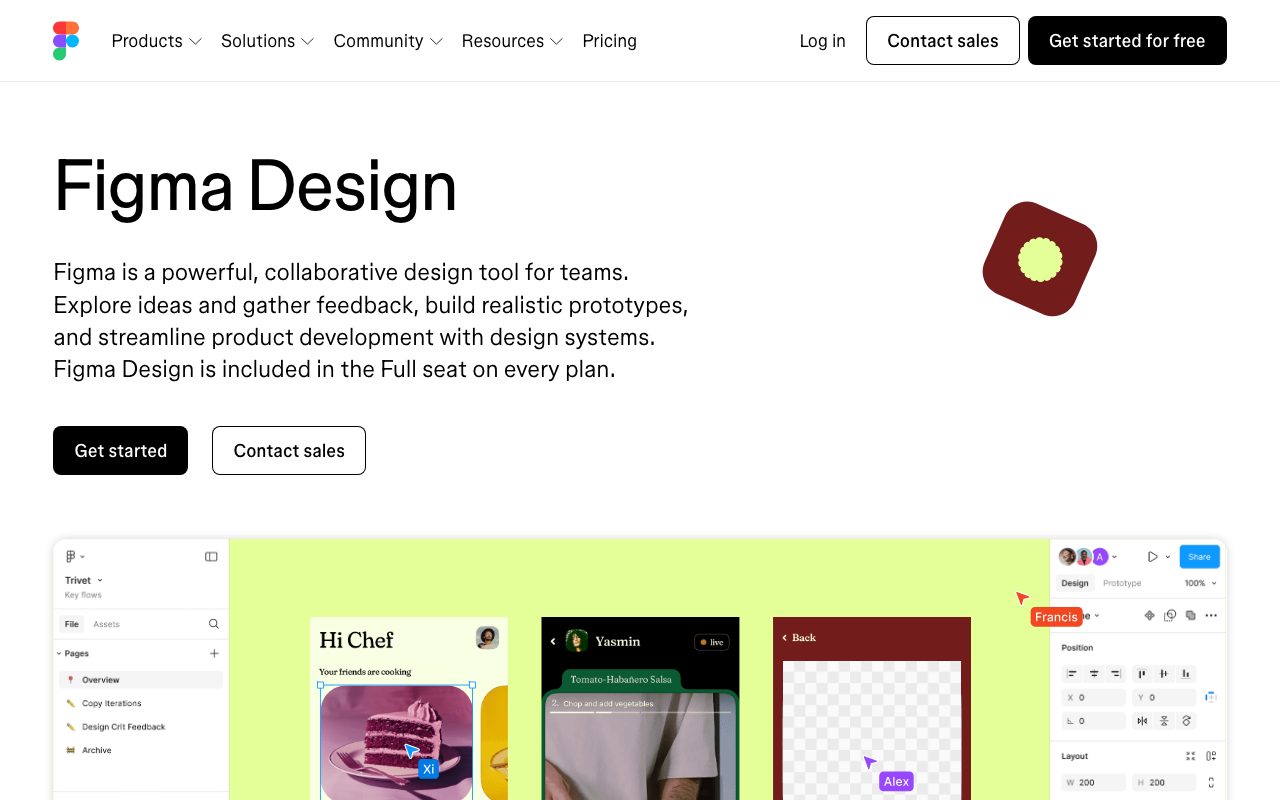
Figma is a vector design tool that runs in the browser. You can do nearly everything Sketch and Illustrator do, with multiplayer collaboration baked in. Live cursors, comments, simultaneous editing, version history.
The product line includes Figma Design (the core), FigJam (whiteboarding for brainstorms), Dev Mode (handoff to engineers), and Slides (a competitor to Keynote/Google Slides launched in 2024).
Recent additions include AI features (generate, rename, replace), advanced prototyping (variables, conditionals), and code generation in Dev Mode. The roadmap shows Figma trying to expand from "design tool" to "product development platform."
Who Figma is for
Designers, obviously. The browser-based collaboration is night-and-day better than file-based Sketch workflows. Once teams move to Figma, they don't go back.
Product managers and engineers benefit too. Figma's commenting, view-only links, and Dev Mode integration mean designers don't have to export PNGs and ship Slack messages anymore.
FigJam expanded the audience further. Whiteboarding sessions, retrospectives, and journey maps used to live in Miro. Now they often live in FigJam, especially for product teams.
Pricing breakdown
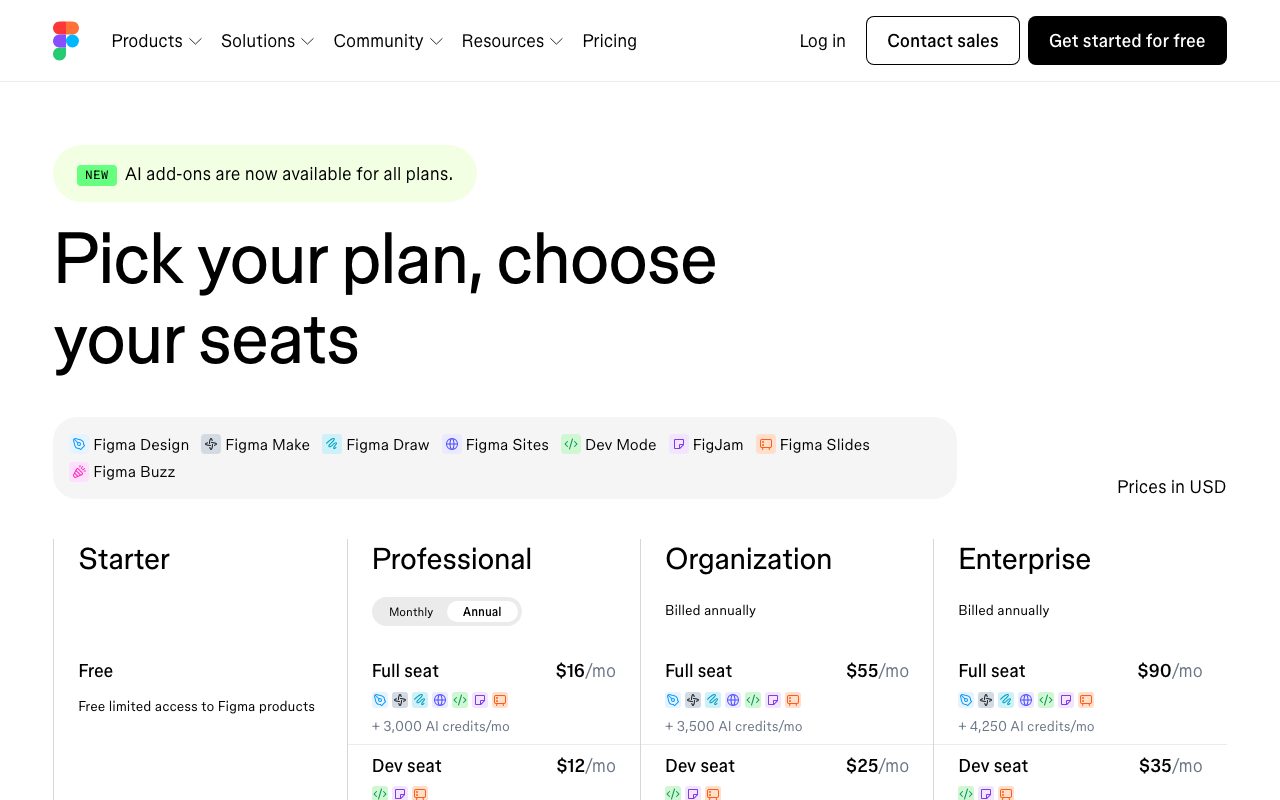
Free tier includes 3 Figma files, unlimited FigJam files, unlimited viewers, and basic features. Generous enough for solo designers and tiny teams.
Professional is $15/month per editor (annual). Adds unlimited files, version history, libraries, and Dev Mode. Organization is $45/editor/month with SSO, design system analytics, and centralized libraries.
Enterprise is $75/editor/month with dedicated workspaces, advanced security, and customer support SLAs. Educational accounts are free with verification.
Standout features
Real-time collaboration
This is the feature that made Figma. Two designers can edit the same file simultaneously, see each other's cursors, and watch changes happen live. It works well even with 10+ people on a file.
The implementation uses operational transforms similar to Google Docs. Conflicts are rare. The cursor-and-comment model has become the design industry standard.
Auto-layout and components
Auto-layout makes responsive design painless. You define padding, gap, alignment, and direction; Figma reflows children automatically. Components with variants and properties enable real design systems at scale.
Dev Mode
Dev Mode (formerly Inspect) gives engineers measurements, CSS, iOS, and Android code snippets directly from designs. Recently added: VS Code integration, MCP server support, and code generation for Tailwind.
Figma's biggest competitive moat isn't features. It's the lock-in of every design library, component, and convention being built inside Figma's data model.
Honest tradeoffs
Performance on huge files degrades. A 5,000-component design system file will lag, especially on lower-end machines. Figma's WebAssembly engine is faster than the early days, but the ceiling is real.
Print and complex illustration are weaker than Illustrator. Figma is a UI tool first. Pixel-art, advanced typography, and CMYK workflows still belong in Adobe.
The pricing pinches at scale. A 100-person company with 30 designers and 70 viewers pays for 30 editors. That's $54,000/year on Organization tier. Adobe XD used to be cheaper. Sketch still is.
Figma vs alternatives
Versus Sketch: Sketch is Mac-only, file-based, and slower-evolving. It still has loyal users, but the ecosystem moved on. Use Sketch only if you have specific reasons to.
Versus Adobe XD: XD has been deprioritized post-Figma-acquisition-attempt. Adobe is funneling resources into Express. Don't start a new project in XD.
Versus Penpot: Penpot is the open-source alternative gaining ground. The collaboration model is similar; the feature depth lags Figma by 2-3 years. Worth tracking, especially for teams that want self-hosted design tools.
Versus Canva: Different tool for different jobs. Canva is for templates and quick marketing assets. Figma is for product design and design systems.
For more, see best design tools or tools for designers.
Bottom line
Figma is the default. It's what new designers learn first, what design systems get built in, and what engineers expect handoff in. There's no realistic alternative for a team in 2026 starting fresh.
The product keeps evolving toward a broader collaboration platform. Slides, FigJam, AI features, Dev Mode, all expanding the surface area. Whether you love or fear that direction, Figma has the install base to make it stick.
If you're not using Figma already, you probably will be soon. If you are, the question is which paid tier matches your team size and how much you'll invest in design system depth.
Figma for design systems
Figma's design system features have matured into the most powerful in the industry. Component variants, properties, slot components, and shared libraries handle the complexity of modern design systems.
A typical design system in Figma includes a foundations library (colors, typography, spacing tokens), a components library (buttons, inputs, cards), and a patterns library (forms, navigation, layouts). Each can be published as a team library and consumed across files.
Variables (released 2023) added the missing piece: design tokens. You can define color, number, string, and boolean variables, mode them by light/dark or brand, and reference them across components. This is the feature design system teams waited years for.
Dev Mode for design system handoff
Dev Mode shows the variable references engineers should use, not just the resolved values. So instead of "background: #1F2937", they see "background: $color-surface-default" and can map directly to their CSS-in-JS or Tailwind config.
This bridges the longstanding gap between Figma's design tokens and the codebase's design tokens. The integration with tools like Tokens Studio and the Figma API powers automated design-to-code pipelines.
FigJam and the broader Figma platform
FigJam is Figma's whiteboarding product, launched in 2021. It competes with Miro and Mural for brainstorming, retros, journey maps, and workshops. The integration with Figma Design lets you embed components and prototypes in jams.
The recent FigJam additions (AI features, voting, timer) match feature-for-feature with Miro. The advantage is that everyone on your design and product team already has a Figma account.
Figma Slides launched in 2024 to compete with Keynote and Google Slides. Early adopters report it's good but not yet a full replacement. Worth tracking as Figma iterates.
The plugin ecosystem
Figma's plugin store has 1,500+ plugins covering automation, content generation, accessibility checking, and integration with external tools. Notable plugins: Iconify (icon library), Stark (accessibility), Content Reel (mock data), Figma to Code (export to React/Vue/HTML).
The plugin SDK uses TypeScript. Building custom plugins for internal team workflows is straightforward. Many design system teams maintain custom plugins for their components.
Common Figma questions
How does Figma handle large files?
Performance scales reasonably until about 5,000 components or 200+ pages. Beyond that, files start lagging on lower-end machines. Best practice: split design systems into multiple files (foundations, components, patterns) and link via team libraries.
The recent WebAssembly engine improvements helped significantly. Files that lagged a year ago feel snappier today.
What about prototyping?
Figma's prototyping is good for design reviews and user testing. Smart Animate, conditional logic, and variables enable surprisingly complex flows.
For high-fidelity interactive prototypes (animations, custom interactions), tools like ProtoPie or Framer go deeper. Figma's prototyping covers 80% of needs without leaving the tool.
Can I use Figma offline?
Limited. The desktop app caches recent files for offline viewing, but editing requires an internet connection. This is a real constraint for designers traveling or working in low-connectivity areas.
The collaboration model fundamentally requires online sync. There's no realistic way for Figma to add full offline editing without breaking real-time multiplayer.
For more design tooling comparisons, see Figma vs Sketch or browse tools for product designers.
Working with Figma in 2026
Figma's role in product development has expanded. It's no longer just where designs live; it's where product specs, prototypes, design tokens, and even slides happen.
For product teams, Figma is increasingly the source of truth for visual decisions. PMs reference Figma in specs. Engineers reference Figma in implementation. Marketers reference Figma for asset creation.
The trend toward Figma-as-platform suggests the lock-in deepens over time. Plan accordingly: invest in design system infrastructure, not just individual files.
For broader design tooling, see best design tools.
Figma in remote-first organizations
Figma's collaboration model assumes remote work as the default. Multi-cursor editing, threaded comments, and async review flows fit distributed teams natively.
For remote design teams, Figma replaces in-person whiteboard sessions and over-shoulder reviews. The collaboration features bridge what physical proximity used to provide.
Permission management at scale matters. Organization-tier admins can enforce library usage, workspace structure, and access patterns. Worth investing time during initial setup.
For more on collaborative design, see tools for remote teams and best collaboration tools.
Tutorial / Demo
Key Features
- Real-time multiplayer collaboration
- Browser-based - works on any OS
- Auto layout and responsive design
- Component variants and design systems
- Dev Mode for developer handoff
- FigJam whiteboarding
- Prototyping with smart animations
- Plugin ecosystem with 1500+ plugins
Pros & Cons
What we like
- Best-in-class collaboration features
- No software to install or update
- Excellent free tier for individuals
- Seamless design-to-development workflow
- Industry standard for product design
Room for improvement
- Requires internet connection
- Complex files can be slow
- Limited offline functionality
- Owned by Adobe (some community concerns)
Frequently Asked Questions
Does Figma have a free tier?
Figma vs Sketch vs Adobe XD?
Can I prototype interactions in Figma?
Does Figma work offline?
Can developers use Figma without a paid seat?
Best For
Featured in
Tags
Alternatives to Figma
ProtoPie
High-fidelity prototyping tool that simulates sensor input, IoT triggers, and complex interactions without writing code.

Excalidraw
Free hand-drawn whiteboard with collaboration and an embeddable editor
Balsamiq
Low-fidelity wireframing tool that intentionally looks hand-drawn so reviewers focus on flows, not pixels.
Sketch
Mac-native vector design app that pioneered the modern UI workflow with symbols, shared libraries, and a deep plugin ecosystem.
Our take
Tool Index Editorial · May 2026· 4.6/5
If you're evaluating Figma, the headline is simple: collaborative interface design tool, and most teams will get value out of the box.
The standout points: Best-in-class collaboration features, No software to install or update, and Excellent free tier for individuals. The friction points: Requires internet connection and Complex files can be slow.
In short: Figma is a strong pick when you need product designers, and a harder sell if requires internet connection would be a dealbreaker.
Editorial opinion from the Tool Index team, written from the public product pages. Not a user review.
Reviews (9)
Hit the Figma sweet spot
Started using Figma casually, now it's pinned in my dock. Real selling point: seamless design-to-development workflow. The prototyping with smart animations is more useful than I expected. Still recommending it to people in similar setups.
Pros
- Seamless design-to-development workflow
Good for most of what we need
Found Figma on a Reddit thread, glad I clicked. What stands out is how no software to install or update. Dev mode for developer handoff works the way you'd hope. Wish they'd address how owned by Adobe (some community concerns). Decent value once you accept the rough edges.
Pros
- No software to install or update
- Industry standard for product design
- Seamless design-to-development workflow
Cons
- Owned by Adobe (some community concerns)
Stuck the landing for our team
Adopted Figma for one project, ended up using it for more. Genuine strength: excellent free tier for individuals. Worth calling out the prototyping with smart animations too. Wish they'd address how requires internet connection. Would buy again without thinking twice.
Pros
- No software to install or update
- Excellent free tier for individuals
Cons
- Requires internet connection
Recommended without reservation
Hadn't planned on switching, but Figma was hard to ignore. Genuine strength: no software to install or update. Found it works best for cross-functional teams.
Pros
- No software to install or update
Solid daily driver
Started using Figma casually, now it's pinned in my dock. The thing I keep coming back to: excellent free tier for individuals. The plugin ecosystem with 1500+ plugins is more useful than I expected. It fits well for cross-functional teams. Still recommending it to people in similar setups.
Pros
- Seamless design-to-development workflow
- Best-in-class collaboration features
Hit the Figma sweet spot
Came to Figma after frustration with what I had before. Real selling point: best-in-class collaboration features. Their take on prototyping with smart animations is solid. Found it works best for product designers. Not perfect: owned by Adobe (some community concerns). Easy yes for anyone weighing the same trade-offs.
Pros
- No software to install or update
- Seamless design-to-development workflow
Cons
- Requires internet connection
Hit the Figma sweet spot
Hadn't planned on switching, but Figma was hard to ignore. Honestly impressed by how no software to install or update. Prototyping with smart animations works the way you'd hope. Main use case: startups. It would be a 5 if not for requires internet connection.
Pros
- Best-in-class collaboration features
- Excellent free tier for individuals
Cons
- Owned by Adobe (some community concerns)
Best decision this quarter
Skeptical at first because Figma looked too simple. It's not. Where it really wins is industry standard for product design. Sticking with Figma.
Pros
- Seamless design-to-development workflow
- Best-in-class collaboration features
The kind of tool you forget you're paying for
The pitch for Figma sounded too good to be true. Mostly true. Honestly impressed by how seamless design-to-development workflow. It fits well for UI/UX teams.
Pros
- Excellent free tier for individuals
- Best-in-class collaboration features
Badge builder
Add Figma to your website
Choose a badge style and size, preview it here, then copy the generated HTML. Badge images are self-contained SVGs and do not require an external script.

<a href="https://toolindex.net/tools/figma?ref=badge" target="_blank" rel="noopener">
  <img src="https://toolindex.net/badge/figma/medium.svg" alt="Figma - Listed on Tool Index" width="180" height="50" />
</a>How to use the badge
- 1. Pick the style, size, and theme that fit your layout.
- 2. Copy the generated HTML from the code block.
- 3. Paste it into your footer, homepage, or press page.
Score badge available
Figma qualifies for the score and circle badges based on its current top-10 positionin Design.
Badge clicks return visitors to this profile with a referral tag so the source remains identifiable.
Related Tools

Apatero Studio
Creator studio for AI image, video, audio, 3D, and avatars. Every model worth using, in one workspace.

Tailwind CSS
Rapidly build custom designs without leaving your HTML

Marvel
Lightweight prototyping platform for turning images and screens into clickable mobile and web prototypes.

Chromatic
Visual regression testing and review platform built by the Storybook team, with cloud-rendered snapshots and PR integration.
Work on Figma? Request listing access or correction