
Marvel
Lightweight prototyping platform for turning images and screens into clickable mobile and web prototypes.
Gallery
About Marvel
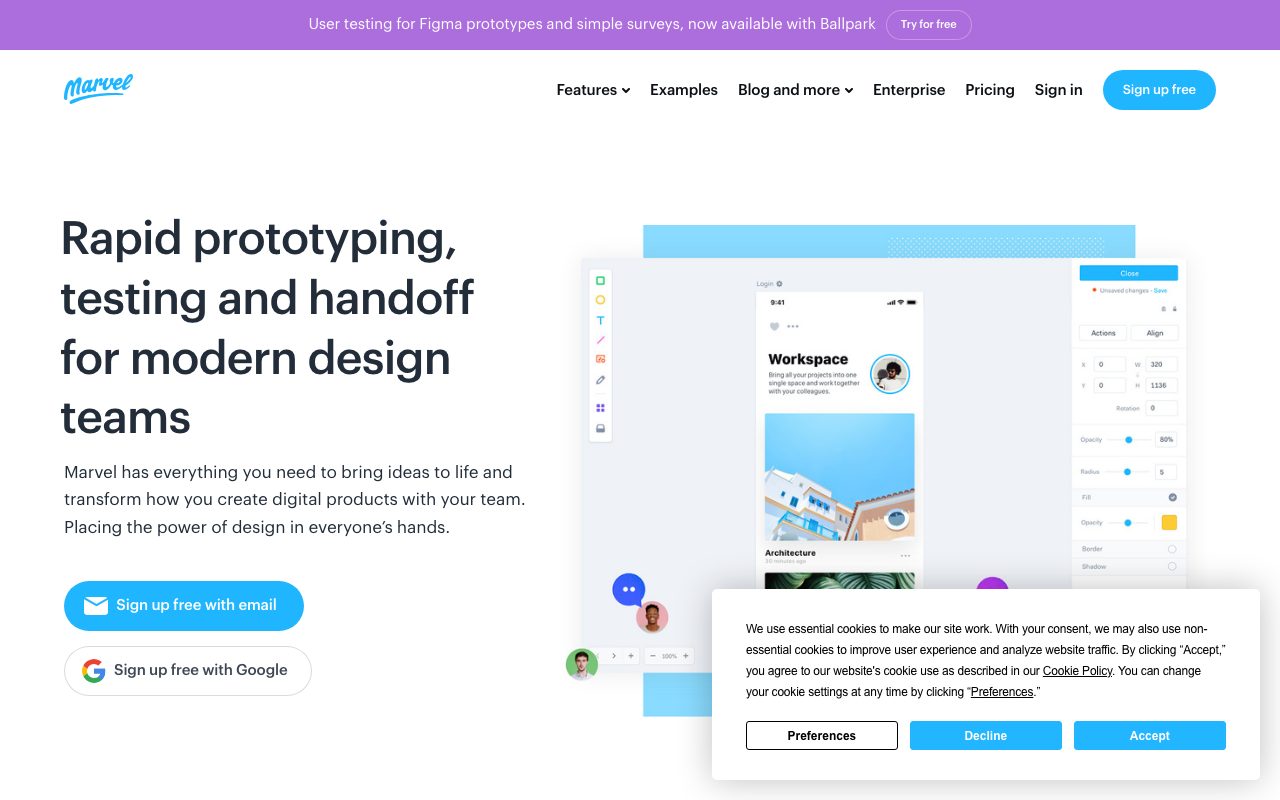
Marvel is the prototyping and design handoff platform that helped popularize the idea that designers should not need to code to validate ideas. It lets you turn static mockups into clickable prototypes, run user tests, and hand off design specs to developers. Marvel has been around long enough to have shaped the category.
It is not the most powerful tool in the prototyping space anymore. Figma overtook a lot of the design-tool landscape, and Marvel adapted by leaning into its strengths around prototyping, user testing, and a shallower learning curve.
The right way to think about Marvel today is as a focused prototyping tool with workflows that beginners and small teams find faster than the heavyweight alternatives.
What Marvel does
Marvel takes images (your existing mockups from Sketch, Figma, Photoshop, or photos of paper sketches) and lets you wire them into clickable prototypes by drawing hotspots between screens. You can add transitions, gestures, and basic interactions without writing code.
The user testing layer records sessions, captures clicks and time-on-screen, and produces shareable test results. You can recruit testers through Marvel's panel or invite your own.
Design handoff generates redlines, CSS, and asset exports for engineers. The integration with Sketch and Figma keeps designs in sync without manual re-uploads.
Who Marvel is for
Beginner designers who want to validate ideas without learning Figma's full surface. Product managers who sketch flows and want to test them before committing engineering time. Small teams that need a lightweight prototyping tool without a steep ramp.
It is also a fit for educators teaching UX fundamentals. Marvel's simplicity is a feature in a classroom; complex tools get in the way of teaching the underlying concepts.
Pricing
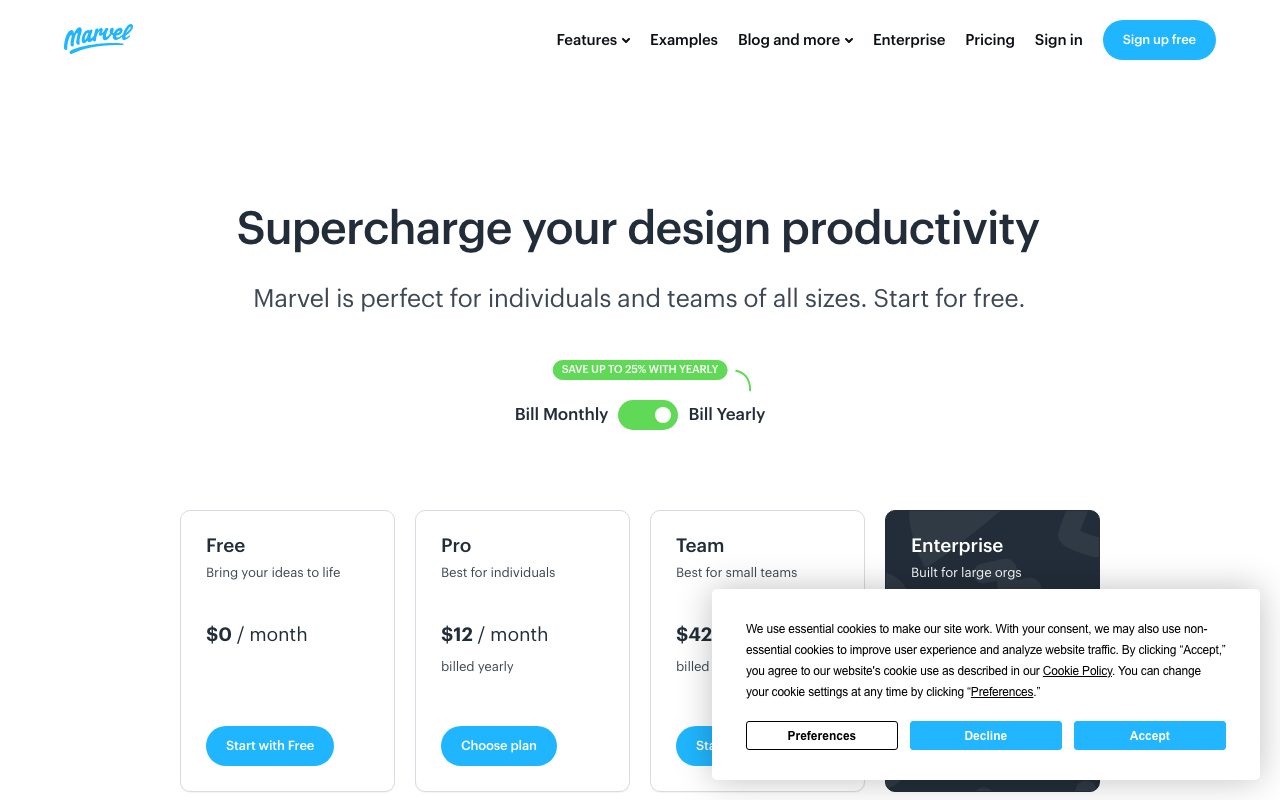
Marvel offers a free tier with limits on project count and integrations. Paid tiers add unlimited projects, version history, advanced testing, and team collaboration. Enterprise tiers add SSO and security controls.
Pricing is gentler than the heavyweight design tools. The free tier is enough to evaluate the workflow against your actual project.
Features worth highlighting
The hotspot-based prototyping is fast. Drop your screens into Marvel, draw rectangles where users tap, link to the next screen. Done. A first prototype takes minutes for a flow you have already designed.
Pop, Marvel's mobile app, lets you photograph paper sketches and turn them into prototypes. It is a charming workflow for whiteboard-first teams and a real time-saver in workshops.
User testing inside Marvel records the prototype session, including misclicks, hesitation, and verbal feedback. Test results aggregate across participants and produce a usable highlight reel.
The design handoff tool generates inspectable specs for developers, including measurements, colors, and assets. It is less rich than Zeplin or Figma's inspector but covers most needs.
Tradeoffs
Marvel is not the right tool for original UI design. Use Figma or Sketch for the design, then bring it to Marvel for prototyping. Marvel's drawing tools exist and are limited.
The prototyping fidelity is intentionally lower than tools like Framer or ProtoPie. Complex animations, advanced state management, and code-based interactions are not its strength.
The platform's growth has slowed compared to peak years. Updates ship less frequently than the leading-edge tools, which matters if you want to be on the bleeding edge.
Marvel is the right pick if you want a prototyping tool that does one thing well, not a full design platform. The category has more powerful options; few are as approachable.
Marvel vs alternatives
Versus Figma, Marvel is simpler and more focused. Figma is the design tool of record now and has prototyping built in. Most teams use Figma for both; Marvel earns a slot when its specific user testing or simplicity is the priority.
Versus InVision, Marvel and InVision were peers in the prototyping era. InVision wound down its core tool; Marvel has continued. If you are a former InVision user, Marvel is one of the natural landing spots.
Versus Framer, Marvel is much simpler. Framer is closer to a code-aware design tool with real interactivity; Marvel is hotspot-based prototyping.
Versus ProtoPie, Marvel is easier; ProtoPie is more powerful. Different shapes of the same problem.
See best prototyping tools, Figma alternatives, and the Marvel vs Figma comparison.
Common questions
Is Marvel free? Yes, with project limits. Can Marvel import from Figma? Yes, including syncing changes. Does Marvel support user testing? Yes, with session recording. Can I use it for mobile? Yes, both prototyping and the Pop sketch app.
Bottom line
Marvel is the focused prototyping tool that earned a place in the lineage of design tools. It is not the right tool for original UI design or for teams already deep in Figma's prototyping. It is a solid pick for educators, beginner designers, and teams that value speed of prototype creation over fidelity.
If your daily design tool is Figma, you probably do not need Marvel. If your daily design tool is paper or Sketch and you want a prototyping layer, Marvel still earns its space. Browse tools for designers and the Marvel profile for current pricing.
When Marvel fits the workflow
Solo designers validating ideas before sending to engineering: Marvel turns mockups into clickable prototypes in minutes. Show stakeholders the flow, not just the screens. Save an engineering sprint that would have built the wrong thing.
Workshop facilitators: paper sketches, photographed with the Pop app, become testable prototypes during the workshop. Ideation moves from drawing to validation in the same session. This is genuinely faster than digital-first workflows.
Educators teaching UX: students can build prototypes without learning Figma's full surface. The cognitive load stays on the design thinking, not the tool.
Small teams without a Figma subscription: Marvel covers the prototyping piece for less than Figma's team plan. The tradeoff is design happens elsewhere or in Marvel's lighter design surface.
Marvel's user testing reality
Recording sessions captures what users actually click, not what they say they would click. The gap between stated and observed behavior is the entire reason user testing exists.
Built-in test recruitment is convenient and not the right fit for every project. For B2B products with specific personas, you will recruit elsewhere and bring participants to Marvel.
Aggregating results across participants gives you the "where do users get stuck" view. This is the actionable output of user testing, and Marvel produces it cleanly.
Migration paths
Coming from InVision (which wound down): Marvel is one of the natural landing spots. Import existing assets, rebuild the prototype interactions.
Going to Figma: most teams eventually consolidate to Figma. Marvel files do not export cleanly to Figma; rebuild as part of the migration.
Coming from paper: the Pop app is the bridge. Photograph, link, share. The simplicity is the entire point.
Marvel resource library
Templates for common app types speed up the start. Mobile app, dashboard, marketing site, onboarding flow. Modify the template; ship the prototype.
The Marvel community shares prototypes and templates. Browse to learn patterns; clone to start.
Tutorial content from the Marvel team and community covers the common workflows. The learning curve is shallow; the tutorials shorten it further.
Marvel for non-designers
Product managers without design skills can build prototypes. Sketch on paper, photograph with Pop, link in Marvel, share with stakeholders. The barrier to "let me show you what I mean" drops dramatically.
Founders pitching investors can build a prototype that feels real without engineering time. The pitch deck moves from static screens to clickable demos. Investors notice.
Customer research participants can interact with a prototype as if it were a real product. The data quality is higher than asking them to react to static images.
Marvel limits to plan around
The free tier limits projects; the paid tiers unlock. For one-off prototypes the free tier works; for sustained use the paid tier is necessary.
The integration list is shorter than the design tool leaders. Sketch and Figma sync are the main ones; some other connectors are missing.
Performance on very large prototypes degrades. Hundreds of screens with complex interactions can slow the editor. Most projects do not hit this; some do.
Marvel pricing and value
The free tier covers two projects, which is enough to evaluate. Paid tiers are reasonable for solo and small team use.
Compared to a Figma seat, Marvel is cheaper for prototyping-only workflows. Most teams that already have Figma use Figma's prototyping; the equation flips for teams without Figma.
The user testing tier earns the upgrade for teams that test regularly. Recording sessions and aggregated results pay back fast.
Marvel future and product direction
The product moves slower than the leading-edge tools. New features arrive; the pace is steady.
The platform's value prop is stability and simplicity. Some users want that; some want bleeding edge.
Long-term direction is unclear given the broader market consolidation. For current users, the tool works; for new evaluators, weigh roadmap against alternatives.
Marvel for designers in 2026
Most designers in 2026 default to Figma. Marvel earns a slot for specific workflows: paper-first ideation, lightweight user testing, classroom teaching.
For those workflows it remains a strong tool. For mainstream design work, the answer is Figma.
Marvel knows this and has positioned around the niches it can win. The tool is honest about its scope.
Marvel and the prototype-first mindset
Some teams build prototypes before they design. Sketch a flow, build the prototype, test it, then design. Marvel suits this inverted workflow because the speed of prototype creation is the priority.
This is the opposite of the Figma-first workflow. Both work; teams pick based on how they think.
Tutorial / Demo
Key Features
- Clickable prototypes from images, sketches, or designs
- Browser-based wireframe editor for low-fidelity work
- Mobile app to photograph paper sketches into prototypes
- Built-in user testing with screen and audio recording
- Sketch and Figma plugins for screen import
- Developer handoff with specs and CSS
Pros & Cons
What we like
- Extremely fast to learn for non-designers
- Useful free tier for solo work and small projects
- Built-in user testing avoids stitching together tools
Room for improvement
- Limited animation and interaction fidelity
- Less actively developed than top-tier competitors
Frequently Asked Questions
Is Marvel still actively developed?
Marvel vs Figma, what's the difference?
Does Marvel have a free plan?
Can Marvel test prototypes with users?
Can I import Sketch or Figma files into Marvel?
Best For
Featured in
Tags
Alternatives to Marvel
View allProtoPie
High-fidelity prototyping tool that simulates sensor input, IoT triggers, and complex interactions without writing code.
Balsamiq
Low-fidelity wireframing tool that intentionally looks hand-drawn so reviewers focus on flows, not pixels.
Figma
Collaborative interface design tool
Sketch
Mac-native vector design app that pioneered the modern UI workflow with symbols, shared libraries, and a deep plugin ecosystem.
Our take
Tool Index Editorial · May 2026· 4.6/5
Marvel is the kind of tool you adopt when you want lightweight prototyping platform for turning images and screens into clickable mobile and web prototypes.
Where it wins: Extremely fast to learn for non-designers, Useful free tier for solo work and small projects, and Built-in user testing avoids stitching together tools. Honest gripes: Limited animation and interaction fidelity and Less actively developed than top-tier competitors.
Recommendation: this is a strong default when you need validating early flows with users before investing in fidelity. If limited animation and interaction fidelity would be a dealbreaker, the alternatives section below is worth a scroll.
Editorial opinion from the Tool Index team, written from the public product pages. Not a user review.
Reviews (6)
Marvel, better than expected
Skeptical at first because Marvel looked too simple. It's not. Where it really wins is extremely fast to learn for non-designers. Their take on sketch and Figma plugins for screen import is solid. It would be a 5 if not for less actively developed than top-tier competitors. Glad I made the switch.
Trade offs worth knowing about
Started using Marvel casually, now it's pinned in my dock. Genuine strength: built-in user testing avoids stitching together tools. Their take on sketch and Figma plugins for screen import is solid. It fits well for teaching UX in classrooms with mixed skill levels. Not perfect: less actively developed than top-tier competitors.
Pros
- Extremely fast to learn for non-designers
- Useful free tier for solo work and small projects
It just works
A few weeks of using Marvel, here's what holds up. The thing I keep coming back to: useful free tier for solo work and small projects. The mobile app to photograph paper sketches into prototypes is more useful than I expected. It fits well for teaching UX in classrooms with mixed skill levels. One thing that bugs me: limited animation and interaction fidelity. Easy yes for anyone weighing the same trade-offs.
Pros
- Extremely fast to learn for non-designers
- Built-in user testing avoids stitching together tools
It just works
Marvel isn't perfect but it's the best I've used in this category. Genuine strength: extremely fast to learn for non-designers. Found it works best for teaching UX in classrooms with mixed skill levels.
Pros
- Useful free tier for solo work and small projects
- Built-in user testing avoids stitching together tools
Quietly excellent
Started using Marvel casually, now it's pinned in my dock. Where it really wins is extremely fast to learn for non-designers. Their take on built-in user testing with screen and audio recording is solid. Found it works best for product managers building click-throughs without designer help. It would be a 5 if not for less actively developed than top-tier competitors. Easy yes for anyone weighing the same trade-offs.
Pros
- Extremely fast to learn for non-designers
- Useful free tier for solo work and small projects
- Built-in user testing avoids stitching together tools
Cons
- Limited animation and interaction fidelity
- Less actively developed than top-tier competitors
Underrated honestly
Adopted Marvel for one project, ended up using it for more. What stands out is how built-in user testing avoids stitching together tools. Found it works best for teaching UX in classrooms with mixed skill levels.
Pros
- Useful free tier for solo work and small projects
- Built-in user testing avoids stitching together tools
Badge builder
Add Marvel to your website
Choose a badge style and size, preview it here, then copy the generated HTML. Badge images are self-contained SVGs and do not require an external script.

<a href="https://toolindex.net/tools/marvel?ref=badge" target="_blank" rel="noopener">
  <img src="https://toolindex.net/badge/marvel/medium.svg" alt="Marvel - Listed on Tool Index" width="180" height="50" />
</a>How to use the badge
- 1. Pick the style, size, and theme that fit your layout.
- 2. Copy the generated HTML from the code block.
- 3. Paste it into your footer, homepage, or press page.
Standard badge available
The standard listing badge is available now. Score and circle badges are limited to tools currently ranked in the top 10 of a category.
Badge clicks return visitors to this profile with a referral tag so the source remains identifiable.
Related Tools

Apatero Studio
Creator studio for AI image, video, audio, 3D, and avatars. Every model worth using, in one workspace.

Tailwind CSS
Rapidly build custom designs without leaving your HTML
Figma
Collaborative interface design tool

Chromatic
Visual regression testing and review platform built by the Storybook team, with cloud-rendered snapshots and PR integration.
Work on Marvel? Request listing access or correction