
Krita
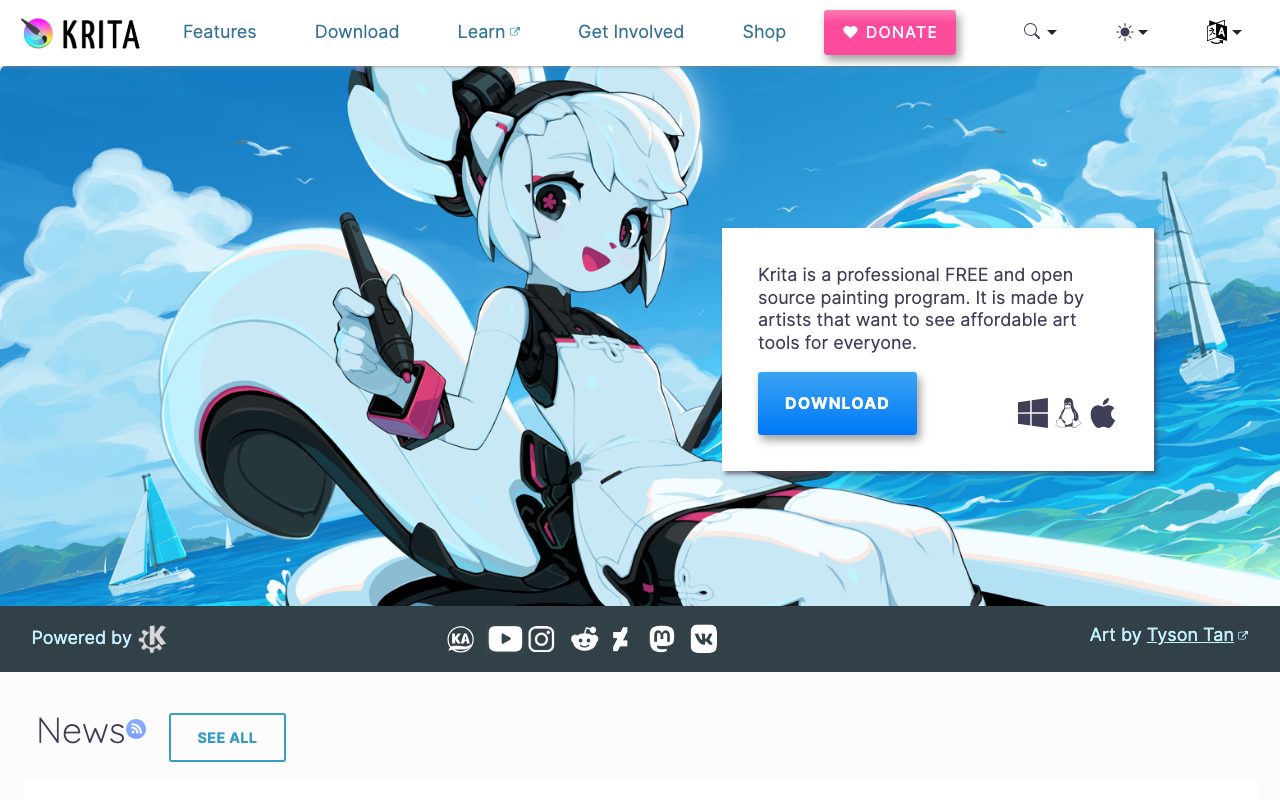
Free, open-source painting application built by and for digital illustrators, with a brush engine and animation timeline.
Gallery
About Krita
Krita is the digital painting app the open-source community built for artists who paint, draw, and illustrate. Free, MIT-licensed, GPL-distributed depending on the build, available on every desktop platform. Brushes that compete with Procreate and Clip Studio Paint, with no subscription, no account, and no feature gates.
You don't pick Krita to settle. You pick it because the brush engine is excellent, the workflow is dialed in, and you'd rather not feed Adobe another $20 a month for the rest of your career.
It won't replace Photoshop for photo retouching. It won't replace Figma for UI design. For digital painting, comics, manga, and 2D animation, Krita is one of the best products in the category, paid or free.
What Krita actually does
Krita is a raster-first painting application. You set up a canvas, pick brushes, and paint. Layers, masks, and blending modes work the way Photoshop trained you to expect.
The brush engine is the heart. Hundreds of preset brushes cover painting, inking, sketching, texturing, and effects. The customization depth is genuinely deep. You can build brushes that mimic specific physical media or invent new ones.
An animation timeline lets you do frame-by-frame 2D animation with onion skinning. It's not Toon Boom Harmony, but it's more than enough for indie animators, students, and anyone exploring 2D animation.
Who Krita is for
Concept artists and digital illustrators who paint for a living. Krita's brush engine and color management hold up to professional production work.
Comic and manga artists laying out pages and panels. Vector tools, text, and reference images integrate well into a comic workflow. Many independent comics ship using Krita exclusively.
2D animators producing short hand-drawn sequences. The animation timeline plus brush engine combination is rare at this price point. Free-and-good is hard to argue with.
Students and hobbyists who can't justify Procreate or Clip Studio Paint. Krita's quality is high enough that "I'm using the free option" doesn't show up in the work.
Pricing breakdown
Krita is free under the GPL. You can download, install, use, and redistribute. No subscription, no account, no usage limits, no upsell.
The Krita Foundation accepts donations and sells builds on Steam and the Mac/Windows app stores for users who want a one-click install plus auto-updates. The store version is identical to the free download.
Standout features in Krita
The brush engine. Customizable in ways Procreate doesn't expose, with a community ecosystem of brush packs that rival the best paid alternatives. Painters who try Krita seriously rarely walk away because of the brushes.
OpenColorIO color management for production-grade workflows. 16-bit-per-channel painting, full ICC profile support, and color spaces that match what film and game studios expect.
Frame-by-frame animation with onion skinning, audio import, and export to image sequences or video. It's a real animation tool, not a tacked-on feature.
Python scripting
Krita exposes a Python API for plugins and automation. The community has built dozens of useful scripts and plugins. Power users can automate repetitive workflows the way TouchDesigner artists do.
Honest tradeoffs
Not built for photo retouching. Healing tools, content-aware fill, and frequency separation aren't here at the level Photoshop offers. Use the right tool for the job.
UI design is not the goal. No artboards, no design tokens, no developer handoff. Use Figma for that work.
Performance on very large canvases trails some commercial tools. Painting at 8K with hundreds of layers exposes the gaps. For typical illustration sizes, performance is fine.
Krita is the strongest argument that "free and open source" can produce art tools that genuinely compete with the best paid options. Use it without apology.
Krita vs alternatives
Versus Procreate, Krita is desktop-only and Procreate is iPad-only. Procreate is more polished and intuitive. Krita is more powerful and free. They serve different studios. See the comparison.
Versus Clip Studio Paint, Krita wins on price (free vs subscription/perpetual). Clip Studio wins on comic-specific tooling depth and Asian-market features. Both are top-tier.
Versus Photoshop, Krita wins on painting and price. Photoshop wins on photo work, ecosystem, and integrations. Different jobs.
For more options, see the best digital painting software and Krita alternatives.
Bottom line
Krita is the digital painting app any illustrator should try before committing to a paid subscription. The brush engine, color management, and animation timeline together make it one of the best free creative tools that exists.
If you're learning, start here. If you're a working illustrator, give it a serious month. The argument against Krita is mostly familiarity with other tools, not capability gaps. That's a high bar for any free product to clear, and Krita clears it.
Getting started in Krita
Download the latest stable release from krita.org. Skip the development builds unless you're contributing or testing specific features.
Spend the first session exploring the brush presets. Krita ships with hundreds; finding the ten you actually like takes an afternoon and shapes your workflow forever after.
Set up a tablet if you don't have one. Krita is technically usable with a mouse, but painting is genuinely a different experience with pressure sensitivity.
Workflow tips
Use layer groups for complex paintings. Background, midground, characters, foreground, effects. The structure scales as the painting grows.
Save versions. Krita has crash recovery, but explicit save-as on milestones protects your work the way no auto-save can.
Master the canvas rotation and mirroring tools. They reveal proportional errors immediately. Most painting mistakes become obvious when the canvas flips.
Krita for animation
The animation timeline supports onion skinning, frame rates, and audio import. It's not Toon Boom Harmony, but it covers indie 2D animation needs well.
Frame-by-frame is the workflow. Tween-style automation isn't part of Krita's animation model. For traditional 2D animation, this matches how the work actually happens.
Export to PNG sequences, GIFs, or directly to MP4 via FFmpeg integration. Most animation studios that use Krita pipe the PNG sequences into After Effects or Premiere for final compositing.
Common Krita questions
Is Krita really free? Yes, fully free under the GPL. The Steam version costs a small fee for convenience and updates; it's identical to the free download.
Can Krita open Photoshop files? Yes. PSD support is good for most files. Complex layer effects don't always translate perfectly.
What hardware does Krita need? Modern Krita runs well on most laptops from the past five years. A graphics tablet is highly recommended.
Browse more at tools for digital art.
Krita for comic and manga workflows
Set up your page template once. Standard manga sizes, panel grids, bleed and trim marks. Save as a template and start every page from the same baseline.
Use vector layers for speech bubbles and panel borders. They scale cleanly when you resize for print or web. Raster bubbles look fine on screen and rough at print resolution.
Manage your assets centrally. Recurring characters, common backgrounds, sound effects. Asset library workflows in Krita support reuse without restyling every page.
Krita for concept art
The brush engine shines on textured, painterly work. Concept artists who paint loose-to-tight workflows find Krita's brushes among the best in any price range.
Color picker behavior, blending modes, and color management hold up at production quality. Studios using Krita for concept work aren't compromising on color science.
Reference image docking lets you keep mood boards or photo refs visible while painting. The workflow integration is smoother than alt-tabbing to another app.
Krita on Linux
Linux support is first-class, not a port. Performance, drivers, and feature parity match Windows and macOS. Some artists actively prefer Krita on Linux for the consistent behavior across distros.
Final thoughts on Krita
Krita is the proof that open-source creative tools can compete with the best paid options. The brush engine, color management, and animation capabilities together make it one of the strongest free creative tools available.
If you're learning, start here. If you're already paying for Procreate or Clip Studio, give Krita a serious month before assuming you can't switch. The barriers are mostly familiarity, not capability.
Browse other options at the best illustration software and animation tools.
Quick recap
Krita fits illustrators, comic artists, manga creators, and 2D animators who want professional-grade tooling without the subscription tax. The brush engine and animation timeline together justify the recommendation alone.
It struggles for photo retouching, UI design, and tasks Photoshop or Figma handle natively. Use the right tool for the right job.
Free, fully featured, no upsells. The Krita Foundation deserves donations from anyone using the tool seriously. Open-source creative software at this quality is rare.
Browse more options at the best painting tools, the digital illustration category, and Krita alternatives.
Tutorial / Demo
Key Features
- Customizable brush engine with hundreds of presets
- Frame-by-frame animation timeline with onion skinning
- Vector tools and text for comic and manga layouts
- OCIO color management and 16-bit painting
- Python scripting API for plugins and automation
- Cross-platform: Windows, macOS, Linux, ChromeOS
Pros & Cons
What we like
- Completely free with no feature gates or accounts
- Brush engine is competitive with the best paid painters
- Active open-source development and community brush packs
Room for improvement
- Not designed for photo retouching or interface design
- Performance on very large canvases trails some commercial tools
Frequently Asked Questions
Is Krita really a Photoshop replacement?
Does Krita do animation?
Can Krita open PSD files?
Is Krita good for beginners?
Does Krita work on iPad?
Best For
Featured in
Tags
Alternatives to Krita
View all
Inkscape
Free, open-source vector graphics editor built around SVG, with a deep tool set for illustration, logos, and technical drawing.

Photopea
Browser-based image editor that opens Photoshop, Sketch, XD, and PDF files without an install or account.

Pixelmator Pro
Mac-native raster and vector image editor with machine-learning enhancements and a one-time purchase price.
Affinity Designer
Professional vector and raster illustration app with one-time pricing, native apps on Mac, Windows, and iPad.
Our take
Tool Index Editorial · May 2026· 4.8/5
Krita is the kind of tool you adopt when you want free, open-source painting application built by and for digital illustrators, with a brush engine and animation timeline.
On the strengths side: Completely free with no feature gates or accounts, Brush engine is competitive with the best paid painters, and Active open-source development and community brush packs. Honest gripes: Not designed for photo retouching or interface design and Performance on very large canvases trails some commercial tools.
Verdict: Krita comfortably earns its spot in the category — a smart default when you need concept artists and illustrators painting digitally.
Editorial opinion from the Tool Index team, written from the public product pages. Not a user review.
Reviews (3)
Genuinely impressed
Picked Krita for the lower price, stayed for the actual quality. What stands out is how completely free with no feature gates or accounts. Their take on frame-by-frame animation timeline with onion skinning is solid.
Pros
- Active open-source development and community brush packs
- Completely free with no feature gates or accounts
Recommended without reservation
Started using Krita casually, now it's pinned in my dock. Honestly impressed by how completely free with no feature gates or accounts. Ocio color management and 16-bit painting works the way you'd hope. It fits well for concept artists and illustrators painting digitally. Would buy again without thinking twice.
Worth the price of admission
Got Krita on the recommendation of someone I trust. What stands out is how completely free with no feature gates or accounts. Ocio color management and 16-bit painting works the way you'd hope. Mostly using it for concept artists and illustrators painting digitally. Would buy again without thinking twice.
Pros
- Brush engine is competitive with the best paid painters
- Completely free with no feature gates or accounts
- Active open-source development and community brush packs
Cons
- Performance on very large canvases trails some commercial tools
- Not designed for photo retouching or interface design
Badge builder
Add Krita to your website
Choose a badge style and size, preview it here, then copy the generated HTML. Badge images are self-contained SVGs and do not require an external script.

<a href="https://toolindex.net/tools/krita?ref=badge" target="_blank" rel="noopener">
  <img src="https://toolindex.net/badge/krita/medium.svg" alt="Krita - Listed on Tool Index" width="180" height="50" />
</a>How to use the badge
- 1. Pick the style, size, and theme that fit your layout.
- 2. Copy the generated HTML from the code block.
- 3. Paste it into your footer, homepage, or press page.
Standard badge available
The standard listing badge is available now. Score and circle badges are limited to tools currently ranked in the top 10 of a category.
Badge clicks return visitors to this profile with a referral tag so the source remains identifiable.
Related Tools

Apatero Studio
Creator studio for AI image, video, audio, 3D, and avatars. Every model worth using, in one workspace.

Tailwind CSS
Rapidly build custom designs without leaving your HTML
Figma
Collaborative interface design tool

Marvel
Lightweight prototyping platform for turning images and screens into clickable mobile and web prototypes.
Work on Krita? Request listing access or correction