
Chromatic
Visual regression testing and review platform built by the Storybook team, with cloud-rendered snapshots and PR integration.
Gallery
About Chromatic
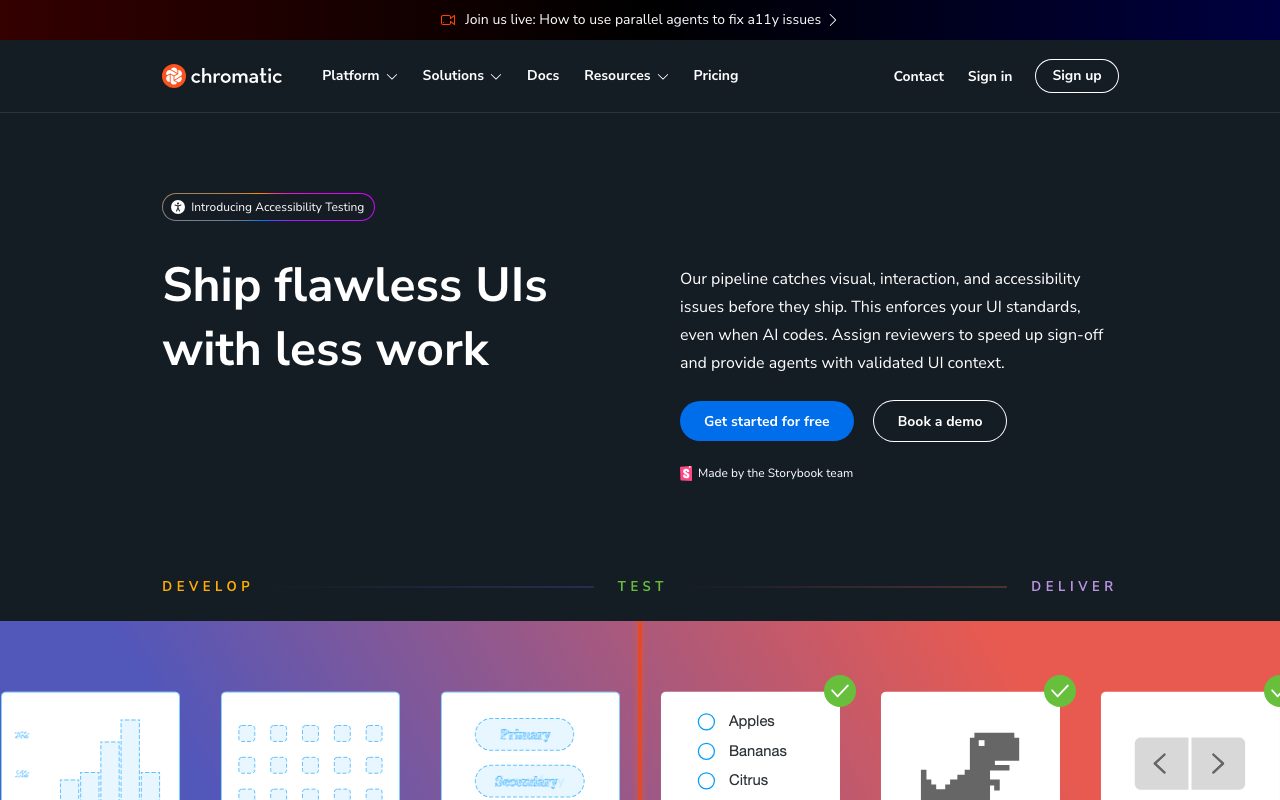
Chromatic is the visual testing and review platform built by the team behind Storybook. It catches UI regressions, accessibility issues, and interaction bugs before merge.
If you write Storybook stories, Chromatic plugs into your CI and screenshots every story across browsers. It compares those snapshots to baselines and flags pixel diffs to reviewers.
Frontend teams at Shopify, GitHub, Auth0, and BBC use Chromatic. It's become the default visual review layer for component-driven workflows.
What Chromatic actually does
Chromatic does three big things. It runs visual regression tests on every commit. It captures interaction tests via Storybook's play functions. And it gives PMs and designers a clean review UI to sign off on UI changes.
It indexes every story across Chrome, Safari, Firefox, and Edge. You get cross-browser screenshots without spinning up a Selenium grid. Mobile viewports are included.
For accessibility, Chromatic runs axe-core against each story and surfaces violations. It also catches focus order and contrast issues you'd miss in a code review.
Who Chromatic is for
Frontend teams already invested in Storybook are the natural fit. If your design system lives in stories, Chromatic is a 30-minute setup.
Design system teams at scale love it. Component libraries in big orgs need a way to gate breaking changes, and Chromatic is purpose-built for that.
If you don't use Storybook, Chromatic still works via its standalone capture API, but you lose half the value. Visual testing without stories is doable elsewhere too.
Pricing breakdown
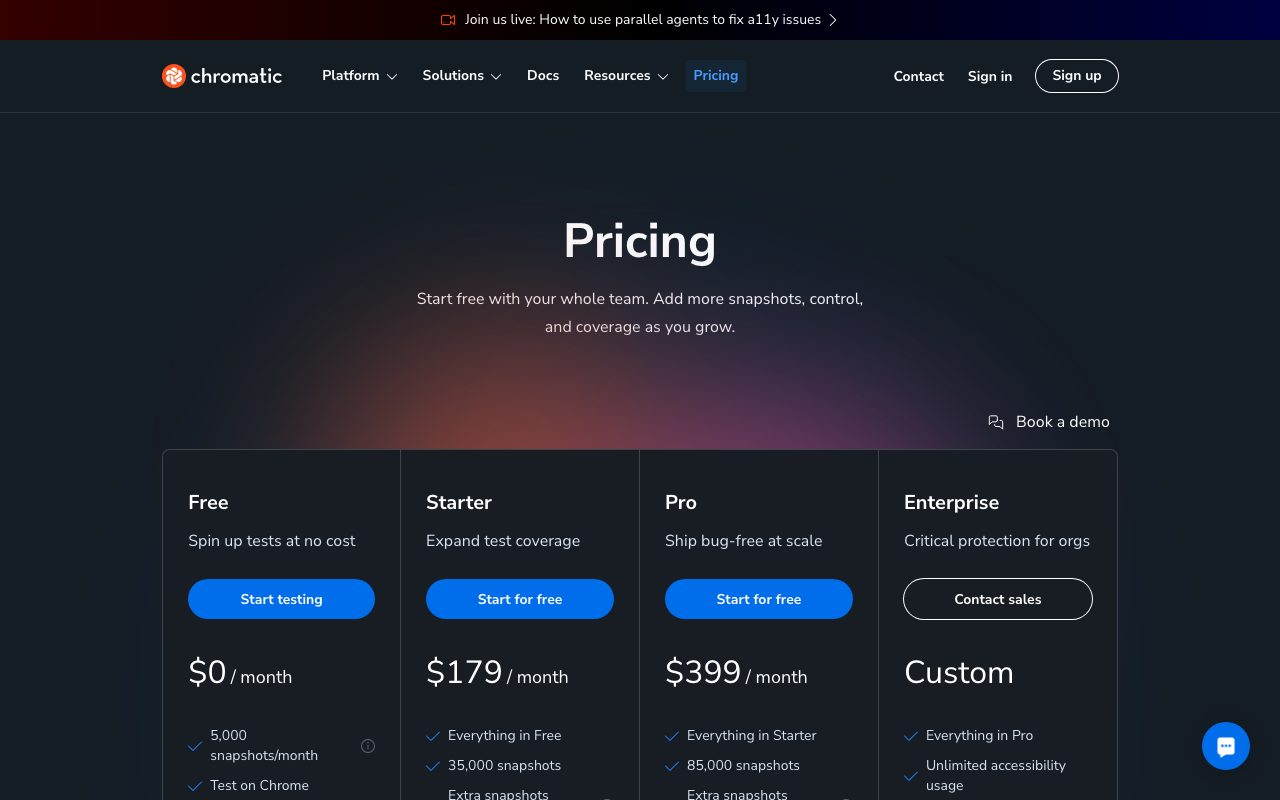
Chromatic has a free Hobby plan with 5,000 snapshots per month. It's enough for small projects.
Paid plans start around $149/month (Pro) for 35,000 snapshots. Higher tiers go up from there. Unused snapshots roll over for a month.
Open source projects get a generous free tier. The pricing is per-snapshot, not per-seat, which is friendly for big teams.
Standout features
TurboSnap is the killer feature. Chromatic only re-snapshots stories whose dependencies changed. CI runs go from minutes to seconds on small PRs.
UI Review is great for PM workflows. Reviewers see a list of changed components, can approve or reject each one, and leave threaded comments.
The Figma integration links design files to live components. Designers spot drift between intent and implementation immediately.
Honest tradeoffs
Chromatic only really shines with Storybook. Without it, you're paying premium for a generic visual diff tool when Percy or Applitools might fit better.
Snapshot pricing can spike unexpectedly when someone updates a global theme. Every story gets re-snapped, and your monthly bucket evaporates.
Setup requires a CI integration and a Storybook config. Teams without either will spend their first day plumbing it in.
Chromatic is what visual testing should feel like. Once it catches a regression you didn't notice, you'll never ship without it.
Chromatic vs Percy vs Applitools
Percy is BrowserStack's general-purpose visual testing tool, framework-agnostic. Applitools uses AI to ignore noisy diffs and works for any UI. Chromatic is laser-focused on Storybook-driven teams.
See our best visual testing tools roundup. We also publish Chromatic alternatives and a Chromatic vs Percy guide.
Other Chromatic alternatives worth comparing: Lost Pixel, Argos, and Visual Regression Tracker. Each takes a different stance on hosting and pricing.
Bottom line on Chromatic
Chromatic is the visual testing tool of choice for Storybook teams. It's fast, sane, and built by people who actually maintain Storybook itself.
For more frontend tools, see tools for design systems and the Storybook profile. Frontend QA is a big space, and Chromatic owns one important corner of it.
If you ship components and value pixel sanity, Chromatic earns its monthly invoice fast.
Setting up Chromatic in CI
Chromatic plugs into GitHub Actions, GitLab CI, CircleCI, and most other pipelines. The basic flow is "build Storybook, push to Chromatic, get a comment with diff link."
The PR comment is gold. Reviewers click, see what changed visually, approve or reject components, and the GitHub status check updates. No code review back-and-forth about pixel changes.
For monorepos, Chromatic supports multiple projects per repo. You can run separate Chromatic projects for your design system, your marketing site, and your app dashboard.
Visual regression testing in practice
Visual regression testing catches the bugs that escape unit tests. CSS regressions, layout shifts, broken icons, and accidental color changes all show up in Chromatic before they ship.
The diff viewer highlights exactly which pixels changed. You can ignore intentional changes (new feature) and approve them as new baselines. Future runs compare against the new baseline.
Smart filters reduce noise. You can ignore animations, dynamic content, or specific viewports for stories where they cause spurious diffs.
Chromatic for Figma-driven design teams
The Figma integration links design files to Chromatic stories. Designers see live components rendered alongside the Figma source. Drift between design intent and implementation surfaces immediately.
Designers can leave comments on rendered components, and engineers see them in their PR review. This closes a loop that historically lived in Slack or Loom recordings.
For design system teams, this integration is a real workflow improvement. It turns "the design says X but the component does Y" into a measurable, reviewable artifact.
Final word on Chromatic
Chromatic earns its place in the modern frontend stack. If you write Storybook stories and don't have visual testing, you're leaving free quality on the table.
Set up the free tier on a side project first. Once you see your first regression caught, you'll understand the value.
Chromatic for design system maintainers
Maintaining a shared design system at a large company is hard. Chromatic gives system maintainers the leverage to ship breaking changes safely.
Every PR against the design system gets visual diffs across every consuming app. Maintainers see exactly which apps will be affected by a Button refactor before merging.
The audit logs and approval history give you a defensible record of who signed off on each visual change. Compliance-conscious organizations love this trail.
Chromatic's accessibility checks catch contrast and ARIA issues at the component level. Catching them in component review beats catching them in app-level audits months later.
For teams running a Storybook composition (multiple Storybook instances stitched together), Chromatic supports the workflow. You can index the composed Storybook and run visual tests against the unified surface.
Pricing scales reasonably for design system teams. The snapshot count matches the number of stories times the number of viewports, which stays manageable for most component libraries.
For more frontend testing context, browse our best visual testing tools and Storybook profile. The combination of Storybook plus Chromatic is one of the most-loved frontend pairs in 2026.
Chromatic FAQ
Do I need Storybook to use Chromatic? Technically no, but Chromatic shines with Storybook. Without Storybook, you're paying premium for a generic visual diff tool. Pair them for the full value.
How does Chromatic handle dynamic content? Smart selectors and ignore rules let you skip parts of stories that change between runs (timestamps, random data, animations). This keeps the diff queue focused on real regressions.
Is the free tier really enough? For small projects with under 5,000 snapshots per month, yes. Many indie projects and OSS libraries run entirely on the Hobby plan and never need to upgrade.
What about CI integration? Chromatic plugs into GitHub Actions, GitLab CI, CircleCI, and most other systems. The setup is well-documented and takes about 30 minutes for a typical project.
Does it support React Native? Chromatic supports React Native Web stories rendered in browsers. Native mobile rendering isn't there yet, but the web preview catches most regressions.
Chromatic is one of those tools where you don't fully appreciate the value until it catches a regression that would have shipped to production. Once that happens, you'll never run a frontend project without visual testing again.
Getting maximum value from Chromatic
Run Chromatic on every PR, not just main branch builds. Catching regressions before merge is the whole point. Skip the stricter "production-only" approach unless you have very specific reasons.
Tune the threshold for ignoring small diffs. Too strict produces false positives. Too lax misses real bugs. Most teams settle around 0.1 to 0.5 percent difference for production stories.
Use modes to test different states (light, dark, large text). One story can render in many modes, multiplying coverage without writing additional stories.
Lean into TurboSnap. Configure it correctly and your CI cost stays predictable. Without TurboSnap, snapshot counts explode on style refactors.
Set up the Figma integration if your designers use Figma. The two-way visibility between Figma and Chromatic catches drift early and saves design review time.
For more frontend QA tools, browse our best visual testing tools roundup and Percy profile.
Chromatic earns its monthly bill the first time it catches a serious regression that would have shipped to production. Once that happens, you'll never run a frontend project without visual testing again.
Tutorial / Demo
Key Features
- Visual regression snapshots for every Storybook story
- Cross-browser testing on Chrome, Firefox, Safari, Edge
- GitHub and GitLab PR status checks
- Component-level review and comment threads
- Interaction-test execution in the same cloud
- Stable per-commit URLs for design review
Pros & Cons
What we like
- Built by the Storybook team, so the integration is tight and native
- Catches a class of bugs unit tests cannot
- Doubles as a review hub and a regression tester
Room for improvement
- Requires Storybook, so not a general E2E visual tester
- Per-snapshot pricing can grow quickly on large component libraries
Frequently Asked Questions
Does Chromatic have a free tier?
What's the difference between Chromatic and Percy?
Do I need Storybook to use Chromatic?
Does Chromatic handle review and approvals?
Will Chromatic flake on animations and dynamic content?
Best For
Featured in
Tags
Alternatives to Chromatic

DeviceKit
Free Screen & Device Tests Online | Private Browser Diagnostics

Storybook
Open-source workshop for building UI components in isolation. Preview, document, and test them outside the app.

Tailwind CSS
Rapidly build custom designs without leaving your HTML
Figma
Collaborative interface design tool
Our take
Tool Index Editorial · May 2026· 4.5/5
If you're evaluating Chromatic, the headline is simple: visual regression testing and review platform built by the storybook team, with cloud-rendered snapshots and pr integration, and most teams will get value out of the box.
On the strengths side: Built by the Storybook team, so the integration is tight and native, Catches a class of bugs unit tests cannot, and Doubles as a review hub and a regression tester. Honest gripes: Requires Storybook, so not a general E2E visual tester and Per-snapshot pricing can grow quickly on large component libraries.
In short: Chromatic is a solid pick when you need catching pixel regressions in a design system, and a harder sell if requires Storybook, so not a general E2E visual tester would be a dealbreaker.
Editorial opinion from the Tool Index team, written from the public product pages. Not a user review.
Reviews (2)
Best decision this quarter
Chromatic has quietly become part of my daily flow. Genuine strength: doubles as a review hub and a regression tester. Cross-browser testing on chrome, firefox, safari, edge works the way you'd hope. Main use case: cross-browser visual coverage of UI components. Honest gripe: requires Storybook — not a general E2E visual tester. Worth the price for what I get out of it.
Cons
- Per-snapshot pricing can grow quickly on large component libraries
- Requires Storybook — not a general E2E visual tester
Stuck the landing for our team
Picked Chromatic for the lower price, stayed for the actual quality. Where it really wins is catches a class of bugs unit tests cannot. Glad I made the switch.
Pros
- Doubles as a review hub and a regression tester
Badge builder
Add Chromatic to your website
Choose a badge style and size, preview it here, then copy the generated HTML. Badge images are self-contained SVGs and do not require an external script.

<a href="https://toolindex.net/tools/chromatic?ref=badge" target="_blank" rel="noopener">
  <img src="https://toolindex.net/badge/chromatic/medium.svg" alt="Chromatic - Listed on Tool Index" width="180" height="50" />
</a>How to use the badge
- 1. Pick the style, size, and theme that fit your layout.
- 2. Copy the generated HTML from the code block.
- 3. Paste it into your footer, homepage, or press page.
Score badge available
Chromatic qualifies for the score and circle badges based on its current top-10 positionin Testing.
Badge clicks return visitors to this profile with a referral tag so the source remains identifiable.
Related Tools

Apatero Studio
Creator studio for AI image, video, audio, 3D, and avatars. Every model worth using, in one workspace.
DeviceKit
Free Screen & Device Tests Online | Private Browser Diagnostics
Tailwind CSS
Rapidly build custom designs without leaving your HTML
Figma
Collaborative interface design tool
Work on Chromatic? Request listing access or correction