
Cadre
Local-first Kanban board for orchestrating coding agents with human approval gates
Gallery
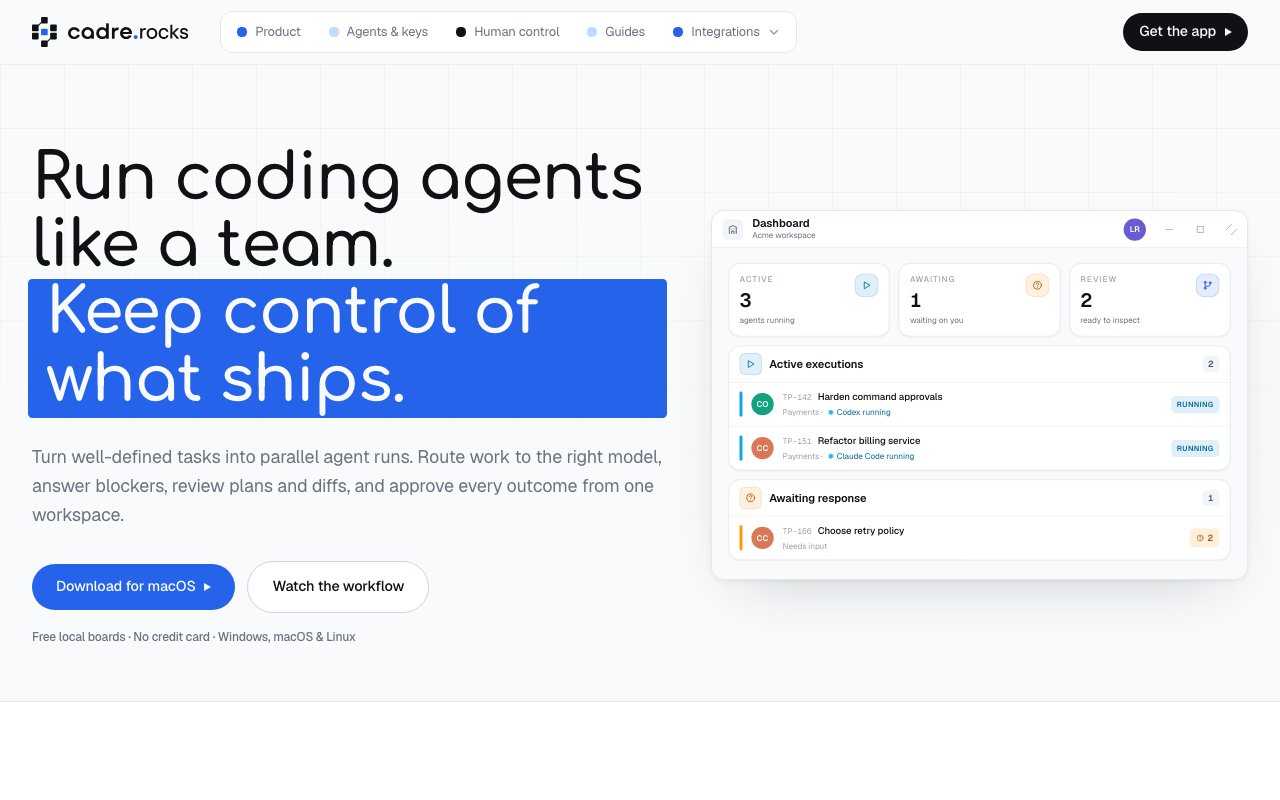
About Cadre
Cadre is a desktop app that puts a Kanban board in front of your coding agents. Instead of juggling separate terminal sessions for Claude Code, Codex, and whatever else you run, you write tasks as cards, route each card to an agent, and watch the work move across columns while you handle the parts that actually need a human, answering questions, reviewing plans, and approving diffs. It's project management software where the workers happen to be AI agents.
The problem it goes after is real for anyone who has leaned into agentic coding. One agent in one terminal is manageable. Three agents across two repos is a mess of windows where you lose track of what's waiting on you, what's running, and what quietly stalled an hour ago. Cadre turns that sprawl into a board with custom columns, sections, and tags, so the state of every task is visible at a glance and parallel runs stop being something you track in your head. The mess compounds because agents are slow in an awkward way, fast enough that you can't walk away, slow enough that you tab elsewhere and forget them. A board that surfaces exactly what stalled and why is the difference between actually running three agents and merely owning three agents.
The Kanban framing sounds cosmetic until you use agents at any volume. Agent work has natural states, queued, planning, waiting on approval, executing, blocked on a question, done, and those states map cleanly onto columns. Sections and tags let you slice the board by project or priority, and routing decides which agent picks up which kind of card. The question you ask all day changes from what is that terminal doing to what needs me right now, which is the right question once the agents outnumber you.
Human oversight is structured rather than assumed. There are four kinds of approval gates where a task pauses for you. An agent can ask a question, present a plan for sign-off, request permission to run a command, or hand over a diff for review before anything proceeds. That's the piece that makes parallel agents tolerable, since you're not trusting five autonomous processes to behave, you're reviewing checkpoints that come to you on the board. In practice you spend your attention where the risk lives, waving a routine chore through its checkpoints in seconds while a risky migration gets a hard look at every gate.
On the agent side it's pointedly neutral. Cadre routes work to Claude Code, OpenAI's Codex, Grok, Opencode, and any OpenAI-compatible endpoint, running them through your existing CLI logins or saved API credentials. You bring your own keys, tokens are billed by your provider, and Cadre is explicit that it charges for the orchestration layer, the boards, parallel runs, and approvals, never per token. Credentials are stored in your OS keyring, and the whole app is local-first and works offline by default, with your repositories, worktrees, and credentials never leaving your machine. That neutrality is worth something on its own. Agent tooling is churning fast, and a board that treats agents as swappable adapters means switching from one CLI to another doesn't mean rebuilding your workflow.
The audience is developers who have moved past trying a coding agent and into depending on several. Solo developers get a control tower for parallel work across projects. Teams get the optional online workspaces, which add cross-device sync, workspace invites, and shared board activity, with only the workspace data you choose ever being synced. Compared to terminal multiplexers, homegrown scripts, or cloud agent platforms that want your repo on their servers, Cadre's pitch is a familiar project-management surface bolted onto local execution, which is a combination not much else offers right now.
Access is friendly to trial. The local desktop version is free, with local boards, local agent adapters, and the full set of approval gates, and no credit card is needed to start. Pro and Team tiers add the online workspaces and collaboration features, though the site doesn't publish their prices. It ships for Windows x64, macOS as a universal binary, and Linux as both AppImage and .deb, so whatever machine your agents live on, the board can live there too. Nothing about the free tier reads like a demo either, it's the actual product, with the paid tiers selling sync and collaboration rather than unlocking the core. For a young product in a fast-moving category, starting free and local is exactly the right posture, since you can adopt it without handing anything over.
Key Features
- Kanban board for agent task orchestration
- Four human approval gate types
- Routes to Claude Code, Codex, Grok, and Opencode
- Parallel agent runs across tasks
- Local-first, offline by default
- Optional synced team workspaces
Pros & Cons
What we like
- Free local version with the full approval workflow
- Bring your own keys, never billed per token
- Repos, worktrees, and credentials stay on your machine
- Works across Windows, macOS, and Linux
Room for improvement
- Pro and Team prices not published on the site
- Younger product in a fast-changing category
- Value depends on already using CLI coding agents
- No public docs or repository linked from the landing page
Frequently Asked Questions
What is Cadre?
Is Cadre free?
Which coding agents does Cadre work with?
Does my code leave my machine?
Best For
Featured in
Alternatives to Cadre

Kevin Gabeci
Solo developer building web apps, cozy browser games, and AI creator toolkits.

SoloDevStack
A solo developer blog built on head-to-head tool comparisons, 580+ posts deep.

Codedex
A gamified, story-driven platform that teaches Python, web dev, and more like an RPG quest

Vibe Built
Building real apps with agentic AI. What worked, what broke, what shipped.
Reviews (0)
Badge builder
Add Cadre to your website
Choose a badge style and size, preview it here, then copy the generated HTML. Badge images are self-contained SVGs and do not require an external script.

<a href="https://toolindex.net/tools/cadre?ref=badge" target="_blank" rel="noopener">
  <img src="https://toolindex.net/badge/cadre/medium.svg" alt="Cadre - Listed on Tool Index" width="180" height="50" />
</a>How to use the badge
- 1. Pick the style, size, and theme that fit your layout.
- 2. Copy the generated HTML from the code block.
- 3. Paste it into your footer, homepage, or press page.
Standard badge available
The standard listing badge is available now. Score and circle badges are limited to tools currently ranked in the top 10 of a category.
Badge clicks return visitors to this profile with a referral tag so the source remains identifiable.
Related Tools
Kevin Gabeci
Solo developer building web apps, cozy browser games, and AI creator toolkits.

Coolify
Self-hostable, open source alternative to Heroku and Netlify

Warp
The modern terminal reimagined with AI and collaboration

Bolt.new
Prompt-to-deployed full-stack app inside the browser
Work on Cadre? Request listing access or correction