
camelAI
An AI software engineer with its own computer that builds, deploys, and maintains your apps
Gallery
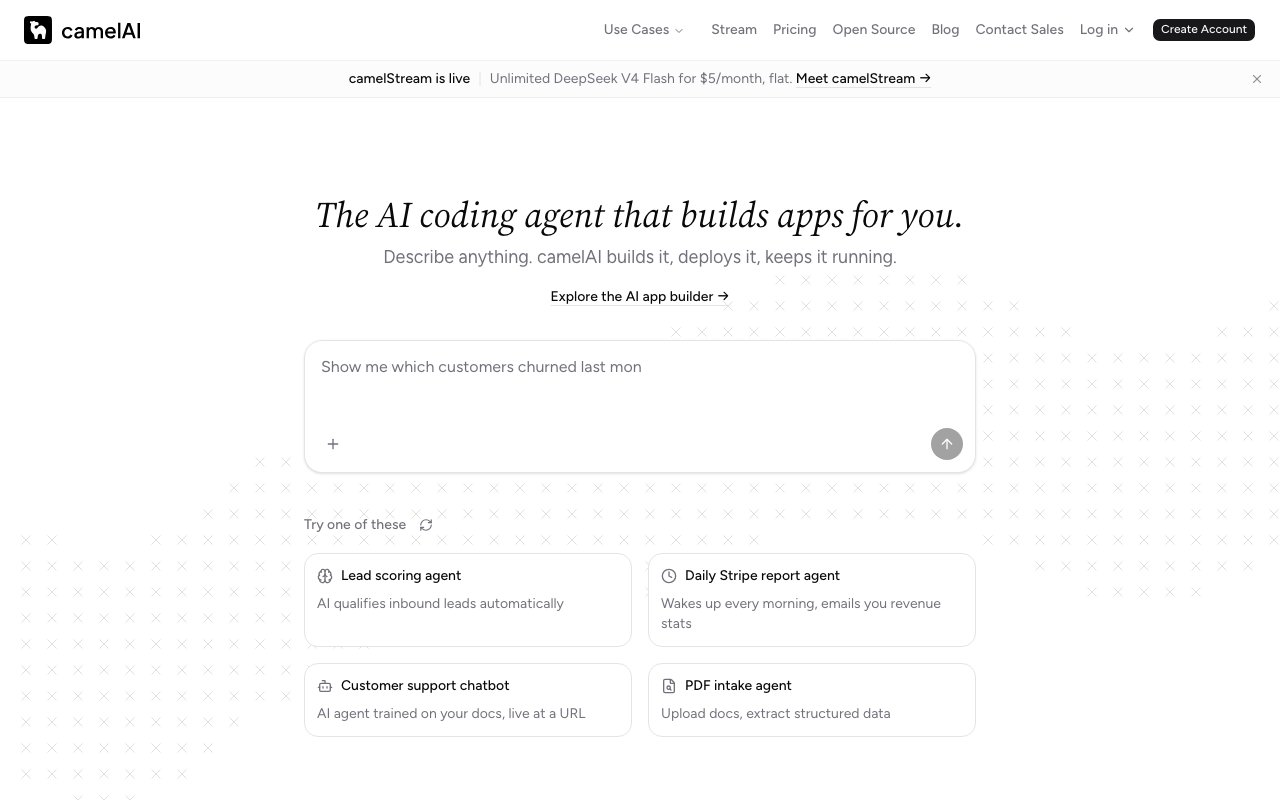
About camelAI
camelAI is an AI software engineer that lives on its own computer. You describe what you want in a chat, and it writes the code, stands up the backend and database, deploys the result, and keeps it running. Where most AI coding tools hand you a snippet or a scaffold and leave the rest to you, camelAI owns the whole loop from prompt to a live, working application.
The core idea is the persistent workspace. Each workspace is a machine with storage where your projects, files, and databases live across sessions, up to 100 GB on the Pro plan. That persistence is what separates it from chat-based code generators that forget everything between conversations. Your app from last week is still there, still deployed, and the agent can pick it back up, fix a bug, or add a feature without you re-explaining the project.
It builds real full-stack software. Describe a dashboard, an automation, an internal tool, a notebook, or an AI agent of your own, and camelAI generates the backend, database, and APIs, then deploys the app on Cloudflare Workers. It connects to more than 50 integrations including Stripe, PostgreSQL, Snowflake, GitHub, HubSpot, and Notion, so the things it builds can talk to the systems you already use. Scheduling is built in as well. Tasks can run on cron schedules without a human in the loop, which turns it into a monitoring and reporting engine, things like an hourly check on a data source or a weekly summary that lands automatically. On paid plans those schedules get tighter, from daily runs on the free tier to hourly on Starter and every five minutes on Pro, which is the difference between a nightly report and something that behaves like real monitoring.
The interface is a multiplayer chat, and you can reach your workspace through the web, by email, or from Slack. That makes it usable by a team rather than a single operator, and it also means the agent can live inside the channels where work already happens instead of demanding yet another tab. Starter and up even give the workspace its own email inbox, so a report request or a data question can arrive as a plain message. On the Team plan, shared workspaces come with role-based access control, so a product team can collaborate with the agent the way they'd collaborate with a contractor, except this one deploys its own work. Custom domains are included from the Starter tier, ten of them, and unlimited on Pro, which means the apps it builds can ship under your own name rather than a platform subdomain.
It fits solo builders who want to ship internal tools and small products without maintaining infrastructure, and teams that need custom dashboards, automations, and data tools faster than an engineering backlog allows. If you've used an AI chat to generate code and then spent the afternoon wiring up hosting, a database, and a scheduler yourself, camelAI is aimed at exactly that gap. The range of things it can produce, from AI agents and automations through web apps, dashboards, and notebooks, means it covers most of what an internal tools team ships, and the enterprise tier's HIPAA and SOC 2 support signals it wants to be trusted with more than side projects.
The pricing model is worth understanding because it's unusually transparent. Every plan lets you bring your own API key, and if you top up credits instead, the site says model usage for GPT, Claude, Gemini, Grok, Kimi, and DeepSeek is billed at cost with no markup. The free plan gives you one workspace, three deployed apps, 5 GB of storage, and two daily cron jobs. Starter is $10 a month with $10 of model credits included, 30 deployed apps, 50 GB, hourly crons, ten custom domains, and an email inbox for the workspace. Pro at $40 a month brings unlimited apps, 100 GB, and 50 cron jobs that can fire every five minutes. Team runs $50 per seat with a three-seat minimum and adds shared workspaces and RBAC, while Enterprise layers on SSO/SAML, bring-your-own-cloud, and HIPAA and SOC 2 support.
Access is freemium in the classic sense. You can sign up, connect your own API key, and deploy three apps without paying anything, and the paid plans come with 7-day free trials and cancel anytime. The honest caveat is that you're trusting an autonomous agent with real deployments, so the results still deserve review before anything business-critical rides on them. As a way to go from a described idea to a running, scheduled, integrated application without touching a server, it's one of the more complete takes on the AI-builds-your-software premise.
Key Features
- Persistent workspace with up to 100 GB storage
- Full-stack generation deployed on Cloudflare Workers
- Autonomous cron-scheduled tasks
- 50+ integrations including Stripe, Postgres, and GitHub
- Multiplayer chat via web, email, or Slack
- Bring-your-own-key or at-cost model credits
Pros & Cons
What we like
- Owns the full loop from prompt to deployed, running app
- Projects and databases persist across sessions
- Model credits billed at cost with no markup, or use your own API key
- Free tier plus 7-day trials on paid plans
Room for improvement
- Autonomous deployments still need human review for critical work
- Free tier is capped at 3 apps and 5 GB
- Team plan requires a 3-seat minimum
- You're tied to its hosted workspace model rather than your own infra
Frequently Asked Questions
What is camelAI?
Is camelAI free?
How does camelAI charge for AI model usage?
Who is camelAI for?
Best For
Featured in
Alternatives to camelAI
Rememori
Embedded memory engine for AI agents in TypeScript with zero dependencies

Almanac
A hosted, source-cited wiki that turns your files into context your AI agents can use

Demi AI
Demi helps busy professionals eliminate repetitive admin work across their favorite tools.

Chariot
Elastic cloud infrastructure for deploying and scaling AI agent fleets with persistent storage
Reviews (0)
Badge builder
Add camelAI to your website
Choose a badge style and size, preview it here, then copy the generated HTML. Badge images are self-contained SVGs and do not require an external script.

<a href="https://toolindex.net/tools/camelai?ref=badge" target="_blank" rel="noopener">
  <img src="https://toolindex.net/badge/camelai/medium.svg" alt="camelAI - Listed on Tool Index" width="180" height="50" />
</a>How to use the badge
- 1. Pick the style, size, and theme that fit your layout.
- 2. Copy the generated HTML from the code block.
- 3. Paste it into your footer, homepage, or press page.
Standard badge available
The standard listing badge is available now. Score and circle badges are limited to tools currently ranked in the top 10 of a category.
Badge clicks return visitors to this profile with a referral tag so the source remains identifiable.
Related Tools

OpenBenchmarks
Public, externally validated benchmarks that help agents pick SaaS APIs
Almanac
A hosted, source-cited wiki that turns your files into context your AI agents can use

Wizard
Self-extending Rust terminal AI agent that works with any model
Chariot
Elastic cloud infrastructure for deploying and scaling AI agent fleets with persistent storage
Work on camelAI? Request listing access or correction