
Clinch Terminal
Open-source terminal built for managing Claude Code and Codex agent sessions
Gallery
About Clinch Terminal
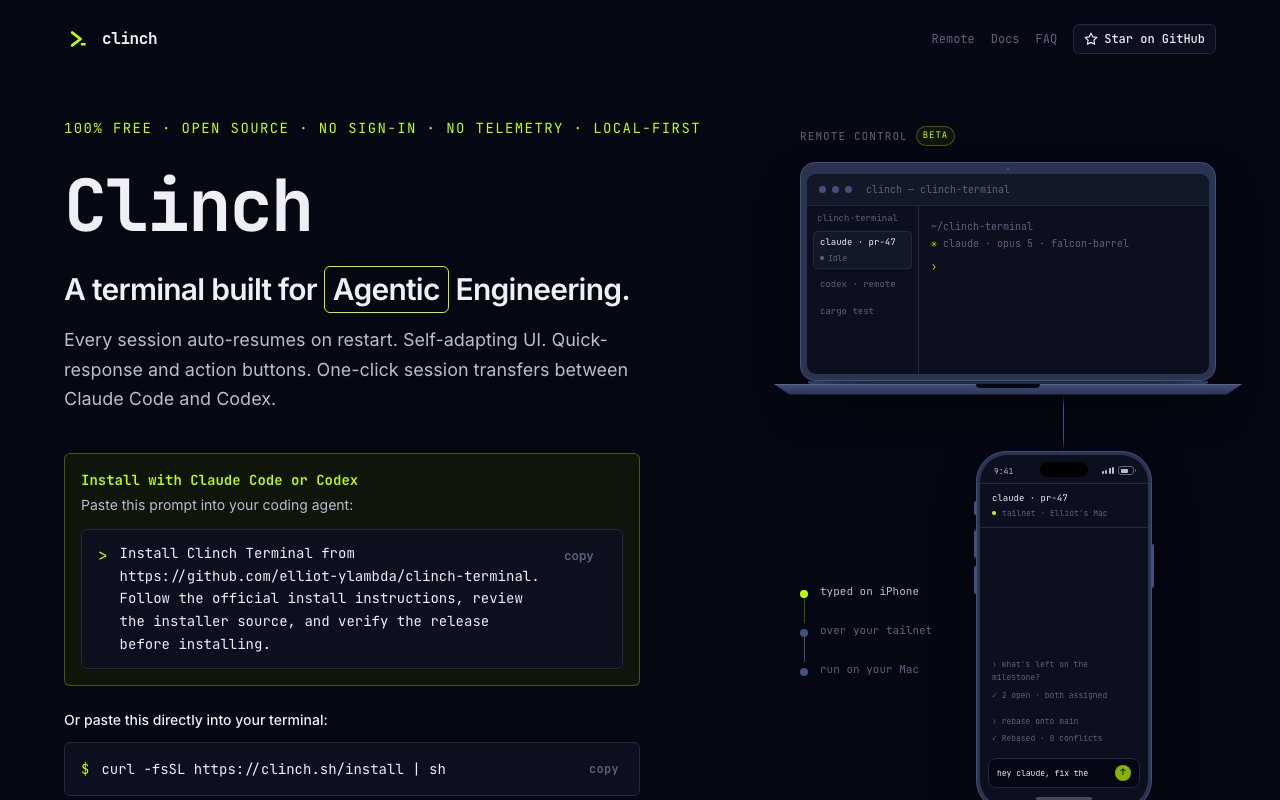
Clinch Terminal is an open-source terminal application built specifically for developers who work with AI coding agents like Claude Code and Codex. It takes the foundation of Warp's open-sourced terminal codebase and rebuilds it around a single purpose, which is making agent sessions easier to manage, resume, and navigate when you are running multiple AI assistants across different projects. Every session auto-resumes on restart. Prompt history persists locally. The interface is designed around the assumption that you have multiple agents running across multiple repositories and need to keep track of all of them without losing context.
The core problem it addresses is session fragmentation. When you are running Claude Code in one terminal window, Codex in another, and juggling multiple repositories, it becomes difficult to track which agent said what, where your conversation left off, and how to pick things back up after a restart. Standard terminals do not care about agent context. Clinch keeps all of that in one place. When you reopen the app, your agent conversations resume exactly where they stopped. File paths from agent output are clickable with Cmd-click. Usage meters in the tab bar show estimated token costs so you know how much of your quota you have burned through. Attention badges cycle through tabs that need your input, making it obvious at a glance which sessions need you.
The interface borrows Chrome's tab model but applies it to projects rather than web pages. Each project gets its own tab with a colored header tint, and within that tab you can run multiple agents, see their status at a glance, and switch between them without losing context. There is a terminal toolbelt for launching agents quickly, quick-reply buttons for common responses like Continue or LGTM, and a conversation finder for digging through past sessions. You can fork sessions to branch off from a point in a conversation, or compact them to manage long-running threads that have grown unwieldy. The self-adapting UI includes a file explorer toggle and project-level visual distinction that makes navigation faster when jumping between projects.
One of the more useful features is automatic worktree generation. When you open a Git repository, Clinch can spin up worktrees as separate tabs, so you can have different branches running different agent sessions without stepping on each other. This fits naturally into workflows where you are testing changes across multiple branches simultaneously, each with its own AI assistant helping with different tasks. Rate-limit auto-continue handles the annoying case where an agent hits a rate limit mid-response and needs to be nudged to keep going. Native macOS notifications alert you when agents are waiting for input so you can work on other things and come back when needed.
Session management includes undo-close functionality and recovery support for crashes or power loss. One-click session transfers let you hand off a conversation between Claude Code and Codex without starting over. The skills panel discovers project-specific capabilities from your Claude Code and Codex configurations. An image preview pane handles SVG, PNG, JPEG, GIF, and WebP files directly in the terminal interface. If you are working across machines, a beta remote control feature lets you send commands from your phone.
Installation happens through a one-line curl command that downloads and runs the installer script, which verifies signatures before execution. The release is currently a technical preview, which means it is ad-hoc signed rather than notarized through Apple, so you will need to allow it through Gatekeeper on first launch. It is built for macOS 14 and later, available as a universal binary for both Intel and Apple Silicon. There is no account required, no telemetry, no crash reporting, and no analytics. The project is open source under AGPL-3.0, with some Warp components remaining MIT-licensed. Everything runs locally first, with no data leaving your machine.
The target audience is developers who spend significant time in Claude Code or Codex and find themselves frustrated by lost context, scattered sessions, or the friction of managing multiple agents across different projects. If you are not using AI coding agents regularly, or you are satisfied with a standard terminal plus separate agent interfaces, Clinch probably will not add much. It is a tool for a specific kind of developer workflow, and it does that one thing thoroughly. The fit is narrow but clear. If you have felt the pain it addresses, you will recognize it immediately. If you have not, this is not trying to solve your problem.
Key Features
- Automatic session resumption on restart
- Chrome-style project tabs with agent context
- Clickable file links in agent output
- Usage meter showing transcript costs
- Quick-reply buttons for common responses
- Git worktree auto-generation per branch
Pros & Cons
What we like
- Sessions persist automatically without manual saving
- No account, telemetry, or analytics required
- Consolidates multiple agent sessions in one interface
- Built on Warp's proven terminal foundation
Room for improvement
- macOS only, no Windows or Linux support
- Technical preview without Apple notarization
- Only useful if you use Claude Code or Codex regularly
- Narrow focus on AI agent workflows
Frequently Asked Questions
What is Clinch Terminal?
Is Clinch Terminal free?
What platforms does Clinch Terminal support?
How is Clinch different from using a regular terminal?
Best For
Featured in
Alternatives to Clinch Terminal

Kevin Gabeci
Solo developer building web apps, cozy browser games, and AI creator toolkits.

SoloDevStack
A solo developer blog built on head-to-head tool comparisons, 580+ posts deep.

Codedex
A gamified, story-driven platform that teaches Python, web dev, and more like an RPG quest

Vibe Built
Building real apps with agentic AI. What worked, what broke, what shipped.
Reviews (0)
Badge builder
Add Clinch Terminal to your website
Choose a badge style and size, preview it here, then copy the generated HTML. Badge images are self-contained SVGs and do not require an external script.

<a href="https://toolindex.net/tools/clinch-terminal?ref=badge" target="_blank" rel="noopener">
  <img src="https://toolindex.net/badge/clinch-terminal/medium.svg" alt="Clinch Terminal - Listed on Tool Index" width="180" height="50" />
</a>How to use the badge
- 1. Pick the style, size, and theme that fit your layout.
- 2. Copy the generated HTML from the code block.
- 3. Paste it into your footer, homepage, or press page.
Standard badge available
The standard listing badge is available now. Score and circle badges are limited to tools currently ranked in the top 10 of a category.
Badge clicks return visitors to this profile with a referral tag so the source remains identifiable.
Related Tools
Kevin Gabeci
Solo developer building web apps, cozy browser games, and AI creator toolkits.

Coolify
Self-hostable, open source alternative to Heroku and Netlify

Warp
The modern terminal reimagined with AI and collaboration

Bolt.new
Prompt-to-deployed full-stack app inside the browser
Work on Clinch Terminal? Request listing access or correction