
CloudPloy
Deploy apps to your cloud or VPS from an MCP-compatible AI tool
Gallery
About CloudPloy
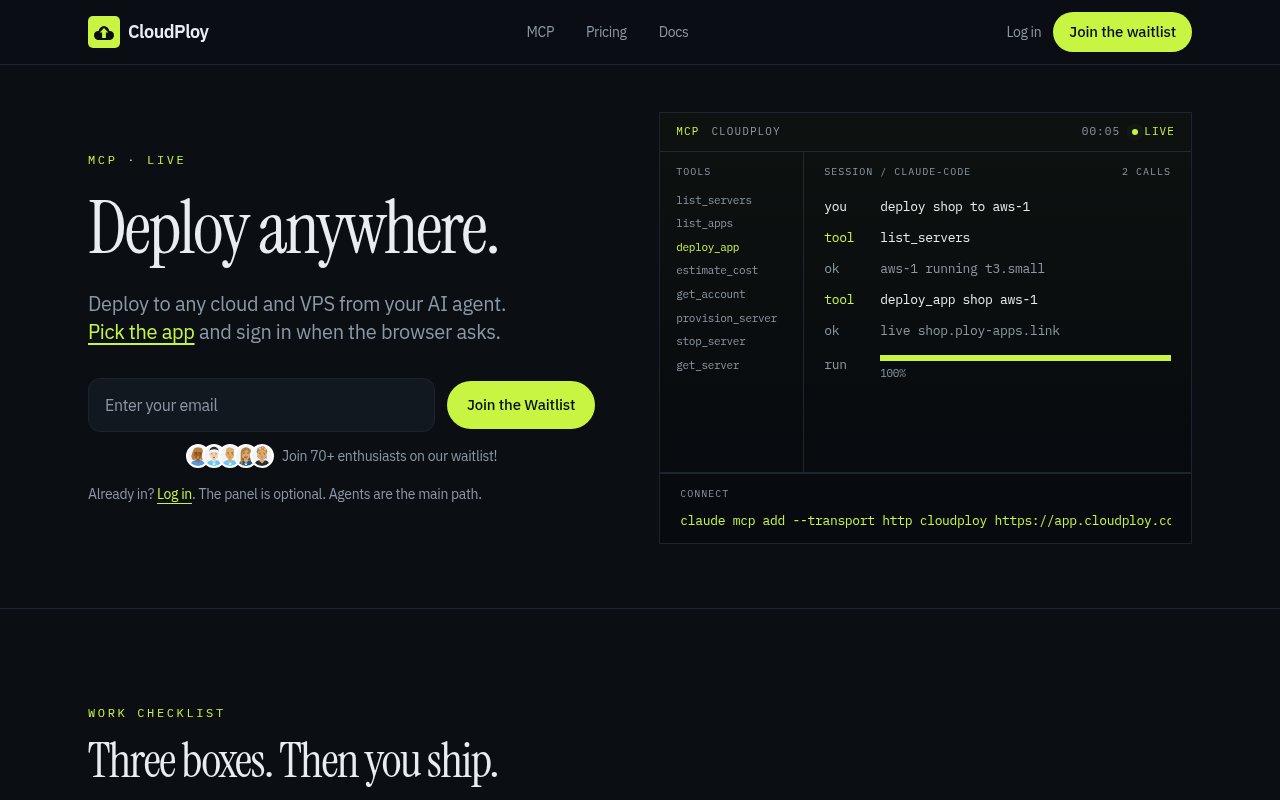
CloudPloy is a deployment control plane that lets developers manage application hosting from an AI assistant through MCP. Instead of leaving a coding conversation to configure a server by hand, a user can connect CloudPloy, authorize access in the browser, and ask the assistant to inspect servers, estimate cost, provision capacity, or deploy an application. The optional web panel remains available, but the product presents agents as the primary path. It is aimed at developers using tools such as Claude Code, ChatGPT, Cursor, or OpenCode who want deployment to sit beside coding tasks without handing ownership of the underlying cloud account to a new hosting provider.
The setup has three main parts. A user opens the CloudPloy MCP connection, signs in when the browser asks, and points a compatible AI client at the hosted MCP address. Claude uses the published plugin route, ChatGPT uses the CloudPloy app, and other MCP clients can add the server URL. The exposed tools cover listing servers and applications, reading an account, estimating cost, deploying an app, provisioning a server, retrieving server details, and stopping infrastructure. Scoped API tokens control what an agent can do, so a team can grant the abilities needed for a workflow rather than treating every connection as unrestricted administrative access. That makes permission design part of onboarding, particularly when the same assistant can both inspect an account and perform a deployment action.
Applications can run on AWS, Google Compute Engine, or a custom VPS. A customer can bring an existing server or ask CloudPloy to provision compute at the provider's rate. Deployment uses Nixpacks for a polyglot path that covers Node, Python, Go, Rust, Ruby, Java, PHP, Deno, and static sites. WordPress and Laravel are also offered as presets. A deployment begins from a Git repository rather than a proprietary project format, which matches the workflow of the coding clients CloudPloy targets. For users who don't want to assemble the operational pieces themselves, CloudPloy handles containers, SSL, and routing. More technical users can still work with environment variables, domains, logs, and the full API, which keeps the service useful after the first guided deploy.
The billing model separates the control plane from compute. A free plan covers one server and one application on a machine no larger than 2 vCPU and 2 GB of memory. Starter costs $9.99 per month for up to three servers, Pro costs $19 per month for up to ten, and Scale costs $39 per month with no published server cap. When CloudPloy provisions compute, prepaid credits pay the provider's exact rate. A server that the customer brings doesn't draw from that credit balance. Customers also retain the provider account, and CloudPloy says it doesn't add a markup to the underlying provider rate. The distinction matters because the monthly subscription is not a bundle of marked-up virtual machines, and a team can retain its cloud account while paying CloudPloy for the management layer.
There are operational limits worth understanding before connecting important workloads. If the credit balance reaches zero, infrastructure provisioned through CloudPloy is stopped and can be destroyed after a seven-day grace period unless the balance is topped up. A bring-your-own server keeps running, though CloudPloy-side routing, SSL, and deploy services can stop if the plan lapses. Provider coverage is currently limited to AWS, Google Compute Engine, and custom VPS machines, with more services described as future work. The public site is also using a waitlist and says keys are sent as spots open, even though existing users can sign in, so immediate access for a new team isn't guaranteed.
CloudPloy fits solo developers and small teams that already build inside an AI coding tool and want a short route from repository to running service. It can reduce the context switching involved in creating a server, calculating likely cost, and deploying a supported stack. It is also relevant to teams that prefer their own infrastructure account over a conventional platform as a service. The useful difference is the combination of an agent-facing MCP interface, bring-your-own infrastructure, and transparent separation between platform fees and compute charges. Access is freemium, but it is still early and waitlist gated. A buyer should confirm admission, regional options, backup expectations, token scopes, and production support before making it the only deployment path for a critical application.
Key Features
- Hosted MCP deployment controls
- AWS, GCE, and VPS support
- Bring-your-own server connections
- Nixpacks polyglot deployments
- Scoped agent API tokens
- SSL, containers, and routing
Pros & Cons
What we like
- Deployments can start inside an AI coding workflow
- Customers keep control of their cloud accounts
- Bring-your-own servers avoid compute credits
- Free tier supports a small live application
Room for improvement
- New access is currently waitlist gated
- Provider support is limited to three paths
- Provisioned servers depend on prepaid credits
- Young service with limited public operating history
Frequently Asked Questions
What is CloudPloy?
Is CloudPloy free?
Can CloudPloy use my existing server?
Which application stacks does CloudPloy support?
Best For
Featured in
Alternatives to CloudPloy

Apatero AI
The creator studio for AI image, video, audio, 3D, and avatars, now at apatero.ai.

SoloDevStack
A solo developer blog built on head-to-head tool comparisons, 580+ posts deep.
Apatero Studio
Creator studio for AI image, video, audio, 3D, and avatars. Every model worth using, in one workspace.

Melodex
Turn your idea into an AI-generated music video
Reviews (0)
Badge builder
Add CloudPloy to your website
Choose a badge style and size, preview it here, then copy the generated HTML. Badge images are self-contained SVGs and do not require an external script.

<a href="https://toolindex.net/tools/cloudploy?ref=badge" target="_blank" rel="noopener">
  <img src="https://toolindex.net/badge/cloudploy/medium.svg" alt="CloudPloy - Listed on Tool Index" width="180" height="50" />
</a>How to use the badge
- 1. Pick the style, size, and theme that fit your layout.
- 2. Copy the generated HTML from the code block.
- 3. Paste it into your footer, homepage, or press page.
Standard badge available
The standard listing badge is available now. Score and circle badges are limited to tools currently ranked in the top 10 of a category.
Badge clicks return visitors to this profile with a referral tag so the source remains identifiable.
Related Tools

Kevin Gabeci
Solo developer building web apps, cozy browser games, and AI creator toolkits.

Coolify
Self-hostable, open source alternative to Heroku and Netlify
Hetzner
High-performance European cloud hosting at unbeatable prices
Apatero AI
The creator studio for AI image, video, audio, 3D, and avatars, now at apatero.ai.
Work on CloudPloy? Request listing access or correction