
Codemod Grep
Structural, syntax-aware code search across public GitHub repositories using ast-grep patterns
Gallery
About Codemod Grep
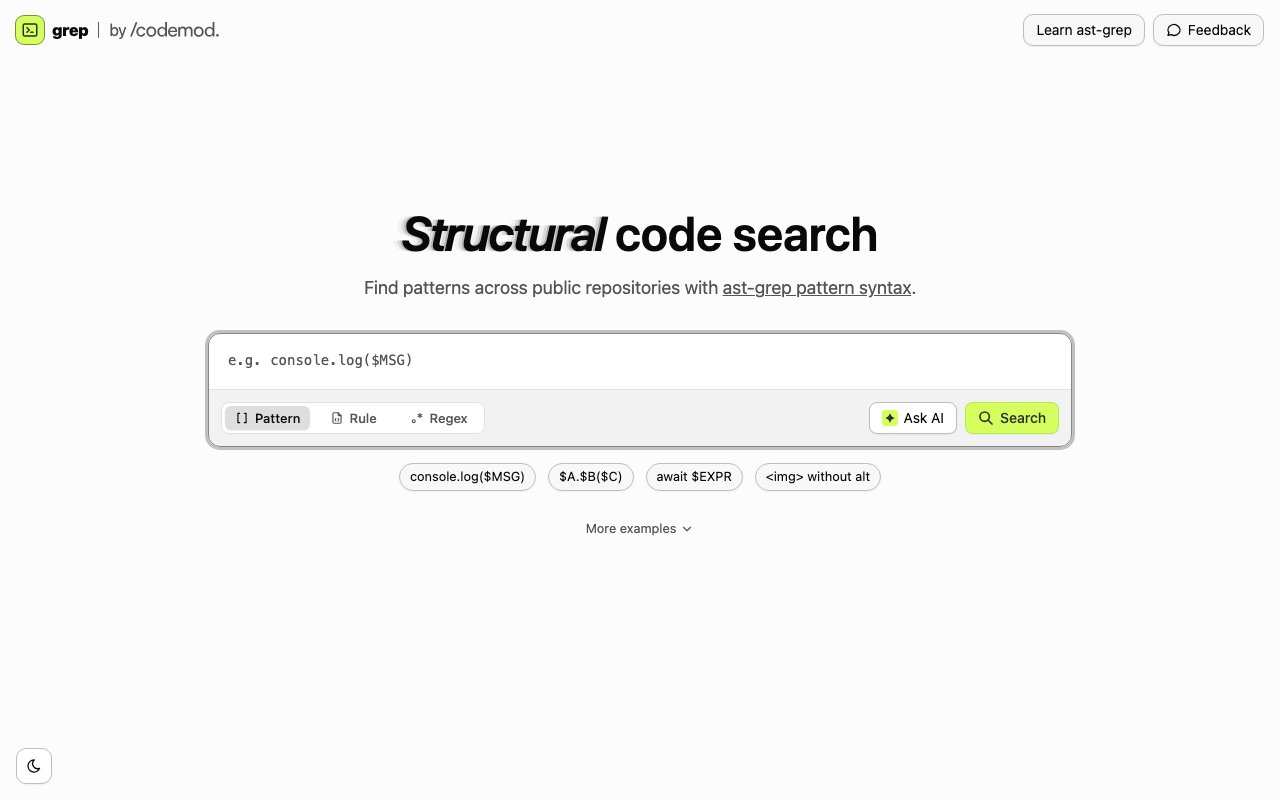
Codemod Grep, presented simply as grep by Codemod, is a structural code search engine for public repositories. Instead of matching text or regular expressions, it matches the shape of code using ast-grep patterns, which operate on the syntax tree rather than the characters. You describe the construct you are looking for, and it finds real occurrences of that construct across public GitHub code regardless of variable names, formatting, or whitespace. Text search tools treat code as strings, and strings lie. A regex for a function call will miss the call split across lines, match the one inside a comment, and drown you in lookalikes, while searching the syntax tree sidesteps that whole category of problem. The tagline framing is find code by shape, not just text or regex, and that is an accurate description of what changes.
The difference from ordinary code search is easiest to see in the examples the site leads with. A pattern like console.log($MSG) finds every console.log call whatever is being logged, because $MSG is a metavariable that matches any expression in that position. $A.$B($C) finds any method call on any object with any single argument. await $EXPR finds every awaited expression. There is even a structural query for an img tag without an alt attribute, which is the kind of search that is nearly impossible to express reliably as a regex but trivial when the engine understands the tree. Regex search is still available when plain text is genuinely what you want, and the interface also includes YAML rule editing for the richer ast-grep rule format and an Ask AI option for help shaping a query, which lowers the entry cost for anyone who has not written a structural pattern before.
The underlying pattern language is ast-grep, an established open source structural search and rewrite tool, and the site links straight to the ast-grep documentation for learning the syntax. That is a sensible choice, because anything you learn writing patterns here transfers directly to running ast-grep locally on your own codebase, and any rule you refine against the public corpus can come home with you. It also means the query language is documented independently and battle-tested, rather than a proprietary syntax that exists only inside one website.
Who is this for in practice? Developers researching how an API is actually used in the wild, not how the docs say it should be used. Library authors checking whether anyone really calls that method they want to deprecate, and in what shapes. Engineers writing codemods or lint rules who need to test a pattern against a large, messy, real-world corpus before trusting it on their own repository. Security-minded folks hunting for a risky construct across open source. In all of these cases the value is the same, the corpus is public GitHub code and the query language understands syntax, so the matches are the construct itself rather than every string that happens to resemble it. There is a teaching value in it too. Reading how a hundred real projects invoke an API is often more instructive than any tutorial, and structural search gets you to those examples without wading through false positives.
The product comes from Codemod, the company behind the codemod.com platform for large-scale automated code migrations, and it fits their toolchain naturally. Writing a codemod starts with finding every instance of the pattern you intend to transform, and a public structural search engine is a low-friction way to develop and sanity-check those patterns. Codemod Grep works perfectly well standalone, though, as a browser tool you reach for whenever grep-the-text is not precise enough. The pairing makes sense in both directions, since people who discover structural search through the free tool have a natural next step into automated transforms, and migration engineers get a public playground for the find half of find-and-replace.
Access is straightforward, the tool is a free web app with no pricing page in sight, and searching does not put you through a paywall. The obvious limits are scope rather than cost. It searches public repositories, so it will not look inside your private code, and the site does not publish figures on exactly how much of GitHub is indexed. For pattern development, API archaeology, and structural exploration of open source, it fills a niche that neither GitHub's own search nor a local grep really covers. The page does not spell out its supported language list either, so a quick test query is the fastest way to see whether your stack is covered. If you have ever tried to answer a question like how do people actually handle this callback, then given up after page three of regex noise, this is the tool for that question.
Key Features
- Structural search with ast-grep patterns
- Metavariables that match code by shape
- YAML rule editing for advanced queries
- Plain regex search mode
- Ask AI query assistance
- Searches public GitHub repositories
Pros & Cons
What we like
- Finds code constructs regex cannot reliably express
- Patterns transfer directly to local ast-grep usage
- Free to use in the browser with no setup
- Useful sandbox for developing codemod and lint rules
Room for improvement
- Public repositories only, no private code search
- Index coverage of GitHub is not documented
- Requires learning ast-grep pattern syntax for full value
- Narrow focus on search, transforms live elsewhere in the Codemod platform
Frequently Asked Questions
What is Codemod Grep?
Is Codemod Grep free?
How is it different from GitHub code search?
Who is Codemod Grep for?
Best For
Featured in
Alternatives to Codemod Grep
View all
Kevin Gabeci
Solo developer building web apps, cozy browser games, and AI creator toolkits.

SoloDevStack
A solo developer blog built on head-to-head tool comparisons, 580+ posts deep.

Codedex
A gamified, story-driven platform that teaches Python, web dev, and more like an RPG quest

Vibe Built
Building real apps with agentic AI. What worked, what broke, what shipped.
Our take
Tool Index Editorial · Oct 2026· 3.5/5
Codemod Grep is a browser tool for searching public repositories by code structure with ast-grep patterns. It is useful to library maintainers, migration engineers, and security researchers who need real examples of a construct rather than noisy text matches. The public page presents it as a free search interface with pattern, YAML rule, text, and AI-assisted query modes.
The strongest choice is using an established query language instead of inventing a proprietary one. Patterns learned here can move into local ast-grep workflows, which makes the tool useful for developing codemods and lint rules. Its limits are substantial but clear. It searches public code only, the captured site does not document corpus coverage or supported languages, and advanced searches still require syntax knowledge. Treat results as a research sample, not proof that every relevant repository was checked.
Editorial opinion from the Tool Index team, written from the public product pages. Not a user review.
Reviews (0)
Badge builder
Add Codemod Grep to your website
Choose a badge style and size, preview it here, then copy the generated HTML. Badge images are self-contained SVGs and do not require an external script.

<a href="https://toolindex.net/tools/codemod-grep?ref=badge" target="_blank" rel="noopener">
  <img src="https://toolindex.net/badge/codemod-grep/medium.svg" alt="Codemod Grep - Listed on Tool Index" width="180" height="50" />
</a>How to use the badge
- 1. Pick the style, size, and theme that fit your layout.
- 2. Copy the generated HTML from the code block.
- 3. Paste it into your footer, homepage, or press page.
Standard badge available
The standard listing badge is available now. Score and circle badges are limited to tools currently ranked in the top 10 of a category.
Badge clicks return visitors to this profile with a referral tag so the source remains identifiable.
Related Tools
Kevin Gabeci
Solo developer building web apps, cozy browser games, and AI creator toolkits.

Coolify
Self-hostable, open source alternative to Heroku and Netlify

Warp
The modern terminal reimagined with AI and collaboration

Bolt.new
Prompt-to-deployed full-stack app inside the browser
Work on Codemod Grep? Request listing access or correction