ColliePWA
Monitor and respond to terminal coding agents from a phone
Gallery
About ColliePWA
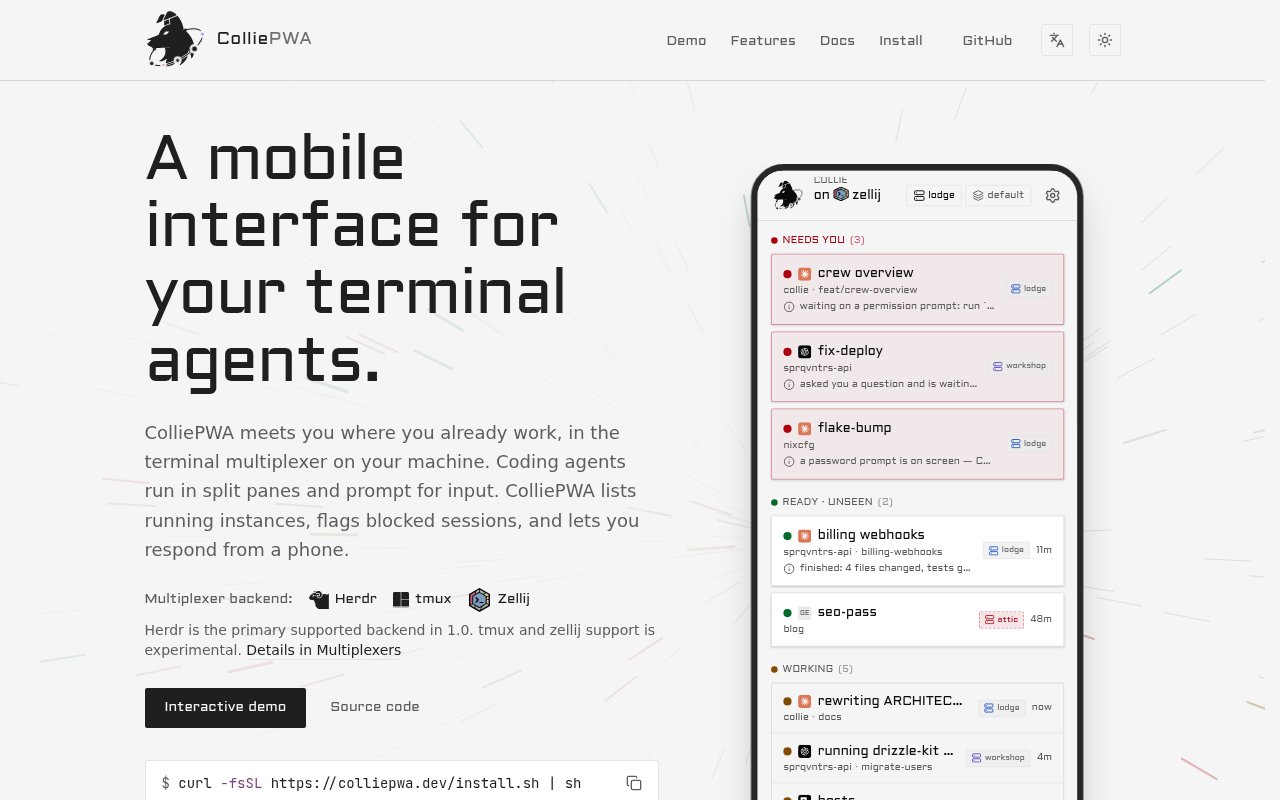
ColliePWA is a self-hosted mobile interface for developers who run coding agents inside terminal multiplexers. It doesn't replace the terminal or move agents into a vendor cloud. Instead, a small binary runs on the same machine as the existing sessions, lists the active agent panes, shows which ones are working or waiting, and lets the operator respond from a phone. The interface is a progressive web app, so it can be added to a mobile home screen without an app store account. The project is built for a specific workflow in which several terminal agents can continue independently until one needs a permission decision, an answer, or another piece of keyboard input.
The dashboard groups agent processes by state and puts blocked sessions first. Selecting a pane opens its raw terminal stream with ANSI color rather than a rewritten summary. That detail matters when the exact command output, prompt, or failure context determines the right response. Permission prompts can appear as discrete action buttons, and ColliePWA checks current terminal state before sending a response to reduce the chance of acting on stale output. A mobile keypad exposes keys that are awkward on a phone, including Escape, Tab, arrows, Control combinations, and navigation controls. Users can also define quick replies and slash commands or use the ordinary text composer with the phone's built-in dictation.
Herdr is the primary supported multiplexer backend in version 1.0. Experimental drivers are available for tmux and Zellij, which expands the audience but comes with less certainty than the Herdr path. ColliePWA retains complete scrollback beyond the visible terminal viewport and can expose multiple sessions through one gateway. Optional Zen mode removes most navigation when someone wants to concentrate on a single terminal. For developers working across several hosts, a crew can put the ColliePWA instance from each machine behind one address. The topology includes a lead, authorized failover, per-machine journals and audit logs, and a phone view that can reach the connected hosts.
The software runs locally and binds strictly to the loopback interface. Remote access therefore needs a private ingress route rather than an open listener. The default startup path configures Tailscale Serve on the host's MagicDNS name, while documented alternatives include WireGuard meshes, reverse proxies, tunnels, and custom ingress. Device pairing uses an eight-character token with a ten-minute lifetime and a five-attempt limit. A paired device receives an authentication token whose hash is stored by the bridge, and revoking the device invalidates its next request. The project is explicit that anyone with authorized access can read terminal output and execute commands with the current user's permissions, so the network boundary and device trust model need to be treated as shell access.
Optional Web Push notifications can alert the operator when an agent becomes blocked or finishes. Tapping a notification opens the relevant pane, and bridge-wide transition filters and quiet periods can control which state changes interrupt the user. Voice input is also optional. Push-to-talk transcription can use OpenAI-compatible APIs, a local whisper.cpp or parakeet.cpp instance, or existing Codex CLI credentials. Both push and built-in voice features require an HTTPS origin. These additions suit the mobile use case, but they're opt-in and don't change the core local execution model. Terminal data stays on the operator's host unless an enabled outside service, such as browser push or a cloud transcription endpoint, receives the information needed for that feature.
Installation is available through a POSIX shell script or a source build. The installer downloads a platform release, checks the published SHA-256 hash, avoids sudo, starts no system services, and places files under the user's local data and binary directories. After installation, running collie start asks which multiplexer to mirror and writes an optional configuration file. Source builds require Git and Bun. The update command downloads and verifies newer releases, while release installations retain previous versions for rollback. This is a technical setup, but the project documents where files go, what the installer does, and how to inspect its source before running it.
ColliePWA is open source under the MIT license and has no cloud plan, account system, or app store distribution. Its best audience is one operator running multiple coding agents across terminal panes and wanting freedom to step away from the desk without missing a blocked prompt. It isn't a general remote desktop, a hosted agent service, or a multi-user collaboration layer. Herdr users get the clearest supported path, while tmux and Zellij users should expect experimental edges. The focused architecture keeps the product close to an existing terminal workflow, but it also asks the operator to be comfortable securing private ingress and granting a phone the equivalent of interactive shell authority.
Key Features
- Raw terminal stream mirroring
- Blocked session prioritization
- Single-tap prompt responses
- Optional Web Push notifications
- Local or compatible voice transcription
- Multi-host crew coordination
Pros & Cons
What we like
- Keeps agents in existing terminal sessions
- Runs without a vendor cloud account
- Shows exact terminal output with full scrollback
- Published MIT source can be inspected and modified
Room for improvement
- Herdr is the only fully supported backend
- tmux and Zellij support remains experimental
- Remote access requires private ingress setup
- Single-user design doesn't suit shared team access
Frequently Asked Questions
What is ColliePWA?
Which terminal multiplexers does ColliePWA support?
Does ColliePWA send terminal sessions to a cloud service?
Is ColliePWA free?
Best For
Featured in
Alternatives to ColliePWA
View all
Kevin Gabeci
Solo developer building web apps, cozy browser games, and AI creator toolkits.

SoloDevStack
A solo developer blog built on head-to-head tool comparisons, 580+ posts deep.

Codedex
A gamified, story-driven platform that teaches Python, web dev, and more like an RPG quest

Vibe Built
Building real apps with agentic AI. What worked, what broke, what shipped.
Our take
Tool Index Editorial · Sep 2026· 4.0/5
ColliePWA mirrors terminal coding-agent panes to a phone and puts blocked sessions first. We found a strong match between the problem and the interface, with raw terminal output, full scrollback, prompt actions, mobile control keys, optional push and voice, and multi-host crews. It is self-hosted, MIT licensed, and has no cloud subscription.
The product is for one technical operator who already runs agents in multiplexed terminals. Herdr is the primary supported backend, while tmux and Zellij remain experimental. Remote use also requires private ingress such as Tailscale, and a paired phone effectively gains the user's shell authority. The security model is documented, but installation, network setup, and device trust are real responsibilities rather than details the product can hide.
Editorial opinion from the Tool Index team, written from the public product pages. Not a user review.
Reviews (0)
Badge builder
Add ColliePWA to your website
Choose a badge style and size, preview it here, then copy the generated HTML. Badge images are self-contained SVGs and do not require an external script.

<a href="https://toolindex.net/tools/colliepwa?ref=badge" target="_blank" rel="noopener">
  <img src="https://toolindex.net/badge/colliepwa/medium.svg" alt="ColliePWA - Listed on Tool Index" width="180" height="50" />
</a>How to use the badge
- 1. Pick the style, size, and theme that fit your layout.
- 2. Copy the generated HTML from the code block.
- 3. Paste it into your footer, homepage, or press page.
Standard badge available
The standard listing badge is available now. Score and circle badges are limited to tools currently ranked in the top 10 of a category.
Badge clicks return visitors to this profile with a referral tag so the source remains identifiable.
Related Tools
Kevin Gabeci
Solo developer building web apps, cozy browser games, and AI creator toolkits.

Coolify
Self-hostable, open source alternative to Heroku and Netlify

Warp
The modern terminal reimagined with AI and collaboration

Bolt.new
Prompt-to-deployed full-stack app inside the browser
Work on ColliePWA? Request listing access or correction