Contextli
Context-aware AI voice assistant for Email, Slack, and every app
Gallery
About Contextli
Contextli is a voice-to-text application designed for professionals who spend significant portions of their day typing across multiple applications. Rather than offering generic speech transcription that requires manual cleanup and formatting, it delivers context-aware dictation that adapts to whatever application is currently active. When a user speaks, the output isn't raw transcription riddled with filler words and awkward phrasing but formatted, polished text ready to send or submit. This transforms voice input from a novelty that creates more work than it saves into a practical replacement for keyboard-heavy workflows, particularly for those handling dozens of small writing tasks throughout the day.
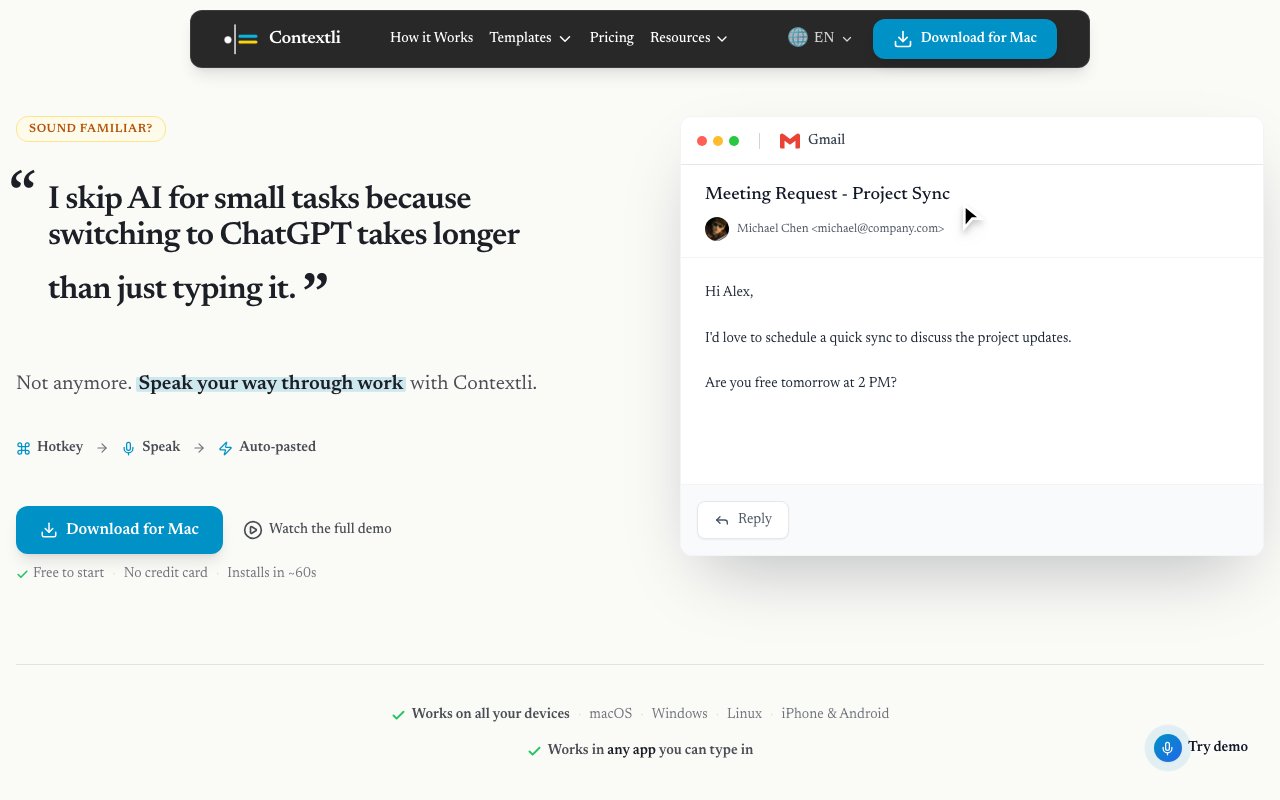
The workflow follows a straightforward three-step process that minimizes friction and maximizes speed. Users press a customizable hotkey from any application, speak naturally while context automatically loads based on the active app, and then watch as the result auto-pastes back into the original application. This seamless loop means users never need to copy text from one window to another, manually adjust formatting, or clean up transcription artifacts. The context awareness handles differences between platforms intelligently, so dictating an email in Gmail produces email-appropriate formatting with proper greetings, while dictating a Slack message produces conversational text suited to that more casual medium.
Cross-application compatibility covers more than fifty applications including Gmail, Slack, Microsoft Teams, Notion, GitHub, and many others that professionals use daily. Users can also create custom AI prompts for specific use cases, allowing the tool to adapt to workflows that standard profiles don't cover. For someone who regularly drafts legal correspondence, technical documentation, and casual team messages, custom prompts ensure each type of content receives appropriate treatment without manual adjustment between tasks. This flexibility extends the utility far beyond what single-purpose dictation tools typically offer, making voice input viable for specialized professional contexts.
Privacy architecture sets Contextli apart from many voice-enabled tools that route audio through cloud servers. All audio processing happens locally on the user's device, meaning voice recordings never touch company servers and never leave the machine where they were captured. This design choice addresses compliance requirements that prevent many professionals from using cloud-based voice tools. Attorneys handling privileged communications, consultants working under NDAs with sensitive client information, and healthcare professionals dealing with protected information can use voice dictation without worrying about sensitive content passing through third-party infrastructure. The local processing model removes a significant adoption barrier for security-conscious organizations.
The application runs on macOS, Windows, Linux, iOS, and Android, providing coverage across essentially all devices professionals might use throughout their workday. This multi-platform support means users can maintain consistent voice-driven workflows whether they're at a desktop workstation, on a laptop during travel, or responding to urgent messages from a mobile device. Integration with AI services including Claude, ChatGPT, and Perplexity enables decision recall and more sophisticated text generation beyond basic transcription, allowing users to reference previous conversations or generate content that builds on earlier context.
The target audience consists of professionals who type extensively and value maintaining focus throughout their workday. Those handling fifty or more small writing tasks daily benefit most, as the cumulative time savings from voice input compound quickly at that volume. Consultants, attorneys, executives, product managers, and anyone spending hours in email and messaging applications represent ideal users. The emphasis on compliance requirements and local processing makes it particularly attractive to regulated industries like legal, healthcare, and finance where cloud-based alternatives create unacceptable risk exposure.
Contextli follows a freemium pricing model that provides one hundred free credits monthly with no credit card required to start. This allows professionals to evaluate the tool against their actual workflow and measure real productivity gains before committing to a paid tier. Premium tiers offer additional credits and capabilities for heavier users whose volume exceeds what the free allocation covers. The combination of local processing for privacy, broad application support for versatility, and accessible entry pricing for evaluation positions Contextli as a practical voice assistant for professionals who previously dismissed dictation tools as impractical for serious work.
Featured in
Alternatives to Contextli

Reviews (13)
Exactly what I needed
Started using Contextli casually, now it is pinned in my dock. What stands out is how little babysitting it needs. Would sign up again without thinking twice.
Powerful once it clicks
Tried Contextli on a side project first, then rolled it out everywhere. Setup was painless and I was productive the same day. It took me a bit to get comfortable with it. No regrets so far.
Solid daily driver
Contextli has quietly become part of my daily flow. The defaults are sensible, so I was not fighting settings on day one.
Pulled its weight from week one
Picked Contextli for the price, stayed for the quality. The core workflow is smooth once you are set up. Easy yes for anyone weighing the same trade offs.
Exactly what I needed
Hadn't planned on switching, but Contextli was hard to ignore. It does what it says, which is rarer than it should be. Hard to imagine going back to my old setup.
Solid daily driver
Came to Contextli after getting frustrated with what I had before. It does what it says, which is rarer than it should be. Worth the price for what I get out of it.
Pulled its weight from week one
Have been running Contextli for a while, here is where I land. It just works, day after day, without surprises. It handles the boring parts so I can focus on the work that matters.
Pulled its weight from week one
Have been running Contextli for a while, here is where I land. The core workflow is smooth once you are set up. Would sign up again without thinking twice.
Genuinely impressed
Contextli has quietly become part of my daily flow. Setup was painless and I was productive the same day. Easy yes for anyone weighing the same trade offs.
Pulled its weight from week one
Came to Contextli after getting frustrated with what I had before. The defaults are sensible, so I was not fighting settings on day one. The output quality holds up better than I expected.
Exactly what I needed
Found Contextli on a Reddit thread and I am glad I clicked. It just works, day after day, without surprises. It earns its place in my stack.
Genuinely impressed
Came to Contextli after getting frustrated with what I had before. It slotted into my routine without much fuss. The defaults are sensible, so I was not fighting settings on day one. Easy yes for anyone weighing the same trade offs.
Good, with a few caveats
Have been running Contextli for a while, here is where I land. It just works, day after day, without surprises. The docs could go a bit deeper in places. Worth the price for what I get out of it.
Badge builder
Add Contextli to your website
Choose a badge style and size, preview it here, then copy the generated HTML. Badge images are self-contained SVGs and do not require an external script.

<a href="https://toolindex.net/tools/contextli?ref=badge" target="_blank" rel="noopener">
  <img src="https://toolindex.net/badge/contextli/medium.svg" alt="Contextli - Listed on Tool Index" width="180" height="50" />
</a>How to use the badge
- 1. Pick the style, size, and theme that fit your layout.
- 2. Copy the generated HTML from the code block.
- 3. Paste it into your footer, homepage, or press page.
Standard badge available
The standard listing badge is available now. Score and circle badges are limited to tools currently ranked in the top 10 of a category.
Badge clicks return visitors to this profile with a referral tag so the source remains identifiable.
Related Tools

Apatero AI
The creator studio for AI image, video, audio, 3D, and avatars, now at apatero.ai.
Kevin Gabeci Toolkits
Seven AI toolkits for writing books, making music, cutting video, and building agents.

Warp
The modern terminal reimagined with AI and collaboration

Bolt.new
Prompt-to-deployed full-stack app inside the browser
Work on Contextli? Request listing access or correction