
CostPerPrompt
Track and compare pricing across 232+ AI models with calculators for real-world API costs
Gallery
About CostPerPrompt
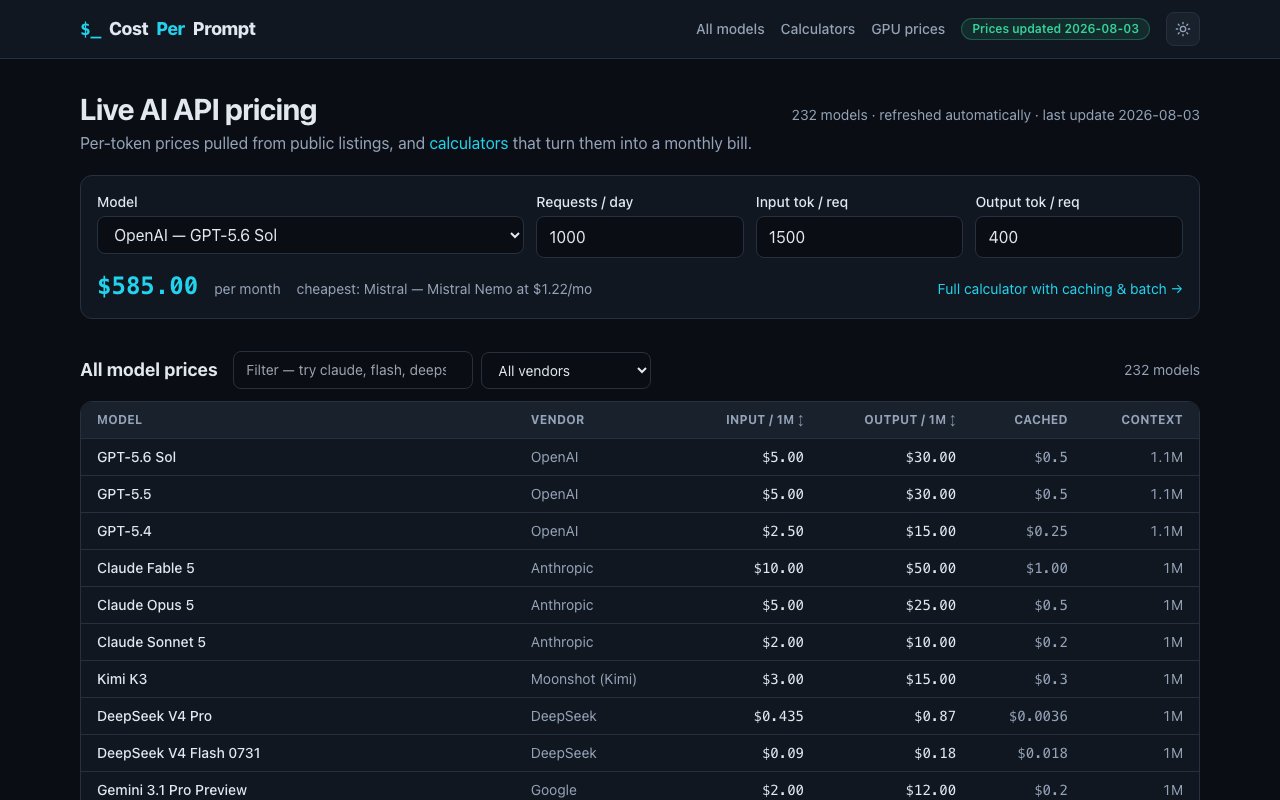
CostPerPrompt is a live pricing database and calculator platform that tracks costs across more than 233 AI language models from providers including OpenAI, Anthropic, Google, Meta, DeepSeek, and dozens of others. The database displays per token input and output costs, context window sizes, and prompt caching rates where providers offer them. Prices update automatically from public provider listings, with the site showing the most recent refresh date so users know they are working with current numbers rather than stale snapshots from months ago. This automatic refresh eliminates the tedious work of manually checking provider pricing pages whenever planning a new project or auditing an existing deployment.
The core value proposition addresses a common blind spot in AI cost estimation. Most articles and tools that answer the question of how much an AI project will cost ignore two major pricing mechanisms that can swing estimates by a factor of two or three in either direction. Prompt caching can reduce input costs by up to 90 percent when the same system prompt or context gets reused across requests. Batch processing offers roughly 50 percent savings in exchange for delayed results rather than real time responses. CostPerPrompt bakes these discounts into its calculators so developers get realistic projections instead of worst case theoretical maximums that would never materialize in production. This accuracy matters when comparing models that have different caching behaviors or when deciding whether batch processing fits a particular use case.
Beyond the raw pricing database, the platform provides a suite of specialized calculators for different use cases that go beyond simple per request math. The API cost calculator compares models side by side while factoring in caching and batch discounts. The chatbot cost simulator models how conversation history accumulates tokens over a session and how cache TTL affects spending on repeated context, reflecting the reality that multi turn conversations compound token usage in ways single request estimates miss. The agent cost calculator accounts for multi step loops, tool calls, and retries that multiply token usage beyond a single request response cycle, which matters for autonomous systems that run without human intervention for extended periods.
The RAG cost breakdown separates indexing costs from retrieval costs from generation costs, since retrieval augmented generation workflows touch different parts of the pricing structure at each stage. Indexing happens once per document but generation happens on every query, so the economics differ substantially from pure chat applications. Voice AI applications get their own calculator that combines speech to text, LLM processing, and text to speech costs per call. This three stage breakdown reflects how voice assistants and phone bots actually consume API resources across multiple providers, not just the LLM in the middle.
For teams considering self hosting, a GPU rental comparison tool covers H100, A100, and RTX 4090 instances across ten cloud providers, helping users decide whether renting inference capacity makes more sense than paying per token at current volumes. The crossover point depends on utilization rates that vary by workload, and the calculator helps quantify when owned or rented hardware becomes cheaper than API fees. Image generation pricing tiers and an in browser token counter round out the toolkit, covering visual AI use cases and providing a quick way to measure how many tokens a given prompt or document will consume before running it through paid APIs.
The platform targets developers evaluating which LLM to use for a new project, AI engineers optimizing existing deployments to reduce monthly bills, and product teams budgeting infrastructure costs before committing to a provider. Finance teams at companies with significant AI API spending can use the calculators to model how switching providers or enabling caching would affect their burn rate without running expensive experiments in production. The calculators work equally well for back of the envelope estimates during planning and for validating assumptions against real world usage patterns once applications go live.
CostPerPrompt itself appears free to use without account creation or payment information required. The business model relies on affiliate links to provider pages rather than subscription fees, meaning users can access all calculators and pricing data without adding another SaaS bill. This keeps the tool accessible to individual developers and small teams who might hesitate at another subscription but still need accurate cost modeling before committing to API integrations. The interface presents the 233 model database in a searchable, filterable table where users can sort by input price, output price, context window, or provider. Each model entry links to additional details, and the calculators accept token counts or text samples to output projected costs across multiple models simultaneously for easy comparison.
Key Features
- 232 model pricing comparisons
- Workload-specific cost calculators
- Prompt caching discount modeling
- Batch processing cost adjustments
- Browser-based token counter
- Daily pricing updates
Pros & Cons
What we like
- Covers a wide range of providers in one place
- Calculators reflect real-world billing factors most estimates miss
- Free with no account required
- Independent of any AI vendor
Room for improvement
- Pricing data can drift between updates
- No historical pricing trends or charts
- Limited to published API rates, not negotiated enterprise deals
- Ad-supported interface
Frequently Asked Questions
What is CostPerPrompt?
Is CostPerPrompt free?
How accurate is the pricing data?
Who is CostPerPrompt for?
Best For
Featured in
Alternatives to CostPerPrompt
View all
Reviews (0)
Badge builder
Add CostPerPrompt to your website
Choose a badge style and size, preview it here, then copy the generated HTML. Badge images are self-contained SVGs and do not require an external script.

<a href="https://toolindex.net/tools/costperprompt?ref=badge" target="_blank" rel="noopener">
  <img src="https://toolindex.net/badge/costperprompt/medium.svg" alt="CostPerPrompt - Listed on Tool Index" width="180" height="50" />
</a>How to use the badge
- 1. Pick the style, size, and theme that fit your layout.
- 2. Copy the generated HTML from the code block.
- 3. Paste it into your footer, homepage, or press page.
Standard badge available
The standard listing badge is available now. Score and circle badges are limited to tools currently ranked in the top 10 of a category.
Badge clicks return visitors to this profile with a referral tag so the source remains identifiable.
Related Tools

Apatero AI
The creator studio for AI image, video, audio, 3D, and avatars, now at apatero.ai.
Kevin Gabeci Toolkits
Seven AI toolkits for writing books, making music, cutting video, and building agents.

Warp
The modern terminal reimagined with AI and collaboration

Bolt.new
Prompt-to-deployed full-stack app inside the browser
Work on CostPerPrompt? Request listing access or correction