Crisp
Free in-browser 4x photo upscaling that never uploads your images
Gallery
About Crisp
Crisp is a browser based image upscaling tool that enlarges photos by four times their original resolution using an open source neural network model called 4x-UltraSharpV2. Everything runs locally in your browser using onnxruntime-web, so your images never leave your device and there's nothing to sign up for. You drag in a low resolution photo and get back a sharper, larger version without waiting for a server round trip or worrying about who might be storing your files. The entire workflow happens client side, which means you could disconnect from the internet after loading the page and it would still work. Once the page and model weights are cached, the tool runs completely offline.
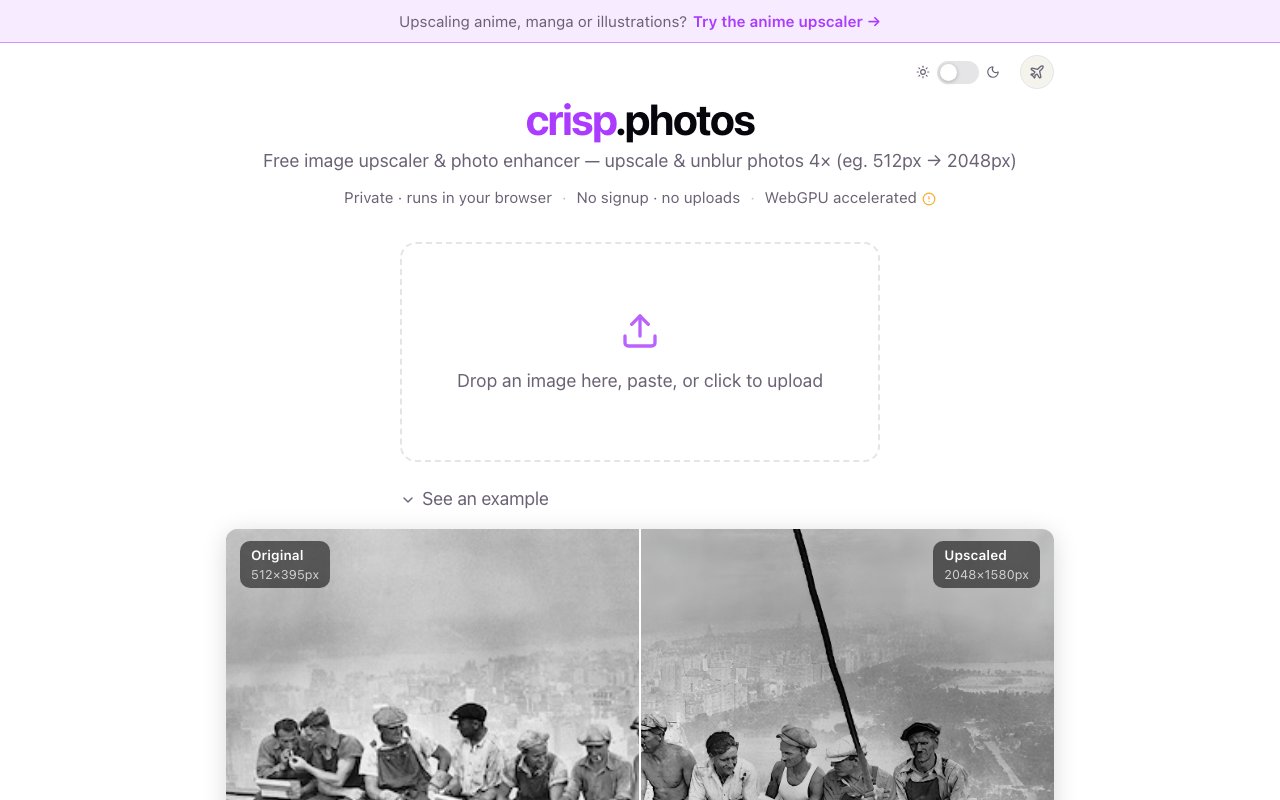
The use case is straightforward. You have a photo that's too small, too blurry, or both, and you need a version that looks acceptable at a larger size. Maybe it's an old family photo you want to print and the original scan was done at 640 pixels wide. Maybe it's a screenshot from a presentation where the source file was tiny and you need it to not look awful when projected. Maybe it's a product image you need to zoom in on without pixelation, or an avatar you want to scale up for a higher resolution display. Crisp applies an AI upscaling model that adds believable detail rather than just stretching pixels and hoping for the best. A 512 pixel image becomes a 2048 pixel image, and the model does its best to recover or invent the fine detail that wasn't there in the original file.
Under the hood, the tool leverages WebGPU on devices that support it, which makes processing significantly faster on modern browsers and newer hardware. If WebGPU isn't available because you're on an older browser or operating system, it falls back to WebGL or CPU execution providers so older machines can still use it, just slower. The 4x-UltraSharpV2 model is tuned specifically for photo upscaling and sharpening, which makes it a better fit for this task than generic neural network upscalers that weren't trained primarily on photographic content. Images that were compressed too aggressively by messaging apps, shot at low resolution on an old phone, or exported at the wrong size by mistake benefit most from this kind of enhancement.
Input formats include JPG, PNG, and WebP, covering the vast majority of images you'll encounter in practice. Output is always PNG to preserve quality after upscaling, since JPEG compression would undermine the detail recovery the model just performed. There are no watermarks stamped on your images, no daily usage limits, and no account required to access the tool. You can upscale as many images as you want, one at a time, with no strings attached. The interface is deliberately minimal. It's a single drag and drop zone with a before and after comparison slider once processing finishes so you can see the improvement. You download the result and move on with your day.
Speed depends entirely on your local hardware since the model runs in your browser rather than on a remote server. A modern laptop with a discrete GPU can handle a small image in a few seconds. Larger files or older machines take longer, sometimes significantly so depending on the resolution of the input and the capabilities of your graphics hardware. This is the inherent tradeoff of local processing versus cloud offload. The benefit is complete privacy. You never upload anything, which matters if you're working with private photos, sensitive documents, images of people who didn't consent to being stored on a random server, or anything you don't want sitting somewhere you have no control over. There's no terms of service granting the operator rights to your images because there is no operator receiving your images in the first place.
Crisp targets anyone who occasionally needs to upscale an image without installing desktop software or signing up for yet another cloud service that wants your email address and credit card. Designers who need to enlarge client provided assets when the client only has a low resolution version, content creators who want to resize old photos for new platforms where resolution standards have increased, and casual users who just want to make a blurry screenshot look better all fit the profile. The workflow is fast enough that you can use it ad hoc whenever the need arises rather than batching up upscaling tasks.
It's not a professional retouching suite and doesn't pretend to be. If you need batch processing to upscale hundreds of images overnight, advanced editing controls, layer support, RAW file handling, or enterprise features like team accounts and audit logs, you'll need to look elsewhere. This is a single purpose tool that does one thing and does it well for the zero dollar price point.
The tool is genuinely free with no premium tier or upgrade path visible on the site. The developer appears to run it as a side project built on top of open source models and the onnxruntime-web inference library. There's no business model to speak of, no ads, no tracking pixels, which means you're not the product either. For occasional one off upscaling with zero friction, it does exactly what it claims without asking for anything in return.
Key Features
- 4x resolution upscaling with AI
- Runs entirely in your browser
- No account or signup required
- WebGPU acceleration on modern devices
- JPG PNG and WebP input support
- No watermarks or usage limits
Pros & Cons
What we like
- Completely free with no catches or hidden costs
- Images never leave your device for full privacy
- No registration or email required to use
- Uses a proven open source upscaling model
Room for improvement
- Processing speed depends on your local hardware
- One image at a time with no batch mode
- Output limited to PNG format only
- Large images can be slow on older machines
Frequently Asked Questions
What is Crisp?
Is Crisp free?
Does Crisp upload my photos?
What formats does Crisp support?
Best For
Featured in
Alternatives to Crisp

AIMakeTattoo
Turn text descriptions into visual tattoo concepts with style and placement options

Poseberry
AI influencers that pose with products for UGC style photos and videos

Recraft
AI image generator built around vector output and brand styles

Midjourney
Create stunning AI artwork from text prompts
Reviews (0)
Badge builder
Add Crisp to your website
Choose a badge style and size, preview it here, then copy the generated HTML. Badge images are self-contained SVGs and do not require an external script.

<a href="https://toolindex.net/tools/crisp-photos?ref=badge" target="_blank" rel="noopener">
  <img src="https://toolindex.net/badge/crisp-photos/medium.svg" alt="Crisp - Listed on Tool Index" width="180" height="50" />
</a>How to use the badge
- 1. Pick the style, size, and theme that fit your layout.
- 2. Copy the generated HTML from the code block.
- 3. Paste it into your footer, homepage, or press page.
Standard badge available
The standard listing badge is available now. Score and circle badges are limited to tools currently ranked in the top 10 of a category.
Badge clicks return visitors to this profile with a referral tag so the source remains identifiable.
Related Tools

HairstylesPro
Try hundreds of hairstyles on your own photo before you commit to a cut
Recraft
AI image generator built around vector output and brand styles
AIMakeTattoo
Turn text descriptions into visual tattoo concepts with style and placement options
Flux by Black Forest Labs
Open and hosted image models that power half the AI art stack
Work on Crisp? Request listing access or correction