
HairstylesPro
Try hundreds of hairstyles on your own photo before you commit to a cut
Gallery
About HairstylesPro
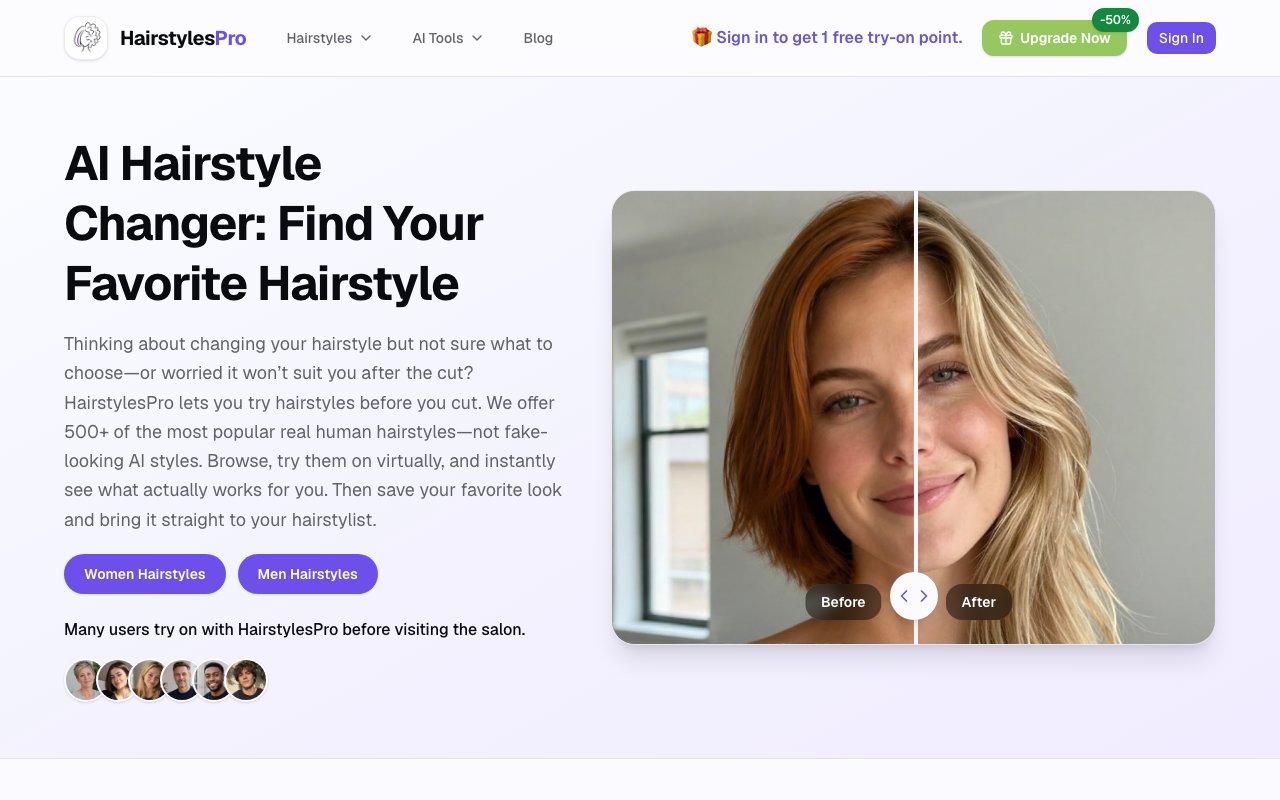
HairstylesPro is an AI hairstyle try-on tool that lets you preview a new haircut on your own face before you ever sit in the chair. You upload a front-facing photo, pick a style from a large catalog, and it generates a realistic image of you wearing it, so you can see whether that bob or that fade actually suits your face instead of guessing from a photo of a stranger with completely different bone structure. The promise on the tin is plain, try hairstyles before you cut, and the whole flow is organized around making that a two-minute exercise.
The problem it solves is the one everyone knows from the salon. You bring in a reference picture, the stylist does their best to interpret it, and the result looks nothing like you imagined because the cut that framed someone else's face does not frame yours the same way. HairstylesPro moves that moment of truth earlier, letting you test the decision on your own features first, so you walk into the appointment starting from something you have already seen and approved rather than from hope. That alone takes a lot of the anxiety out of committing to a real change.
It works from a library of more than five hundred hairstyles, organized so you can actually find what you want rather than scrolling endlessly. Styles are sorted by length across short, medium, long, and bob, and grouped for women, men, boys, and guys, with dedicated sets aimed at specific age ranges including options for people over fifty. You can browse the whole catalog on its own purely for inspiration, then switch over to your uploaded photo the moment you find something worth trying on for real. The browsing and the trying-on stay two separate modes, which keeps casual scrolling from burning your credits.
The part that separates it from a phone filter is the underlying image model. Rather than pasting a flat, wig-like overlay onto the top of your head, it uses AI image generation that pays attention to hairstyle structure, how the cut frames your face, the length, and the overall balance of the finished look. The intent is a preview that reads as a plausible photograph of you with that hair, not an obvious cut-and-paste job, which is exactly what makes the exercise worth doing when you are weighing a genuine change instead of just playing around for a minute.
Alongside the cut previews there is a separate hair color changer, so you can test going lighter, darker, or into a bolder shade using the same upload-and-preview flow. Between the two tools you can experiment with both the shape and the color of a look before you book anything, which covers most of the decisions people quietly agonize over in the days ahead of a big appointment. Seeing a color on your own skin tone, rather than on a swatch or a model in a magazine, is often the single detail that settles the whole question one way or the other.
It's built for the whole household rather than a single demographic. Women weighing a dramatic chop, men deciding between a couple of fades, teenagers and boys after something fresh, and older adults who want to see a modern style on their own face can all use the same tool with the same photo-and-pick flow. It fits anyone heading into a salon who wants to arrive with a clear picture rather than a vague idea, and stylists could just as easily use it to get on the same page with a client before they ever pick up the scissors.
In day-to-day use the appeal is how quickly it turns a vague urge for change into a concrete decision. You start by browsing the catalog the way you might flip through a lookbook, save the handful of styles that catch your eye, and then run them one after another on the same photo to compare them side by side on your own face rather than in the abstract. That back-to-back comparison is hard to get any other way, since a mirror and a reference picture can only take you so far, and it is often the exact moment a maybe becomes a yes or a firm no. Doing that at home also means you are not making the call under pressure in the salon chair with a stylist standing there waiting on you.
Access is freemium. Signing in gives you a single free try-on credit to test the results on your own photo, and from there you can either subscribe for a monthly allotment of a hundred credits or buy a one-time pack of thirty credits that does not expire. That structure suits both the person preparing for one specific appointment and the tinkerer who likes to experiment often, and the one-time option means you are not locked into a subscription just to preview a haircut once or twice a year. Support runs through a published contact email, so there is a direct line if a result looks off or a credit does not land the way it should.
Key Features
- Library of 500-plus hairstyles
- AI try-on from your own photo
- Filters by length, gender, and age
- Separate AI hair color changer
- Realistic structure-aware previews
- Browsable style inspiration catalog
Pros & Cons
What we like
- See a cut on your own face before booking
- Big style library sorted for easy browsing
- Real image model, not a flat filter overlay
- One-time credit option avoids a subscription
Room for improvement
- Results depend on a good front-facing photo
- Requires sign-in and credits beyond the first try
- Narrow focus on hair only
- Previews are approximations, not guarantees
Frequently Asked Questions
What is HairstylesPro?
Is HairstylesPro free?
How is it different from a filter app?
Who is HairstylesPro for?
Best For
Featured in
Alternatives to HairstylesPro

AIMakeTattoo
Turn text descriptions into visual tattoo concepts with style and placement options

Recraft
AI image generator built around vector output and brand styles

CraftVis
AI image editor that transforms photos through natural language instructions
VectorArtGen
AI-powered text-to-SVG generator for logos, icons, and illustrations
Reviews (9)
Two months in, no regrets
Picked HairstylesPro for the price, stayed for the quality. Where it really wins is real image model, not a flat filter overlay. Setup was painless and I was productive the same day. No regrets so far.
Quietly excellent
HairstylesPro has quietly become part of my daily flow. Their take on ai try-on from your own photo is genuinely good. It earns its place in my stack.
Two months in, no regrets
HairstylesPro has quietly become part of my daily flow. Where it really wins is library of 500-plus hairstyles. The output quality holds up better than I expected. It fits well for comparing several styles on one photo. Would sign up again without thinking twice.
Exactly what I needed
Three months of HairstylesPro later, here is what holds up. Setup was painless and I was productive the same day. It slotted into my routine without much fuss. Glad I made the switch.
Worth a look
Tried HairstylesPro on a side project first, then rolled it out everywhere. Their take on real image model, not a flat filter overlay is genuinely good. It fits well for comparing several styles on one photo. Glad I made the switch.
Solid daily driver
HairstylesPro solves a real problem for me without making a fuss about it. Where it really wins is separate ai hair color changer. Mostly using it for comparing several styles on one photo. Worth it for what I get out of it.
Pulled its weight from week one
Hadn't planned on switching, but HairstylesPro was hard to ignore. The thing I keep coming back to is how reliable it is. It fits well for comparing several styles on one photo. It earns its place in my stack.
Genuinely impressed
Have been running HairstylesPro for a while, here is where I land. It just works, day after day, without surprises. It earns its place in my stack.
Quietly excellent
Came to HairstylesPro after getting frustrated with what I had before. It handles the boring parts so I can focus on the work that matters. It has shaved real time off my week. Found it works best for aligning with a stylist on a target look.
Badge builder
Add HairstylesPro to your website
Choose a badge style and size, preview it here, then copy the generated HTML. Badge images are self-contained SVGs and do not require an external script.

<a href="https://toolindex.net/tools/hairstylespro?ref=badge" target="_blank" rel="noopener">
  <img src="https://toolindex.net/badge/hairstylespro/medium.svg" alt="HairstylesPro - Listed on Tool Index" width="180" height="50" />
</a>How to use the badge
- 1. Pick the style, size, and theme that fit your layout.
- 2. Copy the generated HTML from the code block.
- 3. Paste it into your footer, homepage, or press page.
Score badge available
HairstylesPro qualifies for the score and circle badges based on its current top-10 positionin AI Image Generators.
Badge clicks return visitors to this profile with a referral tag so the source remains identifiable.
Related Tools
Recraft
AI image generator built around vector output and brand styles
AIMakeTattoo
Turn text descriptions into visual tattoo concepts with style and placement options
Flux by Black Forest Labs
Open and hosted image models that power half the AI art stack

Visuali
Browser based AI image generator and editor on an infinite canvas
Work on HairstylesPro? Request listing access or correction