
Visuali
Browser based AI image generator and editor on an infinite canvas
Gallery
About Visuali
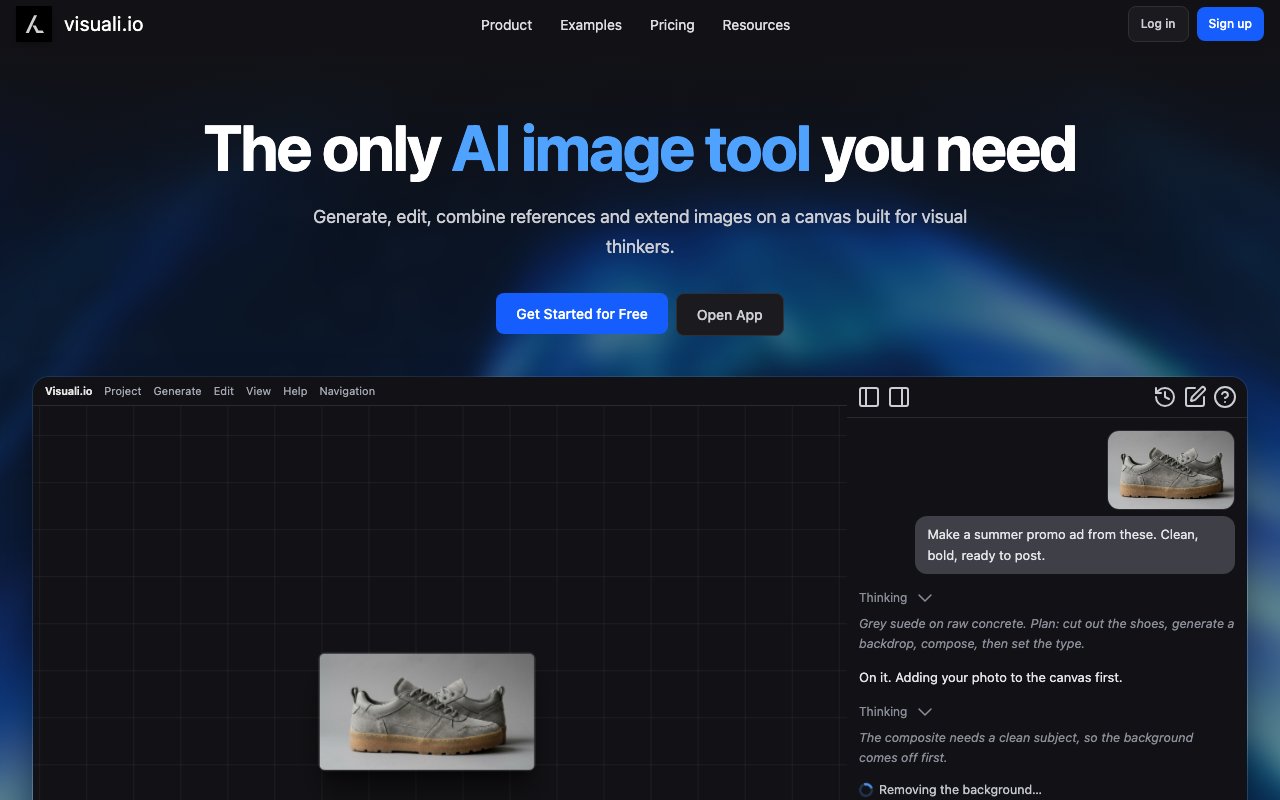
Visuali operates as a browser based AI image generator and photo editor built around an infinite canvas workspace that changes how you interact with generated imagery compared to the typical single image at a time approach. The platform runs entirely in your browser without requiring software downloads or installations and can be set up as a full screen progressive web application on desktop and mobile devices alike, providing synchronized access across whatever hardware you use throughout your day. The infinite canvas model treats every element you add or generate as an independent layer you can drag, reorder, show, hide, delete, and transform independently of everything else on the canvas. Pan and zoom work fluidly at any scale, and the interface supports high resolution displays and DPI aware rendering for users working on modern high pixel density screens.
Image generation capabilities draw from over ten integrated AI models covering different stylistic strengths, speed profiles, and quality levels rather than locking you into a single model's characteristics. Available options include Stable Diffusion XL for the established open source foundation, multiple Flux variants including Schnell for speed, Dev for development flexibility, version 2, and 2 Pro for premium quality output, plus Gemini 3, Nano Banana variants optimized for different scenarios, Seedream 4.0, and Z Image. Generation supports images up to 2048 by 2048 pixels for high resolution output. Having this range of models available within a single workspace matters practically because different models genuinely excel at different types of content, and switching between them without leaving the platform or managing multiple subscriptions saves substantial workflow friction.
The editing capabilities extend well beyond generation into territory that makes Visuali useful for refining and compositing images rather than just creating new ones from scratch. Inpainting lets you modify specific regions of existing images while preserving surrounding content intact, useful for corrections, additions, or style changes to localized areas. Outpainting expands images in any direction, adding coherent additional content that matches the existing image's style and subject matter. Background removal produces clean transparent backgrounds for layering compositions where you need subjects isolated from their original context. Multi image input supports feeding up to six reference images when editing, enabling style transfer, subject consistency, and controlled generation scenarios that require visual guidance beyond text prompts alone. Text addition with multiple font options, freeform drawing tools, geometric shape tools, plus resize, rotate, and arbitrary transform operations on any layer complete the editing toolkit.
An AI agent currently available in beta testing adds a conversational interface for canvas manipulation that changes how you can direct the creative process. You can instruct the agent through chat to generate new images, edit existing elements, and build complete layouts through natural language conversation rather than manual tool operation and menu navigation. The agent handles adding text elements, creating shapes and icons, positioning elements, and other canvas operations that would otherwise require clicking through interface options. This capability costs approximately one token per message exchanged, so it's metered separately from the image generation token costs and adds flexibility for users who prefer conversation based interaction.
Target users include digital artists who want AI assistance integrated naturally into their creative process without replacing their creative judgment, architects working on visualization and presentation materials where iteration speed matters, marketers producing campaign assets across multiple formats and variations, and product designers creating catalog ready imagery that needs to look polished and consistent. The infinite canvas approach particularly suits workflows where you're iterating on multiple visual variations simultaneously rather than evaluating them one at a time, or building complex composite images from combinations of generated and manually edited elements working together.
Pricing centers on a 10 dollar monthly subscription that provides 1,000 tokens, full access to all platform features including advanced models, and cloud storage for your canvas projects and generated images. A 7 day free trial offers 75 tokens with some advanced high cost models restricted, enough to meaningfully evaluate whether the platform's approach and output quality fit your needs before committing. Extra token packs cover heavier usage beyond the monthly allocation at 20 dollars for 1,500 tokens, 36 dollars for 3,000 tokens representing a 10 percent per token discount, and 100 dollars for 9,000 tokens at 20 percent savings for users with substantial ongoing generation volume. Layer grouping and multi select capabilities help organize complex projects with many elements. Export options include PNG and JPEG formats with customizable quality settings, resolution control for output sizing, and background transparency options for compositions intended for further use in other applications or compositing workflows.
Key Features
- Non destructive infinite canvas editor
- Text to image generation with custom resolutions
- Inpainting and outpainting capabilities
- Multi image context for guided generation
- Layer system with undo and redo
- AI chat agent for automated editing
Pros & Cons
What we like
- Runs in browser with no install required
- Multi image context gives more control over output
- Layer based editing keeps work non destructive
- Works across desktop, tablet, and mobile
Room for improvement
- Token based pricing can get expensive with heavy use
- Free trial is limited to seven days and 75 tokens
- AI models used are not disclosed on the site
- Chat agent is still in beta
Frequently Asked Questions
What is Visuali?
Is Visuali free?
What devices does Visuali support?
Can I use multiple reference images at once?
Best For
Featured in
Alternatives to Visuali


Reviews (12)
Good, with a few caveats
Three months of Visuali later, here is what holds up. Their take on ai chat agent for automated editing is genuinely good. What stands out is how little babysitting it needs. It fits well for extending photos beyond their original borders. It would be a five if not for chat agent is still in beta.
Exactly what I needed
Visuali has quietly become part of my daily flow. Their take on ai chat agent for automated editing is genuinely good. It handles the boring parts so I can focus on the work that matters. No regrets so far.
Pulled its weight from week one
Found Visuali on a Show HN thread and I am glad I clicked. Got real value out of works across desktop, tablet, and mobile. What stands out is how little babysitting it needs. Found it works best for combining multiple references into one composition. Would sign up again without thinking twice.
Pulled its weight from week one
Have been running Visuali for a while, here is where I land. Got real value out of non destructive infinite canvas editor.
Genuinely impressed
Hadn't planned on switching, but Visuali was hard to ignore. Their take on multi image context for guided generation is genuinely good. No regrets so far.
Decent with some rough edges
Tried Visuali on a side project first, then rolled it out everywhere. Their take on layer system with undo and redo is genuinely good. Setup was painless and I was productive the same day. Mostly using it for creating mood boards with generated imagery. It would be a five if not for free trial is limited to seven days and 75 tokens. Glad I made the switch.
Quietly excellent
Tried Visuali on a side project first, then rolled it out everywhere. Their take on text to image generation with custom resolutions is genuinely good. It slotted into my routine without much fuss. It fits well for iterating on concept art with inpainting. Easy yes for anyone weighing the same trade offs.
Finally something that fits
Tried Visuali on a side project first, then rolled it out everywhere. Where it really wins is non destructive infinite canvas editor. It fits well for creating mood boards with generated imagery. Easy yes for anyone weighing the same trade offs.
Does the job, a few gripes
Picked Visuali for the price, stayed for the quality. What stands out is how little babysitting it needs. It does what it says, which is rarer than it should be. The catch is free trial is limited to seven days and 75 tokens. It earns its place in my stack.
Recommended without reservation
Hadn't planned on switching, but Visuali was hard to ignore. Their take on multi image context gives more control over output is genuinely good. It slotted into my routine without much fuss. Found it works best for iterating on concept art with inpainting. Glad I made the switch.
Pulled its weight from week one
Visuali solves a real problem for me without making a fuss about it. The output quality holds up better than I expected. It fits well for creating mood boards with generated imagery. It earns its place in my stack.
Finally something that fits
Three months of Visuali later, here is what holds up. It just works, day after day, without surprises.
Badge builder
Add Visuali to your website
Choose a badge style and size, preview it here, then copy the generated HTML. Badge images are self-contained SVGs and do not require an external script.

<a href="https://toolindex.net/tools/visuali?ref=badge" target="_blank" rel="noopener">
  <img src="https://toolindex.net/badge/visuali/medium.svg" alt="Visuali - Listed on Tool Index" width="180" height="50" />
</a>How to use the badge
- 1. Pick the style, size, and theme that fit your layout.
- 2. Copy the generated HTML from the code block.
- 3. Paste it into your footer, homepage, or press page.
Standard badge available
The standard listing badge is available now. Score and circle badges are limited to tools currently ranked in the top 10 of a category.
Badge clicks return visitors to this profile with a referral tag so the source remains identifiable.
Related Tools

HairstylesPro
Try hundreds of hairstyles on your own photo before you commit to a cut

Recraft
AI image generator built around vector output and brand styles

AIMakeTattoo
Turn text descriptions into visual tattoo concepts with style and placement options
Flux by Black Forest Labs
Open and hosted image models that power half the AI art stack
Work on Visuali? Request listing access or correction