
AIMakeTattoo
Turn text descriptions into visual tattoo concepts with style and placement options
Gallery
About AIMakeTattoo
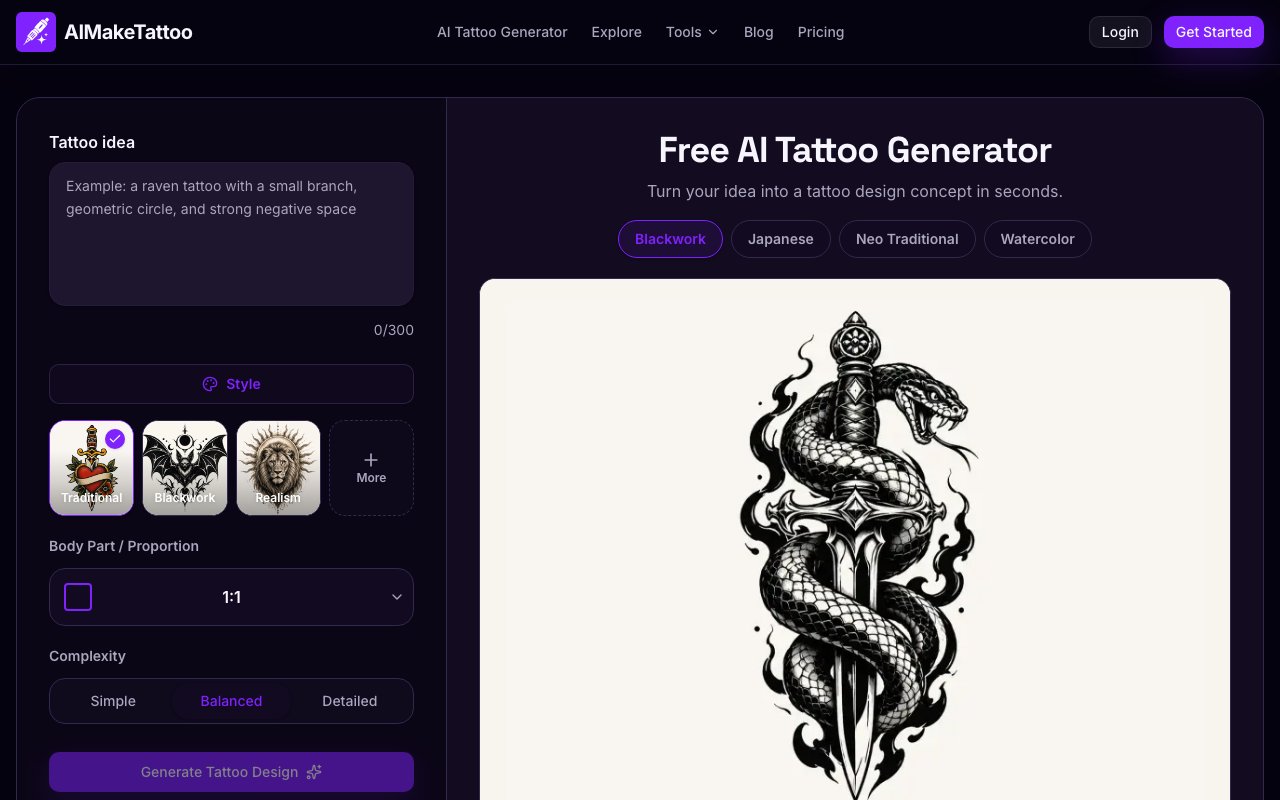
AIMakeTattoo is a free AI tattoo design generator that turns text prompts into custom tattoo concepts. The idea is simple: describe what you want, pick a style, and the tool generates images you can use for inspiration or take to an actual tattoo artist. It's not a replacement for the artist's work, and the platform makes that clear from the start. What it does is help people visualize ideas before committing to permanent ink, which is a sensible use of generative AI in a field where regrets are expensive to fix. Getting a bad tattoo covered up costs more than the original, and laser removal is both painful and imperfect. Having a visual reference before you sit down in the chair just makes sense.
The generation process follows four steps. First, you describe your tattoo idea in plain language. This could be as vague as "a wolf howling at the moon" or as specific as "a fine-line geometric compass surrounded by laurel leaves on a forearm." The platform accepts natural descriptions rather than requiring technical prompt engineering, so you don't need to learn a specialized syntax to get decent results. Second, you pick a visual style. The options span eight categories: fine line, blackwork, realism, Japanese, traditional, watercolor, dotwork, and neo-traditional. Each style fundamentally changes how the AI interprets your description, so a wolf in Japanese style with waves and clouds looks nothing like a wolf in traditional American style with bold outlines and limited color. This matters because style is half the tattoo decision.
Third, you set complexity and body placement. Choosing a forearm versus a back versus a chest affects composition, since designs need to fit the canvas they're going on. A detailed back piece has room to breathe; a wrist tattoo needs to work at a smaller scale. The complexity slider lets you choose between simple, balanced, and detailed output, depending on whether you want something minimal or something that fills space with texture and linework. Finally, you generate the image, compare results, and refine until something clicks. The interface encourages iteration rather than expecting a perfect result on the first try.
What comes out isn't a stencil-ready design. The platform positions its output as a starting point, a visual direction to hand off to a professional who can refine proportions, adjust for skin tone, and ensure the design will age well over decades. This honesty matters in an industry where bad AI-generated designs could lead to bad permanent decisions. Tattoos aren't like digital art you can delete and redo. AIMakeTattoo also generates what it calls an "artist brief," a summary of your choices and preferences that you can bring to a tattoo studio consultation. That's a practical touch for anyone who struggles to articulate what they want when sitting across from an artist with a pen and paper.
The content policy is worth noting. AIMakeTattoo refuses to generate exact replicas of copyrighted characters, which means no Mickey Mouse or Pokemon no matter how you phrase the prompt. It also warns users about cultural symbols that might carry meanings they're not aware of. A tribal design from a culture you have no connection to might look cool in isolation but read as appropriation in context. The platform doesn't block such requests outright, but it does flag the importance of understanding what you're putting on your body permanently. It also warns about verifying text in any language you don't speak, since AI image generators can hallucinate characters or get translations wrong. These guardrails show a level of responsibility that goes beyond what most free tools bother with.
The target audience splits three ways. Tattoo enthusiasts exploring ideas for their first or next piece make up the obvious segment. Designers use it for moodboards and social content, generating tattoo-style imagery for projects without needing to draw everything by hand. Tattoo artists themselves use it to quickly visualize client concepts before committing to hand-drawn work. If a client walks in with a vague idea, generating a few AI concepts can align expectations before the artist spends hours on a custom drawing that might miss the mark.
Pricing follows a freemium model. Basic use is free with daily generation limits, which are enough to explore a handful of ideas each day. Signing up for an account extends those limits, giving you more generations without paying anything. Paid credits are available for anyone who needs volume beyond the daily allowance, but there's no hard paywall blocking initial exploration. For a creative tool in a niche category, AIMakeTattoo does what it promises without overstating its capabilities or pretending to replace the human craft that makes a good tattoo permanent art rather than a regrettable accident.
Key Features
- Text-to-tattoo concept generation
- Nine distinct tattoo style options
- Body placement customization
- Adjustable complexity levels
- Downloadable artist briefs
- Share and save generated designs
Pros & Cons
What we like
- Lets you visualize tattoo ideas before a studio visit
- Style and placement options are native to tattooing
- Free daily generations with no account required
- Artist brief feature bridges the gap to real consultations
Room for improvement
- Output is a concept, not finished tattoo-ready artwork
- Limited free generations before credits are needed
- Results depend heavily on how well you describe your idea
- Niche focus means no broader image generation features
Frequently Asked Questions
What is AIMakeTattoo?
Is AIMakeTattoo free?
Can I use these designs for an actual tattoo?
What tattoo styles does it support?
Best For
Featured in
Alternatives to AIMakeTattoo


Reviews (12)
Two months in, no regrets
Came to AIMakeTattoo after getting frustrated with what I had before. It just works, day after day, without surprises. Performance has been steady even when I lean on it hard. Recommending it to people in a similar spot.
Solid daily driver
Hadn't planned on switching, but AIMakeTattoo was hard to ignore. Setup was painless and I was productive the same day. The defaults are sensible, so I was not fighting settings on day one. Found it works best for creating concept references for artist consultations. Recommending it to people in a similar spot.
Exactly what I needed
Three months of AIMakeTattoo later, here is what holds up. What stands out is how it handles text-to-tattoo concept generation. Recommending it to people in a similar spot.
Recommended without reservation
Have been running AIMakeTattoo for a while, here is where I land. Their take on adjustable complexity levels is genuinely good. The output quality holds up better than I expected. Found it works best for building character moodboards with tattoo designs. No regrets so far.
Solid daily driver
Came to AIMakeTattoo after getting frustrated with what I had before. Got real value out of share and save generated designs.
Exactly what I needed
Hadn't planned on switching, but AIMakeTattoo was hard to ignore. The interface stays out of my way, which I appreciate.
Genuinely impressed
AIMakeTattoo has quietly become part of my daily flow. The interface stays out of my way, which I appreciate. The core workflow is smooth once you are set up.
Powerful once it clicks
Came to AIMakeTattoo after getting frustrated with what I had before. What stands out is how it handles text-to-tattoo concept generation. It fits well for exploring first tattoo ideas at home. My only gripe is niche focus means no broader image generation features. Recommending it to people in a similar spot.
Exactly what I needed
Tried AIMakeTattoo on a side project first, then rolled it out everywhere. Got real value out of downloadable artist briefs. Would sign up again without thinking twice.
Solid daily driver
Picked AIMakeTattoo for the price, stayed for the quality. Got real value out of lets you visualize tattoo ideas before a studio visit. The thing I keep coming back to is how reliable it is. It fits well for exploring first tattoo ideas at home. No regrets so far.
Finally something that fits
Have been running AIMakeTattoo for a while, here is where I land. Their take on share and save generated designs is genuinely good. The output quality holds up better than I expected. Mostly using it for exploring first tattoo ideas at home. Would sign up again without thinking twice.
It just works
AIMakeTattoo solves a real problem for me without making a fuss about it. Where it really wins is lets you visualize tattoo ideas before a studio visit. Would sign up again without thinking twice.
Badge builder
Add AIMakeTattoo to your website
Choose a badge style and size, preview it here, then copy the generated HTML. Badge images are self-contained SVGs and do not require an external script.
<a href="https://toolindex.net/tools/aimaketattoo?ref=badge" target="_blank" rel="noopener">
  <img src="https://toolindex.net/badge/aimaketattoo/medium.svg" alt="AIMakeTattoo - Listed on Tool Index" width="180" height="50" />
</a>How to use the badge
- 1. Pick the style, size, and theme that fit your layout.
- 2. Copy the generated HTML from the code block.
- 3. Paste it into your footer, homepage, or press page.
Score badge available
AIMakeTattoo qualifies for the score and circle badges based on its current top-10 positionin AI Image Generators.
Badge clicks return visitors to this profile with a referral tag so the source remains identifiable.
Related Tools

HairstylesPro
Try hundreds of hairstyles on your own photo before you commit to a cut

Recraft
AI image generator built around vector output and brand styles
Flux by Black Forest Labs
Open and hosted image models that power half the AI art stack

Visuali
Browser based AI image generator and editor on an infinite canvas
Work on AIMakeTattoo? Request a listing correction