CtrlTool
132 free browser-based tools for developers, creators, and everyday tasks
Gallery
About CtrlTool
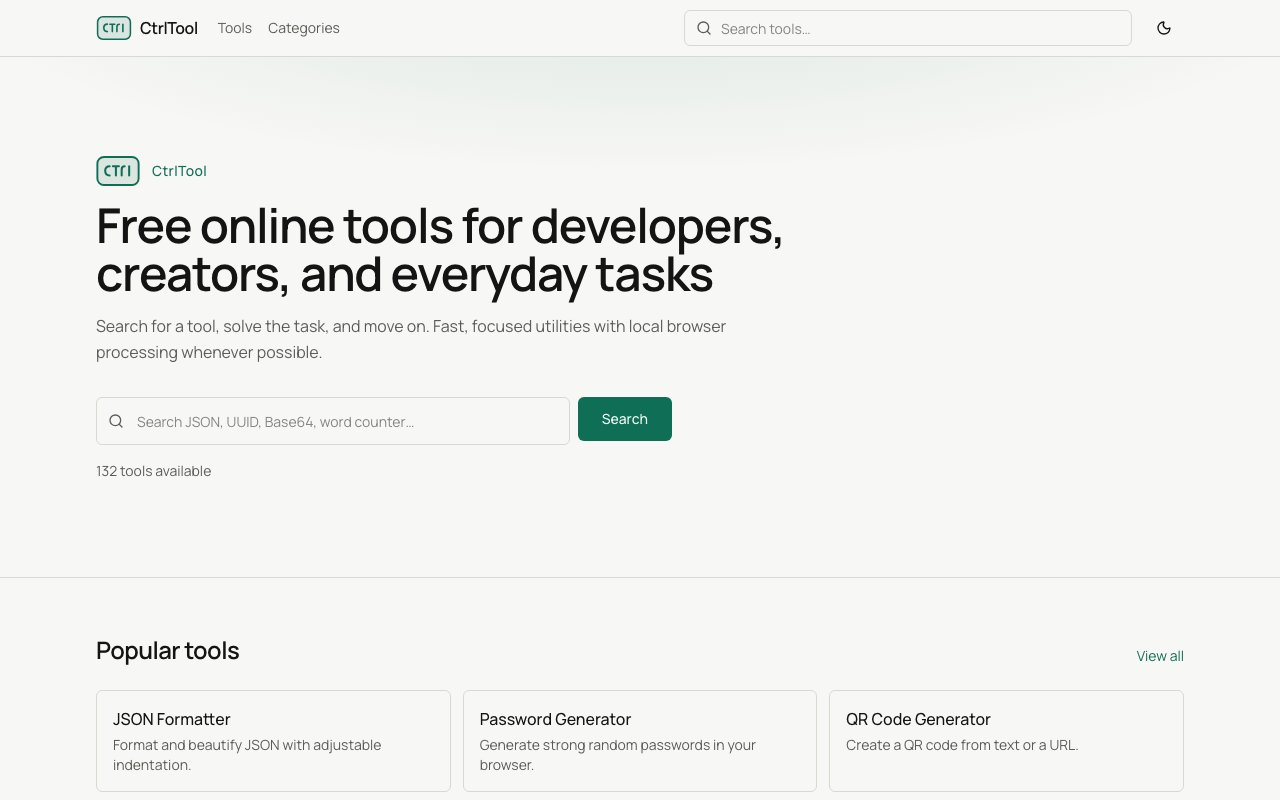
CtrlTool is a collection of 132 free online utilities for developers, content creators, and anyone who regularly needs quick conversions, generators, or formatters. The site bundles everything into one place, organized by category, with most processing happening directly in your browser so your data stays on your machine. The pitch is straightforward. Search for a tool, solve the task, move on. No signups, no paywalls, no friction.
Developer tools form the largest category with 32 utilities. These include JSON formatting and validation, YAML to JSON conversion, CSV parsing, HTML and CSS minification, JavaScript beautification, SQL formatting, and regex testing with live matching. Base64 encoding and decoding sits here too, along with URL encoding, hex conversion, and similar bread and butter operations that developers hit constantly. The idea is to replace a dozen bookmarked single purpose sites with one destination that handles them all.
Text tools cover 18 utilities for content manipulation. Word counters, character counters, line counters. Case converters that switch between uppercase, lowercase, title case, and sentence case. Text diff comparison for spotting changes between two blocks. Find and replace with pattern support. Lorem ipsum generation for placeholder content. Duplicate line removal and text sorting round out the category. Anyone who works with content, whether writing documentation, cleaning up data, or preparing copy, hits these operations regularly.
PDF tools provide 12 operations for document manipulation without installing desktop software. You can merge multiple PDFs into one, split a PDF into separate pages, compress files to reduce size, and convert between formats. These run in the browser when technically possible, keeping your documents off external servers. For quick PDF tasks that do not justify opening a full editor, having them available in a browser tab is convenient.
Security tools include 11 utilities for hashing and credential work. MD5, SHA1, SHA256, and SHA512 hashing cover the common algorithms. Bcrypt generation and verification handles password hashing. JWT decoding breaks down JSON Web Tokens to inspect their contents. HMAC generation creates keyed hash authentication codes. Password strength checking evaluates how resistant a password is to common attacks. These tools are particularly sensitive to where processing happens, and CtrlTool runs them locally so your inputs never leave your browser.
Generators handle 5 common creation tasks. Password generation produces random strings with configurable length and character sets. UUID generation creates universally unique identifiers in the standard format. QR code generation turns text or URLs into scannable codes. Fake data generation produces realistic placeholder names, addresses, and other values for testing. These are the kind of utilities developers reach for multiple times a week.
Internet tools provide 10 network related lookups. IP address lookup shows your current public IP and geolocation. DNS queries return record information for domains. WHOIS lookup retrieves domain registration data. SSL certificate inspection shows the certificate chain and expiration for HTTPS sites. HTTP header inspection displays the response headers from any URL. These operations require actual network calls by nature, so they process server side rather than in the browser.
SEO tools offer 14 utilities for search optimization work. Slug generators create URL friendly strings from titles. Meta tag generators produce standard HTML head tags. Sitemap generators help build XML sitemaps. UTM builders create tagged URLs for campaign tracking. These target marketers and content teams who need quick SEO related formatting without opening specialized software.
Calculators round out the collection with 22 utilities for math and conversion tasks. Percentage calculators handle markup, discount, and proportion math. Loan and mortgage calculators estimate payments and interest. BMI calculators compute body mass index. Unit converters cover length, weight, temperature, and other common conversions. Currency conversion provides approximate exchange rates.
Everyday tools add 8 utilities for general productivity. Pomodoro timers and countdown timers help with time management. World clocks show times across zones. Color pickers provide hex, RGB, and HSL values. Random selection wheels pick items from lists. These fill gaps where you just need a quick utility without installing an app.
The interface supports dark mode and includes search, so you can find tools by keyword rather than browsing categories. No account required, no sign up prompts, no premium tier visible on the site. CtrlTool is completely free with no apparent monetization. For developers and power users who hit these tools regularly, having them organized in one clean location saves time and avoids the ad heavy alternatives that make simple tasks annoying.
Key Features
- 132 tools across nine categories
- Browser-local processing for privacy
- JSON, YAML, CSV, and SQL formatters
- PDF merge, split, and compress utilities
- Password, UUID, and QR code generators
- IP, DNS, WHOIS, and SSL lookup tools
Pros & Cons
What we like
- Completely free with no sign-up required
- Most tools process data locally in the browser
- Wide variety replaces multiple single-purpose sites
- Clean interface with search and dark mode
Room for improvement
- Jack-of-all-trades means some tools are basic
- No offline mode since it's web-based
- Newer site with a smaller user community
- Some tools require server calls by nature
Frequently Asked Questions
What is CtrlTool?
Is CtrlTool free?
Does CtrlTool upload my data?
Who is CtrlTool for?
Best For
Featured in
Alternatives to CtrlTool

Kevin Gabeci
Solo developer building web apps, cozy browser games, and AI creator toolkits.

SoloDevStack
A solo developer blog built on head-to-head tool comparisons, 580+ posts deep.

Codedex
A gamified, story-driven platform that teaches Python, web dev, and more like an RPG quest

Vibe Built
Building real apps with agentic AI. What worked, what broke, what shipped.
Reviews (0)
Badge builder
Add CtrlTool to your website
Choose a badge style and size, preview it here, then copy the generated HTML. Badge images are self-contained SVGs and do not require an external script.

<a href="https://toolindex.net/tools/ctrltool?ref=badge" target="_blank" rel="noopener">
  <img src="https://toolindex.net/badge/ctrltool/medium.svg" alt="CtrlTool - Listed on Tool Index" width="180" height="50" />
</a>How to use the badge
- 1. Pick the style, size, and theme that fit your layout.
- 2. Copy the generated HTML from the code block.
- 3. Paste it into your footer, homepage, or press page.
Standard badge available
The standard listing badge is available now. Score and circle badges are limited to tools currently ranked in the top 10 of a category.
Badge clicks return visitors to this profile with a referral tag so the source remains identifiable.
Related Tools
Kevin Gabeci
Solo developer building web apps, cozy browser games, and AI creator toolkits.

Coolify
Self-hostable, open source alternative to Heroku and Netlify

Warp
The modern terminal reimagined with AI and collaboration

Bolt.new
Prompt-to-deployed full-stack app inside the browser
Work on CtrlTool? Request listing access or correction