
Devbar
Open-source toolbar that captures UI context from any page and hands it to your coding agent over MCP
Gallery
About Devbar
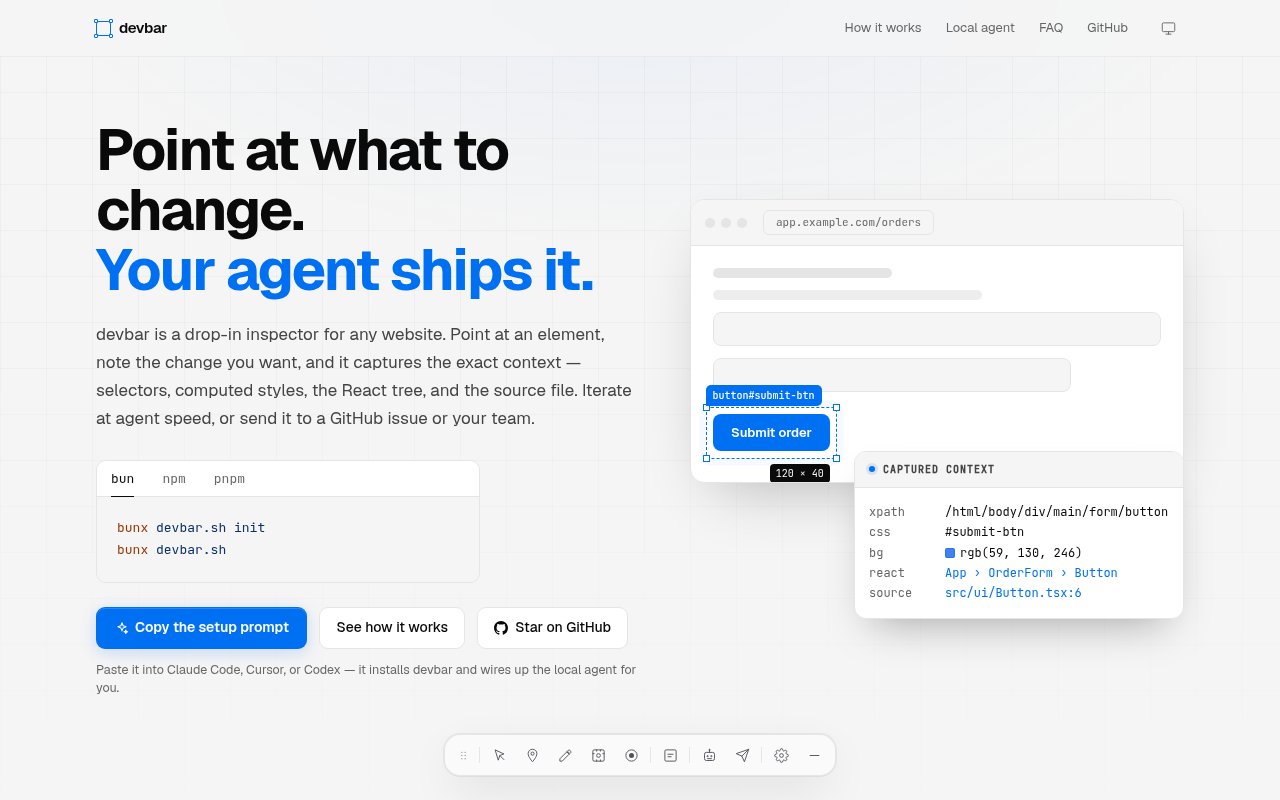
Devbar is an open-source toolbar you drop into any website so you can point at an element, leave a note, and hand the whole thing to a coding agent working in your repo. When you select something on the page it captures the CSS selector, the computed styles, the React component tree, the DOM path and the source file, takes a screenshot, and formats all of that as a prompt an agent can act on. The pitch is short. Point at what to change, and your agent ships it. Notes travel with the capture, so the report says not just where but what you want changed.
The problem is how feedback about a UI actually travels. You see a misaligned button, you take a screenshot, you paste it into a chat with an agent, and then you spend three messages explaining which button, on which page, in which component. The author built Devbar after doing exactly that too many times. Bug reports from teammates are worse, since they often arrive without a URL or any session information. Devbar makes the report precise at the moment it's created. Designers have the same problem in reverse. They can see what's wrong but can't name the component, so their feedback arrives as a screenshot with an arrow on it and someone still has to translate.
Installation is a package called devbar.sh on npm. In a React app you render a Devbar component and import its stylesheet, and there's a CDN build with inlined styles for anything else. It works with server-rendered frameworks such as Next.js, Remix and Astro through a client-side component. Once it's on the page, you can select elements, drop numbered markers, draw freehand annotations, capture a region or the full page, and even record the screen, then attach your notes. Numbered markers let you reference several elements in one report, and freehand annotations cover the cases where a selector can't express what you mean, such as the spacing between two things. Since it's just a component, you decide where it renders, which in practice means development and staging builds rather than production.
Getting the report to an agent is where it earns its name. Devbar can dispatch to a local agent through its CLI, with Claude, Codex and OpenCode supported, or run as an MCP server so a live agent session pulls reports as it works. Screenshots are embedded in the prompt. If you'd rather stay manual, the report copies to the clipboard as text you can paste anywhere. The repository also contains server code for a dashboard and the MCP endpoint, though the author notes that part isn't published as a package yet. The MCP route is the interesting one for people who keep an agent session open all day. The agent asks Devbar for pending reports, gets the selector, styles, tree, source path and screenshot in one structured message, and goes straight to the file.
It's for front-end developers and small product teams who already use coding agents and want the loop from noticing a problem to fixing it to be one step instead of five. Designers reviewing a build get a way to leave notes that carry the technical context a developer or an agent needs, without knowing what a selector is. It also suits solo developers who use an agent as their pair and want to stop describing the page in words when they could just point at it, and teams whose bug reports arrive with the URL and session information already attached, which removes the first round of questions.
What makes it different is the depth of what it captures. Screenshot tools give an agent pixels. Devbar gives it the selector, the computed styles, the component hierarchy and the file the component lives in, which is the difference between an agent guessing and an agent opening the right file. Keeping the whole thing open source under MIT and framework-agnostic through the CDN build means it can sit in any codebase without a vendor in the middle. The screen recording and freehand annotation tools push it past a bug reporter into something closer to a design review tool, one that happens to produce output an agent can read.
Devbar is free and open source under the MIT license, with the code on GitHub and no pricing anywhere on the site. It's a young single-author project, so expect the API to move and the docs to grow, and the agent dispatch features assume you're already running one of the supported agents locally. If you are, it's a small install for a large reduction in copy and paste. The README is the documentation and GitHub issues are the support channel. The install is small enough to remove in a minute if it doesn't fit, which makes trying it on one project a low-risk experiment.
Key Features
- Drop-in toolbar for any website
- Captures selectors, computed styles and React tree
- Screenshots, markers and freehand annotations
- Agent dispatch to Claude, Codex or OpenCode
- MCP server for live agent sessions
- npm package and CDN build
Pros & Cons
What we like
- Reports carry the exact technical context
- Open source under MIT
- Works with Next.js, Remix, Astro and plain pages
- Copy to clipboard fallback when no agent is running
Room for improvement
- Young single-author project
- Agent features assume a supported agent is installed locally
- Dashboard and hosted parts aren't published yet
- Adds a client-side script to your pages
Frequently Asked Questions
What is Devbar?
Is Devbar free?
Which agents does it work with?
Which frameworks does it support?
Best For
Featured in
Alternatives to Devbar
View all
Kevin Gabeci
Solo developer building web apps, cozy browser games, and AI creator toolkits.

SoloDevStack
A solo developer blog built on head-to-head tool comparisons, 580+ posts deep.

Codedex
A gamified, story-driven platform that teaches Python, web dev, and more like an RPG quest

Vibe Built
Building real apps with agentic AI. What worked, what broke, what shipped.
Our take
Tool Index Editorial · Sep 2026· 3.5/5
Devbar is an open-source browser toolbar that turns visual feedback into technical context for a coding agent. Selecting an element captures its CSS selector, computed styles, DOM path, React tree, source location and screenshot, while markers and drawings add human intent. It can copy the report, dispatch it to a local agent or expose it over MCP.
We like how directly it fixes the usual screenshot-and-explanation loop for front-end developers and designers. The npm package and clipboard fallback keep adoption light, and the page shows support for Claude, Codex and other local agents. It is still a young project, though, and adding a client-side inspector to a site requires care about where it is enabled. React gets the richest component context, while hosted dashboard pieces are less clearly packaged. Try it on development or staging before making it part of a team process.
Editorial opinion from the Tool Index team, written from the public product pages. Not a user review.
Reviews (0)
Badge builder
Add Devbar to your website
Choose a badge style and size, preview it here, then copy the generated HTML. Badge images are self-contained SVGs and do not require an external script.

<a href="https://toolindex.net/tools/devbar?ref=badge" target="_blank" rel="noopener">
  <img src="https://toolindex.net/badge/devbar/medium.svg" alt="Devbar - Listed on Tool Index" width="180" height="50" />
</a>How to use the badge
- 1. Pick the style, size, and theme that fit your layout.
- 2. Copy the generated HTML from the code block.
- 3. Paste it into your footer, homepage, or press page.
Standard badge available
The standard listing badge is available now. Score and circle badges are limited to tools currently ranked in the top 10 of a category.
Badge clicks return visitors to this profile with a referral tag so the source remains identifiable.
Related Tools
Kevin Gabeci
Solo developer building web apps, cozy browser games, and AI creator toolkits.

Coolify
Self-hostable, open source alternative to Heroku and Netlify

Warp
The modern terminal reimagined with AI and collaboration

Bolt.new
Prompt-to-deployed full-stack app inside the browser
Work on Devbar? Request listing access or correction