
didit.run
Cron job monitoring that alerts you when a scheduled task doesn't check in on time
Gallery
About didit.run
didit.run is a monitoring service for cron jobs and background tasks. It answers the question in its own name, did the job run, by expecting each job to check in with a single HTTP request after it finishes. If the check-in doesn't arrive inside the expected window you get an alert, and when the job recovers you get told that too, so a fixed job doesn't need a human to close the loop. The whole thing is built around one line added to a crontab and a dashboard that shows what's late.
Silent failure is the problem. A backup script, a nightly report, a queue worker, a certificate renewal, or a billing sync can stop running for weeks before anyone notices, because a job that never starts produces no error. The server was rebooted and cron didn't come back, a credential expired, a disk filled up, or someone commented out a line while debugging. Log-based monitoring doesn't catch any of it, since there's nothing to log. Heartbeat monitoring flips the model. The job has to prove it ran, and the absence of proof is the alarm.
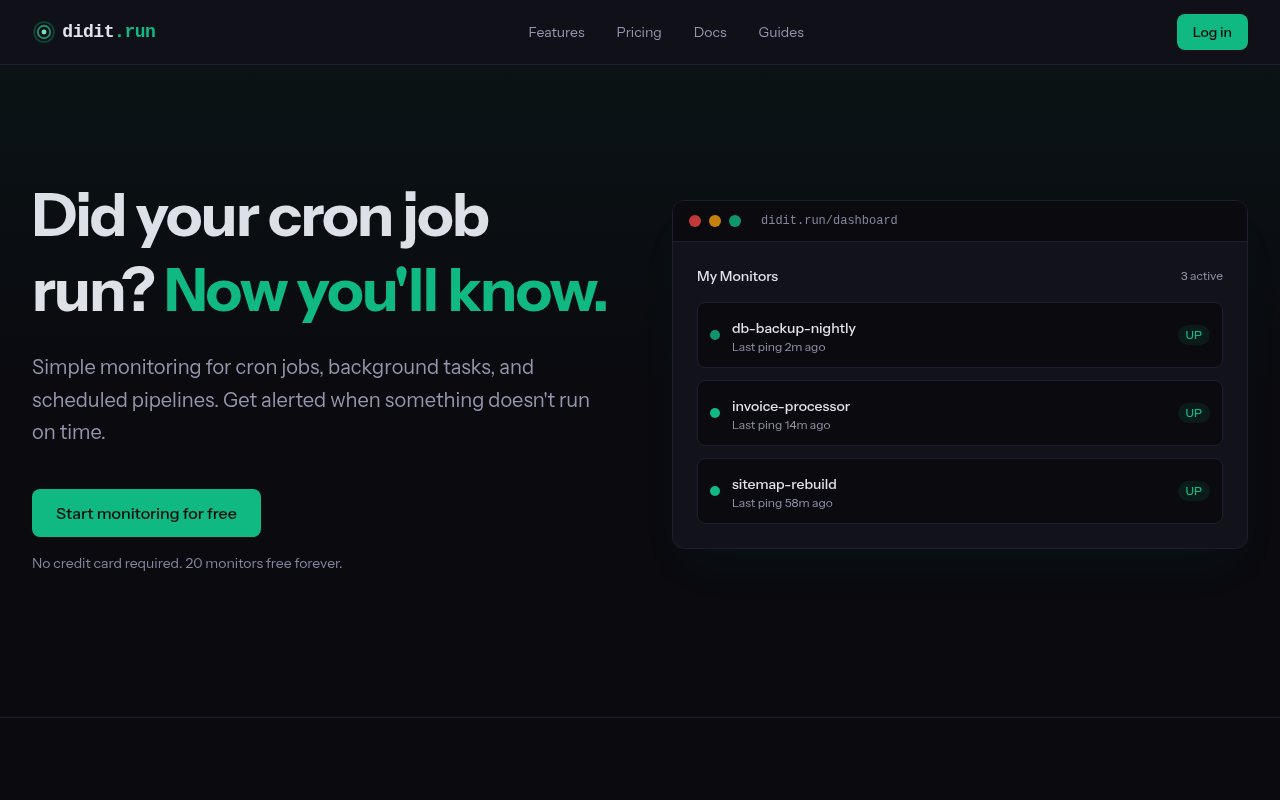
Setup is short. You create a monitor with a name, a schedule, and the alerts you want, and the service hands you a unique ping URL. Then you add one line to the job, a curl call along the lines of curl -fsS --retry 3 with the ping URL, and you're done. Schedules can be a fixed interval or a cron expression, with timezone handling and a grace period so a job that runs a minute late doesn't page anyone. The ping API goes further than a plain success signal. There are endpoints for start, success, and fail, and exit codes can be reported, which lets the service track how long each run takes and flag jobs that are slowing down before they fail outright. Integration examples cover bash, Python, Node.js, PHP, and wget, and there's nothing to install on the host, which matters on machines you don't fully control. The homepage shows a live dashboard example, so you can see the monitor list, its states, and its history before creating an account.
Alerts go out by email, Slack, Telegram, PagerDuty, and webhook, with SMS available at per-country rates drawn from a plan's token allowance. A dashboard shows current state and history, recovery notifications close the loop when a failed job comes back, and public status pages with history let you show uptime for a job to people who don't have a login. Workspaces support teams with roles and invitations, so a small team can share the monitors without sharing one login, and a management REST API is available on every plan, so monitors can be created and updated from code or a deployment script rather than by hand. The docs also cover the common failure modes, pings that don't register, alerts that don't arrive, and timezone confusion, which is the kind of troubleshooting section you want before you need it.
It's for anyone who runs scheduled work and doesn't want to discover a dead job from a customer. That covers solo developers with a handful of cron entries on a VPS, small teams running scheduled jobs across several services, and operations people who want status pages and PagerDuty routing rather than a personal inbox. The site pitches the free tier at side projects and personal use and the paid tiers at larger teams with more monitors, and the jump from 20 monitors to 150 to 1,000 maps onto that progression.
It's a well-understood category, and didit.run isn't trying to reinvent it. What it offers is a compact take with the pieces that matter, cron expression scheduling, grace periods, start and fail pings, duration tracking, status pages, team workspaces, and an API on every tier, without an agent to install. The trade-off is that it's a younger service than the established names in dead man's switch monitoring, so the integration list and the track record are shorter, and the free tier's two days of history won't help you investigate a job that broke last week. Whether that matters depends on whether you want a long audit trail or just the alert. Duration tracking is the feature that separates it from a plain dead man's switch, because a job that still pings but takes three times longer than last month is usually about to become a job that doesn't ping at all.
Access is freemium. The Starter plan is free with no credit card, and includes 20 monitors, two days of history, and 5,000 pings per monitor. Pro is $19 a month for 150 monitors, a year of history, 120,000 pings per monitor, and 17 integrations. Business is $69 a month for 1,000 monitors, two years of history, and 250,000 pings per monitor. Ping limits are per monitor rather than per account, which matters if one job runs every minute. Documentation lives on the site, there's no published contact email, and the sensible way to try it is to put one real cron job on the free plan and see whether the alert arrives when you deliberately break it.
Key Features
- One-line curl check-in per job
- Interval or cron expression schedules
- Grace periods and timezone handling
- Start, success, fail, and exit code pings
- Email, Slack, Telegram, PagerDuty, and webhook alerts
- Public status pages with history
Pros & Cons
What we like
- Setup is a single line added to the job
- Free tier covers 20 monitors without a card
- Duration tracking catches slowdowns early
- REST API and team workspaces on every plan
Room for improvement
- Younger service than the established heartbeat monitors
- Free tier keeps only two days of history
- SMS alerts cost extra per country
- No published support email
Frequently Asked Questions
What is didit.run?
Is didit.run free?
Do I need to install an agent?
How does it alert me?
Best For
Featured in
Alternatives to didit.run
View all
Kevin Gabeci
Solo developer building web apps, cozy browser games, and AI creator toolkits.

SoloDevStack
A solo developer blog built on head-to-head tool comparisons, 580+ posts deep.

Codedex
A gamified, story-driven platform that teaches Python, web dev, and more like an RPG quest

Vibe Built
Building real apps with agentic AI. What worked, what broke, what shipped.
Our take
Tool Index Editorial · Sep 2026· 4.0/5
didit.run watches cron jobs and background tasks by expecting a simple HTTP check in. It covers the essentials well, including interval and cron schedules, grace periods, start and failure signals, duration tracking, recovery notices, status pages, teams, and a management API. The free plan includes 20 monitors, Pro costs $19 a month, and Business costs $69 a month.
We found the setup and documentation refreshingly direct. One curl request is enough for a basic monitor, while explicit start and fail calls expose slow jobs as well as dead ones. This is still a younger service in an established category, and the free plan keeps only two days of history. SMS also consumes country priced tokens. Test an actual missed run and alert route before trusting it with a critical backup.
Editorial opinion from the Tool Index team, written from the public product pages. Not a user review.
Reviews (0)
Badge builder
Add didit.run to your website
Choose a badge style and size, preview it here, then copy the generated HTML. Badge images are self-contained SVGs and do not require an external script.

<a href="https://toolindex.net/tools/didit-run?ref=badge" target="_blank" rel="noopener">
  <img src="https://toolindex.net/badge/didit-run/medium.svg" alt="didit.run - Listed on Tool Index" width="180" height="50" />
</a>How to use the badge
- 1. Pick the style, size, and theme that fit your layout.
- 2. Copy the generated HTML from the code block.
- 3. Paste it into your footer, homepage, or press page.
Standard badge available
The standard listing badge is available now. Score and circle badges are limited to tools currently ranked in the top 10 of a category.
Badge clicks return visitors to this profile with a referral tag so the source remains identifiable.
Related Tools
Kevin Gabeci
Solo developer building web apps, cozy browser games, and AI creator toolkits.

Coolify
Self-hostable, open source alternative to Heroku and Netlify

Warp
The modern terminal reimagined with AI and collaboration

Bolt.new
Prompt-to-deployed full-stack app inside the browser
Work on didit.run? Request listing access or correction