
Dragonfly
Test REST APIs in VS Code with requests built from Express and Next.js routes
Gallery
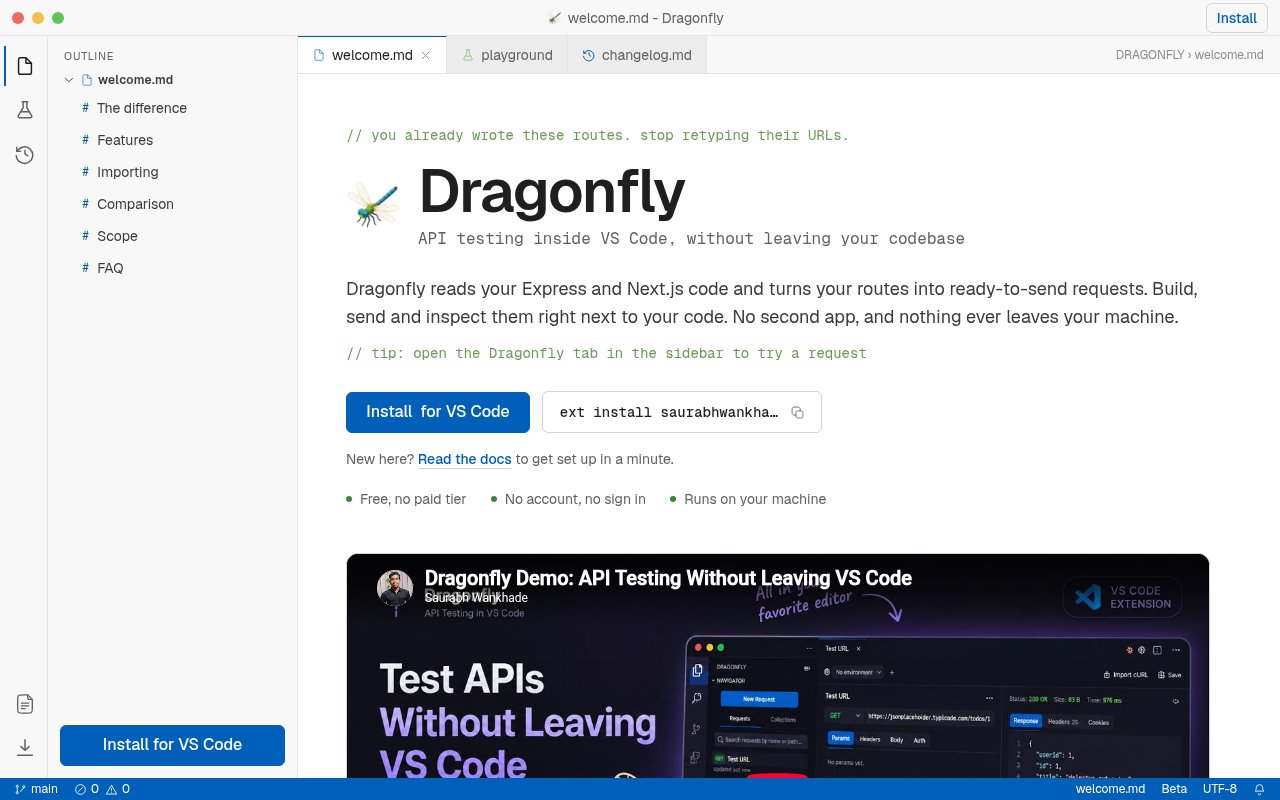
About Dragonfly
Dragonfly is a free REST API client for Visual Studio Code that starts with the routes already in a developer's project. Instead of opening a separate client, creating an empty request, and copying endpoint paths from source files, a developer can ask Dragonfly to scan an Express or Next.js workspace. It turns the routes it finds into a collection that is ready to inspect and send from the editor. Developers can also create requests by hand, so the extension still works when a service uses another framework or when the endpoint lives outside the current repository.
The request builder covers the pieces needed for day-to-day REST work, including the HTTP method, URL, query parameters, headers, body, and authentication. Bearer tokens, API keys, and basic authentication are supported. Requests can be saved in folders, found through collection search, and filled with environment variables such as a different base URL for local, staging, and production systems. Every request sent is recorded in Activity, where it can be reopened or sent again without first saving it as a permanent collection item. The response view shows status, timing, size, headers, and cookies. JSON can be read as formatted, syntax-highlighted text or as a collapsible tree, which helps when an endpoint returns a large nested payload.
Route discovery is the feature that gives Dragonfly a clearer role than a general HTTP form inside an editor. It parses Express route handlers and Next.js API routes, with support for both the App Router and Pages Router, then builds a collection from that code. A later scan picks up added and removed routes. The current framework list is intentionally short, but the extension offers several ways to bring other APIs in. It can import OpenAPI or Swagger specifications, Postman version 1 and version 2 collections, Thunder Client and Insomnia collections, HAR captures, and individual cURL commands. It also imports environments from Postman, Thunder Client, and Insomnia, while leaving live credentials out so users can enter them again through secure storage.
That makes it a practical fit for backend and full-stack developers who spend most of their API testing time on the endpoint they are actively editing. A request can stay beside its implementation, and the developer can move from changing a handler to checking the response without switching to a large standalone workspace. Once a request behaves correctly, Dragonfly can copy it as cURL or generate a snippet for Node.js, Python, Go, PHP, Java, or Rust. Those exports are useful for moving a proven call into application code, documentation, a bug report, or a message to a teammate who doesn't use the extension.
Dragonfly is local-first in a concrete way. Collections, environments, and request history are held in VS Code's own local storage. Tokens and passwords use VS Code's secure storage rather than being written into collection JSON, and the extension says it doesn't contact a server of its own or collect telemetry. Only the API a user chooses to call needs a network connection. This posture suits developers testing internal services or working with credentials who don't want their request library synchronized to a third-party account. It also explains the product's individual workflow. Dragonfly doesn't position itself as a replacement for team workspaces, mock servers, scheduled monitors, or scripted test suites in larger API platforms.
Import handling is designed to make a switch less disruptive. Collections retain folders, requests, headers, query parameters, and bodies where the source format provides them, while imported environment variables continue to resolve in request templates. OpenAPI operations are grouped by tag, and path parameters become variables. The credential safeguards are a sensible tradeoff, since auth types can come across without copying secret values into ordinary files. There are still limits to keep in mind. Automatic route scanning currently centers on Express and Next.js, the product lives inside VS Code, and broader collaboration or automated test execution will still need another tool. For an individual developer who wants fast feedback on REST endpoints, those boundaries keep the extension focused.
Dragonfly is free, with no account, sign-in, paid tier, or telemetry required. Its Marketplace listing identifies it as MIT licensed and provides a direct support email for bugs and feature requests. Installation is through the Visual Studio Marketplace, after which the Dragonfly icon appears in the Activity Bar and route scanning is available from the Command Palette. That makes the first useful workflow small and clear. Install it, scan a supported codebase or open a new request, send the call, and save only the requests worth keeping. It's an appealing option for developers who want their code to remain the starting point for API testing.
Key Features
- Express and Next.js route discovery
- Built-in REST request builder
- Formatted response inspection
- Collections and environment variables
- Broad collection and specification imports
- Local secure credential storage
Pros & Cons
What we like
- Builds request collections directly from supported source code
- Keeps collections and history on the local machine
- Imports several common API client formats
- Requires no account or paid plan
Room for improvement
- Automatic scanning currently covers only Express and Next.js
- Designed for VS Code rather than standalone use
- No team workspaces or shared cloud collections
- Doesn't include monitors or scripted test suites
Frequently Asked Questions
What is Dragonfly?
Which frameworks can Dragonfly scan?
Does Dragonfly send request data to its own server?
Is Dragonfly free?
Best For
Featured in
Alternatives to Dragonfly

Kevin Gabeci
Solo developer building web apps, cozy browser games, and AI creator toolkits.

SoloDevStack
A solo developer blog built on head-to-head tool comparisons, 580+ posts deep.

Codedex
A gamified, story-driven platform that teaches Python, web dev, and more like an RPG quest

Vibe Built
Building real apps with agentic AI. What worked, what broke, what shipped.
Reviews (0)
Badge builder
Add Dragonfly to your website
Choose a badge style and size, preview it here, then copy the generated HTML. Badge images are self-contained SVGs and do not require an external script.

<a href="https://toolindex.net/tools/dragonfly?ref=badge" target="_blank" rel="noopener">
  <img src="https://toolindex.net/badge/dragonfly/medium.svg" alt="Dragonfly - Listed on Tool Index" width="180" height="50" />
</a>How to use the badge
- 1. Pick the style, size, and theme that fit your layout.
- 2. Copy the generated HTML from the code block.
- 3. Paste it into your footer, homepage, or press page.
Standard badge available
The standard listing badge is available now. Score and circle badges are limited to tools currently ranked in the top 10 of a category.
Badge clicks return visitors to this profile with a referral tag so the source remains identifiable.
Related Tools
Kevin Gabeci
Solo developer building web apps, cozy browser games, and AI creator toolkits.

Coolify
Self-hostable, open source alternative to Heroku and Netlify

Warp
The modern terminal reimagined with AI and collaboration

Bolt.new
Prompt-to-deployed full-stack app inside the browser
Work on Dragonfly? Request listing access or correction