
Farm.js
An open-source full-stack framework for integrated product applications
Gallery
About Farm.js
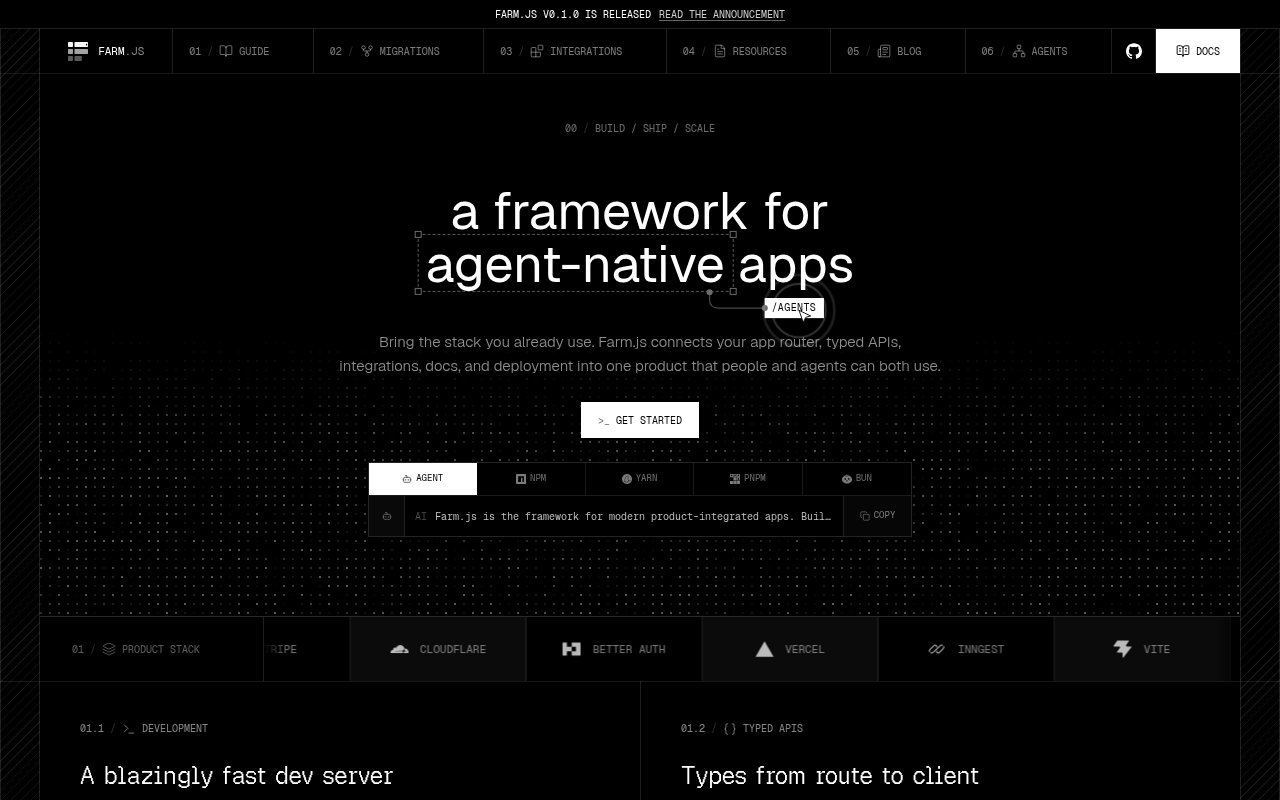
Farm.js is an open-source full-stack framework for building product applications whose frontend, backend, integrations, documentation, agents, and deployment need to work together. Instead of treating those concerns as unrelated packages, it connects them through one application structure and configuration. React is the default interface layer, while Preact, Solid, Vue, and Svelte are also supported renderers. The framework is aimed at TypeScript teams building a complete product rather than a single static site. Its homepage presents routing, typed APIs, middleware, product services, docs, storage, and production output as parts of the same system.
The development workflow starts with one server for the whole application. Pages and API handlers appear in the same app directory, with familiar files for layouts, loading states, and route content. Farm derives route information from that tree and generates typed clients for API calls, which reduces the gap between a server handler and the code that consumes it. More advanced route definitions can validate parameters, prepare request data, load the main result, and schedule work after the main load. The project page also emphasizes visible request timing during development, so a developer can see page and API activity without assembling a separate observability layer just to understand local behavior.
Integrations are another central part of the framework. Farm shows built-in or supported paths for authentication, billing, email, background jobs, API keys, databases, user interface components, and AI services. The homepage names options such as Farm Auth, Better Auth, Auth.js, Clerk, Auth0, WorkOS, Supabase, Stripe, Polar, Autumn, Resend, Inngest, Trigger.dev, Prisma, Unkey, and shadcn UI. Developers can pass an existing provider instance and keep direct control of the underlying service while using Farm's typed application calls. This is useful for teams that want one integration point without giving up access to a vendor's native SDK or moving business logic into a closed visual builder.
Renderer choice does not discard the rest of the application model. React works with no renderer configuration, and Farm also offers paths for Preact, Solid, Vue, and Svelte. Routing, server features, server rendering, hydration, and deployment stay on the shared contract, although the exact client capabilities can differ between renderers. That flexibility makes the framework relevant to teams with an existing UI preference, but React receives the clearest default path and the optional compiler work. A buyer evaluating Farm for a non-React application should check current renderer coverage rather than assuming every framework feature behaves identically across all five choices.
Production concerns remain inside the same project. Farm packages routes, middleware, typed clients, and deployment settings into one build, with built-in Nitro presets for Vercel, Cloudflare, Netlify, and self-hosted Node. Its documentation feature can create MDX pages, navigation, search, MCP access, and agent-readable endpoints from one source. Layers let teams share routes, middleware, components, integrations, and configuration while allowing the consuming project to override local details. Key-value mounts can use SQLite, Redis, S3, or another driver for caches, settings, counters, idempotency records, and object-backed values. These pieces make Farm broader than a router, though each added provider still has its own setup and operational requirements.
The framework also explores performance and agent-focused features. Its experimental React ahead-of-time compiler prepares a safe subset of state updates during the build and falls back to React when it can't prove that an optimization is safe. Experimental native rendering targets large host-only server component regions while leaving interactive or unsupported trees on React. Farm can also run Eve or Cloudflare Agents beside an application and keep the provider's native client interface. Pages can receive Markdown representations for agent readers, and a docs surface can expose MCP access. These features are optional, so a team can start with ordinary pages, APIs, and integrations before deciding whether compiler or agent infrastructure belongs in the application.
Farm.js is free and open source, with public packages available through common JavaScript package managers. The site announces version 0.1.0 as its first stable release, which is useful progress but also signals a younger ecosystem than established alternatives. Some of its most distinctive rendering work is still marked experimental, provider integrations bring separate accounts and charges, and the supported surface varies by renderer. The practical fit is a team that wants an integrated TypeScript product framework and is willing to verify fast-moving documentation against the installed package version. For that audience, the combination of typed APIs, multiple renderers, product integrations, agent-friendly content, and several deployment targets is the main reason to evaluate it.
Key Features
- Typed file-based routing
- Generated API clients
- Multi-renderer application support
- Product service integrations
- Nitro-powered deployment targets
- Optional React AOT compilation
Pros & Cons
What we like
- Combines frontend and backend product concerns
- Supports five UI renderers
- Deploys to several hosted or self-hosted targets
- Open source with public packages
Room for improvement
- Recently stabilized with a smaller ecosystem
- Some rendering features remain experimental
- Non-React renderers have capability differences
- Provider integrations bring separate service costs
Frequently Asked Questions
What is Farm.js?
Is Farm.js open source?
Where can Farm.js applications run?
Does Farm.js require React?
Best For
Featured in
Alternatives to Farm.js

Kevin Gabeci
Solo developer building web apps, cozy browser games, and AI creator toolkits.

SoloDevStack
A solo developer blog built on head-to-head tool comparisons, 580+ posts deep.

Codedex
A gamified, story-driven platform that teaches Python, web dev, and more like an RPG quest

Vibe Built
Building real apps with agentic AI. What worked, what broke, what shipped.
Our take
Tool Index Editorial · Oct 2026· 3.5/5
Farm.js is a young full-stack TypeScript framework that puts routing, typed APIs, integrations, documentation, and deployment in one project. React gets the clearest path, but the public docs also cover Preact, Solid, Vue, and Svelte. We found unusually broad, concrete documentation and a sensible local workflow, including generated API clients and Nitro deployment targets. No paid plan was shown on the captured pages.
The breadth is also the risk. Version 0.1.0 is only the first stable release, some rendering work is explicitly experimental, and capabilities vary by renderer. Farm.js looks worth a prototype for teams that want an integrated product framework, but it hasn't yet earned the ecosystem confidence of older alternatives.
Editorial opinion from the Tool Index team, written from the public product pages. Not a user review.
Reviews (0)
Badge builder
Add Farm.js to your website
Choose a badge style and size, preview it here, then copy the generated HTML. Badge images are self-contained SVGs and do not require an external script.

<a href="https://toolindex.net/tools/farm-js?ref=badge" target="_blank" rel="noopener">
  <img src="https://toolindex.net/badge/farm-js/medium.svg" alt="Farm.js - Listed on Tool Index" width="180" height="50" />
</a>How to use the badge
- 1. Pick the style, size, and theme that fit your layout.
- 2. Copy the generated HTML from the code block.
- 3. Paste it into your footer, homepage, or press page.
Standard badge available
The standard listing badge is available now. Score and circle badges are limited to tools currently ranked in the top 10 of a category.
Badge clicks return visitors to this profile with a referral tag so the source remains identifiable.
Related Tools
Kevin Gabeci
Solo developer building web apps, cozy browser games, and AI creator toolkits.

Coolify
Self-hostable, open source alternative to Heroku and Netlify

Warp
The modern terminal reimagined with AI and collaboration

Bolt.new
Prompt-to-deployed full-stack app inside the browser
Work on Farm.js? Request listing access or correction