
Favicon.one
Generate complete favicon packages from images, text, or emoji
Gallery
About Favicon.one
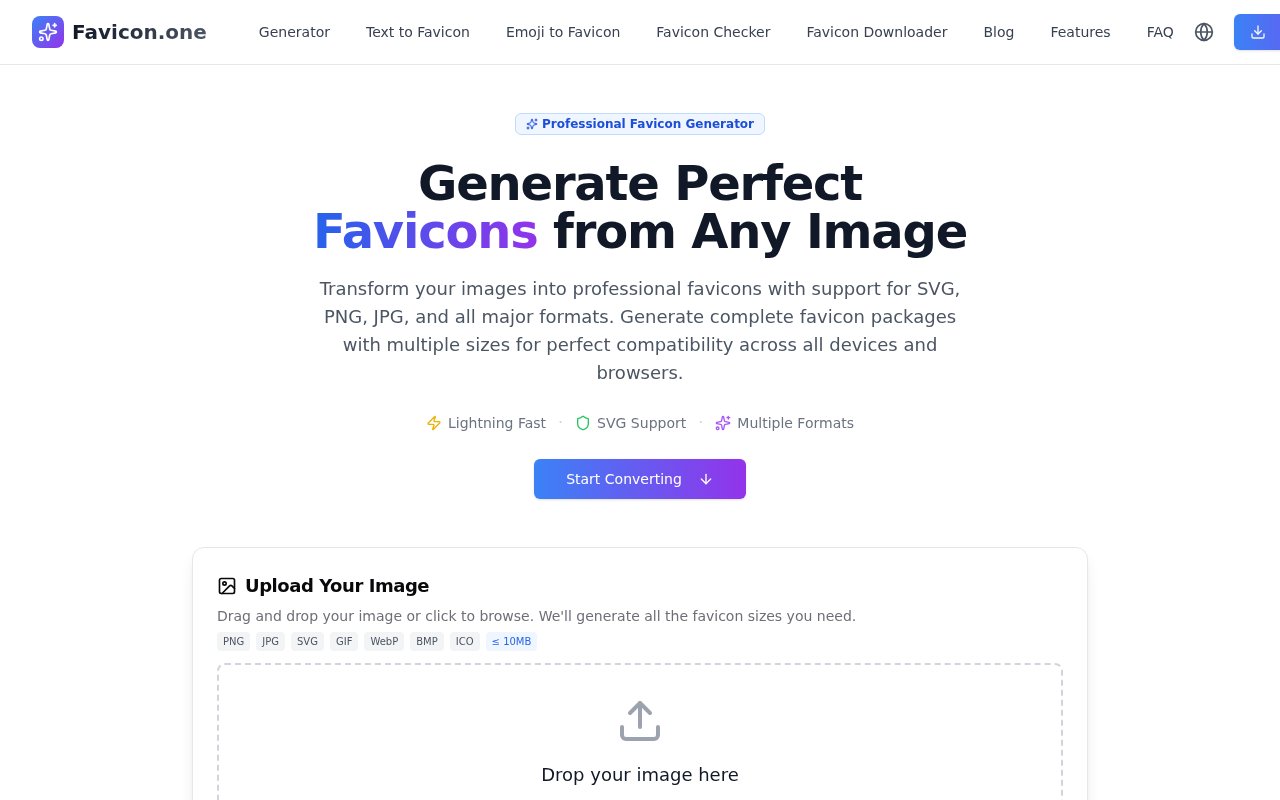
Favicon.one is a browser tool for turning an image, a piece of text, or an emoji into the small icon files a modern website needs. It handles a job that looks simple until a developer has to account for browser tabs, bookmarks, Apple touch icons, Android home screens, and progressive web apps. Instead of resizing a logo several times and assembling the surrounding files by hand, a user can provide a source and download a package made for common browser and device requirements. The main image generator accepts PNG, JPG, SVG, GIF, WebP, BMP, and ICO files up to 10 MB, so it works with most artwork people already have.
The image workflow is direct. A user drops a file into the generator, lets the service create the required sizes, then downloads the result as a ZIP archive. The package includes a classic favicon.ico, 16 and 32 pixel PNG files, an Apple touch icon, 192 and 512 pixel Android Chrome icons, and a site.webmanifest file. That mix covers the traditional browser icon as well as the larger assets expected by mobile devices and installable web apps. SVG input is supported, which is useful when the original logo is already vector artwork and needs to stay clean at small sizes. The site also provides separate text and emoji generators for projects that don't begin with a finished logo.
Favicon.one goes beyond producing files by showing how to put them into a project. It supplies HTML snippets and stack-specific guidance for Next.js App Router, Next.js Pages Router, plain HTML, Vue or Nuxt, Gatsby, and SvelteKit. The instructions explain where generated assets belong and how to reference the manifest and icon variants. That practical handoff matters because a correct image export can still fail if the files are placed in the wrong directory or the page metadata points to the wrong path. A favicon checker helps inspect an existing site, while the downloader can retrieve favicon assets that are already published. Together, those utilities cover creating, installing, checking, and collecting icons without requiring a design application. The installation guide also reminds users to clear cached icons and test across browsers and devices, since favicon changes can appear to fail when an old asset is still cached. Separate size-specific converters make it possible to start with a narrow output need instead of downloading the full bundle every time.
The tool is best suited to developers, designers, solo makers, and small teams that need a production-ready favicon bundle without turning the task into a mini project. It can help when launching a new landing page, replacing an outdated browser icon, preparing a progressive web app, or checking why an icon isn't appearing after deployment. The source image still matters. Detailed artwork and fine lettering often become unreadable at 16 pixels, so users should start with a simple, recognizable mark and test the output in real browser tabs. Favicon.one provides the technical sizes and formats, but it doesn't replace the visual judgment needed to make a tiny icon legible.
Its strongest distinction is the breadth of the package paired with implementation help. A basic converter might return one ICO file, while Favicon.one also prepares PNG variants, mobile icons, and a web manifest. The framework examples reduce the gap between receiving a ZIP and seeing the icon work in an actual codebase. Everything runs through a web interface and no account is required, which makes it convenient for occasional use. There is no API at present, so teams looking to generate assets inside an automated build pipeline will need another approach. The public pages also use inconsistent language about file handling. The About and Contact pages say processing happens in the browser, while the privacy policy and terms describe temporary server processing and deletion within 24 hours. Privacy-sensitive users should take that discrepancy into account.
Favicon.one is free, with no subscription or paid upgrade advertised. The terms say users keep ownership of both uploaded images and generated favicons, and the site asks people to upload only material they are allowed to use. There are no account, billing, or usage tiers to compare. That makes the product a practical option for one-off site launches and repeated manual use, provided the browser workflow fits. Its value is straightforward. It gathers the files, metadata, and installation examples that are easy to overlook when favicon work is done manually, while leaving final testing in the user's hands.
Key Features
- Multi-format image conversion
- Complete favicon ZIP packages
- Text and emoji generators
- Apple and Android icons
- Framework installation snippets
- Favicon checker and downloader
Pros & Cons
What we like
- Creates browser, mobile, and PWA assets together
- Supports common raster and vector inputs
- Includes practical setup guidance for popular frameworks
- Free to use without an account
Room for improvement
- No API for automated generation
- File handling language differs across site pages
- Complex logos still need manual simplification
- Focused only on favicon and icon workflows
Frequently Asked Questions
What is Favicon.one?
What files does Favicon.one generate?
Is Favicon.one free?
Does Favicon.one keep uploaded images?
Best For
Featured in
Alternatives to Favicon.one
View all
Tailwind CSS
Rapidly build custom designs without leaving your HTML

Figma
Collaborative interface design tool
Apatero Studio
Creator studio for AI image, video, audio, 3D, and avatars. Every model worth using, in one workspace.

Pixel Painters
Unlimited graphic design subscriptions built only for churches and ministries
Our take
Tool Index Editorial · Nov 2026· 3.5/5
Favicon.one turns an image, text, or emoji into the ICO, PNG, Apple touch, Android, and manifest files a modern site needs. It is free, needs no account, accepts common image formats, and includes installation examples for several web stacks. That is more useful than a converter that hands back one tiny icon and leaves the integration work unexplained.
It can't make a detailed logo legible at 16 pixels, so the source mark still needs judgment and real browser testing. This is also a focused manual utility rather than a full brand asset workflow. For developers shipping a site or PWA, though, it covers the easy-to-miss favicon chores well.
Editorial opinion from the Tool Index team, written from the public product pages. Not a user review.
Reviews (0)
Badge builder
Add Favicon.one to your website
Choose a badge style and size, preview it here, then copy the generated HTML. Badge images are self-contained SVGs and do not require an external script.

<a href="https://toolindex.net/tools/favicon-one?ref=badge" target="_blank" rel="noopener">
  <img src="https://toolindex.net/badge/favicon-one/medium.svg" alt="Favicon.one - Listed on Tool Index" width="180" height="50" />
</a>How to use the badge
- 1. Pick the style, size, and theme that fit your layout.
- 2. Copy the generated HTML from the code block.
- 3. Paste it into your footer, homepage, or press page.
Standard badge available
The standard listing badge is available now. Score and circle badges are limited to tools currently ranked in the top 10 of a category.
Badge clicks return visitors to this profile with a referral tag so the source remains identifiable.
Related Tools
Apatero Studio
Creator studio for AI image, video, audio, 3D, and avatars. Every model worth using, in one workspace.
Tailwind CSS
Rapidly build custom designs without leaving your HTML
Figma
Collaborative interface design tool

Marvel
Lightweight prototyping platform for turning images and screens into clickable mobile and web prototypes.
Work on Favicon.one? Request listing access or correction