
FlutterFlow
Visual builder that compiles to real Flutter source code, producing native iOS, Android, web, and desktop apps from one project.
Gallery
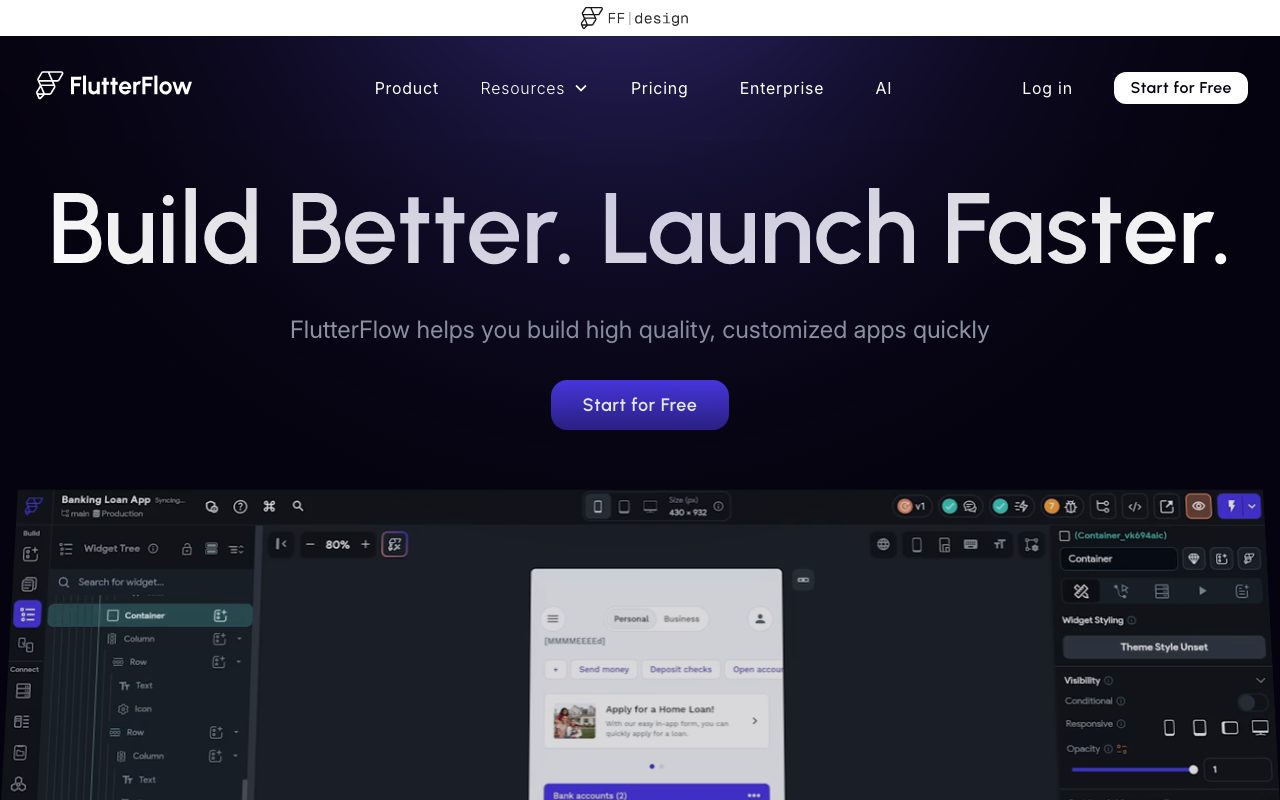

About FlutterFlow
FlutterFlow is the visual builder that doesn't lock you in. You design your app on a canvas, and FlutterFlow compiles it down to real Flutter and Dart source code. You can ship from FlutterFlow itself, or export to GitHub and run it as a normal Flutter project.
That escape hatch is the reason FlutterFlow earns goodwill that no-code tools usually can't. The vendor lock-in story is fundamentally different from Bubble, Adalo, or Glide. If FlutterFlow disappeared tomorrow, you'd still own a working Flutter project.
For solo founders, agencies, and even some engineering teams, FlutterFlow shrinks the timeline from "weeks of mobile-app boilerplate" to "click and ship." The tradeoff is that you have to like Flutter, Firebase, and the visual-builder paradigm.
What FlutterFlow actually does
You build screens by dragging widgets onto a canvas. The widget tree mirrors the actual Flutter widget tree underneath. You bind data to fields, define logic flows, set up actions, and configure responsive layouts.
FlutterFlow targets every Flutter platform from one project. iOS, Android, web, macOS, Windows, Linux. The same canvas produces builds for all of them. Cross-platform truly means cross-platform.
The output is real Dart code in standard Flutter project structure. You can clone the repo, open it in VS Code, and edit by hand. FlutterFlow round-trips your changes if you stay within its conventions.
Who FlutterFlow is for
Solo founders shipping a cross-platform mobile MVP without hiring a team. Two months of boilerplate compresses into two weeks of real product work.
Agencies prototyping client apps where speed matters more than custom polish. Build, demo, iterate, ship. FlutterFlow is faster than hand-coding for that loop.
Engineering teams using FlutterFlow as a visual layer atop Flutter. Designers and PMs build screens, engineers integrate the exported code with custom backends. The handoff is cleaner than handing over Figma.
Pricing breakdown
The free tier lets you build and preview, but blocks meaningful exports and deployments. It's a try-before-you-buy slot, not a usable plan.
Standard runs around $30 per month. Pro adds GitHub integration, source-code download, custom domains, and team collaboration at roughly $70.
Teams and Enterprise tiers exist for larger orgs with seat needs and SSO. Pricing on those is via sales conversation. Compared to hiring a mobile dev for a year, FlutterFlow is essentially free.
Standout features
The source-code escape hatch is the genuine differentiator. Most no-code platforms keep your work hostage. FlutterFlow gives you an industry-standard codebase you can take anywhere.
Native Firebase integration is deep. Authentication, Firestore, Cloud Functions, push notifications. The wiring is mostly done for you. Supabase support has caught up significantly.
The AI page generator is surprisingly useful. Describe a screen or paste a screenshot, get a working layout. It's a starting point, not a final design, but the time savings are real.
Custom Dart code
When the visual builder runs out of road, you can drop in custom Dart functions, widgets, or actions. The escape hatch isn't just at export time. It's available throughout development.
Honest tradeoffs
The visual editor gets noisy with very custom logic. Complex state management, animations, or platform-specific code chafes against the canvas paradigm.
You're tied to Firebase or Supabase by default. Custom REST integration works but requires more setup. If your backend is Postgres on Hetzner, FlutterFlow doesn't make that path easy.
Performance on very large projects can drag. The web editor is doing a lot. On older laptops or slow connections, the iteration loop slows down noticeably.
FlutterFlow is the right call when you want a Flutter app shipped in weeks instead of months and you're okay defaulting to Firebase. Outside that fit, look elsewhere.
FlutterFlow vs alternatives
Versus Bubble, FlutterFlow exports real source code. Bubble doesn't. FlutterFlow targets mobile-first; Bubble is web-first. See the comparison.
Versus Adalo, FlutterFlow has more powerful logic and better cross-platform output. Adalo is simpler to start. FlutterFlow rewards the steeper curve.
Versus hand-coding Flutter from scratch, FlutterFlow is much faster for the first 80% and slower for the last 20%. If you're a senior Flutter engineer, hand-rolling might still win. For everyone else, the math favors FlutterFlow.
For more options, see the best no-code app builders and FlutterFlow alternatives.
Bottom line
FlutterFlow is the most code-respecting visual app builder on the market. The fact that you can export to GitHub and walk away with a real Flutter project changes the long-term lock-in calculus completely.
Use it for MVPs, agency projects, and prototypes. Lean on the source-code escape hatch as your app grows complex. If you fit the Flutter-and-Firebase shape, FlutterFlow is genuinely one of the best tools in this space.
Getting productive in FlutterFlow
Spend the first two days in the tutorials. The platform's data binding and action flow concepts have a learning curve. Skipping the basics costs more time later than the upfront tutorial does.
Set up Firebase or Supabase early. The default integrations work cleanly; pulling in a custom REST API works but adds friction. Pick the easy path unless you have a strong backend reason not to.
Use components from day one. Don't build screen-specific buttons and cards. Build reusable components, parameterize them, and reuse. The pattern that works in React works here.
Custom Dart escape hatches
Custom Dart actions handle business logic the visual builder can't express. Date math, complex API responses, regex parsing.
Custom widgets handle UI the visual builder doesn't have natively. Animated containers, charts, custom inputs.
The escape hatches keep you inside FlutterFlow longer than you'd otherwise be able to stay. Use them when needed; don't avoid them out of purity.
Deploying FlutterFlow apps
Web deployment is one click; FlutterFlow hosts the build on their CDN. Custom domains require Pro.
iOS and Android deployment goes through the standard App Store and Play Store flows. FlutterFlow generates the build artifacts; you handle store submissions.
For larger projects, exporting to GitHub and managing CI/CD yourself often makes sense. The FlutterFlow build is good; full control of the pipeline is sometimes better.
Common FlutterFlow questions
Can a non-developer ship a real app with FlutterFlow? With effort, yes. The learning curve is real but achievable. Plan a month of focused learning before expecting to ship.
How big can a FlutterFlow project get? Many production apps run hundreds of screens with thousands of users. The platform scales technically; the visual editor occasionally lags on the largest projects.
Is the exported code maintainable? Yes, with reasonable Flutter knowledge. It's not boutique hand-written code, but it's normal Flutter that any Flutter dev can pick up.
Browse more at tools for no-code development.
FlutterFlow's marketplace
The marketplace has thousands of templates, components, and full apps you can fork. Quality varies; the top-rated entries are genuinely useful starting points.
Treat templates as scaffolding, not finished products. Customize the design, refactor the data model, replace placeholder logic. The time saved over starting from scratch is still substantial.
Follow the publisher pattern when you build something reusable. Components you build for one project often have second-project potential.
FlutterFlow team workflows
Multiple designers and engineers can collaborate in real time on Pro and Team tiers. The collaboration is solid; merge conflicts are rare because the project model is conservative.
Branch your project before risky changes. The branching workflow lets you experiment without breaking main. Branching is well worth the cognitive overhead on serious projects.
Code reviews on FlutterFlow exports work like any other code review. Pull requests, diffs, comments. The visual builder doesn't preclude engineering rigor.
FlutterFlow performance tuning
Watch your widget tree depth. Deep nesting hurts both build performance and runtime performance. Refactor into components when trees get unwieldy.
Profile real builds on real devices. The visual editor doesn't show you what users feel. Run debug profile builds on the cheapest target hardware you support.
Final thoughts on FlutterFlow
The escape hatch makes FlutterFlow uniquely defensible. You're never trapped. That changes the long-term calculus of investing in the platform.
The visual model has limits. Complex apps eventually push against them. The good news is that pushing past those limits looks like normal Flutter development, not a forced rewrite.
For more options, browse the best mobile app builders and tools for mobile development.
Quick recap
FlutterFlow fits founders, agencies, and teams shipping cross-platform apps where ownership of the source code matters. The escape hatch is the platform's defining feature.
It struggles at the edges of customization. Heavy native integrations, complex animations, or deep platform-specific code eventually push past the visual builder's comfortable range.
Pair it with Firebase or Supabase for the smoothest experience. Custom backends work but add friction the platform doesn't fully smooth over.
Browse more options at the best app builders, the cross-platform tools category, and FlutterFlow alternatives.
Tutorial / Demo
Key Features
- Compiles to real Flutter and Dart source code
- Targets iOS, Android, web, and desktop from one project
- Native Firebase, Supabase, and REST API integration
- AI generation of screens from prompts or screenshots
- Custom Dart code injection for advanced needs
- GitHub export for engineering ownership
Pros & Cons
What we like
- Real source-code escape hatch avoids vendor lock-in
- Genuine cross-platform output from one project
- Active marketplace with templates and reusable components
Room for improvement
- Visual editor friction grows with very custom logic
- Firebase-backed apps inherit Firebase pricing as they scale
Frequently Asked Questions
Does FlutterFlow have a free tier?
FlutterFlow vs FlutterFlow code export, do I need to keep paying?
FlutterFlow vs Bubble vs no-code alternatives?
Do I need to know Flutter to use it?
What about backend?
Best For
Featured in
Tags
Alternatives to FlutterFlow
View all
Expo
The React Native framework and cloud build service that ships native iOS and Android apps without touching Xcode.

Bubble
Full-stack no-code platform for building real web applications with visual programming, a database, and a workflow engine.

Glide
No-code platform that turns spreadsheets and databases into mobile and web apps, with computed columns and AI actions.

MarsX
AI-powered dev tool for building web and mobile apps out of micro-apps combining no-code and code interfaces.
Our take
Tool Index Editorial · May 2026· 4.5/5
What FlutterFlow is really selling — beyond the marketing copy — is visual builder that compiles to real flutter source code, producing native ios, android, web, and desktop apps from one project.
The standout points: Real source-code escape hatch avoids vendor lock-in, Genuine cross-platform output from one project, and Active marketplace with templates and reusable components. Where it stumbles: Visual editor friction grows with very custom logic and Firebase-backed apps inherit Firebase pricing as they scale.
Bottom line: pick FlutterFlow when you need solo founders shipping a cross-platform mobile MVP; look elsewhere if visual editor friction grows with very custom logic would be a dealbreaker.
Editorial opinion from the Tool Index team, written from the public product pages. Not a user review.
Reviews (2)
Glad I tried it, not sure I'd renew
A month of using FlutterFlow, here's what holds up. What stands out is how real source-code escape hatch avoids vendor lock-in. Wish they'd address how firebase-backed apps inherit Firebase pricing as they scale. Worth a trial if you're in the same boat.
Pros
- Genuine cross-platform output from one project
- Active marketplace with templates and reusable components
- Real source-code escape hatch avoids vendor lock-in
Cons
- Visual editor friction grows with very custom logic
- Firebase-backed apps inherit Firebase pricing as they scale
Finally something that fits
Found FlutterFlow on a Reddit thread, glad I clicked. The biggest win has been active marketplace with templates and reusable components. Ai generation of screens from prompts or screenshots works the way you'd hope. It fits well for engineering teams using a visual layer atop Flutter.
Badge builder
Add FlutterFlow to your website
Choose a badge style and size, preview it here, then copy the generated HTML. Badge images are self-contained SVGs and do not require an external script.

<a href="https://toolindex.net/tools/flutterflow?ref=badge" target="_blank" rel="noopener">
  <img src="https://toolindex.net/badge/flutterflow/medium.svg" alt="FlutterFlow - Listed on Tool Index" width="180" height="50" />
</a>How to use the badge
- 1. Pick the style, size, and theme that fit your layout.
- 2. Copy the generated HTML from the code block.
- 3. Paste it into your footer, homepage, or press page.
Score badge available
FlutterFlow qualifies for the score and circle badges based on its current top-10 positionin Mobile.
Badge clicks return visitors to this profile with a referral tag so the source remains identifiable.
Related Tools

Sleep Suivour
Track your sleep, improve your rest

Sanity
Composable content platform with a customizable studio, real-time collaboration, and a queryable structured content backend.
Bubble
Full-stack no-code platform for building real web applications with visual programming, a database, and a workflow engine.

Tally
Form builder with a Notion-like editor, conditional logic, payments, and a generous free tier with unlimited submissions.
Work on FlutterFlow? Request listing access or correction