
Free AI Prompt Generator
Open source prompt engineering tool that runs entirely in your browser with no signup required
Gallery
About Free AI Prompt Generator
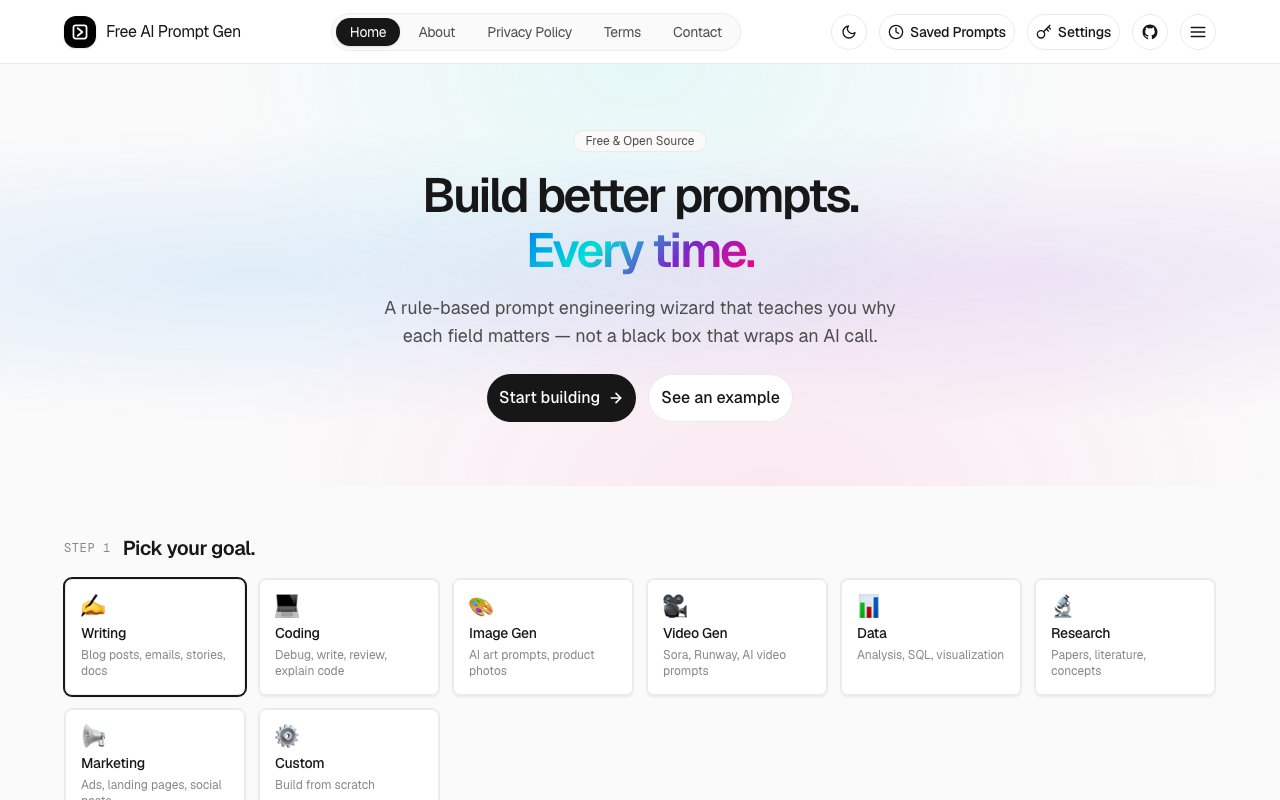
Free AI Prompt Generator is a browser based tool that helps you build structured prompts for AI models like ChatGPT, Claude, Gemini, and Midjourney. Instead of guessing at what will work or copying templates from scattered blog posts, you pick a framework, fill in some fields, and watch the prompt assemble in real time. Everything runs locally in your browser, so nothing you type gets logged or sent to a server. For anyone who has wondered whether their brilliant prompt idea actually makes sense before hitting enter, this is the sanity check that catches mistakes early.
The core problem it tackles is that prompt engineering feels like alchemy when you're starting out. You know the AI can do more. You've seen the impressive demos. But when you sit down to replicate them, the results fall flat because you're missing structure. You might forget to specify a role, or you leave the output format vague, or you bury the actual task in a wall of context. This tool gives you guardrails by offering structured frameworks like RTF (Role, Task, Format), CO-STAR (Context, Objective, Style, Tone, Audience, Response), TAG (Task, Action, Goal), and APE (Action, Purpose, Expectation). Each framework walks you through the components of a strong prompt in a deliberate sequence, so you end up with something more thoughtful than a one-line request tossed into the void.
The way it works is straightforward. You start by picking a goal from a set of categories: writing, coding, image generation, video, data analysis, research, or marketing. Each category surfaces the most relevant frameworks for that type of work. Then you choose your target model and the interface presents fields for things like role, context, task, constraints, and output format. As you fill them in, a live preview shows the prompt taking shape on the right side of the screen. You can see exactly how the pieces fit together before you copy anything. When you're done, you save the result to browser storage for later or export it directly to your clipboard. There's also an optional AI refinement step that uses your own API key from OpenAI, Anthropic, Google, or Cohere to polish the prompt further, but it's entirely client side, so you're never handing credentials to a third party.
Model specific formatting is one of the more useful details that separates this from a blank text box. ChatGPT prompts come out in Markdown because that's what GPT models render well. Claude prompts use XML tags since Anthropic's models respond better to that structure. Gemini prompts use bold labels per Google's recommendations. Midjourney prompts follow that platform's parameter syntax with aspect ratios, stylize values, and chaos settings woven in. That means you can paste directly into the target interface without reformatting or second guessing the syntax. You can also point the tool at local models if you're running Ollama or LM Studio on your machine, which opens up the same structured prompting workflow for self hosted inference.
The audience is anyone who uses AI regularly but hasn't memorized all the tricks: marketers drafting campaign copy who want consistent output across a dozen variations, developers asking for code snippets who keep getting incomplete functions, designers generating image prompts who struggle with Midjourney's parameter syntax, researchers structuring queries who need citations or step by step reasoning. It's especially handy if you jump between models and don't want to remember the formatting quirks for each one. The template library also helps teams standardize how they prompt, so the same structure that works for one person can be shared and reused without reinventing it.
What sets it apart from similar tools is the combination of local first privacy and structured methodology. Plenty of prompt helpers exist, but many are cloud services that store your inputs, train on your data, or require accounts before you can do anything useful. This one keeps everything in localStorage and runs deterministically. You can see exactly how the prompt is built because the logic is transparent, not hidden behind a black box. It's also open source under the MIT license, with the full codebase on GitHub, which means you can audit the code if you're paranoid, fork it if you want custom behavior, or contribute improvements if you find bugs or missing features. The maintainers are responsive, with typical turnaround under 24 hours for issues.
The tool is completely free with no paywalls, no subscriptions, and no account required. You just open the site and start building prompts. For users who want AI powered refinement, you can plug in your own keys for OpenAI, Anthropic, Google, Cohere, or a local LLM endpoint. That feature is optional and the keys stay in your browser. The tech stack is Astro with TypeScript, so it's lightweight and fast even on slower connections. If you hit a snag, there's a contact form on the site and a GitHub issues page where you can report bugs or request features. For a zero cost, privacy respecting prompt tool, it punches well above its weight.
Key Features
- Multiple prompt frameworks including RTF and CO-STAR
- Live preview as you fill in fields
- Model specific formatting for major AI platforms
- Runs 100 percent locally in your browser
- Optional AI refinement using your own API keys
- Template library and local prompt storage
Pros & Cons
What we like
- Completely free with no signup or account required
- Privacy focused since nothing leaves your browser
- Open source and auditable under MIT license
- Supports multiple AI models and local LLMs
Room for improvement
- Frameworks assume you understand the basics of prompting
- AI refinement requires your own API keys
- Interface can feel busy with many field options
- No cloud sync across devices since storage is local
Frequently Asked Questions
What is Free AI Prompt Generator?
Is Free AI Prompt Generator really free?
Is my data private?
Which AI models does it support?
Best For
Featured in
Alternatives to Free AI Prompt Generator
View all
Our take
Tool Index Editorial · Oct 2026· 3.5/5
Free AI Prompt Generator turns frameworks such as RTF, CO-STAR, TAG, and APE into a guided prompt builder for several model families. We found the live preview and plain explanations more valuable than its quality score. They teach users to specify context, constraints, audience, and format instead of hiding prompt assembly behind another AI call. The tool is free, open source, requires no account, and stores prompts locally.
Frameworks can make a weak brief clearer, but they can also turn a simple request into ceremony. Model-specific formatting is a helpful default, not a guarantee of better output, and optional AI refinement requires the user's own provider key. With no cloud sync, saved work also stays tied to one browser unless exported.
Editorial opinion from the Tool Index team, written from the public product pages. Not a user review.
Reviews (0)
No reviews yet
Be the first to share your experience with Free AI Prompt Generator
Sign in to write a reviewBadge builder
Add Free AI Prompt Generator to your website
Choose a badge style and size, preview it here, then copy the generated HTML. Badge images are self-contained SVGs and do not require an external script.

<a href="https://toolindex.net/tools/free-ai-prompt-gen?ref=badge" target="_blank" rel="noopener">
  <img src="https://toolindex.net/badge/free-ai-prompt-gen/medium.svg" alt="Free AI Prompt Generator - Listed on Tool Index" width="180" height="50" />
</a>How to use the badge
- 1. Pick the style, size, and theme that fit your layout.
- 2. Copy the generated HTML from the code block.
- 3. Paste it into your footer, homepage, or press page.
Standard badge available
The standard listing badge is available now. Score and circle badges are limited to tools currently ranked in the top 10 of a category.
Badge clicks return visitors to this profile with a referral tag so the source remains identifiable.
Related Tools

Apatero AI
The creator studio for AI image, video, audio, 3D, and avatars, now at apatero.ai.
Kevin Gabeci Toolkits
Seven AI toolkits for writing books, making music, cutting video, and building agents.

Warp
The modern terminal reimagined with AI and collaboration

Bolt.new
Prompt-to-deployed full-stack app inside the browser
Work on Free AI Prompt Generator? Request listing access or correction