
Fudge
Web design references your AI can query for real fonts, colors, and UI patterns
Gallery
About Fudge
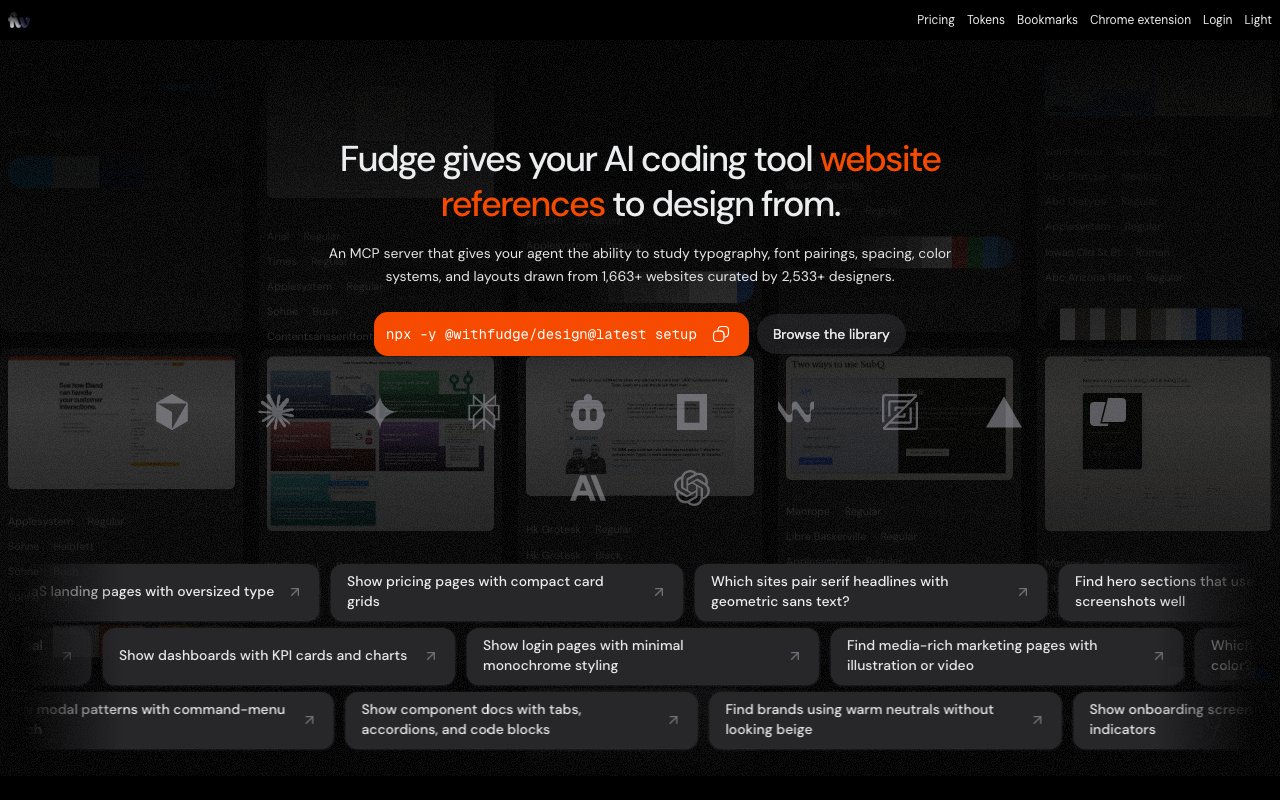
Fudge is a searchable library of web design references drawn from real production websites, built so your AI tools can query them instead of guessing at style. Rather than another screenshot gallery, it captures the underlying design language of a site, the fonts, colors, spacing, and layout, and exposes that as structured data an AI client can actually read and act on. The one-line framing on the site is to add design taste to your AI, and everything about the product bends toward that goal. The catalog is drawn from thousands of the web's best products, so the references are things that shipped and held up rather than concept art.
The problem it addresses shows up the moment you let an AI assistant design something. These models are good at wiring up components, but they tend to reach for the same bland defaults, because they've no grounded reference for what good production sites really look like. Fudge closes that gap by handing the model real examples with real typography and color systems to pull from, so the output has taste rooted in sites that actually shipped instead of an average of everything the model has ever seen. The result is design that looks chosen rather than generated on autopilot. For anyone who has watched an assistant produce a technically correct but forgettable layout, that grounding is the whole point.
The workflow starts in the browser. You capture any section of a live website as a pin using the Chrome extension, and Fudge extracts the colors, fonts, spacing, and layout automatically. Those pins build up into a library you can search, including a vibe search where you describe the feeling you're after and it surfaces designs that match. References are organized by the patterns you actually build, things like hero sections, modal and command-menu search, or onboarding and progress screens, so you can pull a relevant example rather than scrolling a firehose. Adding fresh references is as quick as clicking the extension on a site you like.
It's built on top of Font of Web, the font-discovery engine from the same team, so the underlying catalog of typography runs deep and you can compare type systems across real software websites. Fudge can also generate accessible color scales with WCAG-compliant contrast ratios, which means the palettes come back as usable values, not just swatches that happen to look nice together. Turning a production website into a structured design system takes only a few steps, and that's the part that makes the references reusable rather than decorative. A reference stops being a picture and becomes a set of tokens you can drop into a build.
The piece that makes it a tool for AI is the MCP server. You add Fudge's Model Context Protocol server to your preferred AI client, and from then on any MCP-compatible tool can ask for typography and color systems from real sites in the middle of a task. In practice that turns a coding agent from something that invents a palette on the spot into something that pulls a real one with a source behind it, which is a meaningful difference when the output is meant to ship rather than just demo. Because it's built on the open MCP standard, it isn't tied to a single editor or assistant.
It fits designers and developers who lean on AI to build interfaces and want the results to look considered instead of templated. Where it stands apart is the focus on structured evidence. Plenty of services collect design inspiration as images, but Fudge turns each reference into fonts, colors, and tokens a machine can act on, and it keeps a screenshot trail so a human can still eyeball the source. That machine-readable shape is what makes it useful inside an agent rather than only pleasant to browse, and it's why a developer can wire it into a workflow instead of keeping it open in a second tab.
Access is freemium. There's a free individual tier for browsing and saving, and a paid Pro license for heavier and programmatic use. Business use of the MCP server and automated bulk extraction of pins or design tokens fall under the paid license, so casual exploring stays free while commercial and automated access is where it charges. For companies embedding the data into their own AI products or SaaS, there's an enterprise tier quoted at 6,000 dollars a year with a 30-day paid pilot available, which signals the heavier end of the product is aimed at teams building on the data rather than individual browsing. Either way, you can start on the free tier and see whether real references change the quality of what your AI produces before paying anything.
Key Features
- Searchable library of real site designs
- Auto-extracted fonts, colors, and tokens
- MCP server for AI clients
- Chrome extension to capture pins
- Vibe-based design search
- WCAG-aware color scale generation
Pros & Cons
What we like
- Grounds AI design output in real production websites
- Works with any MCP-compatible AI tool
- Chrome extension makes capturing references quick
- Extracts structured tokens, not just screenshots
Room for improvement
- Value depends on the size of the reference library
- Free tier limits programmatic and bulk access
- Business and MCP use needs a paid license
- Narrow focus on web design references
Frequently Asked Questions
What is Fudge?
How does Fudge work with AI?
Is Fudge free?
Who is Fudge for?
Best For
Featured in
Alternatives to Fudge

Framer
Visual website builder that lets designers ship production-grade marketing sites with real CMS, SEO controls, and code components.

Apatero Studio
Creator studio for AI image, video, audio, 3D, and avatars. Every model worth using, in one workspace.

Pixel Painters
Unlimited graphic design subscriptions built only for churches and ministries
Reviews (11)
Two months in, no regrets
Started using Fudge casually, now it is pinned in my dock. Their take on auto-extracted fonts, colors, and tokens is genuinely good. Support actually answered when I had a question, which surprised me. Recommending it to people in a similar spot.
Good, with a few caveats
Fudge solves a real problem for me without making a fuss about it. Where it really wins is works with any mcp-compatible ai tool. It fits well for building a mood board from production websites. My only gripe is free tier limits programmatic and bulk access. No regrets so far.
Worth a look
Started using Fudge casually, now it is pinned in my dock. It just works, day after day, without surprises. Found it works best for capturing a competitor's design language as tokens. Would sign up again without thinking twice.
Genuinely impressed
Found Fudge on a Show HN thread and I am glad I clicked. Got real value out of extracts structured tokens, not just screenshots. Recommending it to people in a similar spot.
Powerful once it clicks
Found Fudge on a Show HN thread and I am glad I clicked. Got real value out of wcag-aware color scale generation. The output quality holds up better than I expected. It would be a five if not for narrow focus on web design references. Glad I made the switch.
Worth a look
Came to Fudge after getting frustrated with what I had before. Where it really wins is vibe-based design search. No regrets so far.
Powerful once it clicks
Hadn't planned on switching, but Fudge was hard to ignore. Where it really wins is vibe-based design search. It fits well for building a mood board from production websites. The catch is narrow focus on web design references.
Genuinely impressed
Found Fudge on a Show HN thread and I am glad I clicked. Their take on works with any mcp-compatible ai tool is genuinely good. Would sign up again without thinking twice.
Quietly excellent
Found Fudge on a Show HN thread and I am glad I clicked. Where it really wins is searchable library of real site designs. Setup was painless and I was productive the same day. Found it works best for feeding real design references to an ai coding agent. Worth it for what I get out of it.
Two months in, no regrets
Fudge solves a real problem for me without making a fuss about it. The chrome extension makes capturing references quick is more useful than I expected. It has shaved real time off my week. It earns its place in my stack.
It just works
Fudge has quietly become part of my daily flow. The searchable library of real site designs is more useful than I expected.
Badge builder
Add Fudge to your website
Choose a badge style and size, preview it here, then copy the generated HTML. Badge images are self-contained SVGs and do not require an external script.

<a href="https://toolindex.net/tools/fudge?ref=badge" target="_blank" rel="noopener">
  <img src="https://toolindex.net/badge/fudge/medium.svg" alt="Fudge - Listed on Tool Index" width="180" height="50" />
</a>How to use the badge
- 1. Pick the style, size, and theme that fit your layout.
- 2. Copy the generated HTML from the code block.
- 3. Paste it into your footer, homepage, or press page.
Standard badge available
The standard listing badge is available now. Score and circle badges are limited to tools currently ranked in the top 10 of a category.
Badge clicks return visitors to this profile with a referral tag so the source remains identifiable.
Related Tools
Apatero Studio
Creator studio for AI image, video, audio, 3D, and avatars. Every model worth using, in one workspace.

Tailwind CSS
Rapidly build custom designs without leaving your HTML

Figma
Collaborative interface design tool

Marvel
Lightweight prototyping platform for turning images and screens into clickable mobile and web prototypes.
Work on Fudge? Request listing access or correction