
Framer
Visual website builder that lets designers ship production-grade marketing sites with real CMS, SEO controls, and code components.
Gallery
About Framer
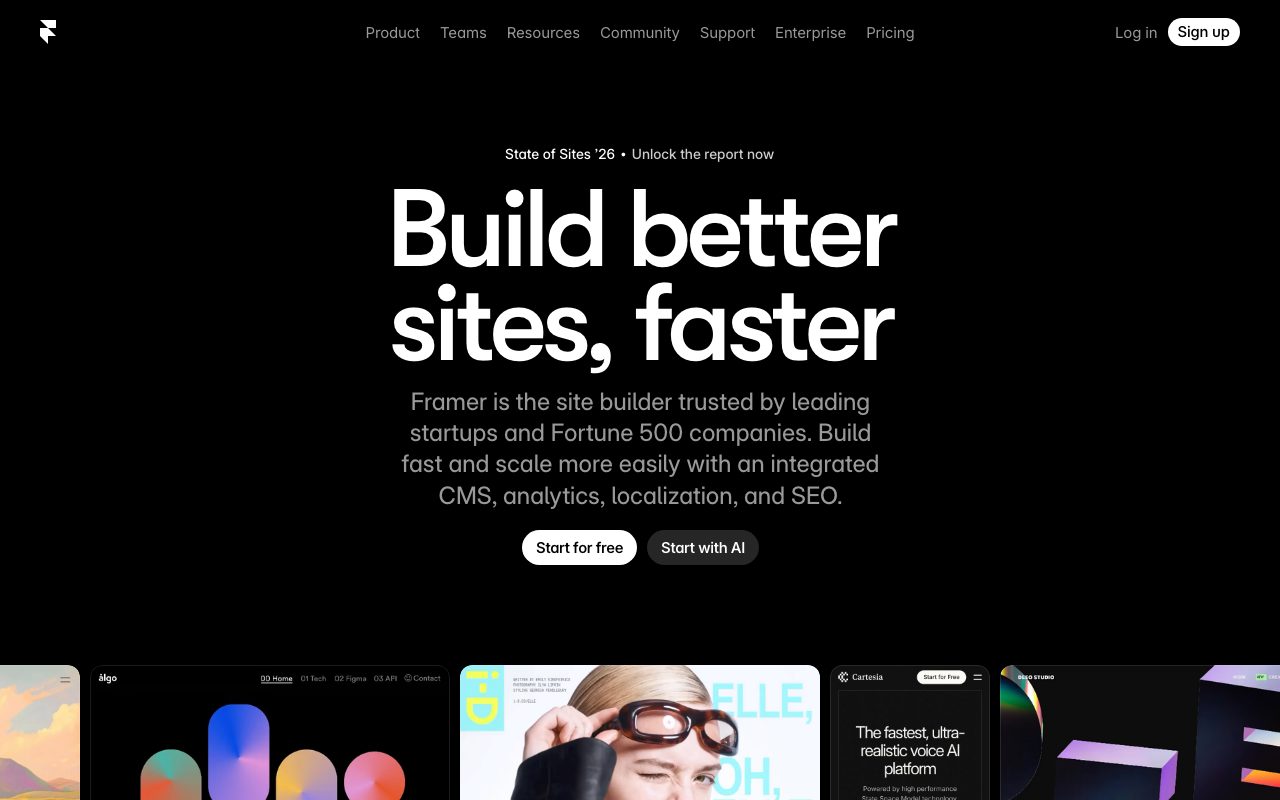
Framer is a website builder for designers who want code-quality output without writing code. The product started as a prototyping tool for product designers and pivoted into a full no-code site builder. Today, Framer is one of the more popular ways to ship a marketing site fast.
The pitch sits between Webflow and Squarespace. You get the design freedom of Webflow with a more designer-friendly canvas, and you get the speed of Squarespace with much more flexibility. Framer publishes sites on a fast global CDN by default.
What Framer actually does
Framer's editor looks and feels like Figma. You design a page on a canvas, drop in components, set breakpoints, and publish. There's no separate "site map" mental model. You just lay out pages.
The platform handles the underlying details. Sites are responsive across breakpoints, support animations, integrate with a CMS for blog posts and pages, and ship as static optimized HTML. SEO controls, redirects, custom code, and analytics are all built in.
Who Framer is built for
Framer is built for designers, founders, and small marketing teams. The typical user knows Figma and wants the same vibe for shipping a site. Agencies use it for client work where speed matters more than custom backend logic.
It's not the right pick for huge ecommerce stores, complex apps, or sites with deep custom server logic. Those still belong on a real frontend stack.
Framer pricing
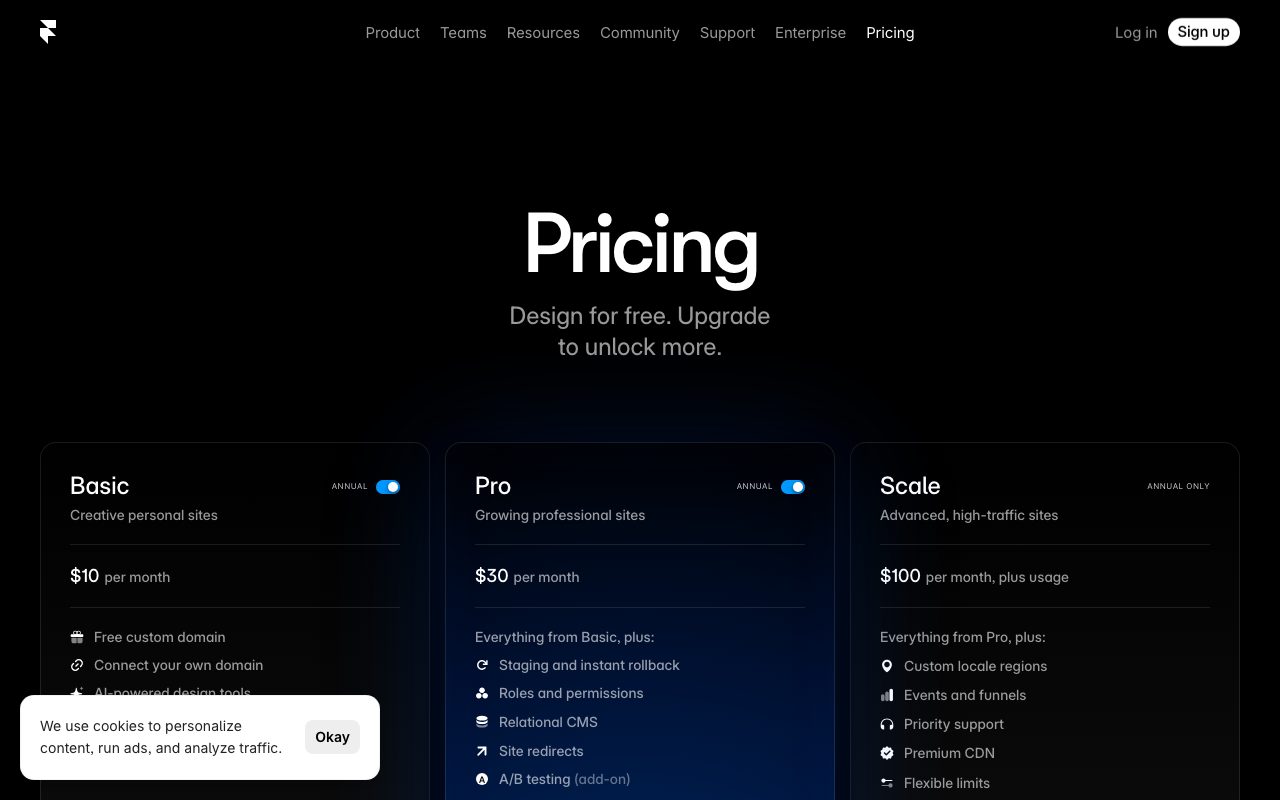
Framer has a free tier with framer.website branding. Paid Mini, Basic, Pro, and Business plans unlock custom domains, more pages, more bandwidth, and team features. Annual pricing is materially cheaper than monthly.
The CMS comes in at higher tiers, and team workspaces with role permissions are available on the top plans. Compare costs against Framer alternatives when benchmarking.
Features that define Framer
The visual canvas is the headline. Breakpoint editing, smart layout primitives, and Figma-level design controls let you ship pixel-perfect pages. Components and variants help reuse design across the site.
The CMS supports collections like blog posts, case studies, team members, and products. Each collection feeds dynamic pages, and you can write content directly in the Framer editor or pull from external sources.
Effects, animations, and interactions are first class. Scroll triggered animations, hover effects, and entrance transitions can be added without code. AI assist generates section copy and images for faster drafting.
Framer's secret weapon is performance. Sites are fast by default, and Lighthouse scores stay in the green without you babysitting the build.
Tradeoffs and rough edges
Framer's CMS is lighter than Webflow's. If your site has hundreds of dynamic items with complex relations, you'll feel the limit. Power blogs sometimes outgrow it.
Custom code injection is supported, but it's not a replacement for a real codebase. Heavy interactive features still feel unnatural compared to building in React directly.
Framer vs alternatives
The biggest comparisons are Framer versus Webflow, Wix Studio, and Squarespace. Webflow is the power-user pick with a steeper learning curve. Wix Studio is broadening into the same category. Squarespace is template-first and the simplest of the four.
Framer's edge is the Figma-style editor and fast publishing. Read Framer vs Webflow and browse the best no-code website builders.
Common questions about Framer
Can Framer handle SEO? Yes, with meta controls, sitemaps, redirects, and clean static output.
Does Framer support custom code? Yes, you can inject scripts and embed custom components.
Is Framer good for ecommerce? It can handle small stores and lead capture, but full ecommerce belongs on dedicated platforms.
Bottom line on Framer
Framer is a designer-first website builder that ships fast, performant sites. It's a strong pick for marketing pages, portfolios, and product launches. Browse tools for founders for the rest of the stack.
If you live in Figma and want a site live this week, Framer is the obvious starting point.
Framer for product launches
Framer is a great fit for the typical SaaS launch site. You design pages in the canvas, drop in components, and ship. The CMS handles a small blog or changelog without needing a separate platform.
For product hunts, Indie Hackers launches, and Show HN posts, Framer's speed matters. You can iterate the hero, add a waitlist form, and push live in an hour. That feedback loop is rare in site builders.
Framer plus other tools
Most teams pair Framer with Figma for early design exploration, then move to Framer for the live site. Components in Figma can be rebuilt as Framer components for production. The mental model translates cleanly.
Analytics and forms typically integrate via popular providers. Loops, ConvertKit, Mailchimp, and HubSpot all wire in with embeds or webhooks. Framer doesn't try to do everything, which keeps the core experience tight.
Tutorial / Demo
Key Features
- Design canvas that outputs production HTML and CSS
- Built-in CMS with collections, fields, and bindings
- Real React/TypeScript code components
- Page transitions and scroll-driven animations
- One-click hosting on a global CDN
- Native form handling, SEO controls, and analytics hooks
Pros & Cons
What we like
- Bridges the gap between design tool and production site
- Code components let teams escape the visual editor when needed
- Animation features that would normally require custom React work
Room for improvement
- Not suited for complex e-commerce or large enterprise CMS needs
- Free tier publishes only on a framer.website subdomain
Frequently Asked Questions
Does Framer have a free tier?
Framer vs Webflow, which is better?
Can I use code in Framer?
Is Framer's CMS good enough?
What about SEO?
Best For
Featured in
Tags
Alternatives to Framer
View all
Carrd
Single-developer-built site builder for fast, single-page sites: link-in-bio pages, landing pages, and personal cards.
ProtoPie
High-fidelity prototyping tool that simulates sensor input, IoT triggers, and complex interactions without writing code.

Figma
Collaborative interface design tool
Penpot
Open-source design and prototyping platform built on web standards, with a self-hostable server and SVG-native files.
Our take
Tool Index Editorial · May 2026· 4.8/5
Framer is the kind of tool you adopt when you want visual website builder that lets designers ship production-grade marketing sites with real cms, seo controls, and code components.
The standout points: Bridges the gap between design tool and production site, Code components let teams escape the visual editor when needed, and Animation features that would normally require custom React work. The friction points: Not suited for complex e-commerce or large enterprise CMS needs and Free tier publishes only on a framer.website subdomain.
Recommendation: this is a strong default when you need shipping a marketing or landing site without engineering. If not suited for complex e-commerce or large enterprise CMS needs would be a dealbreaker, the alternatives section below is worth a scroll.
Editorial opinion from the Tool Index team, written from the public product pages. Not a user review.
Reviews (8)
Onboarded the team in a day
Found Framer on a Reddit thread, glad I clicked. Honestly impressed by how animation features that would normally require custom React work. Main use case: building a designer portfolio with case-study templates. Still recommending it to people in similar setups.
Did exactly what I needed
Hadn't planned on switching, but Framer was hard to ignore. Genuine strength: bridges the gap between design tool and production site. Worth calling out the real React/TypeScript code components too. Worth the price for what I get out of it.
Pros
- Code components let teams escape the visual editor when needed
- Bridges the gap between design tool and production site
- Animation features that would normally require custom React work
Best decision this quarter
Have been using Framer for a while, here's where I land. Honestly impressed by how bridges the gap between design tool and production site. Glad I made the switch.
Pros
- Animation features that would normally require custom React work
- Code components let teams escape the visual editor when needed
- Bridges the gap between design tool and production site
The kind of tool you forget you're paying for
Picked Framer for the lower price, stayed for the actual quality. Real selling point: code components let teams escape the visual editor when needed. The one-click hosting on a global CDN is more useful than I expected. Still recommending it to people in similar setups.
Pros
- Bridges the gap between design tool and production site
- Animation features that would normally require custom React work
Genuinely impressed
Tried half a dozen options before landing on Framer. What stands out is how code components let teams escape the visual editor when needed. Got real value out of one-click hosting on a global CDN. It fits well for building a designer portfolio with case-study templates. Would buy again without thinking twice.
Surprised how much we use this
Started using Framer casually, now it's pinned in my dock. Honestly impressed by how code components let teams escape the visual editor when needed. The page transitions and scroll-driven animations is more useful than I expected. Mostly using it for prototyping animation-heavy interactions then publishing them. Still recommending it to people in similar setups.
It just works
Honest take: Framer delivers most of what the marketing promises. The thing I keep coming back to: animation features that would normally require custom React work. Still recommending it to people in similar setups.
Easy 5 from me
Got Framer on the recommendation of someone I trust. Where it really wins is code components let teams escape the visual editor when needed. Mostly using it for shipping a marketing or landing site without engineering. Worth the price for what I get out of it.
Badge builder
Add Framer to your website
Choose a badge style and size, preview it here, then copy the generated HTML. Badge images are self-contained SVGs and do not require an external script.

<a href="https://toolindex.net/tools/framer?ref=badge" target="_blank" rel="noopener">
  <img src="https://toolindex.net/badge/framer/medium.svg" alt="Framer - Listed on Tool Index" width="180" height="50" />
</a>How to use the badge
- 1. Pick the style, size, and theme that fit your layout.
- 2. Copy the generated HTML from the code block.
- 3. Paste it into your footer, homepage, or press page.
Score badge available
Framer qualifies for the score and circle badges based on its current top-10 positionin No-Code.
Badge clicks return visitors to this profile with a referral tag so the source remains identifiable.
Related Tools

Apatero Studio
Creator studio for AI image, video, audio, 3D, and avatars. Every model worth using, in one workspace.

Tailwind CSS
Rapidly build custom designs without leaving your HTML
Figma
Collaborative interface design tool

Sanity
Composable content platform with a customizable studio, real-time collaboration, and a queryable structured content backend.
Work on Framer? Request listing access or correction