
Ghost Interview
Real-time AI interview copilot that suggests what to say during live interviews
Gallery
About Ghost Interview
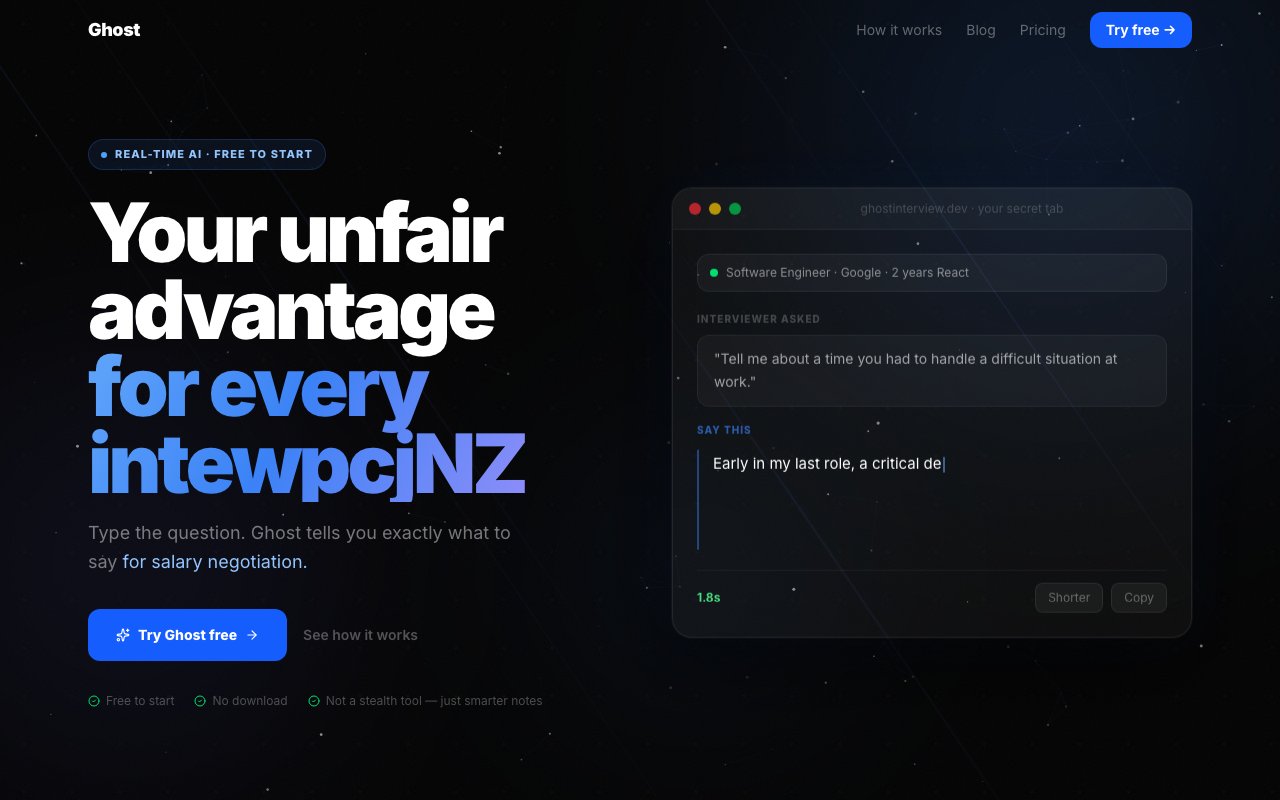
Ghost is a real-time interview assistant that suggests what to say while a job interview is actually happening. It runs in a browser tab you keep open next to the call, and the concept is deliberately plain. When the interviewer asks a question, you type or paste it into Ghost, and it hands back a suggested answer within a few seconds so you're never left scrambling for words. It's an interview copilot rather than a prep course, built to sit beside you during the conversation instead of the week before it, which is a different job from studying flashcards the night before. The whole thing is framed around not going blank, which is the failure mode that costs plenty of qualified people the offers they should have won.
The problem it goes after is the gap between knowing your material and performing under pressure. Plenty of capable people freeze on the classic behavioral prompts, lose the thread halfway through an answer, or fumble a figure during a salary talk. Ghost aims to give you a grounded starting point in the moment, phrased so it reads like something a person would actually say out loud rather than a wall of obviously generated text. The point is to steady your delivery and keep you composed, not to hand you a rigid script you read back word for word while the interviewer waits.
It works by taking your context once at the start of a session. You tell it about the role you're targeting and a little about your own background, and it holds onto that while the session runs. From then on, every question you feed it produces a tailored response instead of a one-size-fits-all template. You can nudge the output with a single click to make it shorter, add a concrete example, or shift the framing, all without retyping the question. That keeps you moving while the interviewer is still mid-sentence, which is the whole reason it exists in a live tab rather than a chat window you tab away to.
Tone is treated as a first-class control rather than an afterthought. Ghost ships four modes, confident, concise, storytelling, and technical, so the same question can come back as a tight two-liner or a fuller STAR-style story depending on what the moment needs. That distinction matters more than it sounds, because a recruiter screen, a hiring-manager round, and a compensation negotiation all reward different registers. A single flat voice across all of them would read as rehearsed, so the modes let you match the answer to the room you're actually in and the person asking. Switching between them is a click, so you can soften into a story for a culture question and then tighten up for a technical one without breaking your stride or losing the thread.
The audience is job seekers first, though the site also points Ghost at phone screens, salary negotiations, and even college admissions conversations. Anyone who thinks clearly on paper but tightens up once the camera is live is the core user. It's built to be quick to scan and unobtrusive, and the makers lean on the detail that processing happens in your own browser rather than being shipped off to their servers, which they frame as a privacy safeguard for something most people would rather keep to themselves. That local-first framing is a deliberate selling point given how sensitive a live interview feels. For candidates who worry about being recorded or logged somewhere they can't see, keeping the work in the browser is meant to be reassuring rather than a footnote buried in a policy page.
What separates it from opening a generic chatbot in another tab is the tuning for live use. Answers are meant to land in under three seconds, and the interface is designed for a fast glance during an active call instead of a drawn-out back-and-forth. In practice it behaves less like a study aid and more like a teleprompter that writes itself as the discussion moves, which is a genuinely different job from rehearsing the common questions the night before and hoping they come up in the order you practiced.
Access is freemium and priced for individuals rather than companies. The free tier covers five sessions a day with all four tone modes and session history, which is enough to rehearse with or get through the occasional interview. Pro costs twelve dollars a month, raises the session limit, adds priority processing speed, and unlocks a dedicated salary-negotiation mode aimed at higher-stakes conversations. There's no visible enterprise tier or team plan, so the product reads clearly as a personal tool for one candidate rather than something an employer would ever deploy across a workforce. Billing is monthly with no long lock-in mentioned, which keeps it low-commitment for someone who only needs it through a single stretch of job hunting and can drop it once they've signed an offer.
Key Features
- Real-time in-interview answer suggestions
- Four adjustable tone modes
- Sub-three-second response speed
- One-click length and example tweaks
- In-browser processing for privacy
- Session history across attempts
Pros & Cons
What we like
- Gives a grounded answer in the moment instead of a blank mind
- Tone modes match a screen, a panel, or a negotiation
- Fast enough to glance at during a live call
- Usable free tier with a low-cost Pro upgrade
Room for improvement
- Leaning on it live carries clear interview-integrity risk
- No team or enterprise plan, it's a solo tool
- You still have to read and adapt each suggestion yourself
- Younger product from a small studio
Frequently Asked Questions
What is Ghost?
Is Ghost free?
Who is Ghost for?
How is Ghost different from a normal chatbot?
Best For
Featured in
Alternatives to Ghost Interview

Reviews (10)
Quietly excellent
Found Ghost Interview on a Show HN thread and I am glad I clicked. What stands out is how it handles in-browser processing for privacy.
Two months in, no regrets
Hadn't planned on switching, but Ghost Interview was hard to ignore. Got real value out of one-click length and example tweaks. It earns its place in my stack.
Powerful once it clicks
Ghost Interview has quietly become part of my daily flow. Got real value out of real-time in-interview answer suggestions. Mostly using it for working through a salary negotiation in real time. The catch is younger product from a small studio. Easy yes for anyone weighing the same trade offs.
Recommended without reservation
Came to Ghost Interview after getting frustrated with what I had before. Their take on tone modes match a screen, a panel, or a negotiation is genuinely good. It slotted into my routine without much fuss. Would sign up again without thinking twice.
Recommended without reservation
Came to Ghost Interview after getting frustrated with what I had before. The defaults are sensible, so I was not fighting settings on day one. The output quality holds up better than I expected. Would sign up again without thinking twice.
Recommended without reservation
Found Ghost Interview on a Show HN thread and I am glad I clicked. What stands out is how it handles sub-three-second response speed. The output quality holds up better than I expected. It fits well for prepping quick answers for a recruiter phone screen. No regrets so far.
Exactly what I needed
Found Ghost Interview on a Show HN thread and I am glad I clicked. It has shaved real time off my week. It does what it says, which is rarer than it should be. Worth it for what I get out of it.
Genuinely impressed
Three months of Ghost Interview later, here is what holds up. It just works, day after day, without surprises. The defaults are sensible, so I was not fighting settings on day one. It fits well for drafting responses for a college admissions conversation. No regrets so far.
Good, with a few caveats
Ghost Interview solves a real problem for me without making a fuss about it. Got real value out of in-browser processing for privacy. Mostly using it for steadying nerves during a live job interview. My only gripe is leaning on it live carries clear interview-integrity risk. Glad I made the switch.
Genuinely impressed
Ghost Interview solves a real problem for me without making a fuss about it. It slotted into my routine without much fuss. Found it works best for drafting responses for a college admissions conversation. Hard to imagine going back to my old setup.
Badge builder
Add Ghost Interview to your website
Choose a badge style and size, preview it here, then copy the generated HTML. Badge images are self-contained SVGs and do not require an external script.

<a href="https://toolindex.net/tools/ghost-interview?ref=badge" target="_blank" rel="noopener">
  <img src="https://toolindex.net/badge/ghost-interview/medium.svg" alt="Ghost Interview - Listed on Tool Index" width="180" height="50" />
</a>How to use the badge
- 1. Pick the style, size, and theme that fit your layout.
- 2. Copy the generated HTML from the code block.
- 3. Paste it into your footer, homepage, or press page.
Standard badge available
The standard listing badge is available now. Score and circle badges are limited to tools currently ranked in the top 10 of a category.
Badge clicks return visitors to this profile with a referral tag so the source remains identifiable.
Related Tools

Apatero AI
The creator studio for AI image, video, audio, 3D, and avatars, now at apatero.ai.
Kevin Gabeci Toolkits
Seven AI toolkits for writing books, making music, cutting video, and building agents.

Warp
The modern terminal reimagined with AI and collaboration

Bolt.new
Prompt-to-deployed full-stack app inside the browser
Work on Ghost Interview? Request listing access or correction