
HeimWall
Menu bar app that catches secrets and PII before you paste them into AI coding tools
Gallery
About HeimWall
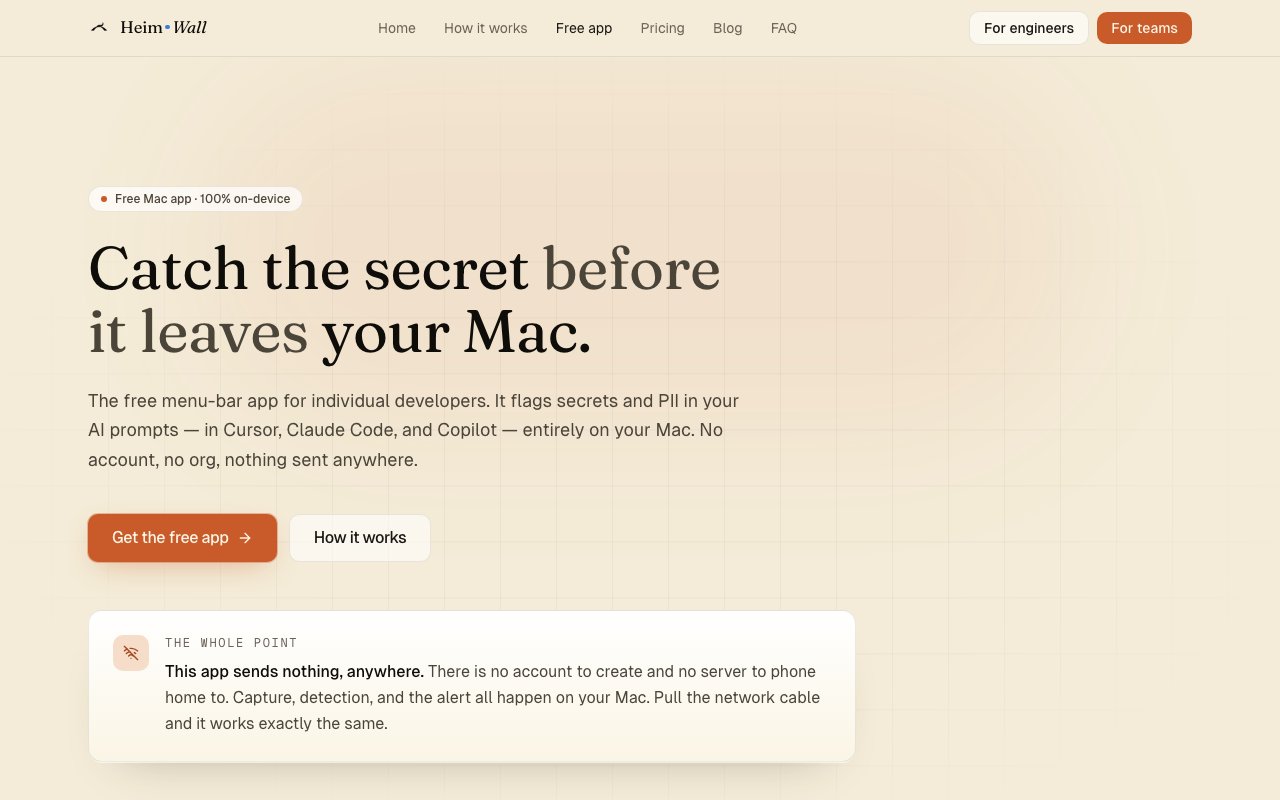
HeimWall is a macOS security application that monitors AI coding prompts for sensitive data exposure before they reach cloud services. It runs entirely on your Mac, flagging secrets and personally identifiable information in prompts sent to Cursor, Claude Code, Copilot, and other AI coding tools. The detection happens locally using deterministic regex matching, which means it's instant, explainable, and works completely offline without any network dependency. Nothing you type ever gets transmitted anywhere, and no account creation or sign in is required to use the free individual version. The application simply watches what you're about to send and warns you if something sensitive appears in your prompt before it leaves your machine.
The detection engine identifies forty seven different credential types including AWS keys, GitHub tokens, private SSH keys, JWTs, database connection URLs, Stripe API keys, Twilio credentials, and various other API secrets that developers regularly paste into prompts while debugging or asking for code help. Beyond credentials, it catches personally identifiable information like social security numbers, credit card numbers, phone numbers, and email addresses that might appear in sample data or test fixtures. A single background agent monitors multiple AI tools simultaneously, so you don't need separate watchers for each coding assistant you use. The regex patterns are deterministic rather than ML based, which means you can understand exactly why something triggered and there's no model making probabilistic guesses about what looks sensitive. When something fires, you know exactly which pattern matched and why.
The technical implementation keeps the application lightweight at just over four megabytes, built with Rust and Tauri for native performance without the bloated overhead of Electron based alternatives. It requires macOS 13 or later and supports Apple Silicon natively with good battery efficiency. When HeimWall detects sensitive content in a prompt, it displays a notification before the prompt reaches the AI service, giving you a chance to redact the sensitive portion or reconsider before sending credentials to a cloud provider you don't control. The scanning happens in the capture pipeline rather than after transmission, which is the only point where interception actually helps prevent exposure. Once data leaves your machine, it's out of your control regardless of what monitoring you have in place afterward.
The free version remains perpetually free for individual developers with no feature gates, trial periods, usage limits, or artificial limitations designed to push you toward paid tiers. If you're a solo developer who wants to avoid accidentally leaking secrets to AI providers, the tool does exactly that at no cost and with no strings attached. A paid team product is under development that will allow managers to see redacted security metrics across their organization while preserving prompt privacy for individual developers. The team tier addresses compliance and audit requirements without compromising the core privacy model since managers see aggregate statistics about detection events rather than actual prompt content or any ability to reconstruct what developers were working on. That balance matters for organizations that need oversight for compliance purposes without implementing invasive surveillance of their engineers.
HeimWall fills a specific gap in the AI coding workflow that other tools don't address well. Developers routinely paste error messages, configuration files, stack traces, environment variable dumps, and debug output into AI prompts, and those snippets often contain credentials or connection strings that shouldn't leave the local machine. Traditional secret scanning happens in CI/CD pipelines or pre commit hooks, but that's too late when the secret already went to an AI provider during development. Pre commit hooks don't run when you're just asking Claude how to fix a bug or pasting a stack trace to understand an exception. By intercepting prompts at the source, HeimWall prevents exposure rather than detecting it after the fact when the damage is already done. The audited architecture and fully local processing model distinguish it from alternatives that analyze prompts server side, where you'd have to trust their infrastructure not to log, retain, or mine your data. For developers who take data hygiene seriously, work under compliance requirements that restrict where sensitive data can flow, or simply prefer tools that respect privacy by design rather than by policy, that distinction matters considerably more than saving a few megabytes on application size.
Key Features
- Local-only secret and PII detection
- 25-plus hand-written credential rules
- On-device classifier fallback
- Under 50ms scan time
- Menu bar integration for Cursor, Claude Code, Copilot
- No account or cloud connection required
Pros & Cons
What we like
- Entirely on-device with zero cloud transmission
- Free forever with no subscription or account
- Lightweight at 15 MB install and 150 MB RAM idle
- Signed and notarized by Apple for easy install
Room for improvement
- Currently Apple Silicon only, no Intel or Windows yet
- Detection rules update requires app update rather than live push
- Focused on coding assistants, not general clipboard monitoring
- Early-stage product at version 0.0.5
Frequently Asked Questions
What is HeimWall?
Is HeimWall free?
Does HeimWall send my data anywhere?
Which AI tools does HeimWall support?
Best For
Featured in
Alternatives to HeimWall

1Password
Password and secrets manager for individuals, families, and developer teams with strong CLI and SSH agent support.
Clerk
Drop-in authentication and user management for modern apps

Tailscale
WireGuard-based mesh VPN that connects your devices, servers, and cloud resources into one private network in minutes.

BackPedal
UK bike theft protection that sends recovery agents after your stolen bike
Reviews (7)
Finally something that fits
HeimWall solves a real problem for me without making a fuss about it. Got real value out of under 50ms scan time. Support actually answered when I had a question, which surprised me. Mostly using it for catching aws keys before pasting into cursor prompts. Recommending it to people in a similar spot.
It just works
Three months of HeimWall later, here is what holds up. It just works, day after day, without surprises. Recommending it to people in a similar spot.
Recommended without reservation
HeimWall has quietly become part of my daily flow. The thing I keep coming back to is how reliable it is. It does what it says, which is rarer than it should be. Found it works best for catching aws keys before pasting into cursor prompts. No regrets so far.
Good, with a few caveats
HeimWall solves a real problem for me without making a fuss about it. The core workflow is smooth once you are set up. What stands out is how little babysitting it needs. The catch is currently apple silicon only, no intel or windows yet. Easy yes for anyone weighing the same trade offs.
Solid but not perfect
HeimWall has quietly become part of my daily flow. Got real value out of lightweight at 15 mb install and 150 mb ram idle. The catch is detection rules update requires app update rather than live push. Would sign up again without thinking twice.
Quietly excellent
Picked HeimWall for the price, stayed for the quality. Their take on menu bar integration for cursor, claude code, copilot is genuinely good. The interface stays out of my way, which I appreciate. It fits well for blocking accidental pii leaks in claude code sessions. No regrets so far.
Recommended without reservation
Hadn't planned on switching, but HeimWall was hard to ignore. It just works, day after day, without surprises. Glad I made the switch.
Badge builder
Add HeimWall to your website
Choose a badge style and size, preview it here, then copy the generated HTML. Badge images are self-contained SVGs and do not require an external script.

<a href="https://toolindex.net/tools/heimwall?ref=badge" target="_blank" rel="noopener">
  <img src="https://toolindex.net/badge/heimwall/medium.svg" alt="HeimWall - Listed on Tool Index" width="180" height="50" />
</a>How to use the badge
- 1. Pick the style, size, and theme that fit your layout.
- 2. Copy the generated HTML from the code block.
- 3. Paste it into your footer, homepage, or press page.
Score badge available
HeimWall qualifies for the score and circle badges based on its current top-10 positionin Security.
Badge clicks return visitors to this profile with a referral tag so the source remains identifiable.
Related Tools
Clerk
Drop-in authentication and user management for modern apps

DomeSOC
Autonomous SOC that grades every AI claim against evidence before it reaches an analyst
Reel
Forensic evidence capture for regulated Kubernetes, plus a free open-source VEX hub

Clay Seal
A control plane that checks and records every action an AI agent takes
Work on HeimWall? Request a listing correction