
Jag's AI Heat Map
See which AI topics and entities are heating up across news and developer sources
Gallery
About Jag's AI Heat Map
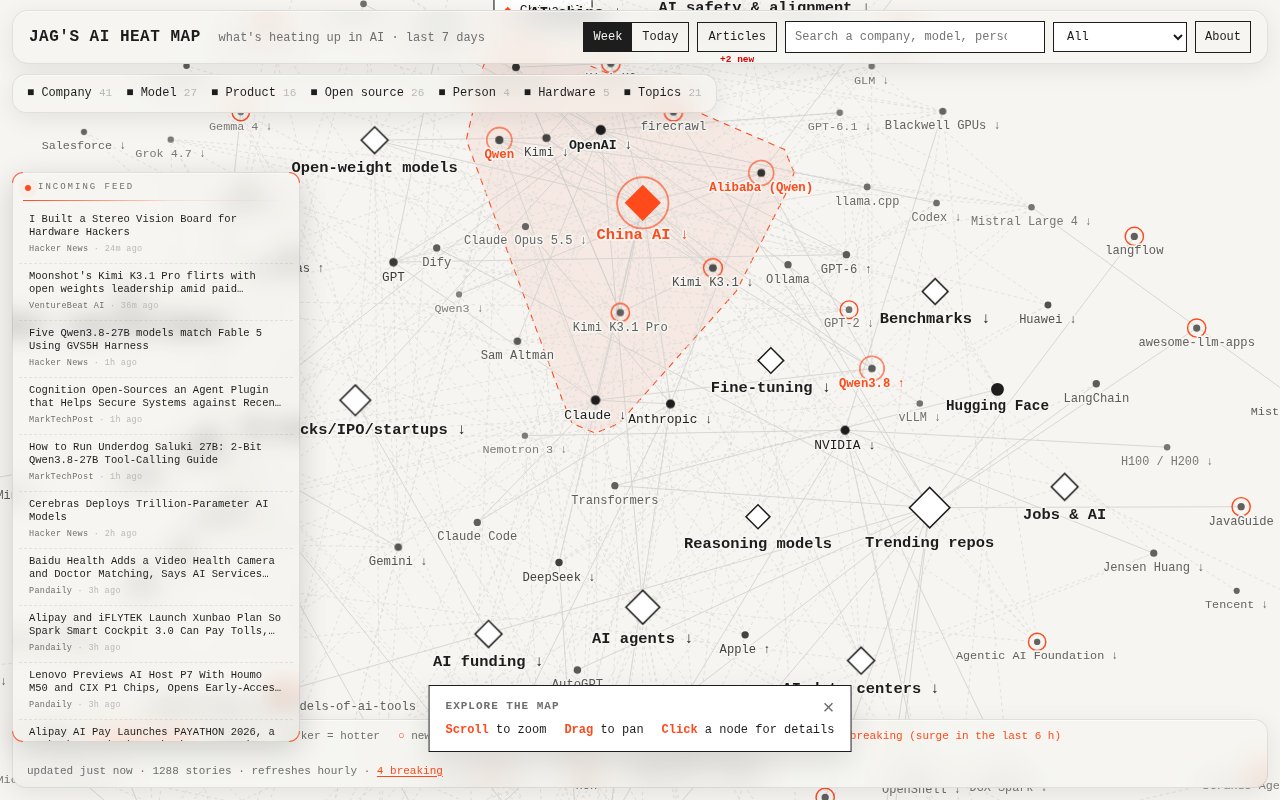
Jag's AI Heat Map is a public, interactive view of the subjects attracting attention across AI news, research, and developer communities. Instead of laying out another chronological feed, it turns companies, models, products, people, hardware, and ideas into a connected map. The visual gives a quick sense of what the wider AI conversation is concentrating on right now. Large, central, dark, and highly connected nodes represent entities receiving more discussion, while spatial relationships show which names and topics are appearing together in the same stories.
The map covers a rolling 7-day window and gives the latest stories more influence as time passes. Each article adds heat to the entities it mentions, with weighting based on the source and public popularity signals such as Hacker News points, Hugging Face upvotes, and GitHub stars. Heat then cools with a 24-hour half-life. This keeps an item from remaining dominant merely because it had one busy day early in the week. A separate Today view narrows the window to 24 hours, uses a 6-hour half-life, and compares attention with the previous six hours for a more immediate reading.
The visual language carries several kinds of context without requiring a spreadsheet. Topic nodes appear as diamonds and entities as circles. Bigger and darker nodes are hotter, and links connect entities mentioned in the same stories. An upward marker identifies heat that is at least 1.5 times its level 24 hours earlier, while a downward marker signals cooling. A ring marks an entity first seen during the week. Breaking names receive a distinct orange treatment when they collect at least two stories and more than 2.5 times the attention of the preceding six hours. The hottest topic and its nearest connections are also emphasized.
Readers can zoom, pan, and select a node for detail, so the page supports both a quick scan and a more deliberate investigation. The Articles view opens the material behind the map as a scrollable archive covering the last 30 days. Stories are grouped by source and ordered newest first, and selecting a source narrows the archive to its own headlines. Each headline opens the original item in a new tab. A small count indicates how many articles the system found during the last hour, which helps distinguish a quiet map from one that has just absorbed a fresh batch of coverage.
The source mix is broader than a conventional technology news homepage. The live page lists feeds from general news publishers, specialist AI outlets, company research blogs, academic sources, developer communities, and repositories. Examples include Hacker News, new GitHub repositories, Hugging Face papers and trending items, arXiv's AI category, major technology publications, research labs, and industry-specific outlets. It also draws from official company and lab channels alongside independent reporting, so a launch can appear through several different kinds of evidence. This range helps analysts, researchers, developers, founders, and curious readers spot overlap between technical releases, commercial activity, research, and public discussion. Readers still need to open the linked material to judge any claim for themselves.
What makes the tool distinct is its emphasis on relative attention and connection rather than editorial ranking alone. A standard feed can show that several stories were published, but it doesn't immediately reveal that the same model, company, and hardware platform are clustering across many sources. Here, proximity, links, heat, recency, and direction of travel work together as a visual summary. The weighting and decay rules are also published on the page, so readers can understand why an entity appears hot. The map doesn't claim that attention equals importance, quality, or approval, and it works best as a discovery layer before reading the underlying coverage. It can show momentum and co-mention patterns, but it doesn't replace source evaluation or explain every reason a subject became popular.
Jag's AI Heat Map is available directly in the browser with no visible account requirement or paid plan. The page presents itself as an independent project, says it isn't affiliated with the companies shown, and credits D3 for graph rendering. There is no personalized watchlist, alert workflow, or private team space described on the public surface. Its focus is narrower and simpler. It helps someone see what is heating up, find the stories contributing to that movement, and follow the original sources when a cluster deserves closer examination.
Key Features
- Interactive AI attention map
- Week and today views
- Rising and cooling indicators
- Breaking topic detection
- Thirty-day article archive
- Source-weighted heat scoring
Pros & Cons
What we like
- Turns a large feed mix into one visual overview
- Explains its heat and decay rules publicly
- Links mapped attention back to original stories
- Requires no account for public exploration
Room for improvement
- Attention does not measure accuracy or importance
- Dense maps may take time to interpret
- No personalized alerts or saved watchlists
- Coverage depends on the selected source mix
Frequently Asked Questions
What is Jag's AI Heat Map?
How does the map decide what is hot?
Can readers see the articles behind the map?
Is Jag's AI Heat Map free?
Best For
Featured in
Alternatives to Jag's AI Heat Map
View allNotionlytics
Page-view analytics and reader feedback widgets for public Notion pages

Cometly
Marketing attribution for B2B SaaS that ties ad spend to pipeline and closed-won revenue

Amplitude
Digital analytics platform for product, growth, and marketing teams to analyze user behavior across web and mobile.

Simple Analytics
Cookieless, GDPR-friendly web analytics that needs no consent banner
Our take
Tool Index Editorial · Oct 2026· 3.5/5
Jag's AI Heat Map turns a week of AI coverage into a visual network of topics, companies, models, and people. We opened the live map and found useful week and today views, clear rising and cooling markers, and an article archive that leads back to the underlying stories. It is free to browse without an account and suits analysts, founders, and developers who want a quick signal before reading further.
The published heat rules are a real strength because users can see how source weight, popularity, and recency affect the picture. Still, attention is not importance or accuracy, and a dense graph can obscure as much as it reveals. There are no visible watchlists or alerts, so this works best as a discovery layer, not a monitoring system.
Editorial opinion from the Tool Index team, written from the public product pages. Not a user review.
Reviews (0)
No reviews yet
Be the first to share your experience with Jag's AI Heat Map
Sign in to write a reviewBadge builder
Add Jag's AI Heat Map to your website
Choose a badge style and size, preview it here, then copy the generated HTML. Badge images are self-contained SVGs and do not require an external script.

<a href="https://toolindex.net/tools/jags-ai-heat-map?ref=badge" target="_blank" rel="noopener">
  <img src="https://toolindex.net/badge/jags-ai-heat-map/medium.svg" alt="Jag's AI Heat Map - Listed on Tool Index" width="180" height="50" />
</a>How to use the badge
- 1. Pick the style, size, and theme that fit your layout.
- 2. Copy the generated HTML from the code block.
- 3. Paste it into your footer, homepage, or press page.
Standard badge available
The standard listing badge is available now. Score and circle badges are limited to tools currently ranked in the top 10 of a category.
Badge clicks return visitors to this profile with a referral tag so the source remains identifiable.
Related Tools

Sleep Suivour
Track your sleep, improve your rest
Notionlytics
Page-view analytics and reader feedback widgets for public Notion pages
Mixpanel
Product analytics tool for tracking user events, funnels, retention, and cohorts to understand how people use your app.

Simple Analytics
Privacy-friendly web analytics with a clean dashboard, event tracking, and a strong stance against personal data collection.
Work on Jag's AI Heat Map? Request listing access or correction