
JarPeek
Open JAR, WAR and CLASS files in the browser and decompile them locally with nothing uploaded
Gallery
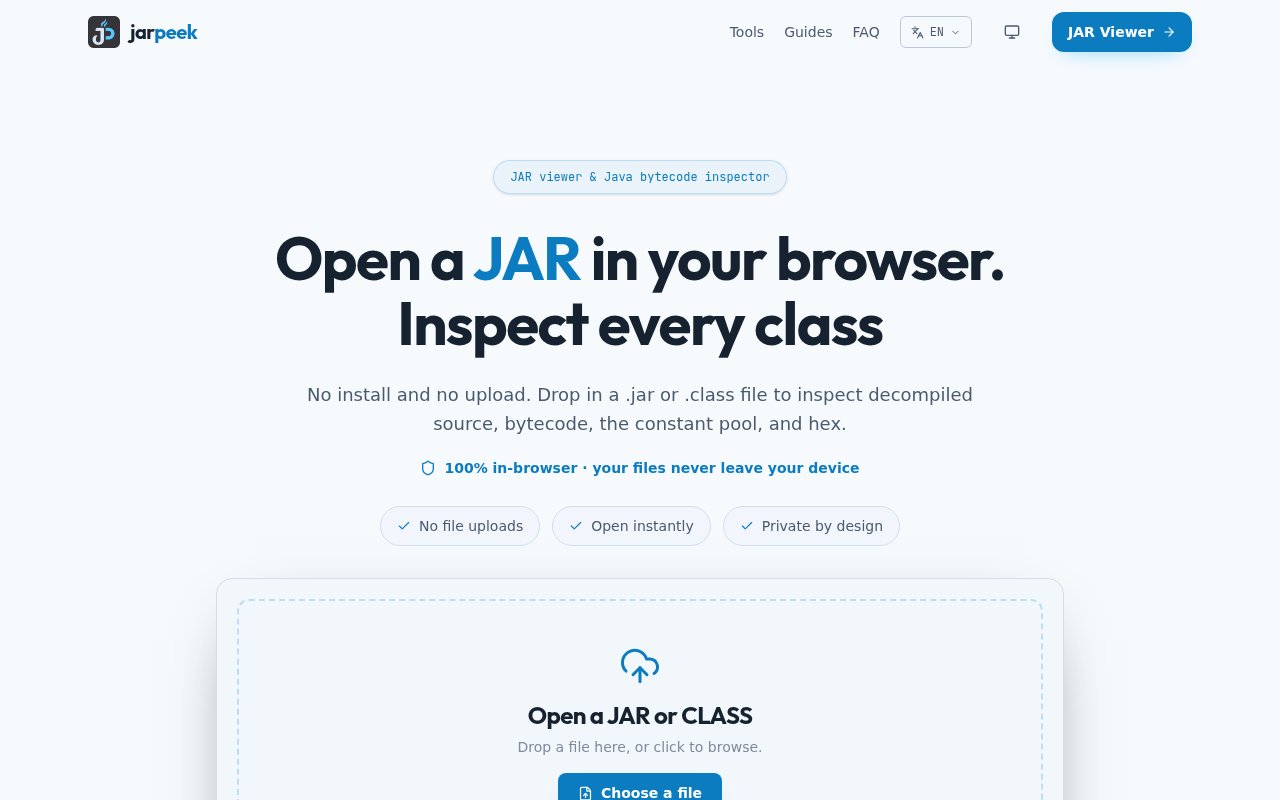
About JarPeek
JarPeek is an online viewer and decompiler for Java archives that does all of its work inside your browser. Drop in a JAR, WAR or CLASS file and you can browse the archive tree, read decompiled source, step through JVM bytecode, inspect constant pools and class metadata, and look at raw bytes in a section-aware hex viewer. Nothing is uploaded. The site's own line is that your files never leave your device, and there's no installation and no JDK required to use it. It handles the plain class files that come out of javac and the archives that wrap them, whether that's a library jar, a web application archive or a fat jar with everything bundled in.
The problem it solves is a familiar one for anyone who works on the JVM. You've got a jar with no source, maybe a third-party library that's misbehaving, a plugin you inherited, or a dependency you want to audit, and the usual answer involves installing a desktop decompiler or running javap in a terminal. Doing that on a locked-down work machine, or with a file you'd rather not send to a random web service, is awkward. JarPeek gives you the desktop tool's capability in a tab, with the privacy of local processing. Local processing also sidesteps the licensing question of uploading a vendor's proprietary code to a third-party server.
Under the hood it uses the Vineflower decompiler running in the browser, so source reconstruction happens on your machine. Alongside the decompiled view there's a bytecode viewer that shows JVM instructions with constant-pool references and attributes, a javap-style metadata view for people used to that output, and a class format inspector for versions, flags and structural details. The javap-style view matters for people who already know the JDK tool, since it shows the same information in the same shape without a terminal, and the class format inspector is the lowest-level view, showing the class file version, access flags and constant pool entries as they sit in the file. Resources inside the archive can be previewed and exported, search and filtering work across the archive, and you can export the reconstructed source as a ZIP. Classes compiled for JVM 8 and later are supported.
One feature that stands out is dependency inspection by coordinate. Instead of downloading an artifact by hand, you can give JarPeek a Maven or Gradle coordinate and it resolves the published artifact so you can look inside it directly. There's also specific guidance for Spring Boot jars, whose nested layout confuses generic tools, and a set of eight guides covering topics such as reading bytecode, extracting jars and understanding Maven dependencies. The Spring Boot guide is there because a fat jar's nested layout puts application classes and bundled dependencies in different places from a plain jar, which is where generic viewers tend to give up.
It's for Java and Kotlin developers debugging libraries they don't have source for, engineers doing code audits or security reviews, plugin and mod developers working against a compiled API, and students learning what the compiler actually emits. The suggested approach on the site is sensible. Start with the question you're trying to answer, check the manifest first, and only go down to bytecode and constant pools when the source view isn't enough. Security reviewers get a way to check what a vendor's binary actually contains before it goes near a build, teachers can put a class file on screen and show the bytecode next to the source that produced it, and because everything stays local it fits inside corporate rules that forbid uploading source or binaries to outside services.
What sets it apart is the combination of depth and restraint. Plenty of online decompilers exist, but most upload your file to a server, and few go beyond a source listing. JarPeek pairs source with bytecode, metadata and hex in one place, keeps everything local, and adds coordinate resolution so common tasks don't start with a download. The site is available in English and Chinese. It also runs in the browser you already have, so there's nothing to install on a machine where you can't install anything, and nothing to keep updated.
JarPeek is free to use, with no account, no pricing page and no published file size limits. It's a small, independent project, so support runs through a published email address rather than a company help desk, and very large archives may test what a browser tab can comfortably hold. For the everyday job of opening a jar and finding out what's in it, though, it's quick, private and complete. A privacy policy is published on the site, and the guides section doubles as documentation for the tool and as a primer on the JVM for people newer to it.
Key Features
- In-browser JAR, WAR and CLASS viewing
- Vineflower decompilation with no upload
- JVM bytecode and constant pool inspection
- Section-aware hex viewer
- Maven and Gradle coordinate resolution
- Resource preview and source export as ZIP
Pros & Cons
What we like
- Files stay on your machine
- No install and no JDK needed
- Source, bytecode, metadata and hex in one place
- Free with no account
Room for improvement
- Browser memory limits very large archives
- Decompiled output is a reconstruction, not the original source
- Independent project with email-only support
- Java 8 and later only
Frequently Asked Questions
What is JarPeek?
Does JarPeek upload my files?
Is JarPeek free?
Can it inspect a Maven dependency?
Best For
Featured in
Alternatives to JarPeek
View all
Kevin Gabeci
Solo developer building web apps, cozy browser games, and AI creator toolkits.

SoloDevStack
A solo developer blog built on head-to-head tool comparisons, 580+ posts deep.

Codedex
A gamified, story-driven platform that teaches Python, web dev, and more like an RPG quest

Vibe Built
Building real apps with agentic AI. What worked, what broke, what shipped.
Our take
Tool Index Editorial · Sep 2026· 4.0/5
JarPeek is a free browser workspace for opening JAR, WAR, ZIP and CLASS files without uploading them. It combines a Vineflower source reconstruction with JVM bytecode, constant pools, class structure, resources and a section-aware hex view. Java developers, auditors and students get unusually deep inspection without installing a JDK or desktop decompiler.
We like that local processing is the architecture rather than a deletion promise, and the recent addition of nested JAR browsing makes it more useful for real applications. The boundaries are clear. Decompiled Java is a reconstruction, remote URL loading depends on CORS, and very large archives are ultimately constrained by browser memory. Within those limits, JarPeek is specific, private and immediately useful.
Editorial opinion from the Tool Index team, written from the public product pages. Not a user review.
Reviews (0)
Badge builder
Add JarPeek to your website
Choose a badge style and size, preview it here, then copy the generated HTML. Badge images are self-contained SVGs and do not require an external script.

<a href="https://toolindex.net/tools/jarpeek?ref=badge" target="_blank" rel="noopener">
  <img src="https://toolindex.net/badge/jarpeek/medium.svg" alt="JarPeek - Listed on Tool Index" width="180" height="50" />
</a>How to use the badge
- 1. Pick the style, size, and theme that fit your layout.
- 2. Copy the generated HTML from the code block.
- 3. Paste it into your footer, homepage, or press page.
Standard badge available
The standard listing badge is available now. Score and circle badges are limited to tools currently ranked in the top 10 of a category.
Badge clicks return visitors to this profile with a referral tag so the source remains identifiable.
Related Tools
Kevin Gabeci
Solo developer building web apps, cozy browser games, and AI creator toolkits.

Coolify
Self-hostable, open source alternative to Heroku and Netlify

Warp
The modern terminal reimagined with AI and collaboration

Bolt.new
Prompt-to-deployed full-stack app inside the browser
Work on JarPeek? Request listing access or correction