
JSON Support
Convert JSON and CSV to Excel spreadsheets instantly without signup or downloads
Gallery
About JSON Support
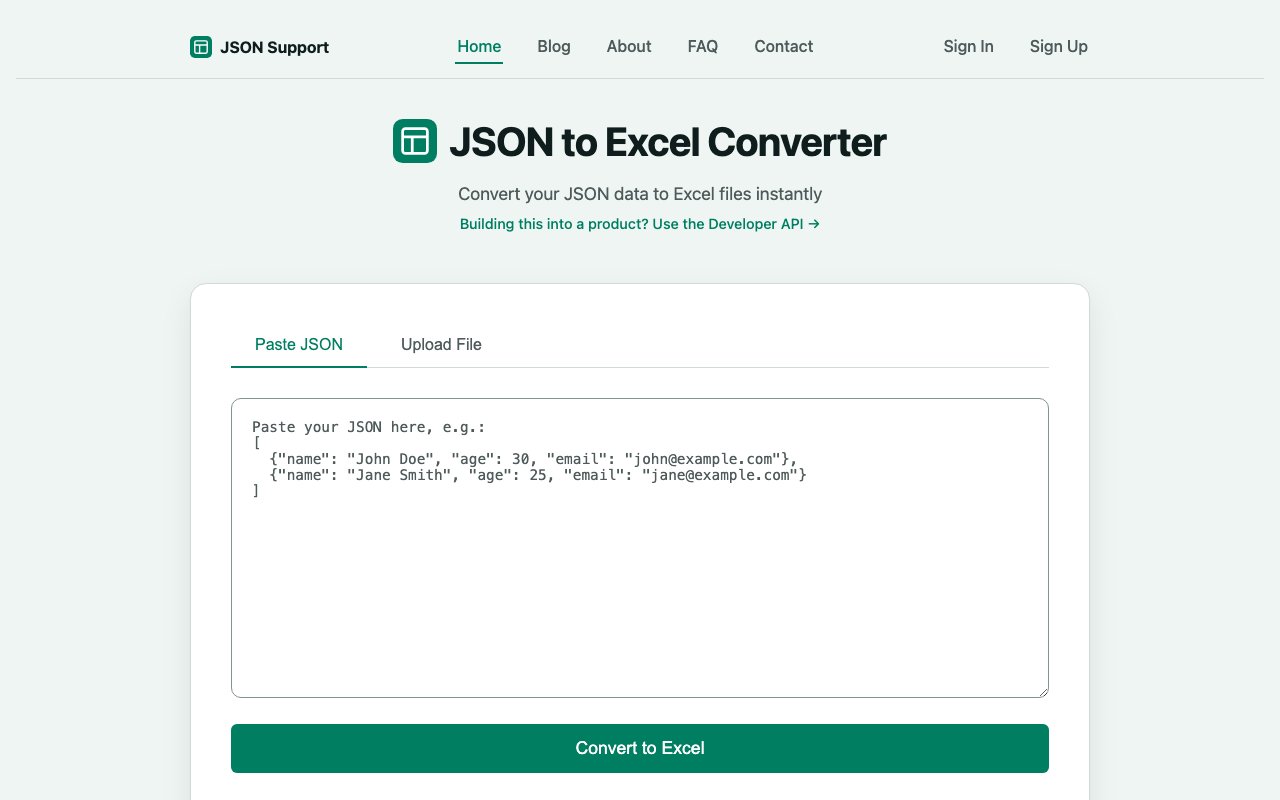
JSON Support is a browser-based conversion tool that transforms JSON data into formatted Excel spreadsheets without requiring registration, software installation, or data storage on external servers. The tool runs on serverless infrastructure powered by AWS Lambda and uses ExcelJS under the hood to generate properly formatted .xlsx files. You paste raw JSON into a text area or drag and drop a file, preview how the data will structure itself into columns and rows, and download the result. The entire conversion happens in seconds, and your data isn't retained after processing completes. It solves a narrow but persistent problem: getting structured data out of developer-friendly formats and into spreadsheet form where colleagues, clients, or stakeholders can actually work with it.
The conversion workflow follows three steps. First, you add your data by either pasting JSON directly into the input field or uploading a .json or .csv file through drag-and-drop. The tool accepts standard JSON, nested structures, arrays of objects, and NDJSON or JSONL formats where each line contains a separate JSON object. Second, you review a preview that shows the initial rows of your converted data so you can verify the structure looks right before committing. Third, you click convert and the tool automatically downloads the .xlsx file to your machine. There's no waiting for email confirmation, no navigating through multiple pages, and no account dashboard to manage. You land on the page, complete the conversion, and leave with your file.
Beyond the primary JSON to Excel converter, the site includes several related utilities that address adjacent problems. An Excel to JSON converter handles the reverse direction for cases where you need to extract spreadsheet data back into structured format for APIs or databases. A JSON formatter cleans up messy, minified, or poorly indented JSON into readable form, running entirely client-side so sensitive data doesn't leave your browser. A JSON validator checks syntax before you attempt conversion, catching missing brackets, trailing commas, or malformed strings that would cause the conversion to fail. These companion tools fill gaps that appear naturally when you're moving data between systems that expect different formats.
The target audience breaks into distinct groups with overlapping needs. Developers and data engineers use it to convert API responses from REST or GraphQL endpoints into spreadsheets they can share with non-technical team members. Data analysts working with exports from NoSQL databases like MongoDB or Firebase use it to get document-oriented data into tabular form for analysis. Operations teams dealing with structured logs, analytics data, or configuration exports use it to make that data accessible to people who live in Excel or Google Sheets. Non-technical users who receive JSON files from developers or automated systems use it because they don't want to learn a new format just to read a config file or review an export. The common thread is bridging the gap between structured data formats that developers produce and spreadsheet workflows that everyone else already knows.
For developers who need programmatic access rather than manual conversions, JSON Support offers an API with authentication and rate limiting. The API includes a free tier for testing and integration development, plus paid Pro tiers for production traffic where you're processing conversions at scale as part of a larger pipeline. This lets you build JSON-to-Excel conversion into your own products without handling the file generation yourself. The web tool remains completely free with no usage limits for individual conversions, no registration wall, and no email capture before you can use it.
What distinguishes JSON Support from other conversion tools is the deliberate removal of friction. Plenty of utilities can convert JSON to Excel, but many require creating an account before you can do anything, bury the conversion feature behind unrelated functionality, display confusing interfaces with options you don't need, or store your data in ways that raise security questions. JSON Support does exactly one thing and does it immediately. You don't configure anything. You don't sign up. You don't wait. The data processes through serverless infrastructure, never persists beyond the conversion, and you walk away with a formatted spreadsheet. That simplicity is the product.
The limitation is equally clear. JSON Support is not a data transformation tool, a spreadsheet editor, or a file processing platform. It won't let you merge multiple JSON files into a single spreadsheet, apply conditional formatting to the output, filter or transform the data during conversion, or handle complex nested structures that don't map cleanly to rows and columns. If you need that kind of manipulation, you'll do it in Excel after the conversion or in your data pipeline before it. JSON Support handles the format translation and nothing more, which keeps the tool fast and simple for the common case where you just need JSON data in .xlsx form without wrestling with configuration or learning a new interface.
Key Features
- JSON to Excel conversion with instant download
- CSV to Excel conversion support
- Excel to JSON reverse conversion
- JSON formatter and validator tools
- No signup or account required
- Developer API with free and paid tiers
Pros & Cons
What we like
- No account, no install, no friction to get started
- Preview output before downloading the spreadsheet
- Works in the browser with nothing to configure
- API available for automated conversion pipelines
Room for improvement
- No data transformation or spreadsheet formatting options
- Does not merge multiple files into one output
- API pricing details require checking the documentation
- Focused tool with no features beyond format conversion
Frequently Asked Questions
What is JSON Support?
Is JSON Support free?
Can JSON Support convert Excel back to JSON?
Who is JSON Support for?
Best For
Featured in
Alternatives to JSON Support
View all
Kevin Gabeci
Solo developer building web apps, cozy browser games, and AI creator toolkits.

SoloDevStack
A solo developer blog built on head-to-head tool comparisons, 580+ posts deep.

Codedex
A gamified, story-driven platform that teaches Python, web dev, and more like an RPG quest

Vibe Built
Building real apps with agentic AI. What worked, what broke, what shipped.
Our take
Tool Index Editorial · Oct 2026· 3.5/5
JSON Support converts JSON, JSONL, or CSV into Excel, CSV, or copy-ready Google Sheets data in the browser. It is for developers and analysts who need to hand structured data to spreadsheet users without setting up a pipeline. The manual converter is free and requires no account. A metered API has a free tier and Pro options, though the captured pages do not show the paid price.
The live preview, nested-field handling, and choice between numbered columns and one row per list item make this more useful than a bare format swap. The main workflow now stays in the browser, which is a good fit for sensitive data. It is still a conversion utility, not a cleaning or modeling tool, and the site says the Excel output adds a one-line credit below the data. Complex nested records may still need reshaping after export.
Editorial opinion from the Tool Index team, written from the public product pages. Not a user review.
Reviews (0)
Badge builder
Add JSON Support to your website
Choose a badge style and size, preview it here, then copy the generated HTML. Badge images are self-contained SVGs and do not require an external script.

<a href="https://toolindex.net/tools/json-support?ref=badge" target="_blank" rel="noopener">
  <img src="https://toolindex.net/badge/json-support/medium.svg" alt="JSON Support - Listed on Tool Index" width="180" height="50" />
</a>How to use the badge
- 1. Pick the style, size, and theme that fit your layout.
- 2. Copy the generated HTML from the code block.
- 3. Paste it into your footer, homepage, or press page.
Standard badge available
The standard listing badge is available now. Score and circle badges are limited to tools currently ranked in the top 10 of a category.
Badge clicks return visitors to this profile with a referral tag so the source remains identifiable.
Related Tools
Kevin Gabeci
Solo developer building web apps, cozy browser games, and AI creator toolkits.

Coolify
Self-hostable, open source alternative to Heroku and Netlify

Warp
The modern terminal reimagined with AI and collaboration

Bolt.new
Prompt-to-deployed full-stack app inside the browser
Work on JSON Support? Request listing access or correction