
Leafwright
A hosted PDF render API and studio, so you never run your own headless browser
Gallery
About Leafwright
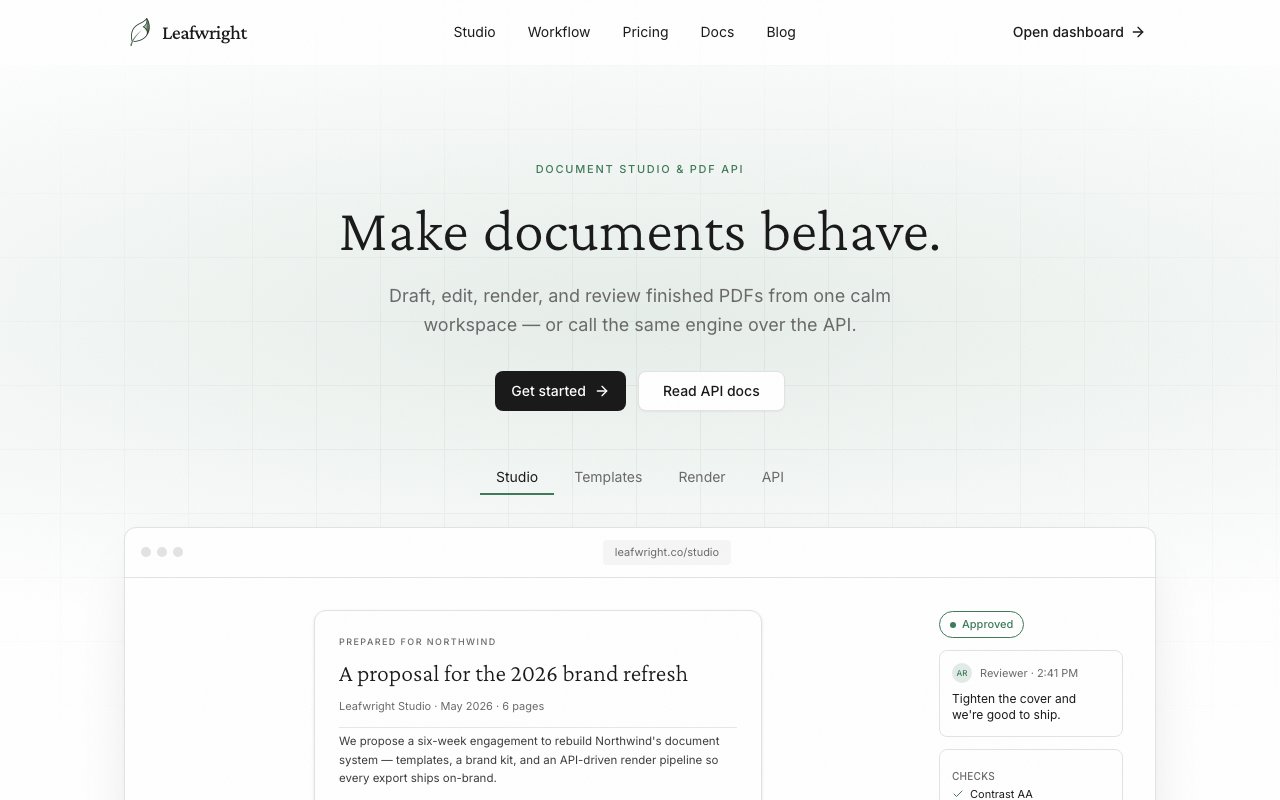
Leafwright is a platform for generating PDFs, built for teams that need finished documents out of an API without standing up and babysitting their own browser infrastructure. It combines a hosted render API with a visual studio, so you can create documents by hand in a workspace or produce them programmatically at scale, and both sides share the same rendering engine so what you design is what your API returns.
Anyone who has built PDF export into a product knows the usual path. You spin up headless Chrome, wire it to a queue, fight with fonts and page breaks, and then own the memory leaks and crashes forever. Leafwright's reason to exist is to take that whole burden off your plate. You send it your content, it renders the PDF, and you never run or maintain a browser cluster yourself. That's the trade it's offering, less infrastructure in exchange for a metered service.
The render API is flexible about what you feed it. You can send raw HTML, point it at a public URL, or call a published template with JSON data, and templates support Handlebars placeholders that get filled from the per-request JSON. That covers the common cases cleanly, from turning an existing web page into a PDF to generating thousands of personalized invoices from a single template. Around the render itself, it gives you project-based API keys with Bearer auth and key rotation, signed delivery URLs so files stay private, webhooks and render events for notifications, automatic retries, and job logging so you can see exactly what happened. Those are the unglamorous pieces that a homegrown setup usually skips and then regrets, since a PDF that silently fails to render or leaks a private file is the kind of bug you only find in production.
The studio is the other half. It lets you draft documents with AI from a text description, edit on a canvas with live preview, and lean on a template system so structured documents stay consistent. There are inline accessibility and print-validation checks that catch problems before you ship, plus review and approval steps so a document can be signed off inside the tool. A brand kit locks fonts, colors, and footers so everything that comes out looks the same, whether a person made it or the API did.
Keeping the studio and the API on one engine is more than a convenience. It means a template you build and preview by hand renders the same way when your code calls it in production, so there are no surprises where the design looked right in the editor and then broke in the automated output. Teams can design and approve a document once, then trust that every programmatic render matches what got signed off, which is exactly the gap that trips up homegrown PDF pipelines.
There's also an angle for AI workflows. Leafwright ships a remote MCP server with OAuth alongside a local stdio package, which means agents in tools like Claude, ChatGPT, Cursor, and Codex can generate PDFs directly. If you're building automation that needs to hand a user a finished document, that's a clean way to wire it in without gluing together your own rendering step at the end.
It fits developers and document teams operating at some scale. Backend engineers who need reliable PDF output, teams churning out proposals and contracts that must stay on-brand, and products that generate receipts or reports for users are the natural audience. The mix of a real editor and a real API also means non-engineers can build and review templates while developers handle the programmatic side, which keeps both groups working inside the same system. That shared workspace is part of the appeal, since design changes don't have to travel through a developer ticket to reach production and a marketer can adjust a footer or a color without touching code.
Pricing is freemium and usage-based. A free Hobby plan gives you 100 PDFs and 8 AI drafts with no credit card, and paid tiers climb from Indie at $19 a month for 3,000 PDFs, to Pro at $79 for 15,000, to Business at $299 for 80,000, with a custom Enterprise tier above that. One credit renders up to a 50-page PDF and longer documents use more credits per 50-page block, paid plans support metered overage through Stripe, and extra AI drafts run between $0.20 and $0.40 each depending on your plan. It's the kind of pricing that stays cheap while you're small and scales with how much you actually render, so a side project can start on the free tier and grow into the paid plans only once the document volume genuinely justifies the added spend.
Key Features
- Render API for HTML, URLs, and templates
- Handlebars templates with per-request JSON
- Signed delivery URLs and webhooks
- AI drafting inside a visual studio
- Brand kit for fonts, colors, and footers
- Remote MCP server for AI agents
Pros & Cons
What we like
- No need to run your own headless-browser infrastructure
- Free Hobby tier with no credit card
- One API handles HTML, URLs, and JSON-filled templates
- Studio and API share the same rendering engine
Room for improvement
- Credit model bills longer PDFs in 50-page increments
- AI drafts are metered and cost extra past the plan
- Younger product with a smaller community
- Hosted service, so you depend on their uptime
Frequently Asked Questions
What is Leafwright?
Is Leafwright free?
What inputs does the render API accept?
How is Leafwright different from running headless Chrome yourself?
Best For
Featured in
Alternatives to Leafwright

1Lookup
Real-time data verification API for phone, email, IP, and domain validation to fight fraud

Plannotator
Review and annotate your AI coding agent's plans and diffs before they ship

Codedex
A gamified, story-driven platform that teaches Python, web dev, and more like an RPG quest

Davit
Native macOS UI for Apple's container platform on Apple silicon
Reviews (13)
Two months in, no regrets
Picked Leafwright for the price, stayed for the quality. The one api handles html, urls, and json-filled templates is more useful than I expected. It fits well for producing branded proposals and contracts at scale. Would sign up again without thinking twice.
Recommended without reservation
Leafwright has quietly become part of my daily flow. Got real value out of ai drafting inside a visual studio. The interface stays out of my way, which I appreciate. No regrets so far.
Solid but not perfect
Hadn't planned on switching, but Leafwright was hard to ignore. The interface stays out of my way, which I appreciate. It does what it says, which is rarer than it should be. It would be a five if not for younger product with a smaller community. Would sign up again without thinking twice.
Recommended without reservation
Picked Leafwright for the price, stayed for the quality. Their take on brand kit for fonts, colors, and footers is genuinely good.
Exactly what I needed
Started using Leafwright casually, now it is pinned in my dock. It handles the boring parts so I can focus on the work that matters. Would sign up again without thinking twice.
Exactly what I needed
Three months of Leafwright later, here is what holds up. Their take on one api handles html, urls, and json-filled templates is genuinely good. Found it works best for letting an ai agent create pdfs through mcp.
Finally something that fits
Hadn't planned on switching, but Leafwright was hard to ignore. It handles the boring parts so I can focus on the work that matters. Worth it for what I get out of it.
Worth a look
Three months of Leafwright later, here is what holds up. Got real value out of remote mcp server for ai agents. Support actually answered when I had a question, which surprised me. It earns its place in my stack.
Two months in, no regrets
Came to Leafwright after getting frustrated with what I had before. The studio and api share the same rendering engine is more useful than I expected. It slotted into my routine without much fuss. Found it works best for generating invoices and receipts from templates.
Quietly excellent
Came to Leafwright after getting frustrated with what I had before. Performance has been steady even when I lean on it hard. It fits well for rendering pdfs from html without maintaining browser infra.
Pulled its weight from week one
Have been running Leafwright for a while, here is where I land. Their take on free hobby tier with no credit card is genuinely good. Setup was painless and I was productive the same day. Mostly using it for generating invoices and receipts from templates. Glad I made the switch.
Two months in, no regrets
Leafwright has quietly become part of my daily flow. What stands out is how it handles free hobby tier with no credit card. Recommending it to people in a similar spot.
It just works
Have been running Leafwright for a while, here is where I land. The brand kit for fonts, colors, and footers is more useful than I expected. Found it works best for generating invoices and receipts from templates. No regrets so far.
Badge builder
Add Leafwright to your website
Choose a badge style and size, preview it here, then copy the generated HTML. Badge images are self-contained SVGs and do not require an external script.

<a href="https://toolindex.net/tools/leafwright?ref=badge" target="_blank" rel="noopener">
  <img src="https://toolindex.net/badge/leafwright/medium.svg" alt="Leafwright - Listed on Tool Index" width="180" height="50" />
</a>How to use the badge
- 1. Pick the style, size, and theme that fit your layout.
- 2. Copy the generated HTML from the code block.
- 3. Paste it into your footer, homepage, or press page.
Standard badge available
The standard listing badge is available now. Score and circle badges are limited to tools currently ranked in the top 10 of a category.
Badge clicks return visitors to this profile with a referral tag so the source remains identifiable.
Related Tools

Kevin Gabeci
Solo developer building web apps, cozy browser games, and AI creator toolkits.

Coolify
Self-hostable, open source alternative to Heroku and Netlify

Warp
The modern terminal reimagined with AI and collaboration

Bolt.new
Prompt-to-deployed full-stack app inside the browser
Work on Leafwright? Request listing access or correction