
Ledge
Write Markdown notes that run shell commands, code, SQL, and AI prompts
Gallery
About Ledge
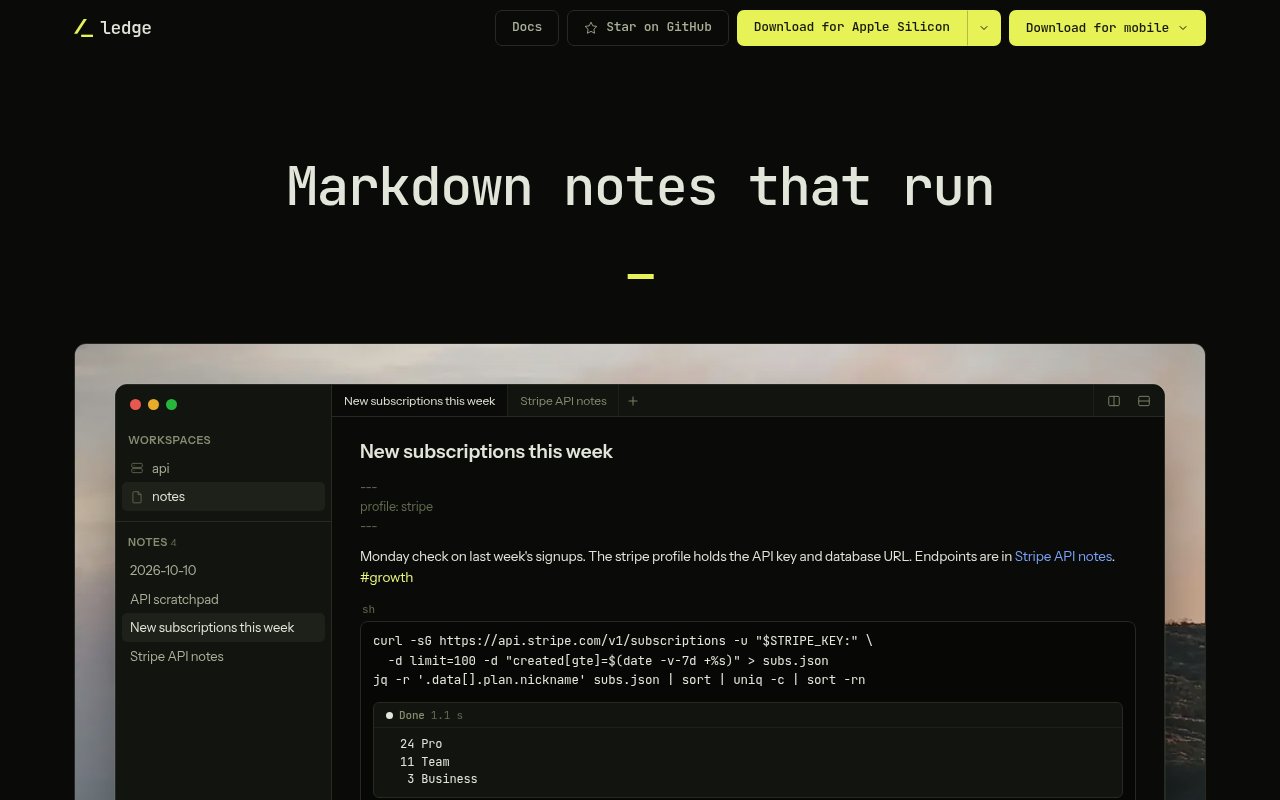
Ledge is a free, open-source Markdown notebook for developers and DevOps work. It combines a notes app with runnable code blocks, so a command, query, script, or AI prompt can live beside the explanation and output it belongs to. Put the cursor in a block and run it to stream results directly beneath the code. The underlying note remains a plain Markdown file in an ordinary folder rather than a record in a proprietary database. That makes Ledge suited to project runbooks, incident notes, data exploration, daily journals, and other technical documents that are more useful when their instructions can execute in place.
Every note gets its own persistent shell. Changing directories, exporting a variable, or activating a virtual environment carries into the next block in that note, which lets a document behave like a repeatable working session. Frontmatter can set the starting directory and environment, while a separate terminal drawer provides an interactive shell for commands that need continued input. Shell, Python, Node, Ruby, PHP, TypeScript, Redis, and SQL examples are supported, and additional interpreters can be configured. Output streams while a block is running, and interactive prompts can accept input. A block can also be marked as nonrunnable or configured to ask for confirmation before execution.
Ledge can work locally, against another machine over SSH, or as a window onto a self-hosted Ledge Server. A note can name a remote host in frontmatter and run its blocks there using the user's existing SSH keys, configuration, agents, and two-factor authentication. When notes live on Ledge Server, the server stores the files and owns the running shells, so work can continue after a laptop closes. The iPhone and iPad apps connect to that server and can read, edit, search, and run notes without storing them on the phone. Android support is labeled beta. This gives the product a useful remote operations story, but the mobile experience depends on a server the user operates.
The remote design avoids a separate hosted account. Ledge connects to a server through SSH, pins its host key, and refuses a different key on a later connection. Mobile pairing creates a key in the phone's Secure Enclave that does not leave the device and is limited to speaking with Ledge. Several computers, phones, or application windows can work against one server while keeping independent tabs. Running blocks belong to the server, so output remains available after a client disconnects. A server command can also place an encrypted backup of the notes in an S3-compatible bucket every hour, leaving backup storage under the user's control.
Security and ownership are handled with plain files, external secret profiles, and optional note locking. A profile is a local environment file referenced by name, so a note can use credentials without embedding them in content that will be synced or read by an agent. Locked note bodies and pasted images are encrypted behind a passphrase, omitted from search and backlinks, and hidden from agents until unlocked. There is no recovery if that passphrase is lost. Since workspaces are folders, users can sync them with iCloud Drive, Dropbox, Syncthing, git, or another file tool. Ledge follows outside file changes and treats a git conflict as a file conflict rather than inventing a separate sync model.
The app also has a built-in MCP server and command line interface. An MCP-capable agent can read, search, create, and edit unlocked notes by title, while no delete tool is exposed and locked bodies remain unavailable. Runnable prompt blocks send their content to the connected agent and stream its response beneath the prompt. The command line tool lists, reads, searches, creates, and appends notes, with JSON output for scripts. Around those automation features is a full note workspace with live Markdown preview, pasted content conversion, daily templates, full-text search, tags, favorites, wikilinks, backlinks, multiple workspaces, split panes, and restorable trash.
Ledge is distributed under the Apache 2.0 license and requires no account or subscription. Desktop downloads cover Apple Silicon Macs, Linux on x64 and arm64, and Windows 11 through WSL. The server is installed and maintained by the user, which preserves control but asks for more technical setup than a hosted notebook. Developers who already keep commands in Markdown can gain a direct path from documentation to execution without moving secrets or notes into a vendor database. People who only need simple prose notes may find the shell model unnecessary, and teams must still use care because runnable documentation can perform the same consequential actions as a terminal.
Key Features
- Runnable Markdown code blocks
- Persistent per-note shells
- Remote execution over SSH
- Encrypted locked note bodies
- Built-in MCP agent server
- Plain-file workspace storage
Pros & Cons
What we like
- Keeps notes as portable Markdown files
- Combines documentation with live execution
- Separates secrets from synced note content
- Supports local, remote, and mobile workflows
Room for improvement
- Mobile use depends on a self-hosted server
- Windows support requires Windows Subsystem for Linux
- Locked notes cannot be recovered without the passphrase
- Runnable notes require normal terminal safety practices
Frequently Asked Questions
What is Ledge?
Is Ledge free and open source?
Where does Ledge store notes?
Can AI agents access Ledge notes?
Best For
Featured in
Alternatives to Ledge

Kevin Gabeci
Solo developer building web apps, cozy browser games, and AI creator toolkits.

SoloDevStack
A solo developer blog built on head-to-head tool comparisons, 580+ posts deep.

Codedex
A gamified, story-driven platform that teaches Python, web dev, and more like an RPG quest

Vibe Built
Building real apps with agentic AI. What worked, what broke, what shipped.
Reviews (0)
Badge builder
Add Ledge to your website
Choose a badge style and size, preview it here, then copy the generated HTML. Badge images are self-contained SVGs and do not require an external script.

<a href="https://toolindex.net/tools/ledge?ref=badge" target="_blank" rel="noopener">
  <img src="https://toolindex.net/badge/ledge/medium.svg" alt="Ledge - Listed on Tool Index" width="180" height="50" />
</a>How to use the badge
- 1. Pick the style, size, and theme that fit your layout.
- 2. Copy the generated HTML from the code block.
- 3. Paste it into your footer, homepage, or press page.
Standard badge available
The standard listing badge is available now. Score and circle badges are limited to tools currently ranked in the top 10 of a category.
Badge clicks return visitors to this profile with a referral tag so the source remains identifiable.
Related Tools
Kevin Gabeci
Solo developer building web apps, cozy browser games, and AI creator toolkits.

Coolify
Self-hostable, open source alternative to Heroku and Netlify

Warp
The modern terminal reimagined with AI and collaboration

Bolt.new
Prompt-to-deployed full-stack app inside the browser
Work on Ledge? Request listing access or correction