
llmspeed
Preview how fast a local LLM will feel on different hardware
Gallery
About llmspeed
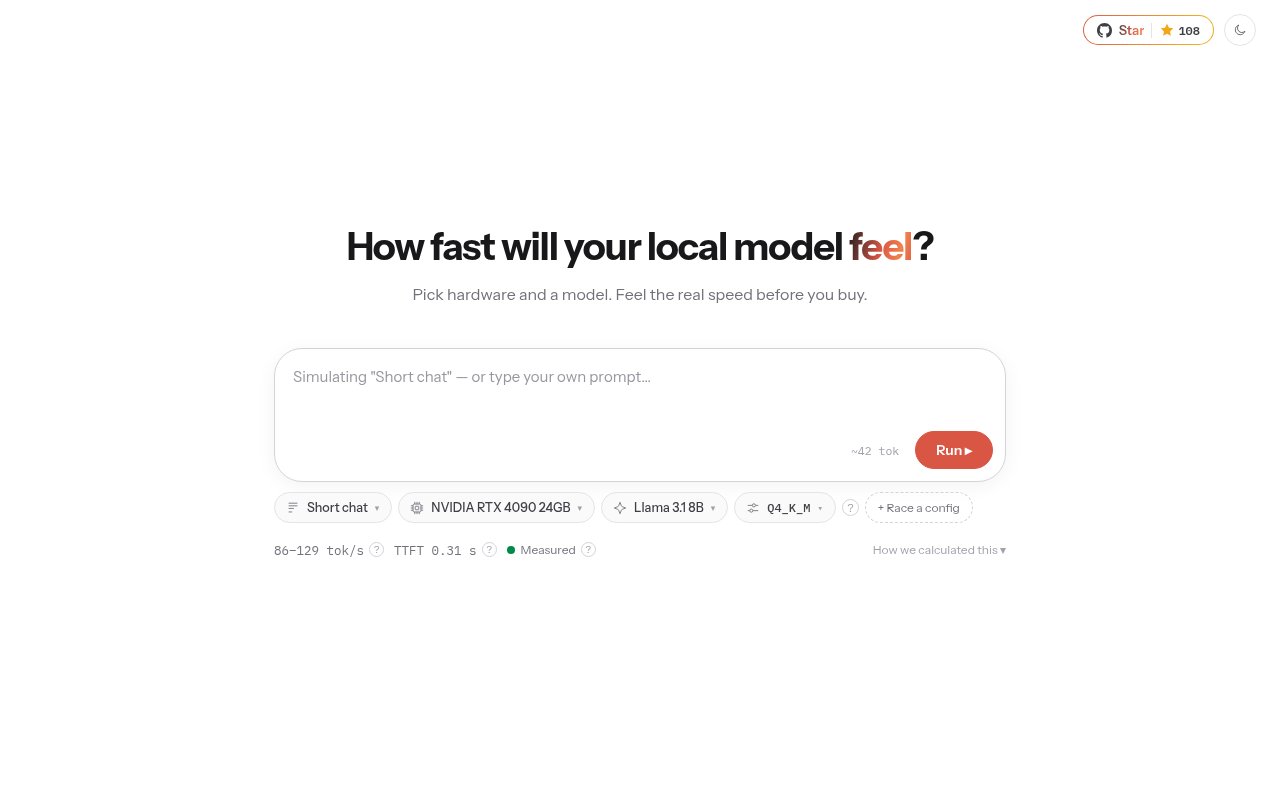
llmspeed is an open source simulator for comparing how local large language models are likely to feel on different computers. It helps answer a practical question that specification sheets rarely settle on their own. If someone buys a particular GPU, Mac, or CPU system, will the model they want actually fit, how long will the first response take, and how quickly will the rest of the answer appear? Instead of reducing that decision to a table of tokens per second, llmspeed streams sample text at the predicted pace. That makes the difference between a responsive setup and a frustrating one easier to understand before money is spent on hardware.
The main workflow starts with a hardware choice, a model, and a quantization. A user can run that configuration and watch an answer arrive after a simulated wait for the first token. The site reports expected generation speed, time to first token, and whether the selected model fits in available memory. It also distinguishes a clean fit from partial offload to system RAM and from a configuration that won't run. The catalog currently spans GPUs, Macs, and CPU hardware across CUDA, Metal, ROCm, Vulkan, and CPU backends. Dedicated pages let visitors browse by hardware or by model, so the tool works both for someone starting with a machine and for someone starting with a model requirement.
Race mode is the most useful part for direct buying comparisons. It runs two setups side by side, which turns an abstract difference in benchmark numbers into two visible response streams. A prospective buyer can compare a discrete GPU with a high memory Mac, try different quantizations, or see the effect of selecting hardware that forces some model weights into system memory. Configurations and races can be shared through links, which is handy when a team is discussing a purchase or helping someone choose a build. The simulation is aimed at short prompts on one device, so it gives a focused picture of interactive local inference rather than pretending to model every possible production workload.
Its estimates combine submitted benchmark results with calculations for combinations that haven't been measured directly. llmspeed labels each result as measured, derived, or projected, giving the reader an immediate signal about how much confidence to place in it. Measured means the same hardware, model, and quantization were benchmarked. Derived figures are interpolated from similar measured setups, while projected figures use hardware specifications and can cover announced hardware before real measurements appear. The calculation accounts for memory bandwidth during generation, compute during prompt processing, backend efficiency, context slowdown, model weights, key value cache, runtime overhead, and the slower system memory path used by partial offload.
That transparent confidence model is what separates llmspeed from a plain benchmark leaderboard. Raw scores are useful, but they often leave a newcomer to translate model size, quantization, memory capacity, prompt processing, and output rate into an actual experience. llmspeed performs that translation while keeping the source quality visible. Community members can contribute measurements by running llama.cpp's benchmark utility and submitting the output, engine version, prompt and generation figures, hardware details, and a source link. Results from other engines are also welcomed when the engine is identified. The site's prediction data is generated by its benchmark pipeline rather than hidden behind an unexplained rating.
The best audience is anyone choosing hardware for local model experimentation, from an individual building a workstation to a developer checking whether a target model is realistic for users' machines. It can narrow a shopping list, compare an existing computer with a possible upgrade, or provide a quick sanity check before downloading a very large model. It isn't a replacement for testing on the final machine. The maintainers say drivers, engine versions, flash attention, power limits, and thermals can move real results by 10 to 30 percent, and multi GPU setups aren't simulated. Projected results for unreleased hardware are also estimates that are meant to be replaced as measurements arrive.
Access is straightforward. The simulator is available on the web, its source and prediction data are public on GitHub, and the project uses the MIT license. There is no account requirement or paid plan presented on the official site. Developers can inspect the assumptions, run the static Vite and Preact application locally, or contribute a benchmark through the repository. That open posture makes llmspeed especially useful as an early decision aid. It offers a faster and more intuitive first pass than collecting scattered benchmark posts, while clearly showing where its output comes from and where a real local test still matters.
Key Features
- Real-time inference speed simulation
- Side-by-side hardware race mode
- Model memory fit checks
- Measured and estimated data labels
- Shareable configuration links
- Hardware and model browsing
Pros & Cons
What we like
- Turns benchmark rates into a visible streaming experience
- Shows memory fit and partial offload outcomes
- Labels measured, derived, and projected estimates clearly
- Publishes its source and prediction data
Room for improvement
- Simulates only single device setups
- Real performance can vary by 10 to 30 percent
- Some combinations rely on derived or projected figures
- Focuses on short interactive prompts
Frequently Asked Questions
What is llmspeed?
Are llmspeed results real benchmarks?
Is llmspeed free?
Can llmspeed compare two hardware setups?
Best For
Featured in
Alternatives to llmspeed

Kevin Gabeci
Solo developer building web apps, cozy browser games, and AI creator toolkits.

SoloDevStack
A solo developer blog built on head-to-head tool comparisons, 580+ posts deep.

Codedex
A gamified, story-driven platform that teaches Python, web dev, and more like an RPG quest

Vibe Built
Building real apps with agentic AI. What worked, what broke, what shipped.
Our take
Tool Index Editorial · Oct 2026· 4.0/5
llmspeed makes local model benchmarks easier to understand by showing how a response is likely to feel on selected hardware, including time to first token and memory fit. We like that it labels results as measured, derived, or projected instead of presenting every estimate with equal confidence. The source and prediction data are public, and the site shows no account requirement or paid plan.
This is a strong shortlisting tool, not a substitute for running the model yourself. The site models short prompts on one device, and many combinations depend on interpolation or hardware specifications rather than direct tests. Drivers, thermals, context length, and runtime settings can all change the result. Used with that caveat, it is a thoughtful way to avoid an obviously poor hardware purchase.
Editorial opinion from the Tool Index team, written from the public product pages. Not a user review.
Reviews (0)
Badge builder
Add llmspeed to your website
Choose a badge style and size, preview it here, then copy the generated HTML. Badge images are self-contained SVGs and do not require an external script.

<a href="https://toolindex.net/tools/llmspeed?ref=badge" target="_blank" rel="noopener">
  <img src="https://toolindex.net/badge/llmspeed/medium.svg" alt="llmspeed - Listed on Tool Index" width="180" height="50" />
</a>How to use the badge
- 1. Pick the style, size, and theme that fit your layout.
- 2. Copy the generated HTML from the code block.
- 3. Paste it into your footer, homepage, or press page.
Standard badge available
The standard listing badge is available now. Score and circle badges are limited to tools currently ranked in the top 10 of a category.
Badge clicks return visitors to this profile with a referral tag so the source remains identifiable.
Related Tools
Kevin Gabeci
Solo developer building web apps, cozy browser games, and AI creator toolkits.

Coolify
Self-hostable, open source alternative to Heroku and Netlify

Warp
The modern terminal reimagined with AI and collaboration

Bolt.new
Prompt-to-deployed full-stack app inside the browser
Work on llmspeed? Request listing access or correction