
MacAudio
Control the volume, mute state, and output of Mac apps and browser tabs from the menu bar
Gallery
About MacAudio
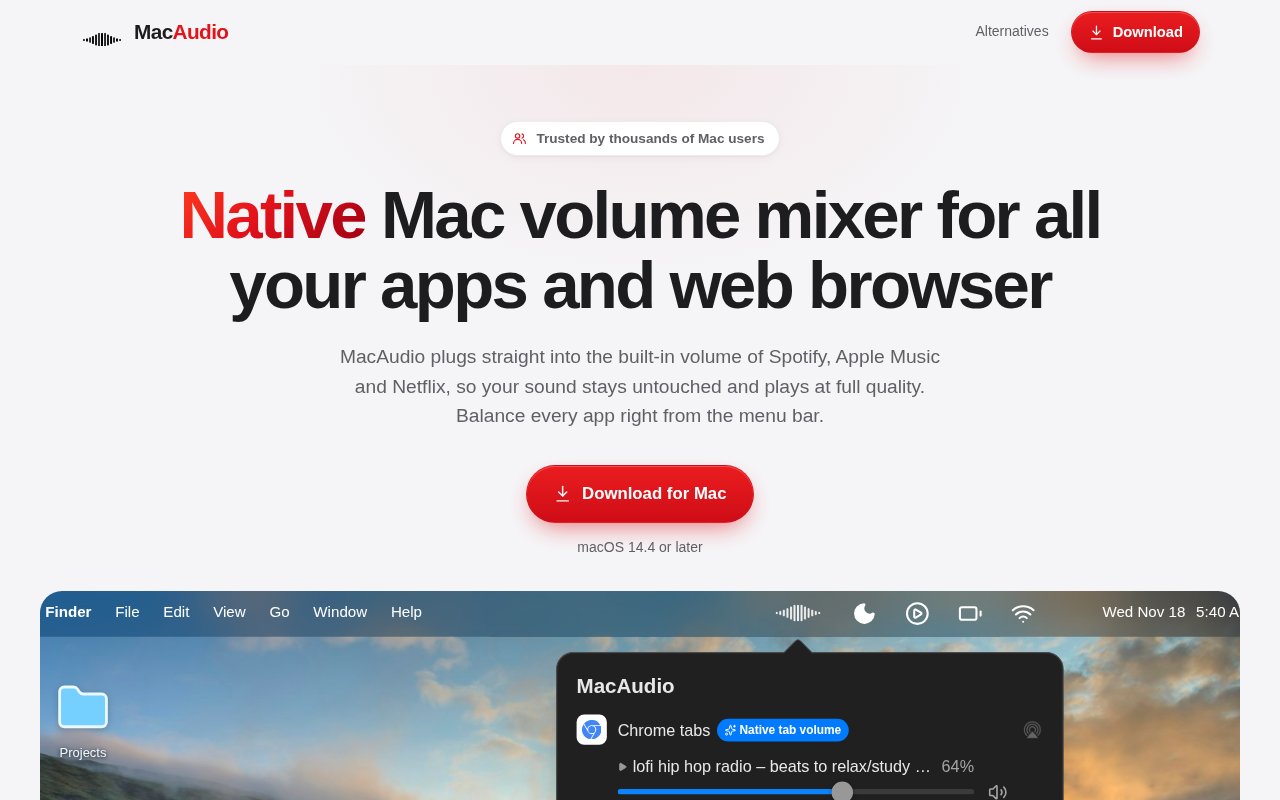
MacAudio is a native macOS volume mixer that gives individual apps and playing browser tabs their own controls in the menu bar. It addresses a basic limitation in macOS, where the normal system control changes the level for everything at once. With MacAudio, a user can turn down a loud YouTube tab, keep a call louder, mute a second browser tab, or change the level of a music app without moving the rest of the mix. It also provides mute and output device controls, which makes it useful for people who regularly move between built-in speakers, headphones, displays, and other audio devices.
The product's distinctive idea is direct control for supported apps and sites. Many Mac mixers capture an application's output and adjust the signal after the app has produced it. MacAudio instead connects to the app's own volume setting where that connection is supported. Moving a slider in the MacAudio menu can move the corresponding control inside the app or web player, so the source handles the level and the audio is not processed simply to make it quieter or louder. This is intended to preserve the original audio quality while still putting the controls in one compact place.
Current native connections include Spotify, Apple Music, and Apple TV. The browser side supports Safari, Chrome, and Edge, with individual sliders for playing tabs on services such as YouTube, YouTube Music, Netflix, and Twitch, plus many other pages that play video or audio. Per-tab control matters because a conventional per-app mixer usually sees the browser as one shared process. MacAudio can separate the active media tabs instead of forcing every sound from Chrome or Safari onto the same level. For unsupported software, the broader app mixer still provides the expected per-app volume workflow, while the direct source-control advantage depends on the published support list.
Output routing broadens the use beyond simple loudness adjustment. Each app or playing tab can be assigned its own output device, and the developer says audio can be sent to different speakers at the same time. That can help a desk setup send music to external speakers while a call uses a headset, or keep a media tab on one device while other system audio stays elsewhere. The menu bar design keeps these choices available without a large mixing window. MacAudio is signed with an Apple Developer ID and notarized by Apple, and payments are handled through Stripe according to the developer's published product notes.
The direct-control design also sets a realistic boundary. A connection has to exist before MacAudio can move the source application's own slider, so native handling is strongest on the named music apps, browsers, and media sites. Browser support goes deeper than ordinary process-level mixing because each playing page can appear separately, while a standard utility often exposes only one Chrome or Safari fader. Users who spend most of their time in those supported services get the clearest benefit. Anyone with a specialized player should use the trial to confirm how it appears, whether its level can be controlled directly, and whether the needed output routing behaves as expected.
The best audience is a Mac user who constantly balances several sources. Remote workers can keep calls prominent while lowering background music. Stream viewers can control two playing tabs independently. Gamers can separate a game, voice chat, and a browser source. People with several output devices can route apps without rebuilding an Audio MIDI Setup configuration for every session. The scope is narrower than a professional audio utility, which is part of the appeal. MacAudio is not presented as an equalizer, effects rack, or input-device controller. Anyone who needs per-app EQ, Audio Unit plug-ins, or detailed input processing will need another tool.
MacAudio is paid software with a 24-hour free trial. A lifetime license costs $29 as a one-time purchase, with no subscription, and the developer publishes a 14-day refund window. That is straightforward for someone who already knows they need per-app or per-tab mixing, though the trial is short for a utility whose value becomes clearest across several different work and entertainment sessions. The supported-app approach also means buyers should check that their important players and browsers are covered. Within those boundaries, the product offers a focused answer to a familiar Mac annoyance, with an especially useful distinction between whole-browser volume and control over each media tab.
Key Features
- Per-app volume and mute
- Independent browser tab sliders
- Menu bar audio controls
- Per-source output routing
- Native supported-app volume control
- Simultaneous multi-device playback
Pros & Cons
What we like
- Separates playing browser tabs instead of one browser process
- Preserves source audio quality for supported native controls
- Combines volume, mute, and output choices in the menu bar
- Uses a one-time license instead of a subscription
Room for improvement
- Available only for macOS
- The free trial lasts only 24 hours
- Direct native control depends on the supported-app list
- Does not include per-app EQ or audio effects
Frequently Asked Questions
What is MacAudio?
Which apps and browsers does MacAudio support directly?
How is MacAudio different from a standard per-app mixer?
How much does MacAudio cost?
Best For
Featured in
Alternatives to MacAudio
View all
CalendHub
Smart scheduling and calendar management for teams
Kevin Gabeci Toolkits
Seven AI toolkits for writing books, making music, cutting video, and building agents.

Eased Into AI
Learn AI from zero. No jargon, no hype, just steps that work.

Zielor
German exam preparation for DTZ, Leben in Deutschland, Goethe and telc. Waitlist open.
Reviews (0)
Badge builder
Add MacAudio to your website
Choose a badge style and size, preview it here, then copy the generated HTML. Badge images are self-contained SVGs and do not require an external script.

<a href="https://toolindex.net/tools/macaudio?ref=badge" target="_blank" rel="noopener">
  <img src="https://toolindex.net/badge/macaudio/medium.svg" alt="MacAudio - Listed on Tool Index" width="180" height="50" />
</a>How to use the badge
- 1. Pick the style, size, and theme that fit your layout.
- 2. Copy the generated HTML from the code block.
- 3. Paste it into your footer, homepage, or press page.
Standard badge available
The standard listing badge is available now. Score and circle badges are limited to tools currently ranked in the top 10 of a category.
Badge clicks return visitors to this profile with a referral tag so the source remains identifiable.
Related Tools

Confluence
Atlassian's long-running team wiki that anchors many enterprise knowledge stacks
Asana
Project management for teams that live in projects, tasks and dependencies
Kevin Gabeci Toolkits
Seven AI toolkits for writing books, making music, cutting video, and building agents.

Logseq
An open-source outliner notes app where every bullet is a first-class block
Work on MacAudio? Request listing access or correction