
Makefaster
Let a coding agent test and keep measured website performance improvements
Gallery
About Makefaster
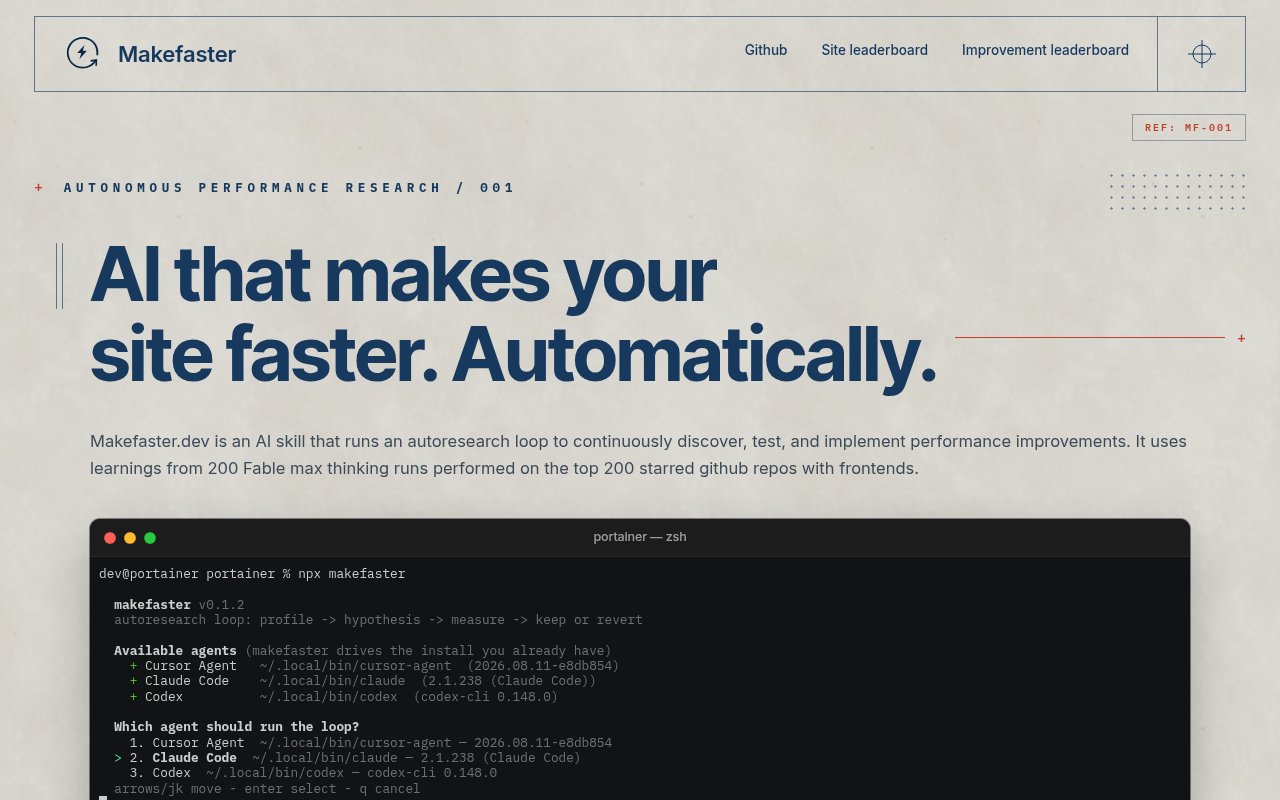
Makefaster is a command-line tool that gives an AI coding agent a disciplined loop for improving website performance. Instead of asking an agent to make a site faster and accepting whatever changes it proposes, the tool has it profile the current site, form one hypothesis at a time, measure the result, and keep only changes that beat the measured noise floor. It is built around user-visible performance metrics, with Largest Contentful Paint as the primary measure when Lighthouse is available. The result is an optimization process tied to actual before and after measurements rather than a list of generic recommendations.
A run starts with npx makefaster inside a website repository. The CLI detects supported agent tools already installed on the machine, currently Cursor Agent, Claude Code, and Codex, and asks the user which available provider and model to use. It reuses the sign-in state already held by that agent instead of requesting or injecting a new API key. Makefaster then imports a ranked improvement checklist from its live leaderboard, with a bundled catalog as a fallback. The agent walks the checklist in order, skips categories that plainly don't apply to the site, and may add up to five hypotheses of its own after the ranked work is complete.
Measurement is the gate for every experiment. The loop profiles a user-felt metric, establishes a baseline, changes one relevant part of the site, runs the measurement again, and compares the result with both the baseline and observed noise. A change is kept only when it clears the project's stated threshold, while a miss is reverted before the next idea. The documented rule for LCP requires an improvement of at least five percent or 20 milliseconds and a result beyond the noise floor. Cold and warm runs, with a median of at least three measurements, are used when the environment supports them. Skipped ideas cost no measurement, while failed experiments still remain visible in the run record.
The terminal dashboard makes the process inspectable while it runs. It shows the current loop and experiment, a table of measured metrics, and timing bars for completed iterations. Kept changes update the running candidate value, while reverted attempts remain part of the measurement history. Session state lives in a .makefaster folder in the target repository, including the imported skill, improvement plan, current state, results, and a compact progress log. That state is automatically excluded through the repository's local Git exclude file, so the working artifacts don't have to become project files or pollute a commit.
The imported leaderboard gives the loop a practical ordering rather than a random tour of performance advice. Categories that have produced measured wins across submitted sites rise in the list, and the local agent checks those before spending its extra hypothesis budget. A site can optionally submit its URL and measured LCP or Time to Interactive results, while generic techniques can be sent without the URL. The shared data doesn't prove that a technique will help every stack, but it provides an evidence-based starting order and still requires the current repository to earn its own keep.
Makefaster is most useful for developers who are comfortable letting an agent edit a real codebase but want a stricter standard than plausible-looking performance work. It can test familiar techniques such as compression, rendering changes, or asset handling, yet the checklist is only an ordering mechanism. The tool's distinctive part is the keep or revert discipline. The agent doesn't declare a win because a diff looks sensible. It has to show a repeatable movement in the selected metric. Browser measurement runs through a loopback broker outside the child agent's filesystem sandbox, while the broker accepts only an HTTP or HTTPS URL and owns the fixed Lighthouse and Chrome flags.
At the end of a round, Makefaster can run another loop or ask whether to share results. Site statistics may be submitted to a public leaderboard with the site URL, favicon, measured improvements, and a pull request link when one exists. Generic improvement data can be submitted without the site URL. Sharing either form is a separate choice, as is submitting the agent's reasoning trace, which defaults to no and is stored privately when accepted. The tool itself is currently free to install from npm and its source is publicly available. It doesn't host a model, so users still need a supported coding agent installed and signed in. The public project is young, but its narrow focus and explicit measurement contract make its behavior unusually concrete.
Key Features
- Measured keep-or-revert experiments
- Ranked performance improvement checklist
- Cursor, Claude, and Codex support
- Live terminal timing dashboard
- Cold and warm profiling
- Optional public result leaderboards
Pros & Cons
What we like
- Requires measured gains before keeping code changes
- Reuses an existing agent login without new keys
- Makes failed experiments visible and reversible
- Works from a normal website repository
Room for improvement
- Requires a supported coding agent already installed
- A full checklist can take many measurement runs
- Automated edits still need developer review
- Young project with a small user community
Frequently Asked Questions
What is Makefaster?
Which coding agents does Makefaster support?
Is Makefaster free?
Does Makefaster publish my results automatically?
Best For
Featured in
Alternatives to Makefaster
View all
Kevin Gabeci
Solo developer building web apps, cozy browser games, and AI creator toolkits.

SoloDevStack
A solo developer blog built on head-to-head tool comparisons, 580+ posts deep.

Codedex
A gamified, story-driven platform that teaches Python, web dev, and more like an RPG quest

Vibe Built
Building real apps with agentic AI. What worked, what broke, what shipped.
Our take
Tool Index Editorial · Sep 2026· 3.0/5
Makefaster gives a coding agent a repeatable loop for finding, testing, and keeping website performance changes. It is for developers who want measured experiments rather than a generic list of optimization tips. The site shows an npx entry point and a live results board, but it does not publish a price in the captured page.
We like the basic discipline of measuring each change and reverting losers. The public board reports large average LCP and TTI gains across 199 sites, but it also says those figures use one run per site and cold-load data where available. That is interesting evidence, not a controlled benchmark. Agent-written changes still need code review, and long experiment loops may consume substantial time and model usage.
Editorial opinion from the Tool Index team, written from the public product pages. Not a user review.
Reviews (0)
Badge builder
Add Makefaster to your website
Choose a badge style and size, preview it here, then copy the generated HTML. Badge images are self-contained SVGs and do not require an external script.

<a href="https://toolindex.net/tools/makefaster?ref=badge" target="_blank" rel="noopener">
  <img src="https://toolindex.net/badge/makefaster/medium.svg" alt="Makefaster - Listed on Tool Index" width="180" height="50" />
</a>How to use the badge
- 1. Pick the style, size, and theme that fit your layout.
- 2. Copy the generated HTML from the code block.
- 3. Paste it into your footer, homepage, or press page.
Standard badge available
The standard listing badge is available now. Score and circle badges are limited to tools currently ranked in the top 10 of a category.
Badge clicks return visitors to this profile with a referral tag so the source remains identifiable.
Related Tools
Kevin Gabeci
Solo developer building web apps, cozy browser games, and AI creator toolkits.

Coolify
Self-hostable, open source alternative to Heroku and Netlify

Warp
The modern terminal reimagined with AI and collaboration

Bolt.new
Prompt-to-deployed full-stack app inside the browser
Work on Makefaster? Request listing access or correction