
MakeThisBetter
AI-powered feedback widget that turns user signals into actionable issues for coding agents
Gallery
About MakeThisBetter
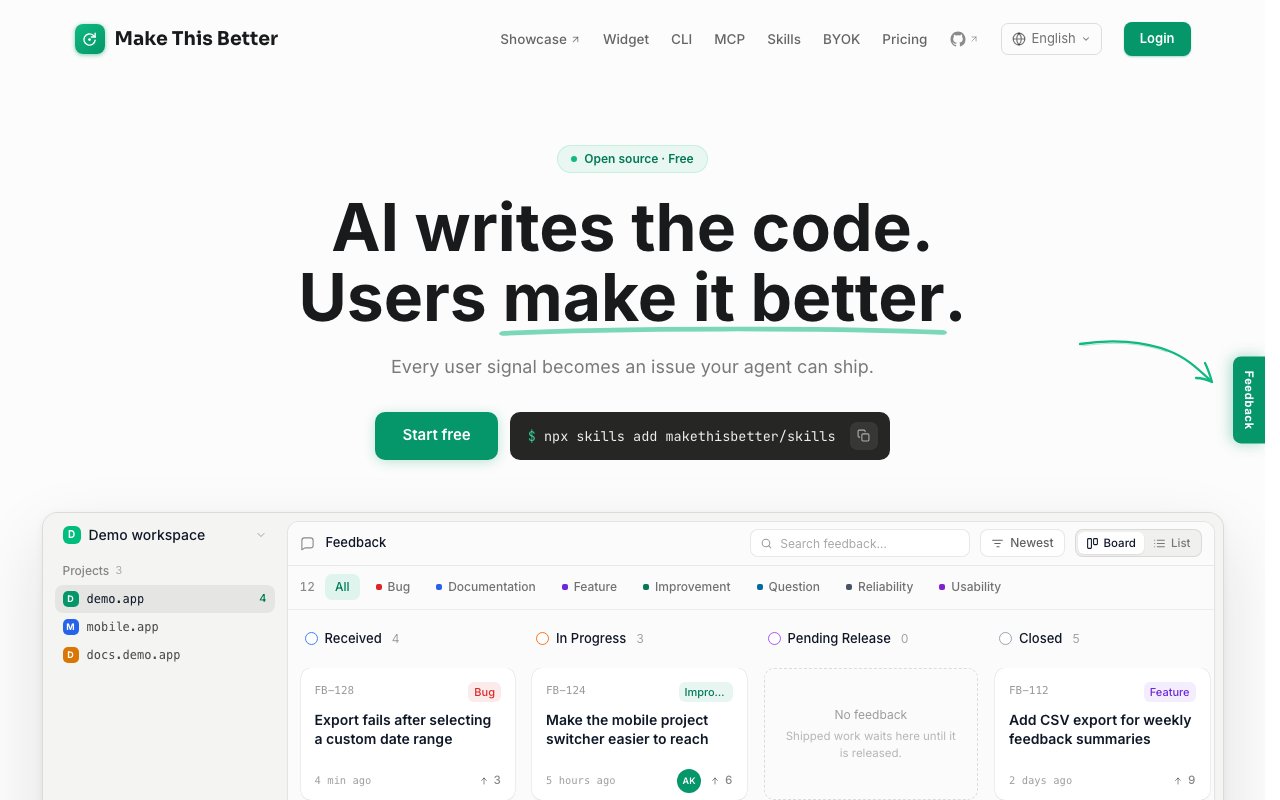
Make This Better is a feedback collection platform that connects user reports directly to AI coding agents. The system captures feedback with screenshots, DOM snapshots, and console logs, then uses AI to triage issues into structured formats that Claude Code, Cursor, Windsurf, or Codex can act on immediately. Instead of feedback sitting in a backlog waiting for a developer to interpret it, the platform transforms scattered user signals into actionable issues that agents can claim and ship. The bridge between user-reported problems and agent-driven fixes closes without manual translation steps that traditionally slow down response cycles and create interpretation errors.
The feedback capture widget lets users mark up screenshots by clicking elements and adding notes directly on the interface. When a user submits feedback, the system automatically captures context including the current URL, a full DOM snapshot, and any console logs present at the moment of submission. This evidence package travels with the issue through the entire pipeline, never getting separated from the report. The AI triage layer asks clarifying questions to structure each report, extracting the scene (context), the blocker, and the underlying user need. Vague complaints become specific, reproducible issues with the technical context already attached. The transformation from raw feedback to structured issue happens before any human developer sees it, front-loading the clarification work that usually happens in frustrating back-and-forth comment threads.
Agent integration works through MCP (Model Context Protocol) and a Skill-based architecture that modern coding tools support. Teams install via a single CLI command: npx @makethisbetter/cli setup. Once connected, agents can run /makethisbetter pick to inspect the evidence, claim an issue, and start the fix. The workflow integrates with deploy notifications and third-party tools, so agents know when their changes ship and users see real-time progress on a public feedback board. That transparency builds trust since users watch issues move from received to in-progress to shipped without needing to ask for updates. The public board becomes a visible commitment to responsiveness rather than a hidden queue where reports disappear into silence.
The platform differentiates from traditional issue trackers by optimizing for AI agent consumption rather than human scanning. Every piece of context that an agent might need, from the exact DOM state to the console errors present at the time of the report, arrives pre-packaged in a machine-readable format. Human developers can also work these issues, but the format favors the structured inputs that modern coding assistants handle well. The evidence chain eliminates the scenario where a developer receives a vague bug report, spends twenty minutes trying to reproduce it, and eventually asks the user for more details. Reproduction context ships with the original report, immediately available.
Pricing starts with a free tier that includes one seat, unlimited feedback and projects, 30 days of history retention, and access to the public feedback board. Teams can validate the workflow with real users before committing to a paid plan. The Pro plan at $15.90 per month (billed annually) adds three seats, one year of history, private boards, and custom domain support, plus $5 in AI credits to get started. Teams needing more seats can upgrade to the Team plan at $39.90 per month (annual billing), which includes ten seats along with roles, permissions, and per-project access controls. Additional seats beyond the plan allocation cost $5 per month or $60 per year. The seat pricing scales reasonably for growing teams without cliff-edge pricing jumps that punish success.
A notable pricing detail is the BYOK (Bring Your Own Key) option available on any plan. Teams that prefer using their own API key for AI operations pay nothing to Make This Better for AI usage, keeping costs predictable for high-volume feedback processing. Teams already hitting their AI provider hard can route Make This Better through their existing key and budget rather than running a parallel cost center. The platform integrates with Paddle, Stripe, and Braintree for payment processing, and the underlying stack uses Hotwire (Turbo and Stimulus) for the web interface. Teams already invested in AI-native development workflows will find the MCP server integration familiar from their experience with other agent-connected tools in the ecosystem.
Key Features
- Screenshot markup with drawing and annotations
- Automatic DOM snapshot and console log capture
- AI triage that extracts scene, blocker, and need
- MCP integration for Claude Code, Cursor, and Windsurf
- Public Feedback Board with user notifications
- Bring Your Own Key for AI usage
Pros & Cons
What we like
- Captures rich context including DOM and console logs automatically
- Routes structured issues directly to AI coding agents
- Free tier includes unlimited feedback and projects
- Users get notified when their reported issues ship
Room for improvement
- Value depends on using AI coding assistants in your workflow
- Agent integration requires MCP setup
- Younger product with a smaller community
- Not a full bug tracker or project management tool
Frequently Asked Questions
What is MakeThisBetter?
Is MakeThisBetter free?
How does MakeThisBetter integrate with AI agents?
Who is MakeThisBetter for?
Best For
Featured in
Alternatives to MakeThisBetter
View all
Kevin Gabeci
Solo developer building web apps, cozy browser games, and AI creator toolkits.

SoloDevStack
A solo developer blog built on head-to-head tool comparisons, 580+ posts deep.

Codedex
A gamified, story-driven platform that teaches Python, web dev, and more like an RPG quest

Vibe Built
Building real apps with agentic AI. What worked, what broke, what shipped.
Reviews (0)
Badge builder
Add MakeThisBetter to your website
Choose a badge style and size, preview it here, then copy the generated HTML. Badge images are self-contained SVGs and do not require an external script.

<a href="https://toolindex.net/tools/makethisbetter?ref=badge" target="_blank" rel="noopener">
  <img src="https://toolindex.net/badge/makethisbetter/medium.svg" alt="MakeThisBetter - Listed on Tool Index" width="180" height="50" />
</a>How to use the badge
- 1. Pick the style, size, and theme that fit your layout.
- 2. Copy the generated HTML from the code block.
- 3. Paste it into your footer, homepage, or press page.
Standard badge available
The standard listing badge is available now. Score and circle badges are limited to tools currently ranked in the top 10 of a category.
Badge clicks return visitors to this profile with a referral tag so the source remains identifiable.
Related Tools
Kevin Gabeci
Solo developer building web apps, cozy browser games, and AI creator toolkits.

Coolify
Self-hostable, open source alternative to Heroku and Netlify

Warp
The modern terminal reimagined with AI and collaboration

Bolt.new
Prompt-to-deployed full-stack app inside the browser
Work on MakeThisBetter? Request listing access or correction