
MCUHex
Flash STM32 firmware and monitor live variables from a browser
Gallery
About MCUHex
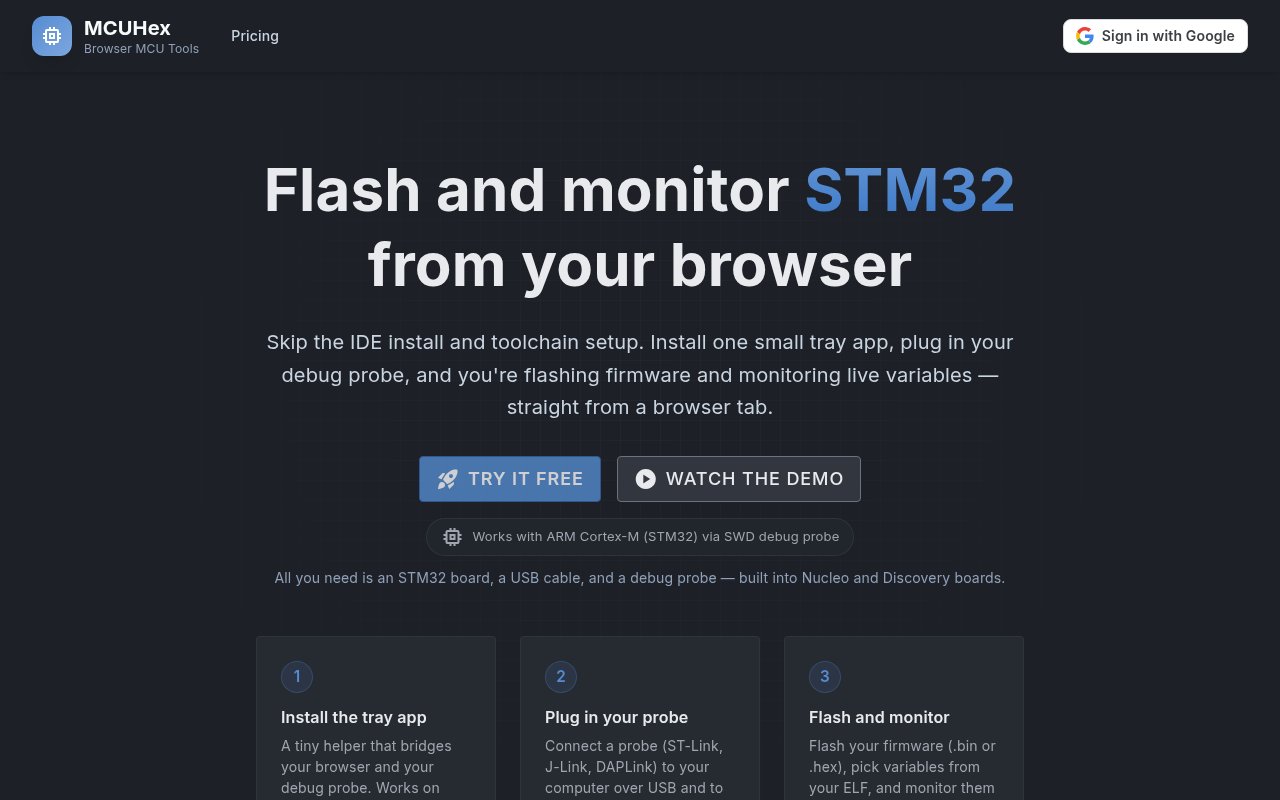
MCUHex is a browser-based utility for flashing firmware to STM32 boards and watching program variables over an SWD debug connection. It is designed for embedded developers who need a focused route from a compiled firmware file to running silicon without opening a full integrated development environment. A small local helper connects the browser to a USB debug probe, while the web interface handles firmware files, symbols, live values, and captures. The current product works with Arm Cortex-M targets over SWD, with STM32 described as its best-tested family. It supports ST-Link, J-Link, and DAPLink probes, including the probes built into many Nucleo and Discovery boards.
The setup has three main pieces. First, the developer installs the MCUHex tray app on a supported computer or runs its local server from source. Next, they plug a probe into the computer and connect it to the board's SWD pins. Finally, they use the browser to flash a .bin or .hex firmware image, add an ELF or OUT file when symbol information is needed, and choose variables to monitor. The flashing view streams the erase, program, and verify phases, then resets the microcontroller. This makes MCUHex useful for quick board checks, firmware handoffs, classroom benches, and debugging sessions where building the firmware already happens elsewhere.
Live monitoring resolves global variables from debug symbols, so developers can search by name instead of calculating memory addresses. Values can be viewed in decoded form, watched for changes, captured into table rows, or plotted in charts. Captured rows can be exported to CSV for later inspection. The companion VS Code extension provides an interactive demo that doesn't require hardware and links into the web dashboard for work with a real board. Projects in the dashboard keep parsed symbols and monitor state together, which reduces repeated setup when a developer returns to the same firmware and target.
The file roles are straightforward but distinct. A BIN or HEX image supplies the bytes that MCUHex erases, programs, verifies, and boots on the target. An ELF or OUT file supplies the debug symbols that turn raw memory locations into searchable global names and decoded values. Users can create a project before signing in, but the product asks for an account when an ELF is uploaded and parsed. Keeping that symbol data with a saved project means the browser can restore a useful monitor rather than asking the developer to reconstruct every watched address on each visit.
The product has a deliberately narrower scope than a full debugger. It can flash and verify firmware and observe live state, but source-level debugging is still marked as coming soon. Breakpoints, stepping, call-stack inspection, registers, serial and RTT consoles, higher-rate sampling, and long-run capture history are listed as future paid capabilities rather than current ones. JTAG-only devices are not supported. That boundary matters for buyers comparing MCUHex with STM32CubeIDE or a complete commercial debugging suite. MCUHex is a lighter tool for a common slice of the workflow, not a replacement for every build, trace, and debug feature.
Local platform support also deserves a quick check before committing to it. The downloadable tray app is available for Windows on x64 hardware and macOS on Apple Silicon. Linux users can run the open-source server from source, and the server must run on the same computer as the connected probe. The downloadable apps are built from the public SDK repository but aren't code-signed. On macOS that requires an explicit Gatekeeper bypass on first launch, while some Windows ST-Link setups may need the probe bound to WinUSB. The site publishes troubleshooting guidance for probe detection and SWD connection errors.
Everything MCUHex currently ships is free. Its public Free plan includes SWD firmware flashing, live variable monitoring from ELF or OUT data, table and chart views, and CSV export. An account isn't required until the developer uploads an ELF file. Pro and Team prices are shown for planned capabilities, but those tiers aren't available to buy yet, and joining an early-access list doesn't create a charge. Boards and debug probes aren't counted, so one developer can work across multiple targets. That makes the current product easy to test with the hardware already on a developer's desk. Its best fit is someone who values a small, browser-led interface and can accept the current operating-system, device, and debugging limits.
Key Features
- Firmware flashing over SWD
- Live variable monitoring
- ELF symbol name resolution
- Table and waveform views
- CSV capture export
- VS Code interactive demo
Pros & Cons
What we like
- Covers flashing and monitoring without a full IDE
- Supports three common SWD probe families
- Current shipped features are free
- Local bridge source is publicly available
Room for improvement
- Source-level debugging is not shipped yet
- STM32 is the best-tested device family
- Downloadable apps are not code-signed
- Linux setup requires running from source
Frequently Asked Questions
What is MCUHex?
Is MCUHex free?
Which operating systems does MCUHex support?
Does MCUHex replace a full debugger?
Best For
Featured in
Alternatives to MCUHex
View all
Kevin Gabeci
Solo developer building web apps, cozy browser games, and AI creator toolkits.

SoloDevStack
A solo developer blog built on head-to-head tool comparisons, 580+ posts deep.

Codedex
A gamified, story-driven platform that teaches Python, web dev, and more like an RPG quest

Vibe Built
Building real apps with agentic AI. What worked, what broke, what shipped.
Our take
Tool Index Editorial · Sep 2026· 3.5/5
MCUHex flashes STM32 firmware and monitors live variables from a browser through a small local bridge and an SWD probe. We found a clear split between BIN or HEX firmware and ELF symbol data, support for ST Link, J Link, and DAPLink, plus tables, charts, and CSV capture. Everything currently shipped is free, while the advertised $29 Pro and $59 Team tiers are still coming soon.
It is a handy fit for bench checks, classrooms, and developers who want flashing and variable inspection without opening a full embedded IDE. Its scope is narrower than a debugger, and that needs to be understood. Breakpoints, stepping, serial consoles, and long captures aren't available yet. The Mac and Windows helpers are unsigned, Linux requires running the server from source, and STM32 is the best tested target family.
Editorial opinion from the Tool Index team, written from the public product pages. Not a user review.
Reviews (0)
Badge builder
Add MCUHex to your website
Choose a badge style and size, preview it here, then copy the generated HTML. Badge images are self-contained SVGs and do not require an external script.

<a href="https://toolindex.net/tools/mcuhex?ref=badge" target="_blank" rel="noopener">
  <img src="https://toolindex.net/badge/mcuhex/medium.svg" alt="MCUHex - Listed on Tool Index" width="180" height="50" />
</a>How to use the badge
- 1. Pick the style, size, and theme that fit your layout.
- 2. Copy the generated HTML from the code block.
- 3. Paste it into your footer, homepage, or press page.
Standard badge available
The standard listing badge is available now. Score and circle badges are limited to tools currently ranked in the top 10 of a category.
Badge clicks return visitors to this profile with a referral tag so the source remains identifiable.
Related Tools
Kevin Gabeci
Solo developer building web apps, cozy browser games, and AI creator toolkits.

Coolify
Self-hostable, open source alternative to Heroku and Netlify

Warp
The modern terminal reimagined with AI and collaboration

Bolt.new
Prompt-to-deployed full-stack app inside the browser
Work on MCUHex? Request listing access or correction