
MP3Transcript
Convert audio and video files into editable transcripts with speaker labels and timestamps
Gallery
About MP3Transcript
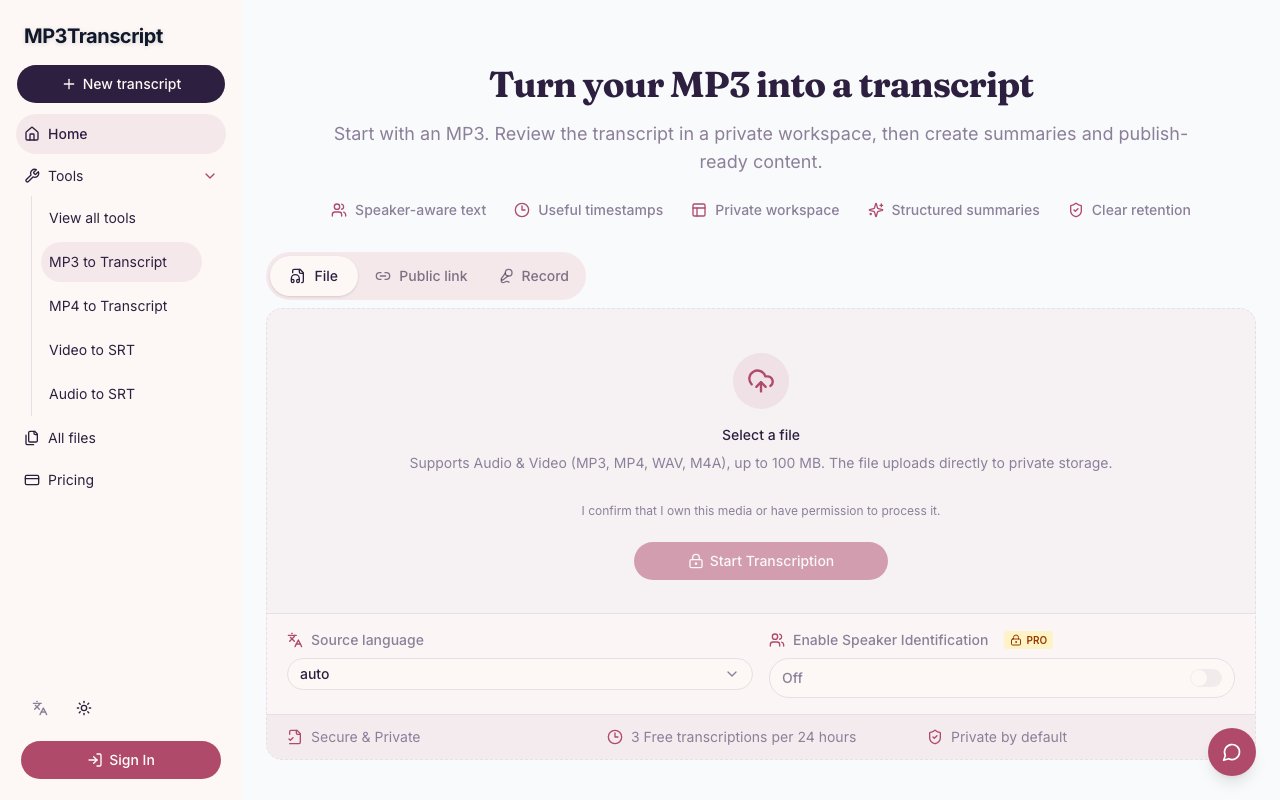
MP3Transcript takes audio and video recordings and turns them into text you can read, edit, and repurpose. Upload an MP3, MP4, WAV, or M4A file, paste a direct URL to a podcast episode or video, and the service returns a transcript you can clean up before publishing or sharing. It supports files up to 100 MB and accepts HTTPS links so you don't have to download podcast episodes to your local machine first. The interface is browser-based, which means there's nothing to install and you can work from any device with an internet connection. Processing happens in the cloud, so your machine doesn't need to run any heavy computation.
The transcripts come with timestamps embedded in the text, which means you can click a word and jump straight to that moment in the original recording. This navigation feature is particularly useful when you're reviewing long interviews or lectures and need to verify what was actually said at a specific point. You don't have to scrub through a timeline hunting for the right moment. When the audio is clear enough, the service also adds speaker labels so you can tell who said what without manually tagging every line. That matters when you're transcribing interviews, panel discussions, podcasts with multiple hosts, or any conversation with more than one voice. The speaker separation isn't perfect on overlapping speech or loud background noise, but it handles standard turn-taking conversations well enough to save significant editing time compared to starting from scratch.
Once you have the transcript, MP3Transcript lets you go further with structured output formats that turn a single recording into multiple pieces of content. The platform can pull out summaries, key takeaways, chapter markers for long recordings, quotable moments worth highlighting, and action items from the conversation. There are also templates designed for specific content repurposing workflows that would otherwise require hours of manual work. If you run a podcast, you can generate show notes in a few clicks rather than listening back and writing them from scratch. If you're repurposing a webinar for a blog post, it can draft the article for you with the key points structured into paragraphs and the filler stripped out. It also creates video descriptions for YouTube uploads, complete with timestamps, and social media packs with short clips and captions, which saves the usual copy and paste routine that eats up post-production time for anyone who publishes regularly.
The editing interface is where most of the real work happens after transcription completes. Transcription engines are good but not perfect, especially with accents, technical jargon, brand names, proper nouns, or speakers who talk quickly without enunciating. MP3Transcript gives you a full text editor where you can fix names, correct misheard words, adjust punctuation, add paragraph breaks, and clean up formatting before you export or generate any secondary content. The editor syncs with the audio timeline, so you can click any paragraph and hear that section of the recording to verify accuracy without switching between applications. Everything stays in your private workspace by default, which means you're not publishing anything until you explicitly choose to export or share. You control when and how the content goes out, and the raw transcript stays editable until you're satisfied with it.
The audience is anyone who creates audio or video and needs text out the other side, which covers a surprisingly broad range of use cases. Podcast hosts who want accurate show notes without hiring a transcription service or spending their own time on data entry. Educators turning lectures, seminars, and course recordings into written materials for students who learn better from reading than listening. Journalists transcribing interviews where accuracy matters both editorially and legally. Marketing teams repurposing webinars, conference talks, customer testimonials, and executive interviews into blog content, case studies, and social posts. Researchers who need searchable archives of recorded interviews for qualitative studies. Lawyers who need transcripts of depositions or recorded statements. Independent content creators who don't have production assistants to handle post-production. The workflow is the same for all of them: upload a file or paste a URL, wait for processing, review and edit the result, export the cleaned transcript or generate derivative content like summaries and social posts.
MP3Transcript runs a free tier that allows three transcriptions per day, each up to five minutes long. That's enough to test the accuracy on your own content and decide whether the full product works for your particular recording environment and voice types. Paid plans unlock longer recordings, higher daily volume, and additional features for power users who process large amounts of audio on a regular schedule. The service handles all speech recognition in the cloud, so there's no hardware requirement on your end, no GPU needed, and no waiting for local processing to complete. Support is available at support@mp3transcript.com if something goes wrong with your transcription, the speaker separation misidentifies voices, or you need help with a particularly complex project like multi-speaker panels or recordings made in noisy field conditions.
Key Features
- Speaker-aware transcripts with labels
- Clickable timestamps for audio navigation
- Structured summaries and key takeaways
- Show notes and blog draft templates
- Social media content packs
- Direct URL ingestion for podcasts
Pros & Cons
What we like
- Editable transcripts let you fix errors before publishing
- Free tier covers short transcriptions without payment
- Templates turn one recording into multiple content formats
- Supports direct podcast and video URLs
Room for improvement
- Free tier limited to five minutes per file
- Accuracy depends on audio clarity and accents
- 100 MB file size cap may restrict long recordings
- No offline or self-hosted option
Frequently Asked Questions
What is MP3Transcript?
Is MP3Transcript free?
What file formats does MP3Transcript support?
Who is MP3Transcript for?
Best For
Featured in
Alternatives to MP3Transcript
View all
Reviews (10)
Solid daily driver
Have been running MP3Transcript for a while, here is where I land. What stands out is how it handles structured summaries and key takeaways. It just works, day after day, without surprises. Worth it for what I get out of it.
Recommended without reservation
MP3Transcript solves a real problem for me without making a fuss about it. What stands out is how it handles direct url ingestion for podcasts. Easy yes for anyone weighing the same trade offs.
Recommended without reservation
Three months of MP3Transcript later, here is what holds up. Their take on direct url ingestion for podcasts is genuinely good. The output quality holds up better than I expected. It earns its place in my stack.
Quietly excellent
Have been running MP3Transcript for a while, here is where I land. It handles the boring parts so I can focus on the work that matters. It does what it says, which is rarer than it should be. Glad I made the switch.
It just works
MP3Transcript has quietly become part of my daily flow. What stands out is how little babysitting it needs. Mostly using it for converting interviews into written articles. No regrets so far.
Genuinely impressed
Picked MP3Transcript for the price, stayed for the quality. Their take on supports direct podcast and video urls is genuinely good. The thing I keep coming back to is how reliable it is. Mostly using it for creating searchable text from lecture recordings. No regrets so far.
Worth a look
Came to MP3Transcript after getting frustrated with what I had before. Support actually answered when I had a question, which surprised me. It slotted into my routine without much fuss. Glad I made the switch.
Good, with a few caveats
MP3Transcript has quietly become part of my daily flow. It just works, day after day, without surprises. Mostly using it for creating searchable text from lecture recordings. My only gripe is no offline or self-hosted option. Hard to imagine going back to my old setup.
Genuinely impressed
MP3Transcript has quietly become part of my daily flow. The show notes and blog draft templates is more useful than I expected. It just works, day after day, without surprises. Mostly using it for converting interviews into written articles.
Quietly excellent
Found MP3Transcript on a Show HN thread and I am glad I clicked. The free tier covers short transcriptions without payment is more useful than I expected. Support actually answered when I had a question, which surprised me. It fits well for creating searchable text from lecture recordings. Would sign up again without thinking twice.
Badge builder
Add MP3Transcript to your website
Choose a badge style and size, preview it here, then copy the generated HTML. Badge images are self-contained SVGs and do not require an external script.

<a href="https://toolindex.net/tools/mp3transcript?ref=badge" target="_blank" rel="noopener">
  <img src="https://toolindex.net/badge/mp3transcript/medium.svg" alt="MP3Transcript - Listed on Tool Index" width="180" height="50" />
</a>How to use the badge
- 1. Pick the style, size, and theme that fit your layout.
- 2. Copy the generated HTML from the code block.
- 3. Paste it into your footer, homepage, or press page.
Standard badge available
The standard listing badge is available now. Score and circle badges are limited to tools currently ranked in the top 10 of a category.
Badge clicks return visitors to this profile with a referral tag so the source remains identifiable.
Related Tools

Apatero AI
The creator studio for AI image, video, audio, 3D, and avatars, now at apatero.ai.
Kevin Gabeci Toolkits
Seven AI toolkits for writing books, making music, cutting video, and building agents.

Warp
The modern terminal reimagined with AI and collaboration

Bolt.new
Prompt-to-deployed full-stack app inside the browser
Work on MP3Transcript? Request listing access or correction