
Notificator
Turn meaningful website and backend events into useful local, mobile, email, or device alerts
Gallery
About Notificator
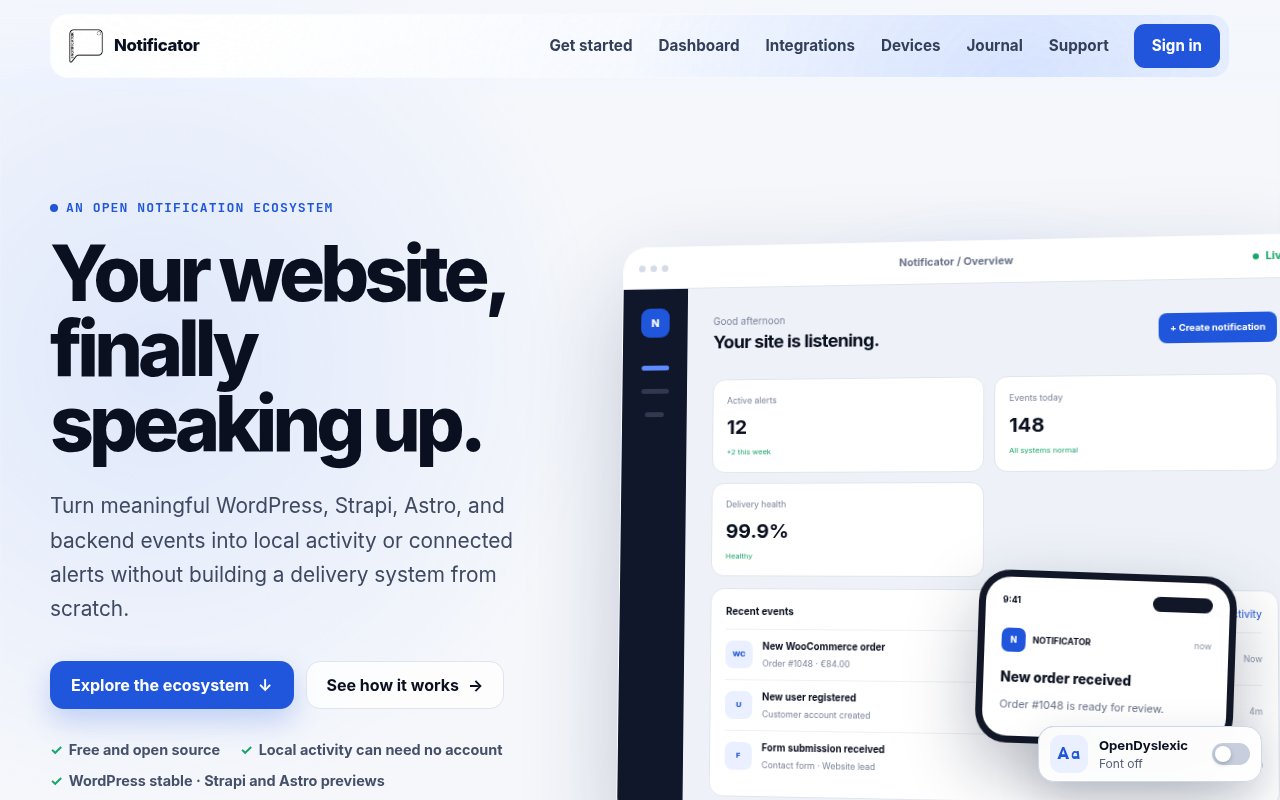
Notificator is an open-source notification ecosystem that turns events from websites and server applications into alerts people can actually act on. It gives a WordPress administrator, Strapi team, or developer a defined path from an event to a readable message and then to the right destination. The stable WordPress plugin can watch core, plugin, commerce, form, and custom hooks. Preview integrations cover Strapi and Astro, while an official Node.js SDK connects other trusted server applications. The goal is to avoid building and maintaining a separate alert delivery system for every project and team.
The basic workflow keeps the source, rule, and destination distinct. A user chooses the event worth watching, names the notification, and builds its message from the details exposed by that event. Conditions narrow when it should fire, priorities communicate importance, and throttling cuts down repetitive noise. The finished notification can remain in the local administration area or travel to connected destinations. This separation makes it easier to understand why an alert appeared, what information it contains, and where it is supposed to go.
WordPress is the most mature starting point. Its plugin scans installed plugins, surfaces hooks with plain-language descriptions, and offers built-in and third-party templates. Users can keep activity entirely inside the WordPress dashboard without creating a Notificator account or adding an API key. Configurations can also be exported and imported on another WordPress site, which is useful for agencies or maintainers who repeat the same monitoring rules across installations. The Strapi 5 extension follows a similar idea for create, update, publish, unpublish, and delete activity, but the site clearly labels that extension as a preview rather than a finished stable release.
Connected delivery expands the same rules beyond a CMS dashboard. The web dashboard and mobile app provide a shared inbox, while the mobile app adds push notifications. Account email can be enabled as another destination. For physical alerts, compatible devices receive structured messages through a user-controlled HiveMQ Cloud MQTT connection. Notificator publishes firmware for a compact ESP32-C3 Base device and a richer Touch preview for tested touchscreen hardware. These device projects are optional, so a team can begin with local alerts and add an account, phone, email, or dedicated display only when the event justifies more reach.
The Astro integration and Node.js SDK make the project relevant outside traditional content management. Astro can send alerts from Actions, API routes, webhooks, server workflows, and successful production builds. The SDK gives Node.js applications, workers, queues, and functions a supported route into the hosted API. This is best suited to developers and site operators who know which operational or business events deserve attention, such as a new order, failed form, content change, or completed backend job. It isn't a general chat app or a replacement for full observability. Its narrower job is turning selected application events into concise signals.
What sets Notificator apart is its local-first posture and the unusual link between software events and physical devices. A WordPress user doesn't have to open an account just to see useful activity in the dashboard, and remote channels are selected per notification instead of becoming an all-or-nothing requirement. The integrations, SDKs, and device firmware are developed publicly, so technical users can inspect the code, report issues, or build another path. Public documentation also gives developers a clearer route through installation, API use, and device setup. That openness is valuable, though the ecosystem is still uneven in maturity. WordPress and the Base device are stable, while Strapi, Astro, the web dashboard, and Touch experience carry preview, new, or beta labels.
The project presents itself as free and open source, with public repositories and optional donation or sponsorship links rather than commercial subscription tiers. That makes it approachable for a developer willing to install and configure the relevant integration. Some remote and device paths still require outside pieces, including a Notificator account, an active API key, compatible hardware, or a user-owned MQTT service. Buyers should treat it as an actively developed independent project with a solid WordPress core and a broader ecosystem that is still taking shape.
Key Features
- Event rules with conditions
- Local CMS activity alerts
- Web and mobile inbox
- Optional email notifications
- MQTT connected device delivery
- Astro and Node.js integrations
Pros & Cons
What we like
- Local WordPress alerts need no account
- Rules separate event sources from destinations
- Open code covers integrations and device firmware
- Configurations can move between WordPress sites
Room for improvement
- WordPress is more mature than other integrations
- Several components are still previews or beta
- Physical alerts require compatible hardware
- MQTT delivery depends on a user-owned broker
Frequently Asked Questions
What is Notificator?
Can Notificator work without an account?
Which integrations are ready to use?
Is Notificator free?
Best For
Featured in
Alternatives to Notificator
View all
Kevin Gabeci
Solo developer building web apps, cozy browser games, and AI creator toolkits.

SoloDevStack
A solo developer blog built on head-to-head tool comparisons, 580+ posts deep.

Codedex
A gamified, story-driven platform that teaches Python, web dev, and more like an RPG quest

Vibe Built
Building real apps with agentic AI. What worked, what broke, what shipped.
Our take
Tool Index Editorial · Oct 2026· 3.5/5
Notificator is a free, open source system for turning selected website and backend events into local activity, mobile push, email, web inbox, or MQTT device alerts. WordPress and Strapi provide the clearest paths, while Astro and Node.js integrations extend it to custom server work. It suits developers and site operators who need concise business events, not a replacement for full monitoring or incident response.
We like the separation between event source, filtering rule, message, and destination. WordPress and Strapi can keep alerts local without an account, and configurations can be reused. The ecosystem is uneven, though. The web dashboard is labeled beta, physical alerts need compatible hardware and a user managed MQTT service, and critical operational events should still have an independent route. The stable CMS integrations are useful today, while the broader device and app story remains a work in progress.
Editorial opinion from the Tool Index team, written from the public product pages. Not a user review.
Reviews (0)
Badge builder
Add Notificator to your website
Choose a badge style and size, preview it here, then copy the generated HTML. Badge images are self-contained SVGs and do not require an external script.

<a href="https://toolindex.net/tools/notificator?ref=badge" target="_blank" rel="noopener">
  <img src="https://toolindex.net/badge/notificator/medium.svg" alt="Notificator - Listed on Tool Index" width="180" height="50" />
</a>How to use the badge
- 1. Pick the style, size, and theme that fit your layout.
- 2. Copy the generated HTML from the code block.
- 3. Paste it into your footer, homepage, or press page.
Standard badge available
The standard listing badge is available now. Score and circle badges are limited to tools currently ranked in the top 10 of a category.
Badge clicks return visitors to this profile with a referral tag so the source remains identifiable.
Related Tools
Kevin Gabeci
Solo developer building web apps, cozy browser games, and AI creator toolkits.

Coolify
Self-hostable, open source alternative to Heroku and Netlify

Warp
The modern terminal reimagined with AI and collaboration

Bolt.new
Prompt-to-deployed full-stack app inside the browser
Work on Notificator? Request listing access or correction