
Notula
Free WYSIWYG Markdown desktop editor that lets non-developers work on docs in git repos
Gallery
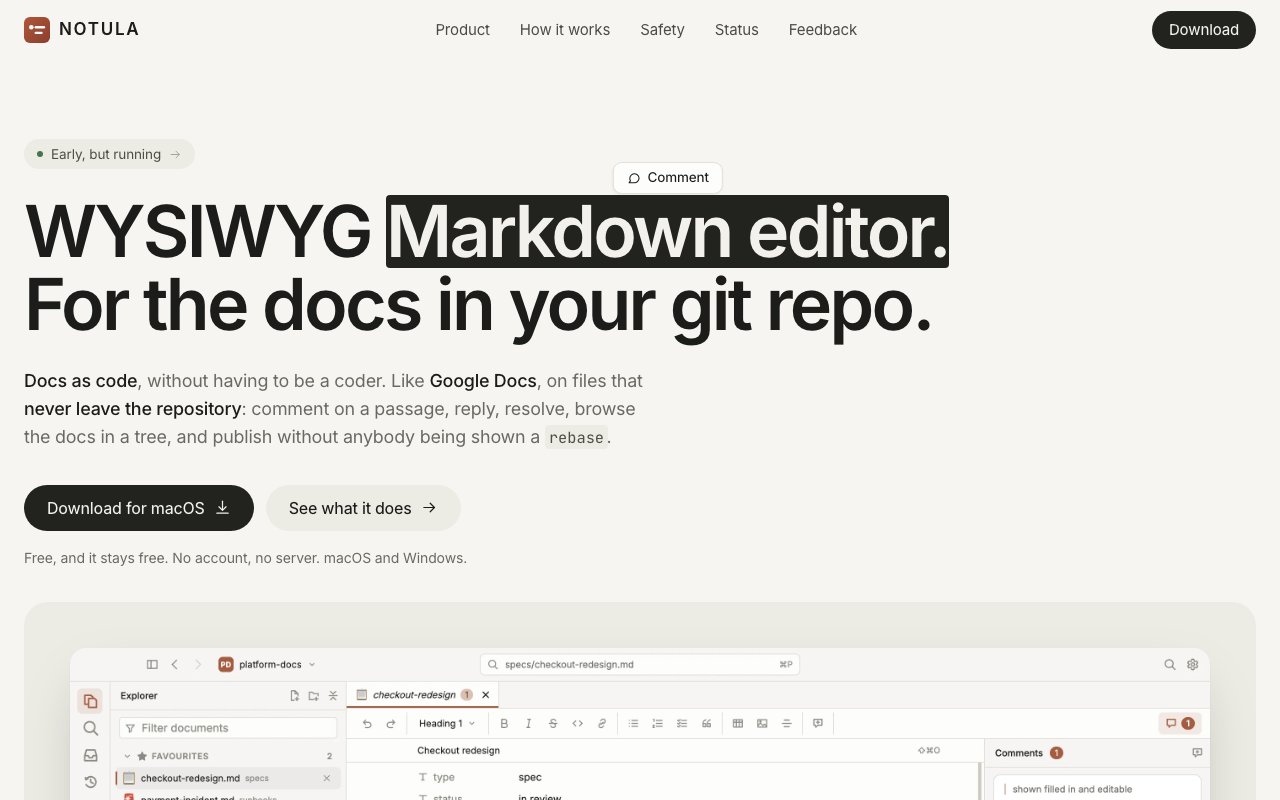
About Notula
Notula is a desktop WYSIWYG Markdown editor built for docs as code, meaning documentation that lives in a git repository next to the software it describes. It shows you the formatted document while you type instead of the syntax that produces it. Headings appear without hashes, bold text without asterisks, tables without pipes. The point is that a product manager, technical writer, or anyone else who doesn't think in Markdown can open a repo and edit real documentation without learning either Markdown or git, while the files underneath stay ordinary Markdown that developers and rendering pipelines can keep treating exactly as before.
The git integration is where most of the engineering went, and it's deliberately conservative. Notula performs background fetches, checking for updates every 30 seconds while you're actively working and every few minutes when idle, shows you incoming changes as they arrive, and lets you publish your edits with nothing more than a one-sentence description of what you changed. What it never does is just as important. It never stages your entire worktree, never stashes, never rewrites history, and never creates branches, so it can sit safely inside a repository that developers are actively working in at the same time. It discovers files with git ls-files, respects .gitignore, and handles repositories with thousands of source files without choking.
Comments are the standout feature. You can anchor a comment thread to a specific passage of a document, and the thread is stored as a plain file committed in the repository next to the document itself, kept as an append-only log with a union merge driver so concurrent comments from different people merge cleanly instead of conflicting. That means review conversations travel with the repo, survive as long as the repo does, and involve no server, no account, and no third-party service holding your discussion history hostage.
Round-trip fidelity gets real numbers instead of hand-waving. The site claims Markdown preservation is byte-identical on 6,000 real documents, and that 96.4 percent of blocks survive an edit untouched. In practice that means opening a doc in Notula and fixing a typo shouldn't shred the diff, which is the exact failure mode that makes developers ban WYSIWYG editors from their repositories. That preservation guarantee is also what makes it plausible to mix Notula users and raw-editor users in the same repo, since neither side sees noisy diffs from the other. Mermaid diagrams render inline while staying stored as ordinary fenced code blocks, so the files remain plain Markdown that renders anywhere else too.
It also leans into AI-assisted workflows. Notula generates a notula-agents.md briefing that describes the workspace conventions, and it integrates with Claude Code through CLAUDE.md references, so coding agents working in the same repository understand how the documentation is organized. There's a notula command line tool that does everything the window does, useful for scripting, automation, and continuous integration checks. The app itself is closed source, but the comment log format is a plain committed file, the workspace schema is published, and the CLI covers the full feature set, so your data isn't locked into the app in any meaningful way.
The fit is teams where developers keep docs in the repo and everyone else has been exiled to a wiki that drifts out of date. Notula works with repositories hosted on GitHub, GitLab, Bitbucket, or Gitea, and also with local repos that have no remote at all. It runs natively on macOS, on both Apple Silicon and Intel machines, and on Windows in x64 and arm64 builds. A Linux build isn't available yet, and it's desktop-only, with no web or mobile version, so everyone who edits needs the app installed locally.
Notula is free, with no account, no server backend, and no seats to pay for. Since it needs nothing but the repository itself, adopting it isn't a migration project. You point it at an existing repo and the docs are already there. The rough edges are around distribution rather than function. The macOS builds are unsigned, so you'll need to clear the quarantine attribute with an xattr command after installing, and the unsigned Windows installer trips SmartScreen, requiring the More info and Run anyway steps. Neither is unusual for a young free app that hasn't bought signing certificates yet, but it's worth knowing before you roll it out to less technical teammates, who are exactly the people it's built for.
Key Features
- WYSIWYG editing with hidden Markdown syntax
- Comment threads stored as committed files
- Safe git publishing for non-developers
- Byte-identical Markdown round-tripping
- Inline Mermaid diagram rendering
- CLI and agent briefing for Claude Code
Pros & Cons
What we like
- Completely free with no account, server, or seats
- Comments live in the repo, not a third-party service
- Never stashes, rebranches, or rewrites history under you
- 96.4 percent of blocks survive an edit untouched
Room for improvement
- No Linux build yet
- Unsigned installers trip macOS quarantine and Windows SmartScreen
- The app itself is closed source
- Desktop-only, with no web or mobile version
Frequently Asked Questions
What is Notula?
Is Notula free?
Is Notula safe to use in a repo developers are working in?
What platforms does Notula run on?
Best For
Featured in
Alternatives to Notula

SoloDevStack
A solo developer blog built on head-to-head tool comparisons, 580+ posts deep.

Confluence
Atlassian's long-running team wiki that anchors many enterprise knowledge stacks

Lunchbreak AI
Run text through six AI detectors at once, then humanize whatever gets flagged

Postdex
An exclusive marketplace for finished, human-made articles. Every piece sells once.
Reviews (0)
Badge builder
Add Notula to your website
Choose a badge style and size, preview it here, then copy the generated HTML. Badge images are self-contained SVGs and do not require an external script.

<a href="https://toolindex.net/tools/notula?ref=badge" target="_blank" rel="noopener">
  <img src="https://toolindex.net/badge/notula/medium.svg" alt="Notula - Listed on Tool Index" width="180" height="50" />
</a>How to use the badge
- 1. Pick the style, size, and theme that fit your layout.
- 2. Copy the generated HTML from the code block.
- 3. Paste it into your footer, homepage, or press page.
Standard badge available
The standard listing badge is available now. Score and circle badges are limited to tools currently ranked in the top 10 of a category.
Badge clicks return visitors to this profile with a referral tag so the source remains identifiable.
Related Tools
Confluence
Atlassian's long-running team wiki that anchors many enterprise knowledge stacks
SoloDevStack
A solo developer blog built on head-to-head tool comparisons, 580+ posts deep.

Logseq
An open-source outliner notes app where every bullet is a first-class block

Bear
A beautiful Markdown notes app for Apple devices that doubles as a writing tool
Work on Notula? Request listing access or correction