
Now You Can Use
Explore when web platform features become usable across major browsers
Gallery
About Now You Can Use
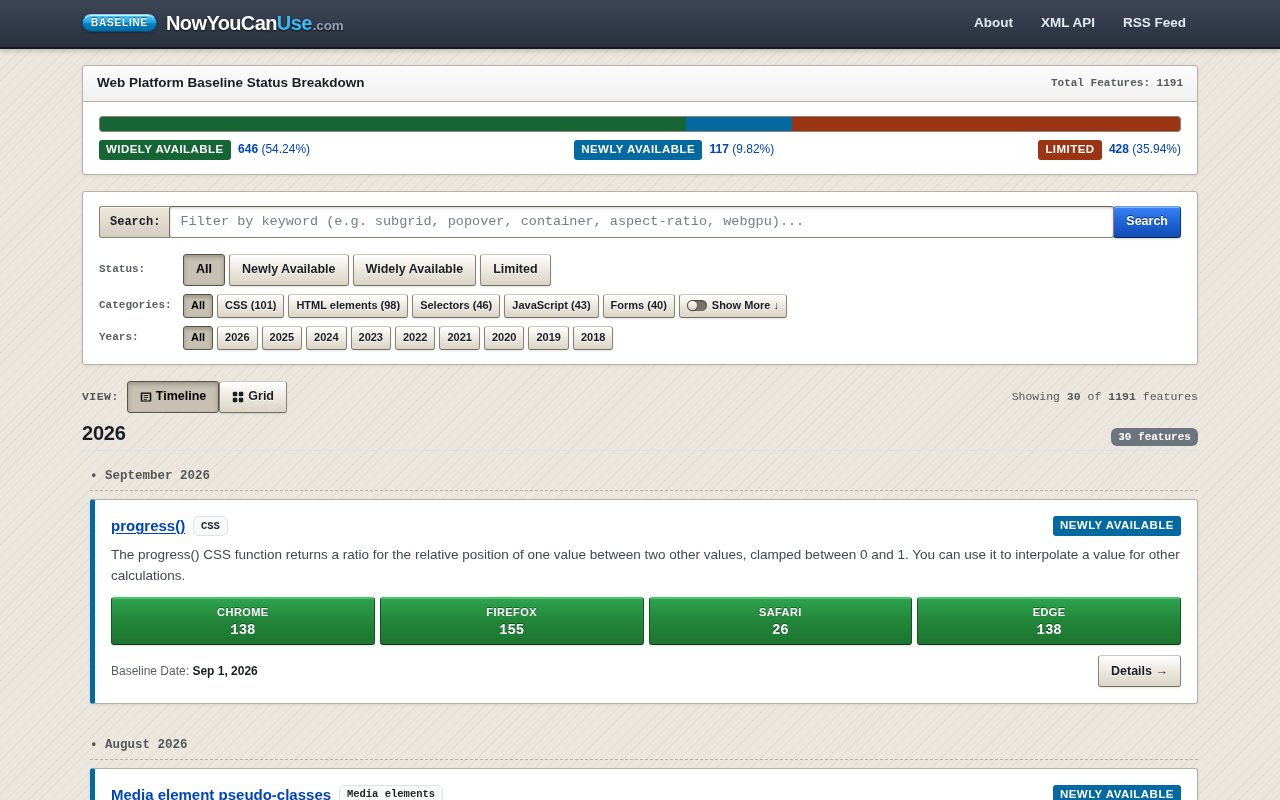
Now You Can Use is a searchable timeline of web platform features and their Baseline availability. It helps developers answer a practical question that ordinary release notes often leave open. A browser may have announced an API, CSS property, HTML element, or JavaScript capability, but is it available across the major browser engines yet? The site collects that compatibility data in one browsable reference and organizes features by the date when they reached a shared support milestone. It is especially useful for engineers returning to frontend work after time in enterprise backends or legacy applications, where an older mental model can lead to unnecessary polyfills, preprocessors, or packages.
The main page divides the catalog into Widely Available, Newly Available, and Limited groups. A keyword search can narrow the list by a feature name or concept, while separate filters cover status, category, and Baseline year. Categories range from CSS, HTML elements, selectors, and JavaScript to WebAssembly, media queries, forms, performance, WebGL, security, storage, workers, and many smaller platform areas. Year filters cover Baseline milestones from 2018 onward. Results are placed on a chronological timeline, which makes the site useful both for checking one feature and for scanning what has changed in the platform during a particular period.
Each feature entry gives more than a badge. The timeline card includes a short explanation, its category, current Baseline status, the Baseline date, and the browser versions associated with support in Chrome, Firefox, Safari, and Edge. A details page provides a focused view when a developer needs to investigate one item rather than browse the whole catalog. This presentation connects the high-level readiness label to concrete compatibility information. It also helps readers distinguish a feature that has just arrived across core engines from one that has had time to reach a broader installed browser base.
The status model comes from the WebDX Baseline dataset rather than a homegrown scoring system. In the site's explanation, Newly Available means a feature has shipped across the core browser engines on desktop and mobile. Widely Available follows after 30 months, providing a more conservative milestone for teams that support delayed corporate updates or older devices. Limited identifies features that are still absent from at least one major engine. The site frames Limited features as candidates for progressive enhancement or feature flags. This model will not replace project-specific testing, but it gives teams a consistent starting point for deciding where that testing effort belongs.
Now You Can Use also makes the underlying catalog available outside the visual interface. Public RSS 2.0 and Atom 1.0 feeds can be filtered by availability status, category, year, or combinations of those fields. Every feature has a standalone XML document with its name, description, group, Baseline dates, browser support, specifications, compatibility keys, and canonical page address. The feeds support conditional requests with ETag and compressed responses, so a script or feed reader can check for changes without repeatedly downloading unchanged content. This gives teams a lightweight way to follow platform updates or pull compatibility records into an internal workflow without a custom client library.
The clearest fit is for web developers, frontend leads, platform teams, and technical educators. An engineer can check whether native CSS nesting is mature enough for a supported browser policy, compare the arrival dates of related APIs, or find native replacements for code that once required a library. A team maintaining an enterprise application can use the Widely Available view as a conservative discovery list. Someone working on a modern evergreen application may care more about the Newly Available stream. The search and filters make all of these paths faster than reading separate browser release notes, while the timeline shows how quickly the platform is moving.
The site is free to browse, and its feeds and XML documents are publicly accessible. There is no account, paid plan, or commercial upgrade presented. Its focus is intentionally narrower than a full compatibility database. Baseline summarizes support across a defined core browser set, so it does not cover every embedded web view, older device, assistive technology combination, or browser outside that set. It also does not decide whether a feature is appropriate for a particular product. Within those limits, Now You Can Use offers a clear, current reference for discovering native platform capabilities, checking their interoperability status, and following changes in a machine-readable form.
Key Features
- Searchable Baseline feature catalog
- Availability status filters
- Category and year filtering
- Browser version support details
- RSS and Atom feeds
- Per-feature XML documents
Pros & Cons
What we like
- Uses the vendor-neutral WebDX Baseline dataset
- Connects readiness labels to browser versions
- Supports both browsing and programmatic access
- Requires no account or custom client library
Room for improvement
- Baseline covers a defined core browser set
- It does not replace project-specific testing
- Programmatic records are XML rather than JSON
- The reference has a deliberately narrow compatibility focus
Frequently Asked Questions
What is Now You Can Use?
What do the Baseline statuses mean?
Can teams access the data programmatically?
Is Now You Can Use free?
Best For
Featured in
Alternatives to Now You Can Use
View all
Kevin Gabeci
Solo developer building web apps, cozy browser games, and AI creator toolkits.

SoloDevStack
A solo developer blog built on head-to-head tool comparisons, 580+ posts deep.

Codedex
A gamified, story-driven platform that teaches Python, web dev, and more like an RPG quest

Vibe Built
Building real apps with agentic AI. What worked, what broke, what shipped.
Our take
Tool Index Editorial · Sep 2026· 4.0/5
Now You Can Use turns Web Platform Baseline data into a searchable timeline of browser features. We found 1,191 entries with status, year, category, browser versions, and direct detail pages, plus RSS, Atom, and per feature XML feeds. It is free to browse and unusually useful for both a quick compatibility check and an internal monitoring workflow.
The presentation is clearer than digging through release notes, but Baseline is a readiness summary for a defined browser set, not proof that a feature suits every device, web view, or accessibility combination. It cannot replace project testing, and developers wanting JSON will find the XML only API dated. Within that focused job, it is an excellent reference.
Editorial opinion from the Tool Index team, written from the public product pages. Not a user review.
Reviews (0)
Badge builder
Add Now You Can Use to your website
Choose a badge style and size, preview it here, then copy the generated HTML. Badge images are self-contained SVGs and do not require an external script.

<a href="https://toolindex.net/tools/now-you-can-use?ref=badge" target="_blank" rel="noopener">
  <img src="https://toolindex.net/badge/now-you-can-use/medium.svg" alt="Now You Can Use - Listed on Tool Index" width="180" height="50" />
</a>How to use the badge
- 1. Pick the style, size, and theme that fit your layout.
- 2. Copy the generated HTML from the code block.
- 3. Paste it into your footer, homepage, or press page.
Standard badge available
The standard listing badge is available now. Score and circle badges are limited to tools currently ranked in the top 10 of a category.
Badge clicks return visitors to this profile with a referral tag so the source remains identifiable.
Related Tools
Kevin Gabeci
Solo developer building web apps, cozy browser games, and AI creator toolkits.

Coolify
Self-hostable, open source alternative to Heroku and Netlify

Warp
The modern terminal reimagined with AI and collaboration

Bolt.new
Prompt-to-deployed full-stack app inside the browser
Work on Now You Can Use? Request listing access or correction