
Nowdex
Track AI coding usage and reset times across Apple devices
Gallery
About Nowdex
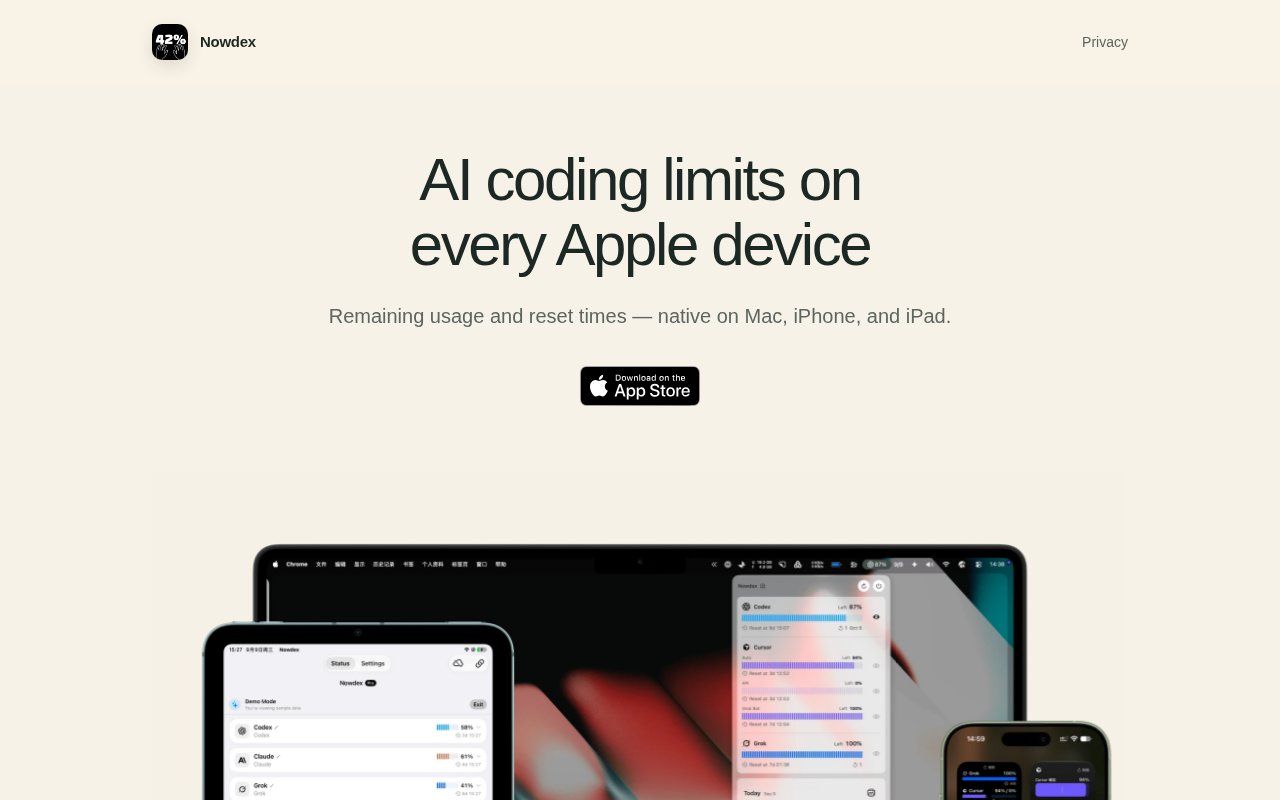
Nowdex is a native Apple app for keeping an eye on usage limits across several AI coding and agent services. It puts remaining capacity, reset times, and related account information in one compact dashboard at a glance instead of making someone open each provider separately. The app currently supports services including Codex, Claude, Cursor, Grok, Kimi, and GLM. Its App Store listing describes live usage monitoring on iPhone, iPad, and Mac, while the product site emphasizes a quick view of how much capacity is left and when a limit will become available again. That narrow purpose makes it useful for developers who move among several assistants and need to know which one has room before starting another substantial task.
The main view brings usage from linked provider accounts into one place. Depending on what an account exposes, Nowdex can show the current session, weekly usage, remaining capacity, reset times, extra rate limits, credit balances, and available reset credits. A user can choose whether a quota is shown as used or remaining, which helps the display match the way they think about a budget. The app also supports multiple provider accounts and can place more than one provider in a widget. That matters when a developer has separate work and personal subscriptions or regularly switches between coding agents. The information comes from the connected services, so the exact fields available can vary by provider and account.
Widgets are a central part of the product rather than a small add on. Nowdex can put the relevant limits on an iPhone or iPad Home Screen and on the iPhone Lock Screen, so checking capacity doesn't require opening the full app. On Mac, it can run as a menu bar view or in a regular window. Widget appearance can follow the system or use light and dark styles, so the status can match the rest of the device. Together, those options make the same information available in the places where someone is likely to notice it. This cross device design is the clearest distinction from tools that live only in a Mac menu bar. A phone or tablet can show the limits without requiring the Mac app to be installed or running, while the Mac can still keep the same information close during work. Optional iCloud sync can carry linked account metadata and credentials through the user's own iCloud environment, keeping the setup consistent across Apple devices.
The privacy design is unusually important here because connecting an AI account involves sensitive credentials. Nowdex says sign in tokens and related secrets remain in the device Keychain. If iCloud sync is enabled, credentials may also use iCloud Keychain, while details such as linked providers, account display names, and sync identity fields can travel through the user's iCloud. Usage is fetched on the device from provider interfaces and displayed locally, including in widgets. Nowdex says it doesn't store passwords or usage on its own servers. There is also no separate Nowdex account. A user connects an existing account from a supported service instead.
Nowdex fits people whose AI work is already spread across subscriptions. A developer can glance at a phone before choosing an agent, watch a weekly allowance from a Lock Screen, or keep several provider limits visible while working on a Mac. It is less relevant to someone who uses only one service occasionally or works outside Apple's device ecosystem. It also isn't a billing system, cost optimizer, or account administrator. It reports the usage and quota information made available by the providers. Because the available fields depend on those connected services, one account may expose more detail than another. The display is best treated as a convenient operational view rather than a replacement for a provider's own account page.
Access follows a freemium model. The App Store lists Nowdex as a free download with in app purchases and shows Nowdex Pro at $5.99 in the United States storefront. The public listing doesn't spell out which functions require Pro, so buyers should check the current purchase screen before assuming a particular feature is included. Platform requirements are specific to Apple's operating systems, which makes older hardware worth checking before download. For an Apple focused developer who wants quota checks available away from the desk as well as on the Mac, Nowdex offers a focused answer with widgets, multiple provider connections, and a privacy model based on local storage and the user's own iCloud.
Key Features
- Multi provider usage dashboard
- Home and Lock Screen widgets
- Mac menu bar view
- Remaining capacity and reset times
- Multiple connected provider accounts
- Optional iCloud sync
Pros & Cons
What we like
- Checks several AI service limits in one place
- Works natively across iPhone, iPad, and Mac
- Keeps credentials in Keychain rather than a Nowdex server
- Makes quotas visible through configurable widgets
Room for improvement
- Limited to the Apple device ecosystem
- Provider data can be delayed or incomplete
- Supported details vary between connected services
- Public pricing doesn't explain every Pro feature
Frequently Asked Questions
What is Nowdex?
Which services does Nowdex support?
Does Nowdex store account credentials?
Is Nowdex free?
Best For
Featured in
Alternatives to Nowdex
View all
Kevin Gabeci
Solo developer building web apps, cozy browser games, and AI creator toolkits.

SoloDevStack
A solo developer blog built on head-to-head tool comparisons, 580+ posts deep.

Codedex
A gamified, story-driven platform that teaches Python, web dev, and more like an RPG quest

Vibe Built
Building real apps with agentic AI. What worked, what broke, what shipped.
Our take
Tool Index Editorial · Sep 2026· 3.0/5
Nowdex puts remaining AI coding usage and reset times on Mac, iPhone, and iPad. We could verify the native cross device focus, widgets, Mac menu bar positioning, and support claims for several coding services from the public page. That makes it a tidy utility for developers who rotate between providers and want to know which allowance is available before starting work.
The captured site was sparse, however, and didn't expose current pricing, detailed provider fields, refresh behavior, or the boundaries of any paid version. Usage data can also lag or change when providers alter private account interfaces. It is limited to Apple's ecosystem and should be treated as a convenient glanceable indicator, not a billing record or guaranteed real time quota source.
Editorial opinion from the Tool Index team, written from the public product pages. Not a user review.
Reviews (0)
Badge builder
Add Nowdex to your website
Choose a badge style and size, preview it here, then copy the generated HTML. Badge images are self-contained SVGs and do not require an external script.

<a href="https://toolindex.net/tools/nowdex?ref=badge" target="_blank" rel="noopener">
  <img src="https://toolindex.net/badge/nowdex/medium.svg" alt="Nowdex - Listed on Tool Index" width="180" height="50" />
</a>How to use the badge
- 1. Pick the style, size, and theme that fit your layout.
- 2. Copy the generated HTML from the code block.
- 3. Paste it into your footer, homepage, or press page.
Standard badge available
The standard listing badge is available now. Score and circle badges are limited to tools currently ranked in the top 10 of a category.
Badge clicks return visitors to this profile with a referral tag so the source remains identifiable.
Related Tools
Kevin Gabeci
Solo developer building web apps, cozy browser games, and AI creator toolkits.

Coolify
Self-hostable, open source alternative to Heroku and Netlify

Warp
The modern terminal reimagined with AI and collaboration

Bolt.new
Prompt-to-deployed full-stack app inside the browser
Work on Nowdex? Request listing access or correction