
OmniPackage
Build and publish native Linux packages across distributions
Gallery
About OmniPackage
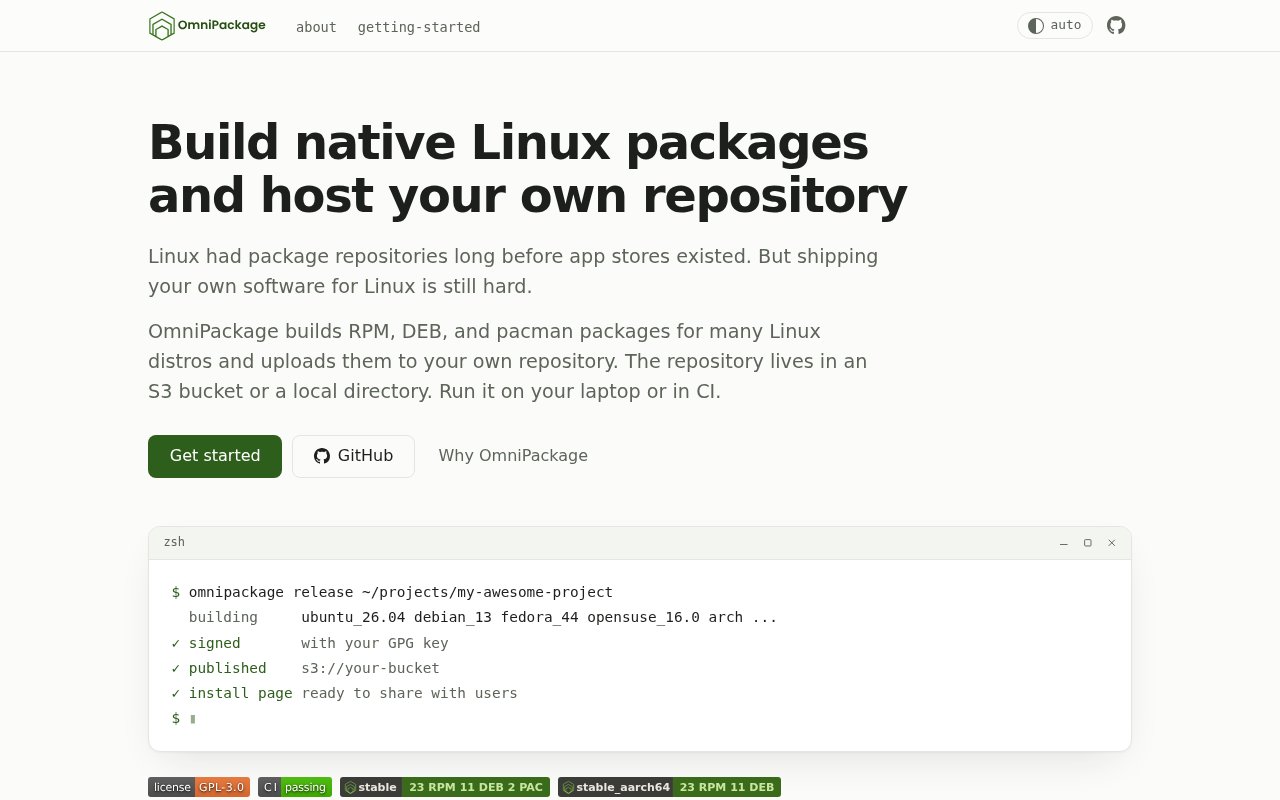
OmniPackage is an open-source command line tool for turning a software project into native Linux packages for multiple distributions and publishing them through a repository the developer controls. It is aimed at the awkward gap between having a working application and giving Linux users a normal installation and update experience. Rather than asking every user to download a loose archive or learn a language-specific package manager, a maintainer can ship packages that work with apt, dnf, zypper, or pacman. OmniPackage handles the repetitive packaging and repository work from one project configuration, whether the release runs on a laptop or in continuous integration.
The build process begins by scaffolding the files expected by the target package ecosystems. OmniPackage can generate RPM specifications, Debian package files, and PKGBUILD files, then run the native build tools inside a container for each chosen distribution. Building within the target distribution matters because the resulting software links against that distribution's own libraries and declares dependencies as native packages. The system package manager can then resolve those dependencies instead of relying on a bundled runtime. OmniPackage uses tools such as rpmbuild, dpkg-buildpackage, and makepkg behind one release workflow, which reduces the amount of distribution-specific packaging knowledge a small project needs to carry.
Packaging is only part of a release. OmniPackage signs packages with the maintainer's GPG key and publishes the output to an S3-compatible bucket or a local directory. AWS S3, Cloudflare R2, and MinIO are among the storage options named by the project, while local output is useful for testing. The chosen location becomes the project's own package repository. OmniPackage also generates an installation page that maintainers can share with users. That page provides the repository setup and package installation steps appropriate to a visitor's distribution. Once a user adds the repository, future versions arrive through the same system update commands used for distribution packages. The project doesn't store packages itself, so the binaries, metadata, and hosting relationship remain under the maintainer's control.
A YAML configuration describes builds, repositories, version extraction, image caches, secrets, and related release settings. Maintainers can run the full process with the release command or separate building and publishing when a pipeline needs finer control. The documentation includes a reusable GitHub Actions pattern that expands supported distributions into a job matrix and keeps stable and development channels separate. It also shows how to cache container images so repeat builds don't reconstruct every target environment from scratch. Example projects are available for C, C++, CMake, Rust, Go, Python, Ruby, Crystal, Electron, and Tauri, while the package content can be proprietary even though OmniPackage itself is open source.
OmniPackage fits independent developers and small release teams that want broad Linux distribution without running a different manual packaging process for every ecosystem. It is especially useful when native dependency resolution and ordinary system updates are more important than bundling an application with its own runtime. That is its key difference from formats such as Snap, Flatpak, and AppImage. Those approaches package or supply more of the runtime, while OmniPackage deliberately builds native DEB, RPM, and pacman packages for repositories managed by the project. It can also suit organizations that need packages in private or internal object storage, since publishing isn't tied to a central app store or a particular cloud.
The project is free under the GPL-3.0 license and requires no OmniPackage account, subscription, or credit card. It does expect the maintainer to bring several operational pieces. Builds need Podman or Docker, packages need an appropriate signing key, and production publishing needs an S3-compatible bucket or another selected directory. Builds follow the host architecture, with the documented targets covering x86_64 and ARM64 where the base image supports them. The scope is intentionally narrower than a universal Linux release service. OmniPackage doesn't build Flatpak, Snap, AppImage, AUR, or Nix outputs, doesn't host the repository for the developer, and doesn't sandbox installed software. For teams comfortable owning storage and CI, those limits preserve a direct, native distribution path.
Key Features
- Multi-distribution native package builds
- DEB, RPM, and pacman output
- Containerized target environments
- GPG package signing
- S3-compatible repository publishing
- Generated user installation pages
Pros & Cons
What we like
- Replaces several distribution-specific release workflows
- Produces packages that use native dependency resolution
- Keeps repositories and artifacts under maintainer control
- Works locally or inside continuous integration
Room for improvement
- Requires Podman or Docker for target builds
- Maintainers must provide storage and signing keys
- Doesn't produce Flatpak, Snap, AppImage, AUR, or Nix packages
- Build architecture follows the machine running the release
Frequently Asked Questions
What is OmniPackage?
Where does OmniPackage host packages?
Does OmniPackage require Docker?
Is OmniPackage free?
Best For
Featured in
Alternatives to OmniPackage
View all
Kevin Gabeci
Solo developer building web apps, cozy browser games, and AI creator toolkits.

SoloDevStack
A solo developer blog built on head-to-head tool comparisons, 580+ posts deep.

Codedex
A gamified, story-driven platform that teaches Python, web dev, and more like an RPG quest

Vibe Built
Building real apps with agentic AI. What worked, what broke, what shipped.
Our take
Tool Index Editorial · Sep 2026· 4.0/5
OmniPackage builds DEB, RPM, and pacman packages inside target-distribution containers, signs them, and publishes a repository to S3-compatible storage or a local directory. It is for independent Linux developers who want users to install and update through apt, dnf, zypper, or pacman. The tool is open source and needs no account or subscription.
This is a focused answer to a genuinely tedious release problem. Native packages preserve familiar dependency and update behavior, while self-hosted storage avoids tying releases to one vendor. The cost is operational ownership. Maintainers still need Docker or Podman, GPG keys, storage, and CI, and builds follow the host architecture. It also does not cover Flatpak, Snap, AppImage, AUR, or Nix, so it will not replace every Linux distribution path.
Editorial opinion from the Tool Index team, written from the public product pages. Not a user review.
Reviews (0)
Badge builder
Add OmniPackage to your website
Choose a badge style and size, preview it here, then copy the generated HTML. Badge images are self-contained SVGs and do not require an external script.

<a href="https://toolindex.net/tools/omnipackage?ref=badge" target="_blank" rel="noopener">
  <img src="https://toolindex.net/badge/omnipackage/medium.svg" alt="OmniPackage - Listed on Tool Index" width="180" height="50" />
</a>How to use the badge
- 1. Pick the style, size, and theme that fit your layout.
- 2. Copy the generated HTML from the code block.
- 3. Paste it into your footer, homepage, or press page.
Standard badge available
The standard listing badge is available now. Score and circle badges are limited to tools currently ranked in the top 10 of a category.
Badge clicks return visitors to this profile with a referral tag so the source remains identifiable.
Related Tools
Kevin Gabeci
Solo developer building web apps, cozy browser games, and AI creator toolkits.

Coolify
Self-hostable, open source alternative to Heroku and Netlify

Warp
The modern terminal reimagined with AI and collaboration

Bolt.new
Prompt-to-deployed full-stack app inside the browser
Work on OmniPackage? Request listing access or correction