
OpenZPL
Preview ZPL labels and render them as PNG or PDF through a compatible API
Gallery
About OpenZPL
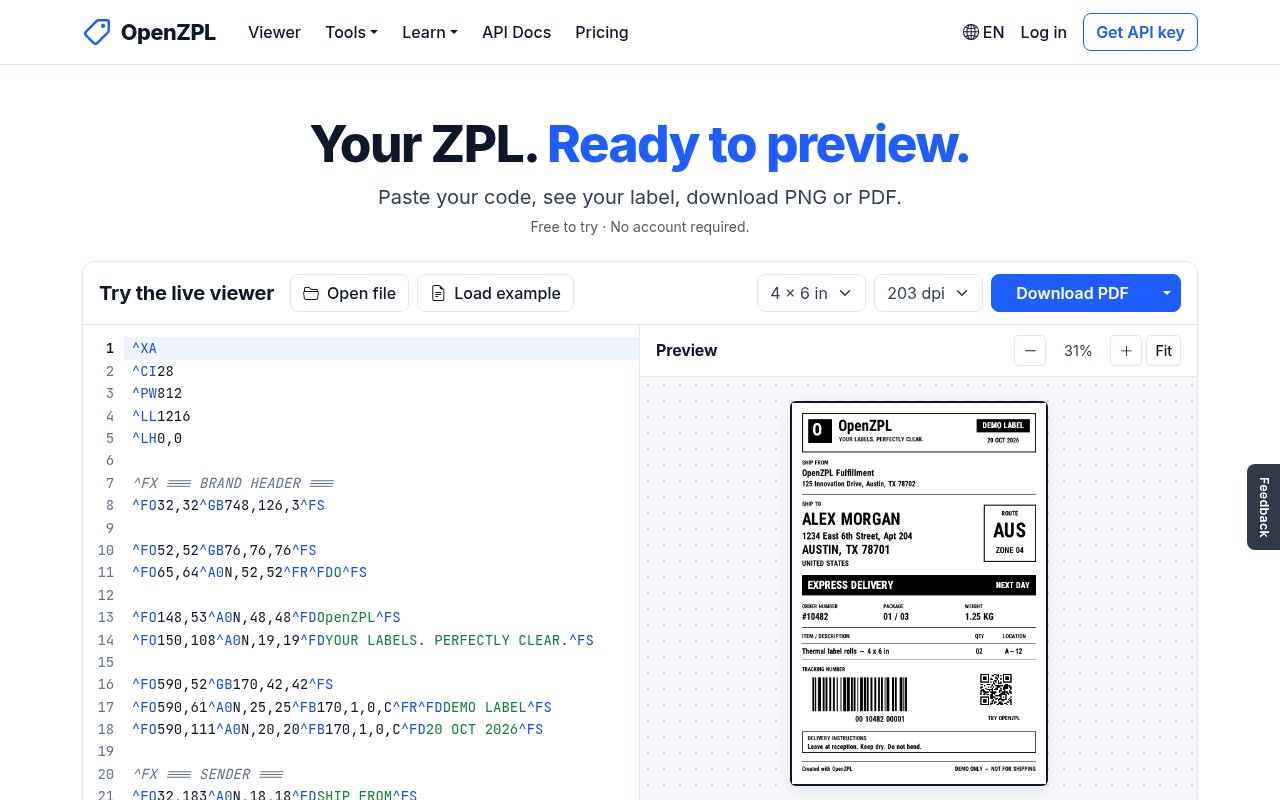
OpenZPL is a browser viewer and web API for rendering Zebra Programming Language labels before they reach a printer. A user can paste ZPL into the live editor, see the rendered label, and download the result as PNG or PDF without creating an account. It addresses a practical gap in label work. Raw ZPL is readable enough to edit, but it doesn't show whether text wraps, a barcode fits, or a field lands in the intended place. OpenZPL turns that code into a visual artifact that developers, operations teams, and label designers can inspect and share.
The browser tool is the simplest route. It accepts pasted code or an opened file, displays a label preview, and offers downloads for the current label, every label in a PDF, or the original ZPL file. The last label is remembered in the browser, which makes it convenient for returning to an unfinished layout. This is useful while tuning shipping labels, retail barcodes, warehouse tags, or any other format produced by software that speaks ZPL. It remains a preview rather than a physical print test. OpenZPL explicitly notes that printer firmware, installed fonts, darkness, and media can change the final output, so critical labels still need to be checked on their target hardware.
For automated use, one API endpoint accepts ZPL and returns either PNG or PDF. Short strings can be sent with GET, while POST accepts a raw request body or a multipart file. Callers choose print density, label dimensions, and the label index through the URL. Omitting the index with PDF output returns all labels, one per page. Headers control output format, clockwise rotation, and grayscale or smaller bitonal rendering. Successful responses include the total label count, and errors use plain text with conventional HTTP status codes. The site also publishes an OpenAPI 3.1 contract, Markdown documentation, and examples for Python, Node.js, PHP, C#, and cURL.
OpenZPL is especially approachable for teams moving from Labelary. Its API preserves Labelary's version 1 paths, request bodies, headers, error conventions, and total count response header. In many existing clients, migration comes down to changing the hostname. That compatibility gives developers a low effort way to test the service without rewriting an integration. It also means the tool can serve two related jobs. People can use the browser as a quick visual debugger, while applications can call the same rendering engine during label generation, testing, review, or document export.
The engine's scope is documented in unusual detail. Its compatibility page says it draws 51 commands from the site's command reference, with one handled partially, and deliberately ignores commands that configure a physical printer rather than the label. Common text, positioning, graphic, image, QR, Data Matrix, PDF417, Code 128, EAN, UPC, Aztec, and MaxiCode operations are among the documented capabilities. The page also names unsupported barcode commands and known font differences instead of implying perfect printer parity. A set of 116 public fixtures records the exact ZPL, size, density, and generated image used for site build checks. That evidence makes it easier to judge whether a particular label vocabulary fits before adopting the API.
The public API can be used without registration or a key. Its free allowance is three requests per second and 5,000 rendered labels per UTC day for each IP address, with up to 50 labels per request. Each request can contain a body up to 1 MB, use dimensions up to 15 inches per side, and render for up to 10 seconds. The service counts produced labels rather than calls toward the daily allowance, including copies requested with the ZPL quantity command and pages in a multi-label PDF. When a limit is reached, it returns a 429 response with a retry interval, which gives client code a clear recovery path.
OpenZPL has announced Starter, Pro, and Business subscriptions at $9, $29, and $99 per month, but the pricing page says billing is not live yet. Accounts and API keys work now, and a workspace stays on the Free plan until paid billing opens. The announced tiers increase daily volume and request rate, while higher tiers add support, service commitments, or a data processing agreement. There is no uptime commitment for the current free API, and self-hosting is not offered as a product today. That makes OpenZPL a strong fit for previewing, development, and moderate automated workloads now, with clearly stated limits for teams assessing production use.
Key Features
- Live browser ZPL preview
- PNG and PDF downloads
- Labelary compatible rendering API
- Multi-label PDF output
- Rotation and quality controls
- Published compatibility test fixtures
Pros & Cons
What we like
- Browser viewer works without an account
- Free API allowance covers substantial testing
- Labelary compatibility lowers migration effort
- Compatibility limits are documented with fixtures
Room for improvement
- Paid plans are announced but not live
- Current free service has no uptime SLA
- Some ZPL commands remain unsupported
- Self-hosting is not currently available
Frequently Asked Questions
What is OpenZPL?
Can I use OpenZPL without an account?
Is OpenZPL free?
Can OpenZPL replace Labelary in an existing integration?
Best For
Featured in
Alternatives to OpenZPL
View all
Kevin Gabeci
Solo developer building web apps, cozy browser games, and AI creator toolkits.

SoloDevStack
A solo developer blog built on head-to-head tool comparisons, 580+ posts deep.

Codedex
A gamified, story-driven platform that teaches Python, web dev, and more like an RPG quest

Vibe Built
Building real apps with agentic AI. What worked, what broke, what shipped.
Reviews (0)
Badge builder
Add OpenZPL to your website
Choose a badge style and size, preview it here, then copy the generated HTML. Badge images are self-contained SVGs and do not require an external script.

<a href="https://toolindex.net/tools/openzpl?ref=badge" target="_blank" rel="noopener">
  <img src="https://toolindex.net/badge/openzpl/medium.svg" alt="OpenZPL - Listed on Tool Index" width="180" height="50" />
</a>How to use the badge
- 1. Pick the style, size, and theme that fit your layout.
- 2. Copy the generated HTML from the code block.
- 3. Paste it into your footer, homepage, or press page.
Standard badge available
The standard listing badge is available now. Score and circle badges are limited to tools currently ranked in the top 10 of a category.
Badge clicks return visitors to this profile with a referral tag so the source remains identifiable.
Related Tools
Kevin Gabeci
Solo developer building web apps, cozy browser games, and AI creator toolkits.

Coolify
Self-hostable, open source alternative to Heroku and Netlify

Warp
The modern terminal reimagined with AI and collaboration

Bolt.new
Prompt-to-deployed full-stack app inside the browser
Work on OpenZPL? Request listing access or correction