
Orbtile Claude Code Builders
Build Claude Code status lines, hooks, and permission rules in the browser
Gallery
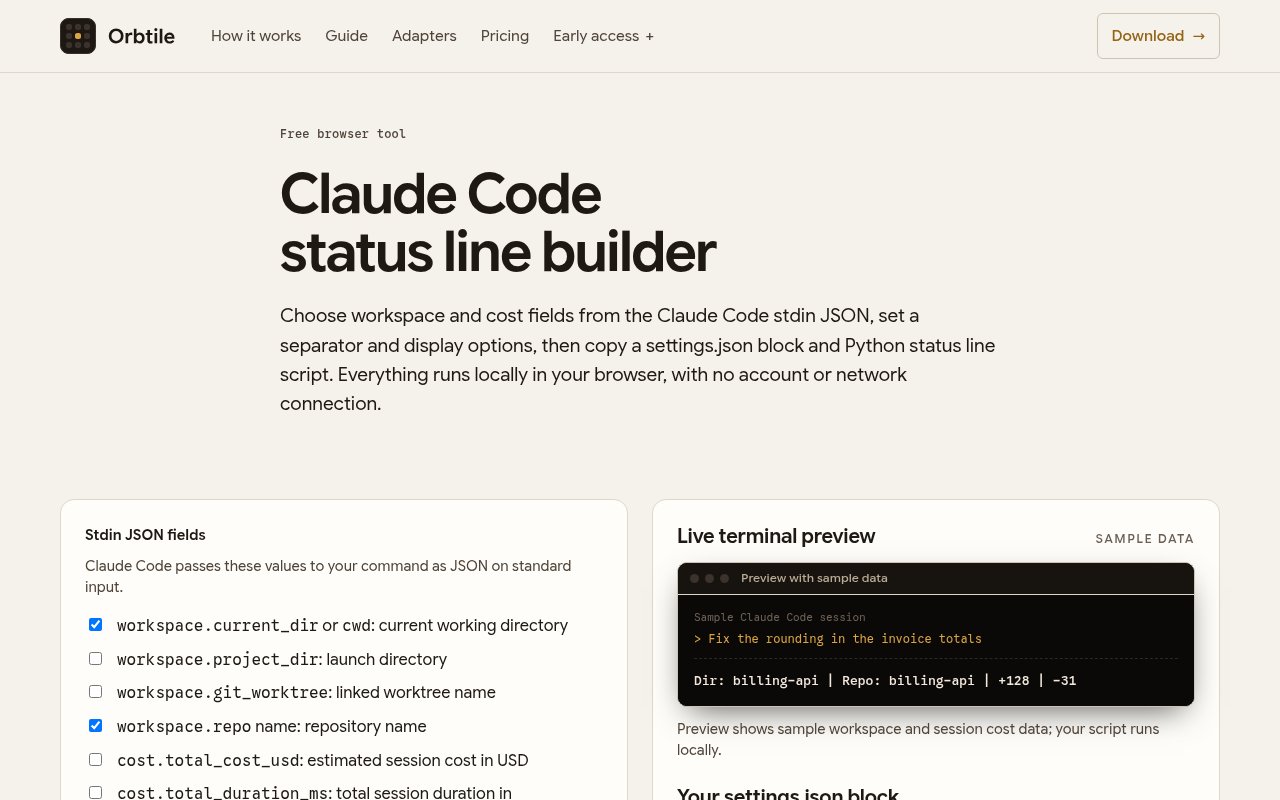
About Orbtile Claude Code Builders
Orbtile Claude Code Builders is a set of browser tools for creating three kinds of Claude Code configuration without assembling the JSON by hand. It covers a custom terminal status line, lifecycle hooks, and permission rules. These settings are powerful, but their nested objects, event names, matchers, and shell commands can be easy to mistype. Orbtile turns the common choices into form controls and keeps the resulting configuration visible so a developer can copy it into the right settings file. The tool is separate from Orbtile's paid status-pad application and is presented as a free web utility.
The status line builder addresses the row Claude Code can render at the bottom of a terminal session. A status line command reads a JSON payload on standard input and can display details such as the repository, current folder, lines added and removed, elapsed API time, and estimated session cost. Orbtile's guide explains that the command runs locally and doesn't consume API tokens. Claude Code invokes it when a session starts or resumes and again on relevant events, with an optional refresh interval for timed updates. The builder's job is to make that setup approachable, while the generated command still runs on the user's own machine.
The hooks builder creates the nested settings block for commands that run at specific points in an agent session. A user chooses an event, an optional matcher, and a shell command, then copies the generated JSON into user, project, or local settings. Events can cover a session starting or ending, a prompt being submitted, a tool running, a notification arriving, or a turn stopping. Matchers narrow tool events to names such as Bash, Edit, or Write. Orbtile's standalone hooks generator says its output updates in the browser and needs no account, cookies, or network connection, which is useful when the command contains project-specific details.
Permission configuration is the most security-sensitive part of the set. Claude Code permission rules can allow, ask about, or deny tools and scoped command patterns, with deny rules taking precedence. A visual builder can reduce punctuation mistakes and make the intended scope easier to inspect, but it doesn't decide whether a rule is safe. Broad rules can still give an agent more authority than expected. Generated settings deserve the same review as handwritten settings, especially for shell commands, writes outside a project, network access, or any rule intended to suppress approval prompts.
The tools suit developers who already use Claude Code but don't want to memorize its settings schema. They can also help team leads prepare a project-level example that colleagues can review and commit, or educators demonstrate how events and matchers fit together. The output remains ordinary Claude Code configuration, so there isn't a proprietary runtime or hosted automation layer to adopt. That portability is the main advantage. A user can inspect the JSON, edit it further, keep it in version control where appropriate, and remove it using Claude Code's normal settings workflow.
Access is free in the browser, and the related generator page explicitly says no account is required. There is no subscription attached to producing or copying the configuration. The narrow focus is also the main limitation. These builders don't replace understanding what a hook command does, testing it in a safe project, or consulting current Claude Code documentation when the schema changes. Orbtile publishes detailed guides on status lines, hooks, and permission modes, which gives the generated output useful context. For people who want valid scaffolding and a visible starting point, the builders remove a modest but real configuration chore.
Scope is important when placing the result. User settings apply across projects on a computer, project settings can be shared through a repository, and local project settings are intended for personal overrides. Hook entries from several levels can merge rather than replace one another, so a generated block needs to be considered alongside settings that already exist. Matchers can limit a hook to one tool or a group such as Edit and Write, while an empty matcher can cover every occurrence of an event. The builder makes those choices visible, but careful placement prevents a useful project hook from unexpectedly becoming a machine-wide behavior. Copying the output is the beginning of setup, followed by review, a small test, and confirmation that the selected event fires only where intended.
Key Features
- Visual status line builder
- Claude Code hooks generator
- Permission rule configuration
- Live settings JSON output
- Event and matcher controls
- Account-free browser access
Pros & Cons
What we like
- Reduces mistakes in nested Claude Code settings
- Produces portable configuration rather than a proprietary format
- Runs as a focused browser utility without an account
- Official guides explain the underlying configuration concepts
Room for improvement
- Works only with Claude Code configuration
- Generated shell commands still require careful review
- Doesn't test rules inside a real project
- May need updates as Claude Code settings evolve
Frequently Asked Questions
What are Orbtile Claude Code Builders?
Are the builders free?
Do generated hooks run on Orbtile's servers?
Does the permission builder make broad rules safe?
Best For
Featured in
Alternatives to Orbtile Claude Code Builders
View all
Kevin Gabeci
Solo developer building web apps, cozy browser games, and AI creator toolkits.

SoloDevStack
A solo developer blog built on head-to-head tool comparisons, 580+ posts deep.

Codedex
A gamified, story-driven platform that teaches Python, web dev, and more like an RPG quest

Vibe Built
Building real apps with agentic AI. What worked, what broke, what shipped.
Reviews (0)
No reviews yet
Be the first to share your experience with Orbtile Claude Code Builders
Sign in to write a reviewBadge builder
Add Orbtile Claude Code Builders to your website
Choose a badge style and size, preview it here, then copy the generated HTML. Badge images are self-contained SVGs and do not require an external script.

<a href="https://toolindex.net/tools/orbtile-claude-code-builders?ref=badge" target="_blank" rel="noopener">
  <img src="https://toolindex.net/badge/orbtile-claude-code-builders/medium.svg" alt="Orbtile Claude Code Builders - Listed on Tool Index" width="180" height="50" />
</a>How to use the badge
- 1. Pick the style, size, and theme that fit your layout.
- 2. Copy the generated HTML from the code block.
- 3. Paste it into your footer, homepage, or press page.
Standard badge available
The standard listing badge is available now. Score and circle badges are limited to tools currently ranked in the top 10 of a category.
Badge clicks return visitors to this profile with a referral tag so the source remains identifiable.
Related Tools
Kevin Gabeci
Solo developer building web apps, cozy browser games, and AI creator toolkits.

Coolify
Self-hostable, open source alternative to Heroku and Netlify

Warp
The modern terminal reimagined with AI and collaboration

Bolt.new
Prompt-to-deployed full-stack app inside the browser
Work on Orbtile Claude Code Builders? Request listing access or correction