
Parakeet.wgsl
Run NVIDIA Parakeet speech-to-text entirely in your browser with WebGPU, no server required
Gallery
About Parakeet.wgsl
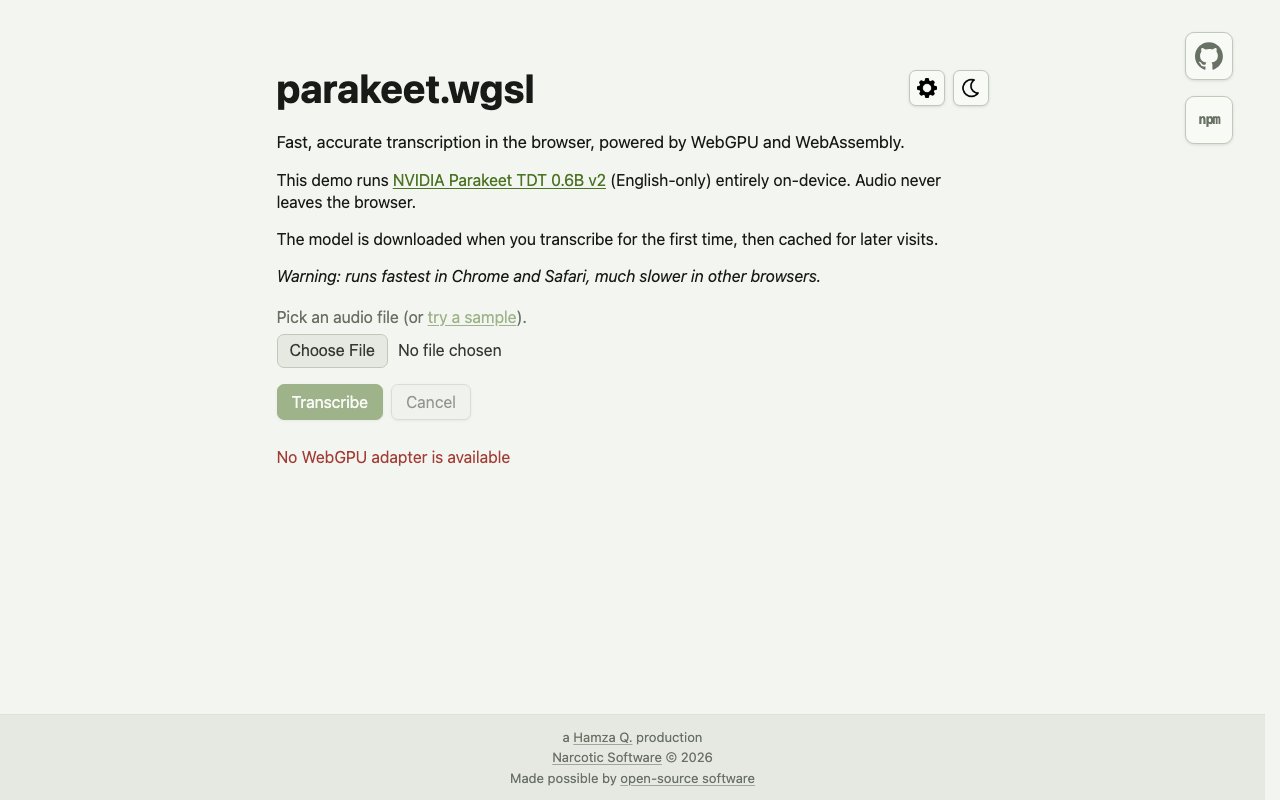
Parakeet.wgsl is a browser-based speech-to-text tool that runs the NVIDIA Parakeet TDT 0.6B v2 model entirely on your device. You upload an audio file or select a sample, and transcription happens locally through WebGPU and WebAssembly. Nothing leaves your browser. The model downloads on first use, caches automatically, and subsequent sessions start faster because the weights are already stored. The project comes from Hamza Q. at Narcotic Software and is available on GitHub and npm for anyone who wants to inspect, fork, or extend it. Released in 2026, it represents one of the first serious demonstrations of running a production-grade speech model entirely in the browser without server assistance.
The problem it solves is straightforward. Most transcription services require uploading audio to a server, which means your recordings pass through someone else's infrastructure. For sensitive meetings, legal depositions, medical dictation, therapy sessions, journalistic interviews, HR investigations, or anything you would rather keep private, that creates friction. Even if you trust the service, compliance requirements may prohibit sending certain audio off-device. Cloud transcription APIs also tend to charge by the minute, so high-volume users face ongoing bills that add up quickly. Parakeet.wgsl skips both issues entirely. The compute happens on your GPU, in your browser, and the audio never touches the network. There is no account, no usage tracking, no API key, and no per-minute billing.
Under the hood, the project packages the Parakeet model for WebGPU execution. WebGPU is a newer browser API that provides direct access to the GPU, bypassing the older WebGL abstraction and enabling general-purpose compute workloads. That makes running a 600-million-parameter speech recognition model feasible on consumer hardware, something that would have been impractical in the browser just a few years ago. WebAssembly handles the parts that benefit from compiled code, and together the two technologies let the browser act as a local inference engine. The interface shows performance metrics including audio length, wall time, and transcription speed in real-time factor, so you can see exactly how your machine handles the workload. Those metrics help you gauge whether your hardware is up to the task before committing to a long transcription job.
English audio is the only supported language. The model was trained on English speech, so other languages will produce poor results or fail outright. That is a hard limit of the underlying Parakeet model from NVIDIA, not something the wrapper can fix. If you need multilingual support, this is not the tool for you. Format support varies depending on your browser's media decoders, and the project notes that some files can be transcribed even if the browser's audio player cannot play them back. In practice, common formats like MP3, WAV, M4A, and FLAC work, but edge cases may require conversion before upload.
The tool fits several audiences. Developers exploring on-device AI can use it as a reference implementation for WebGPU inference. Privacy-focused users who want local transcription without trusting a cloud service can transcribe meetings, voice memos, or dictation without any data leaving their machine. Researchers working with sensitive audio, including fields like medicine, law, and journalism, get a workflow that satisfies strict data handling requirements. And anyone curious about what WebGPU can do with a real machine learning model can see a concrete, working example. Developers can also pull the underlying npm package and integrate the same model into their own web applications, which opens doors for local-first apps that need transcription without server calls or per-minute API costs.
Where it differs from cloud transcription APIs is the complete absence of a server. You open the page, load the model, and transcribe. The tradeoff is that performance depends entirely on your hardware. A recent discrete GPU handles the 600-million-parameter model well, producing transcriptions faster than real-time playback on capable machines. Older or integrated graphics will struggle with speed, and underpowered devices may fail to load the model entirely. Browser support also matters. Chrome and Edge have the broadest WebGPU support as of now, while Safari and Firefox lag behind or require flags. If your browser does not support WebGPU, the tool will not work at all.
Access is free. There is no paid tier, no premium features locked behind a subscription, and no rate limits. The project is open source under a permissive license, so you can audit the code to verify that audio stays local and nothing phones home. For anyone who wants transcription without sending files anywhere, this is one of the few options that actually delivers on that promise without compromise. The first-run model download is large, around 600 megabytes for the weights, so initial load takes longer on slow connections, but caching means you only pay that cost once per browser. Subsequent sessions start in seconds.
Key Features
- On-device transcription via WebGPU
- NVIDIA Parakeet TDT 0.6B v2 model
- Automatic model caching after first load
- No server upload or account required
- Performance metrics display
- npm package for developer integration
Pros & Cons
What we like
- Audio never leaves your browser
- Free with no usage caps or billing
- Model caches locally for faster subsequent runs
- Open source and available on npm
Room for improvement
- Performance depends heavily on your GPU
- English audio only, no other languages
- Initial model download is large
- WebGPU support varies by browser
Frequently Asked Questions
What is Parakeet.wgsl?
Is Parakeet.wgsl free?
What languages does it support?
What hardware do I need?
Best For
Featured in
Alternatives to Parakeet.wgsl

Cartesia
Ultra-low-latency real-time text-to-speech powered by the Sonic model, built for live voice AI agents
ElevenLabs
The voice cloning and text-to-speech service everyone benchmarks against

Listnr
Ultra-realistic AI text-to-speech and voiceover platform with 1,000+ voices across 142+ languages
Resemble AI
Secure voice cloning, real-time text-to-speech, and speech-to-speech paired with deepfake detection and watermarking
Reviews (0)
Badge builder
Add Parakeet.wgsl to your website
Choose a badge style and size, preview it here, then copy the generated HTML. Badge images are self-contained SVGs and do not require an external script.

<a href="https://toolindex.net/tools/parakeet-wgsl?ref=badge" target="_blank" rel="noopener">
  <img src="https://toolindex.net/badge/parakeet-wgsl/medium.svg" alt="Parakeet.wgsl - Listed on Tool Index" width="180" height="50" />
</a>How to use the badge
- 1. Pick the style, size, and theme that fit your layout.
- 2. Copy the generated HTML from the code block.
- 3. Paste it into your footer, homepage, or press page.
Standard badge available
The standard listing badge is available now. Score and circle badges are limited to tools currently ranked in the top 10 of a category.
Badge clicks return visitors to this profile with a referral tag so the source remains identifiable.
Related Tools

NexSub
Offline real time subtitle translation using local Whisper models for any video source
Listnr
Ultra-realistic AI text-to-speech and voiceover platform with 1,000+ voices across 142+ languages

List55
Voice transcription app that converts audio recordings into formatted text lists

WellSaid Labs
Enterprise text-to-speech with studio-quality AI voice avatars trained on consenting voice actors
Work on Parakeet.wgsl? Request listing access or correction