
Peko
Turn any web app into native macOS, Windows, Linux, iOS, and Android builds from one codebase
Gallery
About Peko
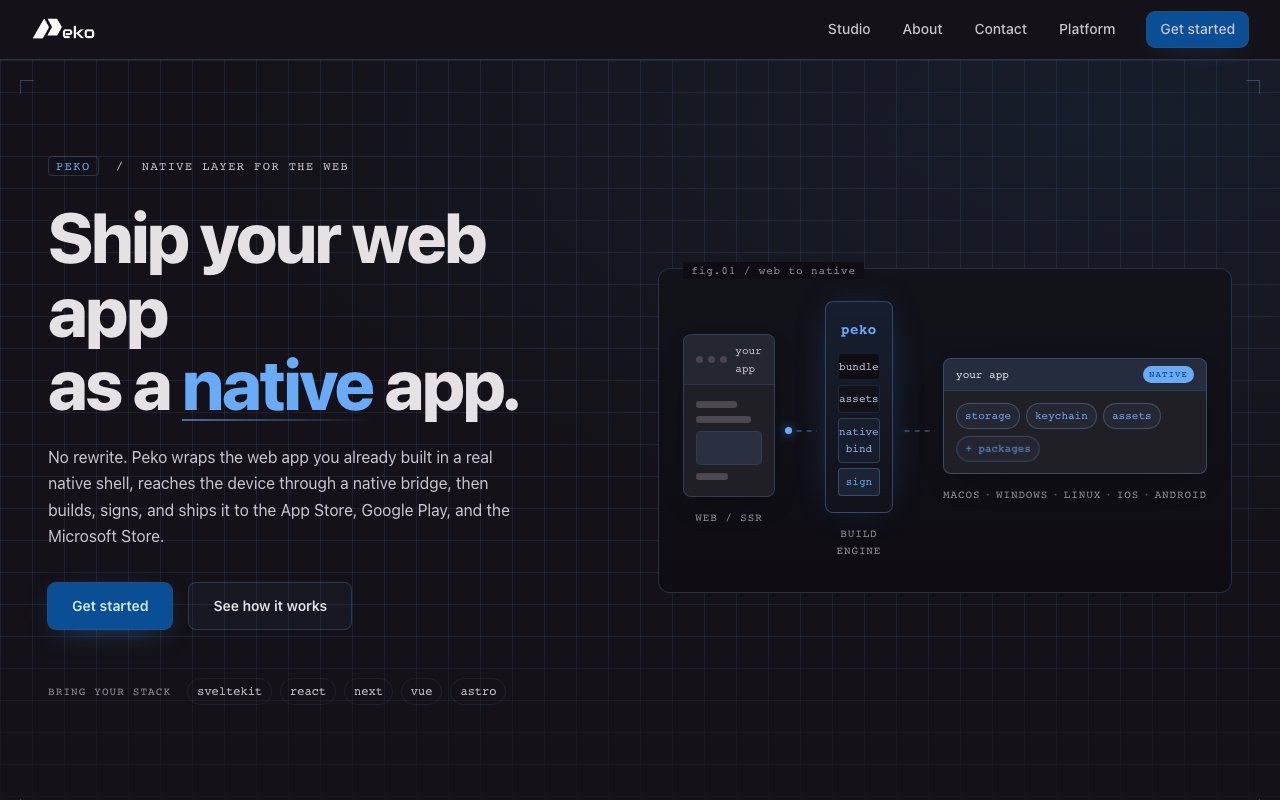
Peko is a build platform that converts existing web applications into native apps for macOS, Windows, Linux, iOS, and Android without requiring developers to rewrite their code or maintain separate native projects. The workflow is straightforward. A developer points Peko at a SvelteKit, React, Next.js, Vue, or Astro project, and the platform produces signed, store-ready binaries for all five target platforms from a single command. The result is not a compromised webview wrapper but an actual native application with access to device features, proper code signing, and assets formatted for each platform's store submission process.
The problem Peko addresses is one that web developers face constantly. A web app runs beautifully in a browser, but shipping it through the App Store, Google Play, or Microsoft Store traditionally means spinning up entirely separate native codebases. That path leads to maintaining multiple repositories, hiring specialists for each platform, dealing with code signing certificates and provisioning profiles, and keeping versions synchronized across a fragmented toolchain. Most indie developers and small teams simply skip native distribution because the overhead is too high. Peko collapses that overhead by handling the native layer itself, letting the developer stay focused on the web codebase they already know.
Under the hood, Peko wraps the web application in a native shell and provides a bridge API that exposes device-level functionality to the JavaScript layer. The bridge currently supports three categories of native features. Durable key-value storage persists data to disk across app restarts. Native secret keychain integration stores sensitive credentials securely using each platform's built-in keychain service. Asset URLs let the app reference bundled files like images, fonts, or configuration documents that ship inside the binary rather than fetching from a server. Window control APIs give the web code access to native interface behaviors like resizing, minimizing, or going fullscreen. This means the resulting app is not just a browser pointing at a URL. It can function offline, store data locally, protect secrets properly, and behave like a native citizen of the operating system.
Server-side rendering complicates most web-to-native conversion tools, but Peko handles it directly. If the web app relies on SSR, the platform deploys the server component alongside the native build on AWS infrastructure. Both pieces version together, so the server and client never drift out of sync. Developers do not need to provision their own hosting or configure a separate deployment pipeline. The same build command that outputs the native binaries also handles the server side, which removes one of the bigger friction points in distributing SSR applications as native apps.
One of the most valuable details is the remote Mac build infrastructure. Compiling and signing for iOS and macOS requires running the build on actual Apple hardware, which has historically meant owning a Mac. Peko runs those builds on hosted Macs in the cloud, so a developer working entirely on Windows or Linux can still produce signed App Store binaries without buying hardware they would otherwise never use. This opens Apple distribution to teams that have deliberately avoided the platform because of the tooling requirements.
The output extends beyond raw binaries. Peko generates framed screenshots captured on real devices across all five platforms, formatted to each store's specific size and framing requirements. It also produces legal documentation, including privacy policies, terms of service, and EULAs, generated from the source code and hosted at URLs that the app stores can verify. The listing text and metadata for App Store Connect, Google Play, and Microsoft Store come out ready to paste. Submitting to the store still requires the developer to log in and upload manually, but the time-consuming asset preparation is handled automatically.
The target audience is web developers who want native distribution without native development. Indie hackers shipping a side project, agencies building apps for clients, and startups validating an idea before investing in platform-specific teams all fit. If you have a working web app built on one of the supported frameworks and you want it in the stores, Peko is designed to close that gap with minimal setup.
Pricing is currently listed as free for the core builder. The landing page does not show paid tiers, though infrastructure costs for cloud Mac builds, SSR hosting, and code signing may lead to paid plans in the future. For now, the platform appears fully accessible without a subscription, which makes it easy to try against an existing project and see what the output looks like before committing to the workflow.
Key Features
- Single-command multi-platform builds
- Native bridge for device features
- Remote Mac builds for Apple signing
- Integrated server-side deployment
- Auto-generated store assets and metadata
- Support for SvelteKit, React, Next.js, Vue, and Astro
Pros & Cons
What we like
- Ships to five platforms from one web codebase
- Remote Macs remove the need to own Apple hardware
- Generates screenshots and listing text for stores
- Native bridge gives access to device features beyond a webview
Room for improvement
- Newer platform with a smaller user base
- Native performance may lag fully native apps for heavy workloads
- Long-term pricing not yet published
- Store submission still requires manual upload
Frequently Asked Questions
What is Peko?
Do I need a Mac to build for iOS?
Is Peko free?
Can I use native device features?
Best For
Featured in
Alternatives to Peko
View all
Kevin Gabeci
Solo developer building web apps, cozy browser games, and AI creator toolkits.

SoloDevStack
A solo developer blog built on head-to-head tool comparisons, 580+ posts deep.

Codedex
A gamified, story-driven platform that teaches Python, web dev, and more like an RPG quest

Vibe Built
Building real apps with agentic AI. What worked, what broke, what shipped.
Reviews (0)
Badge builder
Add Peko to your website
Choose a badge style and size, preview it here, then copy the generated HTML. Badge images are self-contained SVGs and do not require an external script.

<a href="https://toolindex.net/tools/peko?ref=badge" target="_blank" rel="noopener">
  <img src="https://toolindex.net/badge/peko/medium.svg" alt="Peko - Listed on Tool Index" width="180" height="50" />
</a>How to use the badge
- 1. Pick the style, size, and theme that fit your layout.
- 2. Copy the generated HTML from the code block.
- 3. Paste it into your footer, homepage, or press page.
Standard badge available
The standard listing badge is available now. Score and circle badges are limited to tools currently ranked in the top 10 of a category.
Badge clicks return visitors to this profile with a referral tag so the source remains identifiable.
Related Tools
Kevin Gabeci
Solo developer building web apps, cozy browser games, and AI creator toolkits.

Coolify
Self-hostable, open source alternative to Heroku and Netlify

Warp
The modern terminal reimagined with AI and collaboration

Bolt.new
Prompt-to-deployed full-stack app inside the browser
Work on Peko? Request listing access or correction