
Pinch
Translate live conversations and recorded media while preserving each speaker's voice
Gallery
About Pinch
Pinch is a speech translation platform for people who need to understand or publish spoken content across languages without replacing the character of the original voice. Its newer Sidecar experience can dub the audio from a Chrome tab while that tab keeps playing, which makes it useful for live streams, webinars, lectures, podcasts, and meetings. Pinch also offers a browser dubbing studio, a real-time translation API, and an early desktop application. The common thread is voice-aware translation that aims to keep the speaker's tone and delivery instead of turning every person into the same generic synthetic narrator.
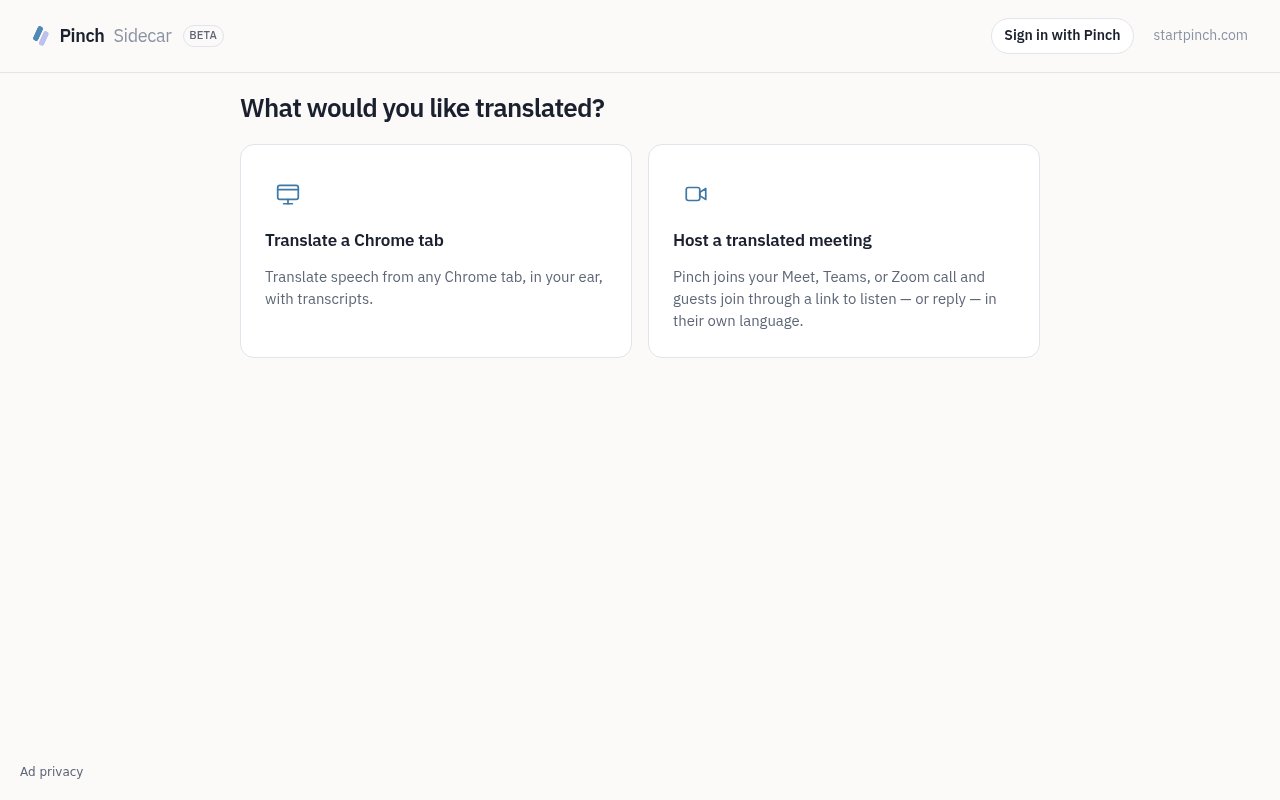
The Sidecar workflow avoids installing a virtual audio driver. A user shares the audio from a Chrome tab with Pinch, then Pinch mutes the original tab audio and mixes translated speech back into the listening experience. The translated track uses speaker-matched voices, so a conversation can remain easier to follow when more than one person speaks. Meeting organizers can also host translated sessions for Google Meet, Zoom, or Microsoft Teams. Listeners join through Sidecar, choose their own language, and can listen or interact without requiring the organizer to move the meeting to a new conferencing service.
For recorded media, the web studio accepts video or audio and gives the user a review step before generation. It identifies speakers, lays out source and translated text side by side, and lets the user reassign or merge speakers and edit individual transcript or translation lines. Pinch shows an estimated cost before it generates the final dub. The service then transcribes the source, translates it with attention to natural phrasing, synthesizes speech in voices modeled on the original speakers, and keeps music, ambience, and other background audio. Supported input formats include MP4, MOV, WebM, MP3, and WAV.
Developers can use the same underlying capabilities without sending every job through the studio. The dubbing API takes a video or audio URL, creates a job, and provides a result for download when processing finishes. Completed output URLs remain available for 48 hours, so an application should copy results into its own storage rather than treat the job response as permanent hosting. A separate live translation API works over WebSocket and supports speech-to-speech output or captions across more than 50 languages. That makes Pinch relevant to teams building multilingual voice applications, live communication tools, or translation into an existing media workflow. The APIs are usage based, so a prototype can start small without committing to a monthly seat plan.
Pinch fits media teams, course creators, podcasters, event organizers, and product developers with spoken material that needs to cross language boundaries. The tab workflow is particularly practical when the user doesn't control the source platform, since the audio can come from any compatible Chrome tab rather than a custom integration. The meeting mode is more useful when the organizer does control the event and wants attendees to choose a listening language. The studio serves a different need, giving an editor time to check names, speaker assignments, phrasing, and cost before publishing a permanent translated version. Corporate training, short marketing videos, documentary material, and social clips are all use cases shown by Pinch.
What separates Pinch from a captions-only translator is its focus on the sound of the translated result. It preserves the speaker's voice and background track for recorded dubbing, and Sidecar mixes live translated audio into the browser rather than only placing text on screen. It also spans ready-to-use interfaces and developer access. That said, the product surfaces aren't identical. Recorded dubbing currently lists ten output languages, the live API advertises broader coverage, and the desktop app remains an early beta for macOS. Buyers should check the exact language and access path that matches their project.
Pricing is freemium and based on usage rather than subscriptions for the public dubbing and API products. New accounts receive $5 in credit without a card, and users can add prepaid balances that don't expire. Recorded dubbing is priced per source minute, with lip sync as a higher-cost option, while the live translation API has its own per-minute rate. The free credit is enough to test a short job, but ongoing production use is paid. Pinch also offers custom rates, dedicated capacity, data residency, contractual service levels, and invoicing arrangements for higher-volume teams.
Key Features
- Live Chrome tab dubbing
- Speaker-matched translated voices
- Multilingual meeting Sidecar
- Voice-preserving media dubbing
- Editable transcript and translation preview
- Live and recorded media APIs
Pros & Cons
What we like
- Works with audio from a shared Chrome tab
- Preserves voices and background audio in recorded dubs
- Provides review controls before generation
- Offers both browser tools and developer APIs
Room for improvement
- Tab dubbing depends on Chrome tab sharing
- Free access is limited to starter credit
- Desktop access is still an early macOS beta
- Language coverage differs between product surfaces
Frequently Asked Questions
What is Pinch?
Can Pinch translate a live browser tab?
Is Pinch free?
Does Pinch preserve the original speaker's voice?
Best For
Featured in
Alternatives to Pinch
View all
Cartesia
Ultra-low-latency real-time text-to-speech powered by the Sonic model, built for live voice AI agents
ElevenLabs
The voice cloning and text-to-speech service everyone benchmarks against

Listnr
Ultra-realistic AI text-to-speech and voiceover platform with 1,000+ voices across 142+ languages
Resemble AI
Secure voice cloning, real-time text-to-speech, and speech-to-speech paired with deepfake detection and watermarking
Our take
Tool Index Editorial · Sep 2026· 3.0/5
Pinch translates speech from a shared Chrome tab or joins an online meeting so listeners can hear another language. The focus on interpreted audio rather than captions alone is compelling, especially for webinars and meetings that already live in Meet, Teams, or Zoom. We found the Sidecar entry point direct and easy to understand.
The page we reviewed labels the experience beta and says little about pricing, supported language pairs, latency, accuracy, or what happens when speakers overlap. Tab translation also depends on Chrome sharing, which narrows the setup. Voice preserving translation could make Pinch stand out, but buyers should test their actual accents, meeting platform, and audio conditions before relying on it live.
Editorial opinion from the Tool Index team, written from the public product pages. Not a user review.
Reviews (0)
Badge builder
Add Pinch to your website
Choose a badge style and size, preview it here, then copy the generated HTML. Badge images are self-contained SVGs and do not require an external script.

<a href="https://toolindex.net/tools/pinch?ref=badge" target="_blank" rel="noopener">
  <img src="https://toolindex.net/badge/pinch/medium.svg" alt="Pinch - Listed on Tool Index" width="180" height="50" />
</a>How to use the badge
- 1. Pick the style, size, and theme that fit your layout.
- 2. Copy the generated HTML from the code block.
- 3. Paste it into your footer, homepage, or press page.
Standard badge available
The standard listing badge is available now. Score and circle badges are limited to tools currently ranked in the top 10 of a category.
Badge clicks return visitors to this profile with a referral tag so the source remains identifiable.
Related Tools

NexSub
Offline real time subtitle translation using local Whisper models for any video source
Listnr
Ultra-realistic AI text-to-speech and voiceover platform with 1,000+ voices across 142+ languages

List55
Voice transcription app that converts audio recordings into formatted text lists

WellSaid Labs
Enterprise text-to-speech with studio-quality AI voice avatars trained on consenting voice actors
Work on Pinch? Request listing access or correction