
PingClass
Manage students, attendance, fees, teachers, and parents from one tuition dashboard
Gallery
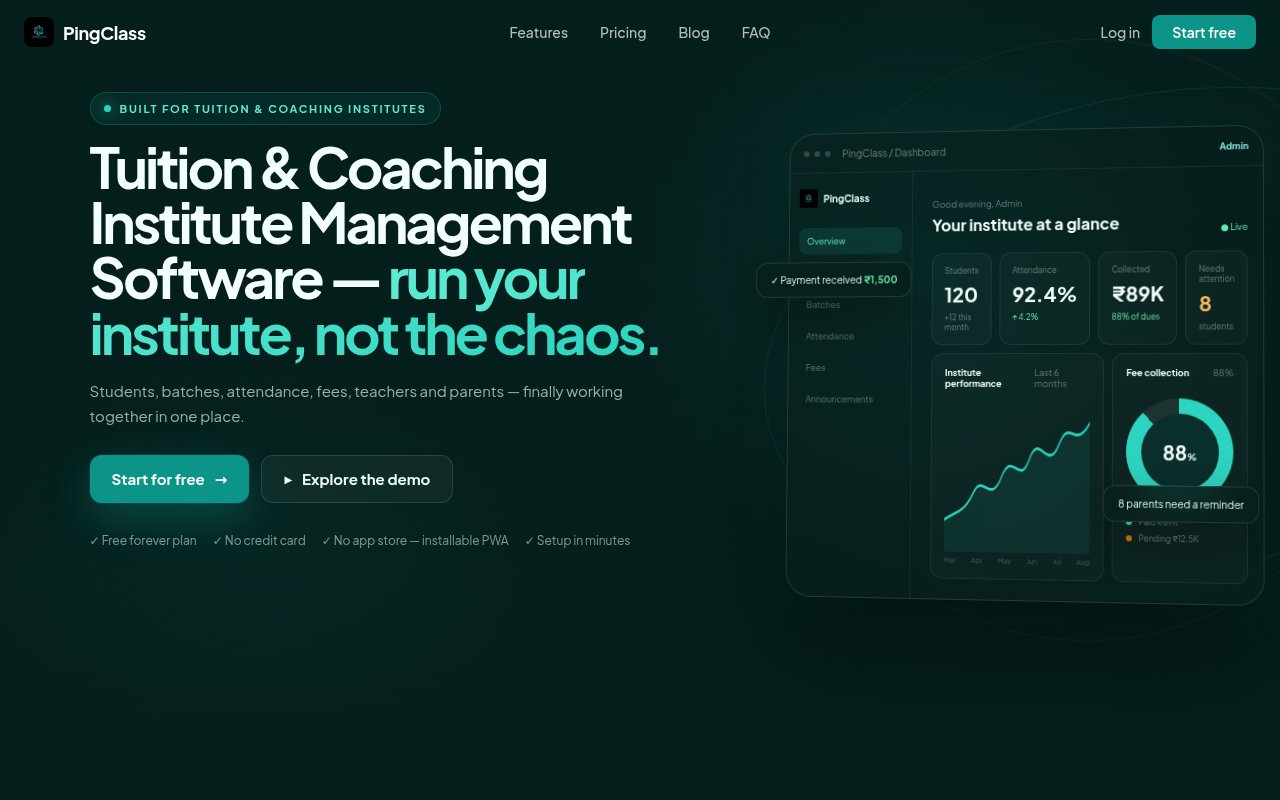
About PingClass
PingClass is management software for tuition and coaching institutes that want to replace paper registers, fee spreadsheets, and scattered parent messages with one connected system. It keeps student records, batches, attendance, fees, teachers, announcements, and parent access together. The product is built around the daily work of a small institute rather than the broader needs of a school district or university. Its site describes the main audience as centers with one to five teachers and up to 200 students, although the highest plan allows unlimited students and multiple teachers. For an owner who currently reconciles several sheets and chat threads, the appeal is a single view of what is happening.
Admins add students, organize them into batches, and see an overview of enrollment, attendance, collections, and items needing attention. Teachers get a more focused view of their batches and students. They can mark batch attendance quickly, while admins can watch overall rates and identify students who may be falling behind. Parents receive their own access to attendance history, fees, and updates, which reduces the need to ask the administrator for routine information. Role based views keep each participant focused on relevant tasks rather than exposing one shared spreadsheet to everyone. The service runs as an installable progressive web app, so it can sit on a phone home screen without requiring an app store download.
Fee handling is another central workflow. PingClass tracks paid, pending, and overdue amounts by student and batch. When a payment is recorded, the system can issue a numbered receipt that a parent can download later. Fee reminders and announcements bring communication into the same record keeping flow. Parents can opt into free browser push notifications before due dates, which means an institute doesn't need an SMS package or a WhatsApp API connection for those reminders. The dashboard also gives the owner a quick picture of collected and outstanding fees. PingClass lists payment for its own subscription through Razorpay using UPI, cards, and net banking, but the public product page doesn't describe a built-in gateway for parents to pay institute fees online.
The fit is strongest for independent tutors and small or mid-sized coaching centers in India. Fees are presented in rupees, attendance is organized around batches, and the plans scale by student and batch counts. An owner can start with one batch, then move up when parent access, announcements, more batches, or more teachers become necessary. The interface is also useful when more than one staff member updates records, since teachers, admins, and parents work from the same source of truth. Larger education businesses may want deeper scheduling, payroll, admissions automation, accounting integrations, or multi-branch controls. Those capabilities aren't presented on the public feature page, so buyers with those needs should confirm them before adopting the service.
Pricing is simple and published. The Free plan costs nothing and supports up to 20 students in one batch, with attendance tracking and fee reminders. Basic costs 249 Indian rupees per month and raises capacity to 100 students and five batches while adding parent access and announcements. Pro costs 599 Indian rupees per month and includes unlimited students, unlimited batches, multiple teachers, priority support, and everything from Basic. The company says there are no contracts and customers can cancel at any time, with access continuing until the current billing period ends. A credit card isn't required to open the free account, and the free plan has no stated time limit.
PingClass stands out through its narrow operational focus and accessible entry price rather than a long list of enterprise modules. A tuition owner can manage the records that trigger the most repeated questions, including who attended, who owes fees, what a parent can see, and which batch a teacher handles. The tradeoff is that its public positioning is deliberately aimed at smaller institutes, and several sophisticated school management functions are outside the advertised scope. Data is described as stored on encrypted servers with access limited to the institute and authorized teachers. Support is offered by email, with the site saying a real person replies within 24 hours. For a center ready to outgrow spreadsheets without taking on a large campus platform, it offers a practical progression from a permanent free plan to two modest paid tiers.
Key Features
- Student and batch management
- Batch-wise attendance tracking
- Fee status and numbered receipts
- Admin teacher and parent views
- Browser push fee reminders
- Installable progressive web app
Pros & Cons
What we like
- Connects attendance, fees, and parent updates
- Free plan has no stated time limit
- Role based views reduce unnecessary record exposure
- Published pricing stays accessible for small institutes
Room for improvement
- Free plan supports only one batch
- Parent access starts on the paid Basic plan
- Public positioning focuses on smaller institutes
- No native mobile app store download
Frequently Asked Questions
What is PingClass?
Can an institute use PingClass for free?
How do parents receive reminders?
How much do paid PingClass plans cost?
Best For
Featured in
Alternatives to PingClass

CalendHub
Smart scheduling and calendar management for teams
Kevin Gabeci Toolkits
Seven AI toolkits for writing books, making music, cutting video, and building agents.

Eased Into AI
Learn AI from zero. No jargon, no hype, just steps that work.

Fix It Gently
Calm, plain-English fixes for everyday tech problems.
Reviews (0)
Badge builder
Add PingClass to your website
Choose a badge style and size, preview it here, then copy the generated HTML. Badge images are self-contained SVGs and do not require an external script.

<a href="https://toolindex.net/tools/pingclass?ref=badge" target="_blank" rel="noopener">
  <img src="https://toolindex.net/badge/pingclass/medium.svg" alt="PingClass - Listed on Tool Index" width="180" height="50" />
</a>How to use the badge
- 1. Pick the style, size, and theme that fit your layout.
- 2. Copy the generated HTML from the code block.
- 3. Paste it into your footer, homepage, or press page.
Score badge available
PingClass qualifies for the score and circle badges based on its current top-10 positionin Mobile.
Badge clicks return visitors to this profile with a referral tag so the source remains identifiable.
Related Tools

Confluence
Atlassian's long-running team wiki that anchors many enterprise knowledge stacks
Asana
Project management for teams that live in projects, tasks and dependencies
Kevin Gabeci Toolkits
Seven AI toolkits for writing books, making music, cutting video, and building agents.

Sleep Suivour
Track your sleep, improve your rest
Work on PingClass? Request a listing correction